Flutter 框架跨平台鸿蒙开发 - 节日礼物清单应用开发教程
·
Flutter节日礼物清单应用开发教程
项目简介
节日礼物清单是一个专为管理各种节日礼物而设计的Flutter应用。无论是生日、情人节、圣诞节还是其他重要节日,这个应用都能帮助用户有条不紊地规划和管理礼物清单,确保不会错过任何重要的送礼时机。
运行效果图
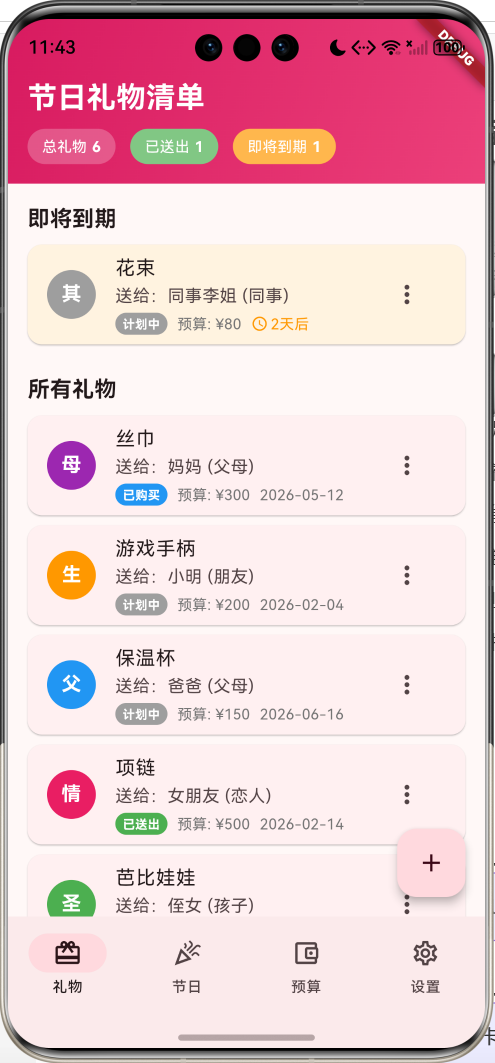
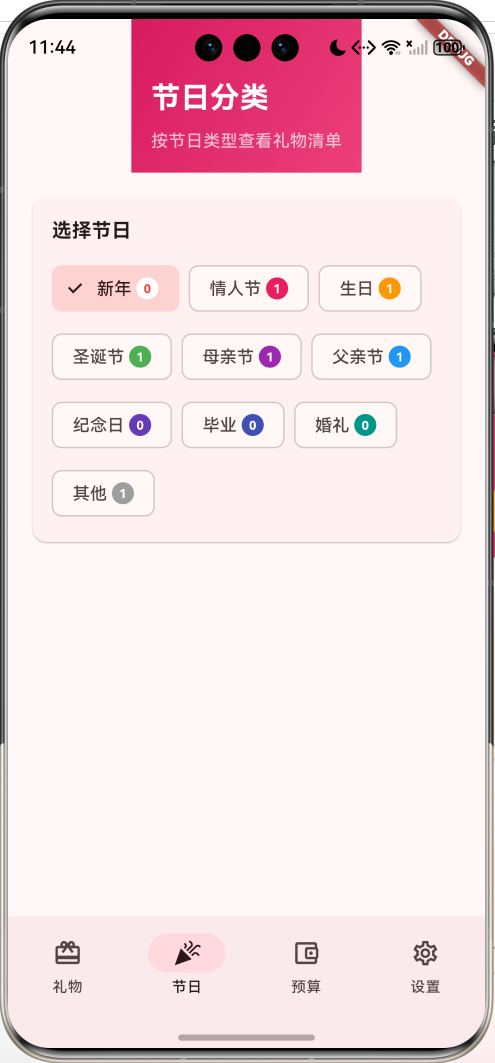
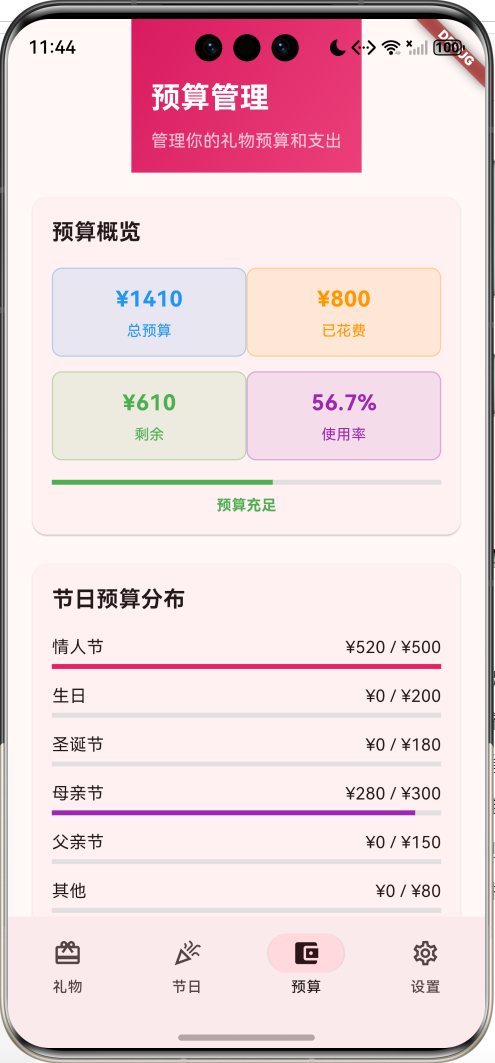
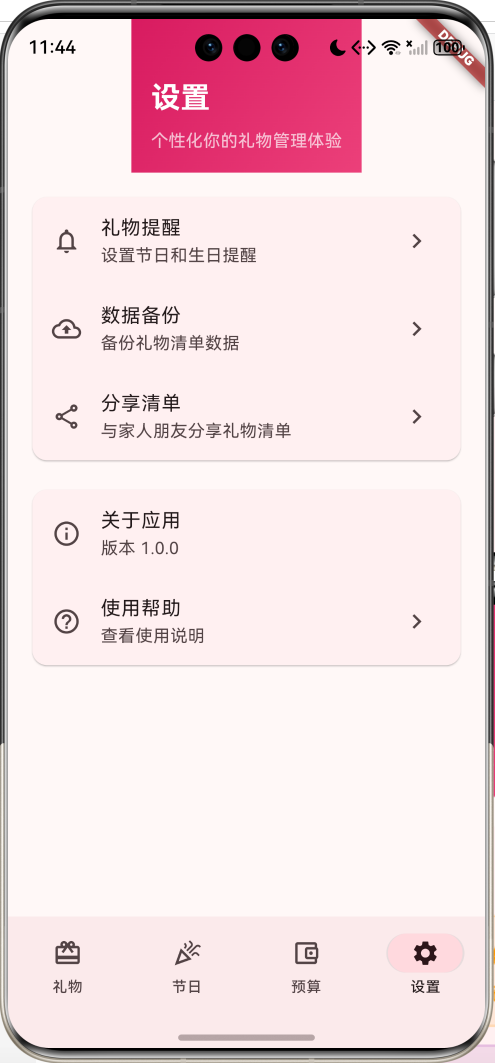
核心功能特性
- 多节日支持:涵盖10种常见节日类型,满足全年送礼需求
- 智能提醒:自动识别即将到期和已过期的礼物计划
- 预算管理:完整的预算规划和支出跟踪功能
- 关系分类:支持8种收礼人关系类型,精准分类管理
- 状态跟踪:4阶段礼物状态管理,从计划到送出全程跟踪
- 数据统计:多维度统计分析,直观展示礼物和预算情况
技术架构
数据模型设计
核心数据模型
GiftItem 礼物项目模型
class GiftItem {
  final String id;              // 唯一标识符
  final String recipientName;   // 收礼人姓名
  final Relationship relationship; // 收礼人关系
  final HolidayType holiday;    // 节日类型
  final String giftName;        // 礼物名称
  final String description;     // 礼物描述
  final double budget;          // 预算金额
  final double actualCost;      // 实际花费
  final GiftStatus status;      // 礼物状态
  final DateTime targetDate;    // 目标日期
  final String notes;           // 备注信息
  final List<String> ideas;     // 礼物想法列表
}
枚举类型定义
HolidayType 节日类型
| 枚举值 | 中文名称 | 颜色标识 | 使用场景 |
|---|---|---|---|
| newYear | 新年 | 红色 | 春节、元旦 |
| valentine | 情人节 | 粉色 | 情侣间礼物 |
| birthday | 生日 | 橙色 | 生日庆祝 |
| christmas | 圣诞节 | 绿色 | 圣诞庆祝 |
| motherDay | 母亲节 | 紫色 | 母亲节礼物 |
| fatherDay | 父亲节 | 蓝色 | 父亲节礼物 |
| anniversary | 纪念日 | 深紫色 | 重要纪念日 |
| graduation | 毕业 | 靛蓝色 | 毕业庆祝 |
| wedding | 婚礼 | 青色 | 婚礼庆祝 |
| other | 其他 | 灰色 | 其他场合 |
GiftStatus 礼物状态
Relationship 收礼人关系
- family: 家人 - 红色标识
- friend: 朋友 - 蓝色标识
- colleague: 同事 - 绿色标识
- lover: 恋人 - 粉色标识
- child: 孩子 - 橙色标识
- parent: 父母 - 紫色标识
- relative: 亲戚 - 青色标识
- other: 其他 - 灰色标识
配置类设计
GiftConfig 配置管理类
class GiftConfig {
  // 节日名称映射
  static const Map<HolidayType, String> holidayNames = {...};

  // 节日颜色映射
  static const Map<HolidayType, Color> holidayColors = {...};

  // 状态名称映射
  static const Map<GiftStatus, String> statusNames = {...};

  // 状态颜色映射
  static const Map<GiftStatus, Color> statusColors = {...};

  // 关系名称映射
  static const Map<Relationship, String> relationshipNames = {...};

  // 关系颜色映射
  static const Map<Relationship, Color> relationshipColors = {...};
}
核心功能实现
1. 礼物管理功能
礼物列表展示
Widget _buildGiftListPage() {
  final upcomingGifts = _gifts.where((gift) =>
    gift.isUpcoming || gift.isOverdue).toList();
  final allGifts = _gifts;

  return Column(
    children: [
      _buildGiftListHeader(),
      Expanded(
        child: allGifts.isEmpty
            ? _buildEmptyGiftView()
            : ListView(
                padding: const EdgeInsets.all(16),
                children: [
                  // 即将到期礼物优先显示
                  if (upcomingGifts.isNotEmpty) ...[
                    const Text('即将到期',
                      style: TextStyle(fontSize: 18, fontWeight: FontWeight.bold)),
                    ...upcomingGifts.map((gift) =>
                      _buildGiftCard(gift, isUrgent: true)),
                  ],
                  // 所有礼物列表
                  const Text('所有礼物',
                    style: TextStyle(fontSize: 18, fontWeight: FontWeight.bold)),
                  ...allGifts.map((gift) => _buildGiftCard(gift)),
                ],
              ),
      ),
    ],
  );
}
智能提醒算法
class GiftItem {
  // 剩余天数计算
  int get daysLeft {
    final now = DateTime.now();
    if (now.isAfter(targetDate)) return 0;
    return targetDate.difference(now).inDays;
  }

  // 即将到期判断(7天内)
  bool get isUpcoming => daysLeft <= 7 && daysLeft > 0;

  // 过期判断
  bool get isOverdue =>
    DateTime.now().isAfter(targetDate) && status != GiftStatus.given;
}
2. 预算管理系统
预算统计算法
Widget _buildBudgetOverviewCard(double totalBudget, double totalSpent, double remaining) {
  return Card(
    child: Padding(
      padding: const EdgeInsets.all(16),
      child: Column(
        children: [
          // 预算概览数据
          Row(
            children: [
              Expanded(child: _buildBudgetItem('总预算',
                '¥${totalBudget.toStringAsFixed(0)}', Colors.blue)),
              Expanded(child: _buildBudgetItem('已花费',
                '¥${totalSpent.toStringAsFixed(0)}', Colors.orange)),
            ],
          ),
          // 预算进度条
          if (totalBudget > 0)
            LinearProgressIndicator(
              value: (totalSpent / totalBudget).clamp(0.0, 1.0),
              valueColor: AlwaysStoppedAnimation<Color>(
                totalSpent > totalBudget ? Colors.red : Colors.green,
              ),
            ),
        ],
      ),
    ),
  );
}
超预算检测
class GiftItem {
  // 超预算判断
  bool get isOverBudget => actualCost > budget && budget > 0;
}
3. 节日分类管理
节日筛选功能
Widget _buildHolidayFilter() {
  return Card(
    child: Padding(
      padding: const EdgeInsets.all(16),
      child: Wrap(
        spacing: 8,
        runSpacing: 8,
        children: HolidayType.values.map((holiday) {
          final isSelected = _filterHoliday == holiday;
          final count = _getGiftsByHoliday(holiday).length;

          return FilterChip(
            selected: isSelected,
            label: Row(
              mainAxisSize: MainAxisSize.min,
              children: [
                Text(GiftConfig.holidayNames[holiday] ?? ''),
                // 礼物数量徽章
                Container(
                  padding: const EdgeInsets.symmetric(horizontal: 6, vertical: 2),
                  decoration: BoxDecoration(
                    color: isSelected ? Colors.white :
                      GiftConfig.holidayColors[holiday],
                    borderRadius: BorderRadius.circular(10),
                  ),
                  child: Text(count.toString()),
                ),
              ],
            ),
            onSelected: (selected) {
              setState(() {
                _filterHoliday = holiday;
              });
            },
          );
        }).toList(),
      ),
    ),
  );
}
UI组件设计
1. 导航栏设计
NavigationBar(
  selectedIndex: _selectedIndex,
  onDestinationSelected: (index) {
    setState(() {
      _selectedIndex = index;
    });
  },
  destinations: const [
    NavigationDestination(
      icon: Icon(Icons.card_giftcard_outlined),
      selectedIcon: Icon(Icons.card_giftcard),
      label: '礼物',
    ),
    NavigationDestination(
      icon: Icon(Icons.celebration_outlined),
      selectedIcon: Icon(Icons.celebration),
      label: '节日',
    ),
    NavigationDestination(
      icon: Icon(Icons.account_balance_wallet_outlined),
      selectedIcon: Icon(Icons.account_balance_wallet),
      label: '预算',
    ),
    NavigationDestination(
      icon: Icon(Icons.settings_outlined),
      selectedIcon: Icon(Icons.settings),
      label: '设置',
    ),
  ],
)
2. 礼物卡片组件
Widget _buildGiftCard(GiftItem gift, {bool isUrgent = false}) {
  return Card(
    margin: const EdgeInsets.only(bottom: 8),
    color: isUrgent ? Colors.orange.shade50 : null,
    child: ListTile(
      // 节日类型头像
      leading: CircleAvatar(
        backgroundColor: GiftConfig.holidayColors[gift.holiday],
        child: Text(
          GiftConfig.holidayNames[gift.holiday]?.substring(0, 1) ?? '',
          style: const TextStyle(color: Colors.white, fontWeight: FontWeight.bold),
        ),
      ),
      title: Text(gift.giftName),
      subtitle: Column(
        crossAxisAlignment: CrossAxisAlignment.start,
        children: [
          Text('送给:${gift.recipientName} (${GiftConfig.relationshipNames[gift.relationship]})'),
          // 状态和时间信息
          Row(
            children: [
              _buildStatusChip(gift.status),
              const SizedBox(width: 8),
              _buildTimeInfo(gift),
            ],
          ),
        ],
      ),
      trailing: _buildGiftMenu(gift),
    ),
  );
}
3. 渐变色头部设计
Widget _buildGiftListHeader() {
  return Container(
    padding: const EdgeInsets.fromLTRB(16, 48, 16, 16),
    decoration: BoxDecoration(
      gradient: LinearGradient(
        colors: [Colors.pink.shade600, Colors.pink.shade400],
        begin: Alignment.topLeft,
        end: Alignment.bottomRight,
      ),
    ),
    child: Column(
      crossAxisAlignment: CrossAxisAlignment.start,
      children: [
        const Text(
          '节日礼物清单',
          style: TextStyle(
            fontSize: 24,
            fontWeight: FontWeight.bold,
            color: Colors.white,
          ),
        ),
        // 统计信息芯片
        Row(
          children: [
            _buildStatChip('总礼物', totalGifts.toString(), Colors.white24),
            _buildStatChip('已送出', completedGifts.toString(), Colors.green.shade300),
            _buildStatChip('即将到期', upcomingCount.toString(), Colors.orange.shade300),
          ],
        ),
      ],
    ),
  );
}
对话框组件实现
1. 添加/编辑礼物对话框
void _showGiftDialog({GiftItem? gift}) {
  final isEdit = gift != null;
  // 控制器初始化
  final recipientController = TextEditingController(text: gift?.recipientName ?? '');
  final giftNameController = TextEditingController(text: gift?.giftName ?? '');
  final budgetController = TextEditingController(text: gift?.budget.toString() ?? '');

  // 状态变量
  Relationship selectedRelationship = gift?.relationship ?? Relationship.friend;
  HolidayType selectedHoliday = gift?.holiday ?? HolidayType.birthday;
  DateTime selectedDate = gift?.targetDate ?? DateTime.now().add(const Duration(days: 30));

  showDialog(
    context: context,
    builder: (context) => StatefulBuilder(
      builder: (context, setDialogState) => AlertDialog(
        title: Text(isEdit ? '编辑礼物' : '添加礼物'),
        content: SingleChildScrollView(
          child: Column(
            mainAxisSize: MainAxisSize.min,
            children: [
              // 收礼人姓名输入
              TextField(
                controller: recipientController,
                decoration: const InputDecoration(
                  labelText: '收礼人姓名',
                  border: OutlineInputBorder(),
                ),
              ),
              // 关系选择下拉框
              DropdownButtonFormField<Relationship>(
                value: selectedRelationship,
                decoration: const InputDecoration(
                  labelText: '关系',
                  border: OutlineInputBorder(),
                ),
                items: Relationship.values.map((relationship) {
                  return DropdownMenuItem(
                    value: relationship,
                    child: Row(
                      children: [
                        Container(
                          width: 16,
                          height: 16,
                          decoration: BoxDecoration(
                            color: GiftConfig.relationshipColors[relationship],
                            shape: BoxShape.circle,
                          ),
                        ),
                        const SizedBox(width: 8),
                        Text(GiftConfig.relationshipNames[relationship] ?? ''),
                      ],
                    ),
                  );
                }).toList(),
                onChanged: (value) {
                  setDialogState(() {
                    selectedRelationship = value!;
                  });
                },
              ),
              // 日期选择器
              ListTile(
                title: const Text('目标日期'),
                subtitle: Text(_formatDate(selectedDate)),
                trailing: const Icon(Icons.calendar_today),
                onTap: () async {
                  final date = await showDatePicker(
                    context: context,
                    initialDate: selectedDate,
                    firstDate: DateTime.now(),
                    lastDate: DateTime.now().add(const Duration(days: 365)),
                  );
                  if (date != null) {
                    setDialogState(() {
                      selectedDate = date;
                    });
                  }
                },
              ),
            ],
          ),
        ),
        actions: [
          TextButton(
            onPressed: () => Navigator.pop(context),
            child: const Text('取消'),
          ),
          ElevatedButton(
            onPressed: () => _saveGift(/* 参数 */),
            child: Text(isEdit ? '更新' : '添加'),
          ),
        ],
      ),
    ),
  );
}
2. 状态更新对话框
void _showStatusUpdateDialog(GiftItem gift) {
  showDialog(
    context: context,
    builder: (context) => AlertDialog(
      title: const Text('更新礼物状态'),
      content: Column(
        mainAxisSize: MainAxisSize.min,
        children: GiftStatus.values.map((status) {
          return RadioListTile<GiftStatus>(
            title: Text(GiftConfig.statusNames[status] ?? ''),
            value: status,
            groupValue: gift.status,
            onChanged: (value) {
              if (value != null) {
                _updateGiftStatus(gift, value);
                Navigator.pop(context);
              }
            },
          );
        }).toList(),
      ),
    ),
  );
}
状态管理
1. 本地状态管理
class _GiftListHomePageState extends State<GiftListHomePage> {
int _selectedIndex = 0; // 当前选中的导航索引
List<GiftItem> _gifts = []; // 礼物列表
HolidayType _filterHoliday = HolidayType.newYear; // 节日筛选器
void initState() {
super.initState();
_loadSampleData(); // 加载示例数据
}
}
2. 数据操作方法
// 添加礼物
void _addGift(GiftItem gift) {
  setState(() {
    _gifts.add(gift);
  });
}

// 更新礼物
void _updateGift(GiftItem updatedGift) {
  setState(() {
    final index = _gifts.indexWhere((g) => g.id == updatedGift.id);
    if (index != -1) {
      _gifts[index] = updatedGift;
    }
  });
}

// 删除礼物
void _deleteGift(String id) {
  setState(() {
    _gifts.removeWhere((gift) => gift.id == id);
  });
}

// 更新礼物状态
void _updateGiftStatus(GiftItem gift, GiftStatus newStatus) {
  setState(() {
    final index = _gifts.indexWhere((g) => g.id == gift.id);
    if (index != -1) {
      _gifts[index] = gift.copyWith(status: newStatus);
    }
  });
}
工具方法实现
1. 日期格式化
String _formatDate(DateTime date) {
  return '${date.year}-${date.month.toString().padLeft(2, '0')}-${date.day.toString().padLeft(2, '0')}';
}
2. 数据筛选方法
// 按节日获取礼物列表
List<GiftItem> _getGiftsByHoliday(HolidayType holiday) {
  return _gifts.where((gift) => gift.holiday == holiday).toList();
}

// 获取即将到期的礼物
List<GiftItem> _getUpcomingGifts() {
  return _gifts.where((gift) => gift.isUpcoming || gift.isOverdue).toList();
}

// 获取高价值礼物
List<GiftItem> _getExpensiveGifts() {
  return _gifts.where((gift) => gift.budget > 200).toList()
    ..sort((a, b) => b.budget.compareTo(a.budget));
}
3. 统计计算方法
// 计算总预算
double _calculateTotalBudget() {
  return _gifts.fold(0.0, (sum, gift) => sum + gift.budget);
}

// 计算总支出
double _calculateTotalSpent() {
  return _gifts.fold(0.0, (sum, gift) => sum + gift.actualCost);
}

// 计算完成率
double _calculateCompletionRate() {
  if (_gifts.isEmpty) return 0.0;
  final completedCount = _gifts.where((gift) => gift.status == GiftStatus.given).length;
  return completedCount / _gifts.length;
}
功能扩展建议
1. 数据持久化
// 使用SharedPreferences存储数据
class GiftDataManager {
  static const String _keyGifts = 'gifts';

  static Future<void> saveGifts(List<GiftItem> gifts) async {
    final prefs = await SharedPreferences.getInstance();
    final giftsJson = gifts.map((gift) => gift.toJson()).toList();
    await prefs.setString(_keyGifts, jsonEncode(giftsJson));
  }

  static Future<List<GiftItem>> loadGifts() async {
    final prefs = await SharedPreferences.getInstance();
    final giftsString = prefs.getString(_keyGifts);
    if (giftsString != null) {
      final giftsJson = jsonDecode(giftsString) as List;
      return giftsJson.map((json) => GiftItem.fromJson(json)).toList();
    }
    return [];
  }
}
2. 推送通知
// 使用flutter_local_notifications
class NotificationService {
  static Future<void> scheduleGiftReminder(GiftItem gift) async {
    final flutterLocalNotificationsPlugin = FlutterLocalNotificationsPlugin();

    await flutterLocalNotificationsPlugin.zonedSchedule(
      gift.id.hashCode,
      '礼物提醒',
      '${gift.recipientName}的${GiftConfig.holidayNames[gift.holiday]}礼物还有3天到期',
      tz.TZDateTime.from(gift.targetDate.subtract(const Duration(days: 3)), tz.local),
      const NotificationDetails(
        android: AndroidNotificationDetails(
          'gift_reminder',
          '礼物提醒',
          channelDescription: '节日礼物到期提醒',
          importance: Importance.max,
          priority: Priority.high,
        ),
      ),
      uiLocalNotificationDateInterpretation: UILocalNotificationDateInterpretation.absoluteTime,
    );
  }
}
3. 数据导出功能
// 导出为CSV格式
class DataExporter {
  static Future<String> exportToCSV(List<GiftItem> gifts) async {
    final buffer = StringBuffer();
    buffer.writeln('收礼人,关系,节日,礼物名称,预算,实际花费,状态,目标日期,备注');

    for (final gift in gifts) {
      buffer.writeln([
        gift.recipientName,
        GiftConfig.relationshipNames[gift.relationship],
        GiftConfig.holidayNames[gift.holiday],
        gift.giftName,
        gift.budget,
        gift.actualCost,
        GiftConfig.statusNames[gift.status],
        _formatDate(gift.targetDate),
        gift.notes,
      ].join(','));
    }

    return buffer.toString();
  }
}
4. 搜索功能
// 全文搜索
List<GiftItem> searchGifts(String query) {
  if (query.isEmpty) return _gifts;

  return _gifts.where((gift) {
    return gift.recipientName.toLowerCase().contains(query.toLowerCase()) ||
           gift.giftName.toLowerCase().contains(query.toLowerCase()) ||
           gift.description.toLowerCase().contains(query.toLowerCase()) ||
           gift.notes.toLowerCase().contains(query.toLowerCase());
  }).toList();
}
性能优化策略
1. 列表优化
// 使用ListView.builder优化长列表性能
Widget _buildOptimizedGiftList() {
  return ListView.builder(
    itemCount: _gifts.length,
    itemBuilder: (context, index) {
      final gift = _gifts[index];
      return _buildGiftCard(gift);
    },
  );
}
2. 图片缓存
// 使用cached_network_image缓存网络图片
Widget _buildGiftImage(String imageUrl) {
  return CachedNetworkImage(
    imageUrl: imageUrl,
    placeholder: (context, url) => const CircularProgressIndicator(),
    errorWidget: (context, url, error) => const Icon(Icons.error),
    memCacheWidth: 200,
    memCacheHeight: 200,
  );
}
3. 状态管理优化
// 使用Provider进行状态管理
class GiftProvider extends ChangeNotifier {
  List<GiftItem> _gifts = [];

  List<GiftItem> get gifts => _gifts;

  void addGift(GiftItem gift) {
    _gifts.add(gift);
    notifyListeners();
  }

  void updateGift(GiftItem updatedGift) {
    final index = _gifts.indexWhere((g) => g.id == updatedGift.id);
    if (index != -1) {
      _gifts[index] = updatedGift;
      notifyListeners();
    }
  }
}
测试指南
1. 单元测试
// test/gift_item_test.dart
import 'package:flutter_test/flutter_test.dart';

void main() {
  group('GiftItem Tests', () {
    test('should calculate days left correctly', () {
      final gift = GiftItem(
        id: '1',
        recipientName: 'Test',
        relationship: Relationship.friend,
        holiday: HolidayType.birthday,
        giftName: 'Test Gift',
        targetDate: DateTime.now().add(const Duration(days: 5)),
      );

      expect(gift.daysLeft, equals(5));
    });

    test('should detect upcoming gifts', () {
      final gift = GiftItem(
        id: '1',
        recipientName: 'Test',
        relationship: Relationship.friend,
        holiday: HolidayType.birthday,
        giftName: 'Test Gift',
        targetDate: DateTime.now().add(const Duration(days: 3)),
      );

      expect(gift.isUpcoming, isTrue);
    });

    test('should detect overdue gifts', () {
      final gift = GiftItem(
        id: '1',
        recipientName: 'Test',
        relationship: Relationship.friend,
        holiday: HolidayType.birthday,
        giftName: 'Test Gift',
        targetDate: DateTime.now().subtract(const Duration(days: 1)),
        status: GiftStatus.planned,
      );

      expect(gift.isOverdue, isTrue);
    });
  });
}
2. Widget测试
// test/widget_test.dart
import 'package:flutter/material.dart';
import 'package:flutter_test/flutter_test.dart';

void main() {
  testWidgets('Gift list displays correctly', (WidgetTester tester) async {
    await tester.pumpWidget(const MaterialApp(home: GiftListHomePage()));

    // 验证导航栏
    expect(find.text('礼物'), findsOneWidget);
    expect(find.text('节日'), findsOneWidget);
    expect(find.text('预算'), findsOneWidget);
    expect(find.text('设置'), findsOneWidget);

    // 验证浮动按钮
    expect(find.byType(FloatingActionButton), findsOneWidget);
  });

  testWidgets('Add gift dialog opens correctly', (WidgetTester tester) async {
    await tester.pumpWidget(const MaterialApp(home: GiftListHomePage()));

    // 点击添加按钮
    await tester.tap(find.byType(FloatingActionButton));
    await tester.pumpAndSettle();

    // 验证对话框出现
    expect(find.text('添加礼物'), findsOneWidget);
    expect(find.text('收礼人姓名'), findsOneWidget);
  });
}
3. 集成测试
// integration_test/app_test.dart
import 'package:flutter/material.dart';
import 'package:flutter_test/flutter_test.dart';
import 'package:integration_test/integration_test.dart';

void main() {
  IntegrationTestWidgetsFlutterBinding.ensureInitialized();

  group('Gift List App Integration Tests', () {
    testWidgets('Complete gift management flow', (WidgetTester tester) async {
      await tester.pumpWidget(const HolidayGiftListApp());

      // 添加礼物
      await tester.tap(find.byType(FloatingActionButton));
      await tester.pumpAndSettle();

      await tester.enterText(find.byType(TextField).first, '小明');
      await tester.enterText(find.byType(TextField).at(1), '生日礼物');

      await tester.tap(find.text('添加'));
      await tester.pumpAndSettle();

      // 验证礼物已添加
      expect(find.text('小明'), findsOneWidget);
      expect(find.text('生日礼物'), findsOneWidget);
    });
  });
}
部署指南
1. Android部署
# 构建APK
flutter build apk --release

# 构建App Bundle
flutter build appbundle --release

# 安装到设备
flutter install
2. iOS部署
# 构建iOS应用
flutter build ios --release

# 使用Xcode打开项目
open ios/Runner.xcworkspace
3. Web部署
# 构建Web应用
flutter build web --release

# 部署到Firebase Hosting
firebase deploy --only hosting
4. 桌面应用部署
# Windows
flutter build windows --release

# macOS
flutter build macos --release

# Linux
flutter build linux --release
项目总结
节日礼物清单应用成功实现了一个功能完整、界面美观的礼物管理工具。通过合理的数据模型设计、直观的用户界面和完善的功能实现,为用户提供了便捷的礼物规划和管理体验。
技术亮点
- 单文件架构:简化项目结构,便于维护和理解
- Material Design 3:现代化的设计语言,提供优秀的用户体验
- 智能提醒系统:自动识别即将到期和过期的礼物
- 完整的预算管理:支持预算规划、支出跟踪和超支提醒
- 多维度分类:支持节日、关系、状态等多种分类方式
- 响应式设计:适配不同屏幕尺寸和设备类型
学习价值
- Flutter基础:掌握Widget组合、状态管理、导航等核心概念
- UI设计:学习Material Design组件的使用和自定义
- 数据管理:理解数据模型设计和本地状态管理
- 用户体验:体验完整的应用开发流程和用户交互设计
这个项目为Flutter初学者提供了一个很好的学习案例,同时也是一个实用的生活工具,展示了Flutter在移动应用开发中的强大能力和灵活性。
欢迎加入开源鸿蒙跨平台社区:https://openharmonycrossplatform.csdn.net

开源鸿蒙跨平台开发社区汇聚开发者与厂商,共建“一次开发,多端部署”的开源生态,致力于降低跨端开发门槛,推动万物智联创新。
更多推荐
 11
11 0
0- 0


 已为社区贡献27条内容

所有评论(0)