Flutter 框架跨平台鸿蒙开发 - 游戏存档管理器应用开发教程
Flutter游戏存档管理器应用开发教程
项目简介
这是一款专业的游戏存档管理器应用,为游戏玩家提供全面的存档备份、恢复和管理功能。应用采用Material Design 3设计风格,支持多平台游戏存档管理、自动备份、云端同步、智能检测等功能,界面简洁美观,操作安全可靠,是保护游戏进度的理想工具。
运行效果图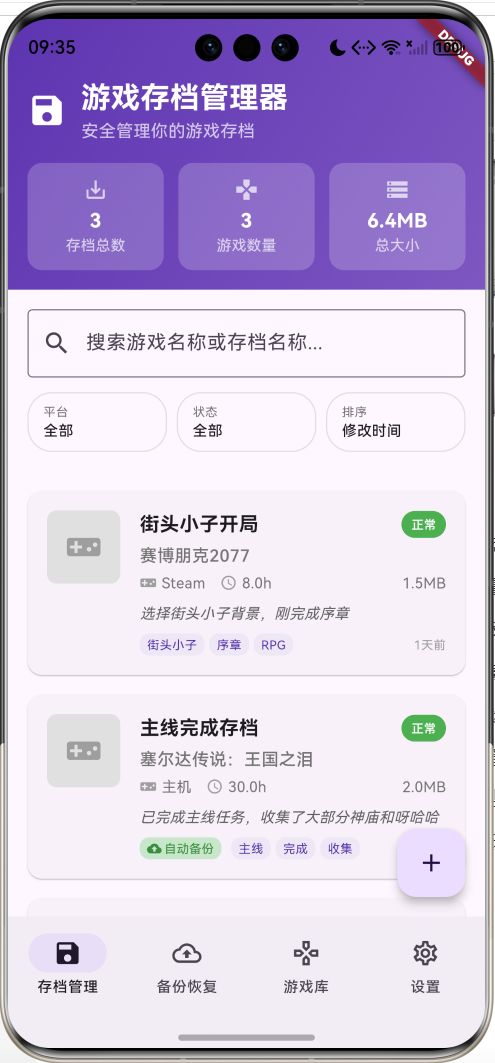
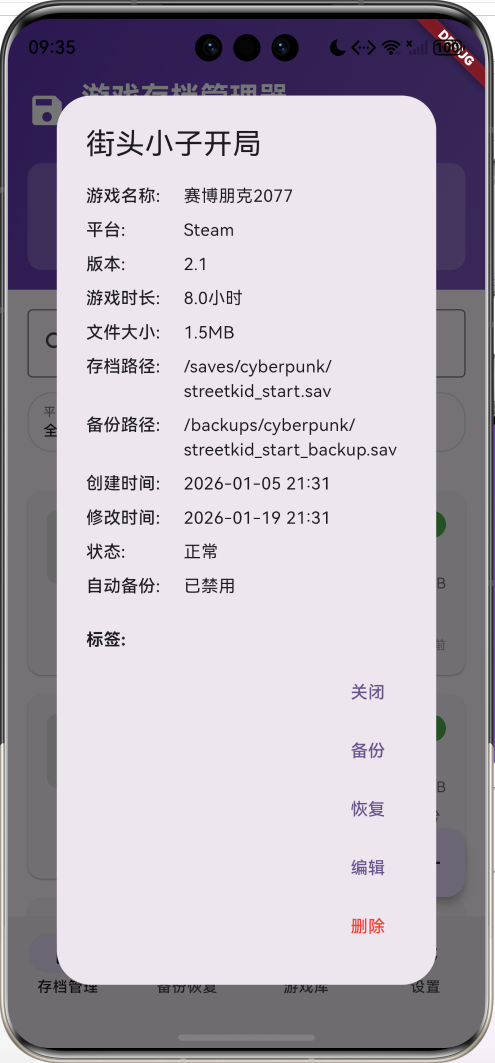
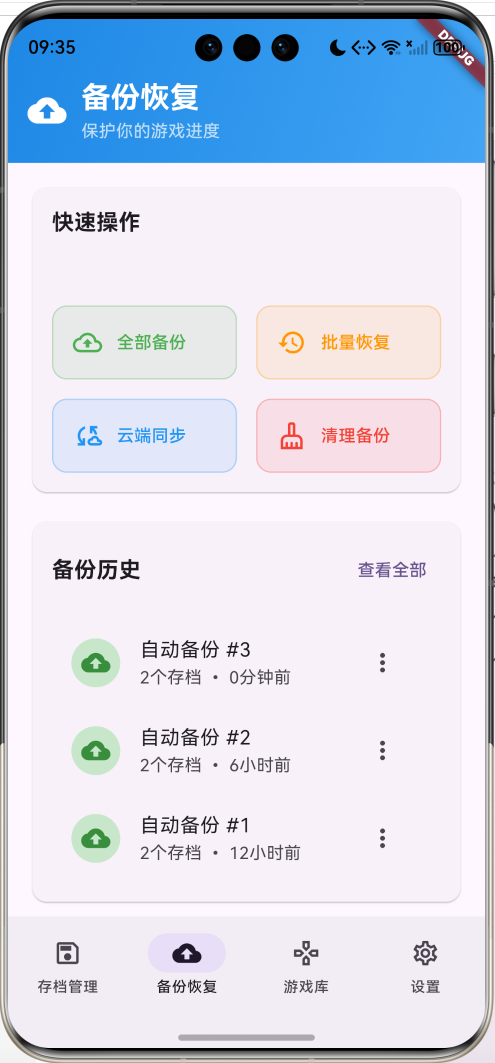
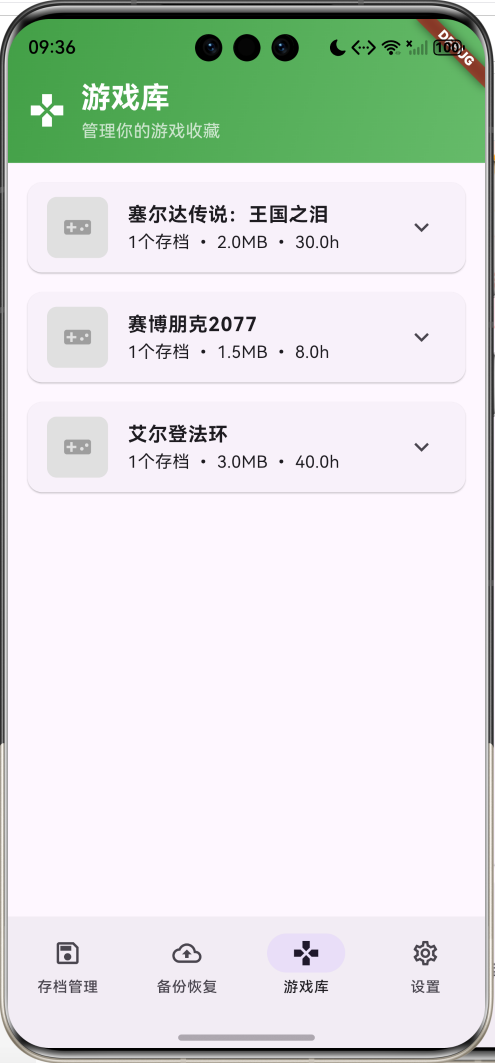
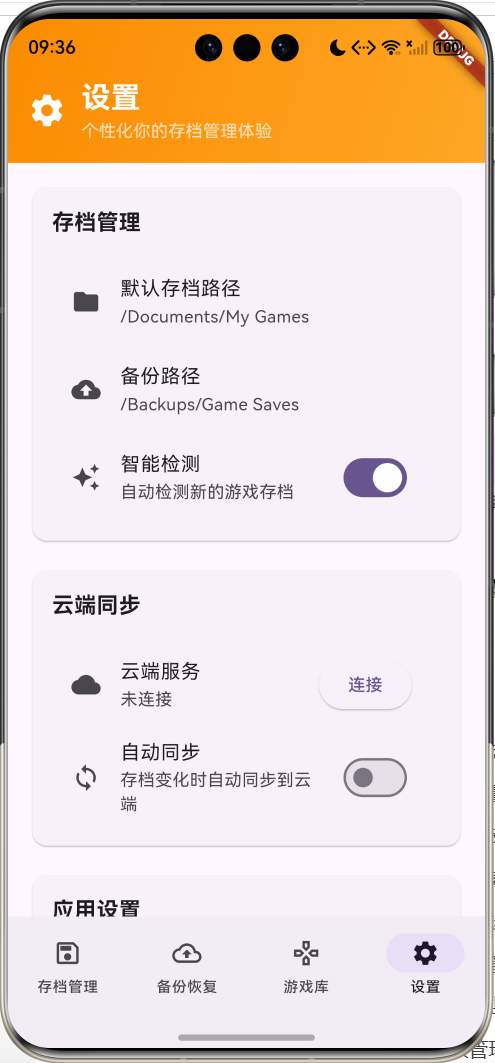
核心特性
- 多平台支持:PC、Steam、Epic、Origin、Ubisoft、GOG、手机、主机等平台
- 智能存档管理:自动检测、分类管理、状态监控
- 安全备份恢复:自动备份、手动备份、批量恢复、版本管理
- 云端同步:多设备同步、数据安全、离线支持
- 高级搜索:游戏名称、存档名称的模糊搜索
- 多维筛选:按平台、状态、时间等条件筛选
- 游戏库管理:游戏分组、统计分析、收藏管理
- 自动化功能:定时备份、智能清理、状态监控
- 安全保护:加密存储、密码保护、权限管理
- 精美界面:渐变设计和流畅的用户体验
技术栈
- Flutter 3.x
- Material Design 3
- 文件系统操作
- 数据持久化
- 动画控制器(AnimationController)
- 状态管理
- 云端同步服务
项目架构
数据模型设计
GameSave(游戏存档模型)
class GameSave {
  final String id;                      // 唯一标识
  final String gameName;                // 游戏名称
  final String saveName;                // 存档名称
  final String description;             // 存档描述
  final String savePath;                // 存档路径
  final String backupPath;              // 备份路径
  final DateTime createTime;            // 创建时间
  final DateTime lastModified;          // 最后修改时间
  final int fileSize;                   // 文件大小(字节)
  final GamePlatform platform;          // 游戏平台
  final List<String> tags;              // 标签列表
  final bool isAutoBackup;              // 是否自动备份
  final String thumbnail;               // 缩略图路径
  final SaveStatus status;              // 存档状态
  final String version;                 // 游戏版本
  final int playTime;                   // 游戏时长(分钟)

  const GameSave({
    required this.id,
    required this.gameName,
    required this.saveName,
    required this.description,
    required this.savePath,
    required this.backupPath,
    required this.createTime,
    required this.lastModified,
    required this.fileSize,
    required this.platform,
    this.tags = const [],
    this.isAutoBackup = false,
    this.thumbnail = '',
    this.status = SaveStatus.normal,
    this.version = '',
    this.playTime = 0,
  });
}
设计要点:
- id使用时间戳确保唯一性
- savePath和backupPath分别存储原始和备份路径
- fileSize记录文件大小便于统计和管理
- platform使用枚举确保平台类型一致性
- tags支持多标签分类管理
- isAutoBackup控制自动备份行为
GamePlatform(游戏平台枚举)
enum GamePlatform {
  pc,       // PC游戏
  steam,    // Steam平台
  epic,     // Epic Games
  origin,   // Origin/EA
  uplay,    // Ubisoft Connect
  gog,      // GOG Galaxy
  mobile,   // 手机游戏
  console,  // 主机游戏
  other,    // 其他平台
}
SaveStatus(存档状态枚举)
enum SaveStatus {
  normal,     // 正常
  corrupted,  // 损坏
  missing,    // 丢失
  outdated,   // 过期
  syncing,    // 同步中
}
SortBy(排序方式枚举)
enum SortBy {
  createTime,    // 创建时间
  lastModified,  // 修改时间
  gameName,      // 游戏名称
  fileSize,      // 文件大小
  playTime,      // 游戏时长
}
数据关系图
统计数据模型
// 统计信息
int _totalSaves = 0;                     // 总存档数
int _totalGames = 0;                     // 总游戏数
double _totalSize = 0.0;                 // 总大小(MB)
int _autoBackupCount = 0;                // 自动备份数量

// 筛选条件
String _searchQuery = '';                // 搜索关键词
List<GamePlatform> _selectedPlatforms = []; // 选中的平台
SaveStatus? _selectedStatus;             // 选中的状态
SortBy _sortBy = SortBy.lastModified;    // 排序方式
bool _sortAscending = false;             // 排序方向
核心功能实现
1. 存档信息管理
实现完整的游戏存档信息录入和管理功能。
void _showAddSaveDialog() {
showDialog(
context: context,
builder: (context) => _AddSaveDialog(
onSave: (save) {
setState(() {
_gameSaves.add(save);
});
_updateStatistics();
},
),
);
}
class _AddSaveDialog extends StatefulWidget {
final Function(GameSave) onSave;
const _AddSaveDialog({required this.onSave});
State<_AddSaveDialog> createState() => _AddSaveDialogState();
}
class _AddSaveDialogState extends State<_AddSaveDialog> {
final _formKey = GlobalKey<FormState>();
final _gameNameController = TextEditingController();
final _saveNameController = TextEditingController();
final _descriptionController = TextEditingController();
final _savePathController = TextEditingController();
final _versionController = TextEditingController();
final _playTimeController = TextEditingController();
GamePlatform _platform = GamePlatform.pc;
bool _isAutoBackup = false;
List<String> _tags = [];
final _tagController = TextEditingController();
void _saveSave() {
if (_formKey.currentState!.validate()) {
final save = GameSave(
id: DateTime.now().millisecondsSinceEpoch.toString(),
gameName: _gameNameController.text,
saveName: _saveNameController.text,
description: _descriptionController.text,
savePath: _savePathController.text,
backupPath: '/backups/${_gameNameController.text}/${_saveNameController.text}.bak',
createTime: DateTime.now(),
lastModified: DateTime.now(),
fileSize: 1024 * 1024, // 默认1MB
platform: _platform,
tags: _tags,
isAutoBackup: _isAutoBackup,
status: SaveStatus.normal,
version: _versionController.text,
playTime: (double.tryParse(_playTimeController.text) ?? 0.0 * 60).toInt(),
);
widget.onSave(save);
Navigator.pop(context);
}
}
}
功能特点:
- 表单验证:必填字段的完整性检查
- 平台选择:下拉选择支持多种游戏平台
- 路径选择:文件选择器选择存档路径
- 标签管理:动态添加和删除标签
- 自动备份:开关控制自动备份功能
2. 搜索和筛选系统
实现强大的搜索和多维度筛选功能。
List<GameSave> _getFilteredSaves() {
  var filtered = _gameSaves.where((save) {
    // 搜索过滤
    if (_searchQuery.isNotEmpty) {
      final query = _searchQuery.toLowerCase();
      if (!save.gameName.toLowerCase().contains(query) &&
          !save.saveName.toLowerCase().contains(query)) {
        return false;
      }
    }

    // 平台过滤
    if (_selectedPlatforms.isNotEmpty) {
      if (!_selectedPlatforms.contains(save.platform)) {
        return false;
      }
    }

    // 状态过滤
    if (_selectedStatus != null && save.status != _selectedStatus) {
      return false;
    }

    return true;
  }).toList();

  // 排序
  filtered.sort((a, b) {
    switch (_sortBy) {
      case SortBy.createTime:
        return _sortAscending
            ? a.createTime.compareTo(b.createTime)
            : b.createTime.compareTo(a.createTime);
      case SortBy.lastModified:
        return _sortAscending
            ? a.lastModified.compareTo(b.lastModified)
            : b.lastModified.compareTo(a.lastModified);
      case SortBy.gameName:
        return _sortAscending
            ? a.gameName.compareTo(b.gameName)
            : b.gameName.compareTo(a.gameName);
      case SortBy.fileSize:
        return _sortAscending
            ? a.fileSize.compareTo(b.fileSize)
            : b.fileSize.compareTo(a.fileSize);
      case SortBy.playTime:
        return _sortAscending
            ? a.playTime.compareTo(b.playTime)
            : b.playTime.compareTo(a.playTime);
    }
  });

  return filtered;
}

Widget _buildSearchAndFilter() {
  return Container(
    padding: const EdgeInsets.all(16),
    child: Column(
      children: [
        TextField(
          decoration: const InputDecoration(
            hintText: '搜索游戏名称或存档名称...',
            prefixIcon: Icon(Icons.search),
            border: OutlineInputBorder(),
          ),
          onChanged: (value) {
            setState(() {
              _searchQuery = value;
            });
          },
        ),
        const SizedBox(height: 12),
        Row(
          children: [
            Expanded(
              child: _buildFilterChip('平台',
                  _selectedPlatforms.isEmpty ? '全部' : '${_selectedPlatforms.length}个',
                  () => _showPlatformFilter()),
            ),
            const SizedBox(width: 8),
            Expanded(
              child: _buildFilterChip('状态', _getStatusName(_selectedStatus),
                  () => _showStatusFilter()),
            ),
            const SizedBox(width: 8),
            Expanded(
              child: _buildFilterChip('排序', _getSortName(_sortBy),
                  () => _showSortOptions()),
            ),
          ],
        ),
      ],
    ),
  );
}
搜索筛选特点:
- 模糊搜索:支持游戏名称和存档名称的模糊匹配
- 多平台筛选:支持多选平台筛选
- 状态筛选:按存档状态筛选
- 灵活排序:多种排序方式和升降序切换
- 实时更新:输入即时更新搜索结果
3. 备份恢复系统
提供完整的备份和恢复功能。
Widget _buildQuickActions() {
  return Card(
    child: Padding(
      padding: const EdgeInsets.all(16),
      child: Column(
        crossAxisAlignment: CrossAxisAlignment.start,
        children: [
          const Text(
            '快速操作',
            style: TextStyle(fontSize: 18, fontWeight: FontWeight.bold),
          ),
          const SizedBox(height: 16),
          GridView.count(
            shrinkWrap: true,
            physics: const NeverScrollableScrollPhysics(),
            crossAxisCount: 2,
            crossAxisSpacing: 16,
            mainAxisSpacing: 16,
            childAspectRatio: 2.5,
            children: [
              _buildActionCard(
                '全部备份',
                Icons.backup_outlined,
                Colors.green,
                () => _backupAllSaves(),
              ),
              _buildActionCard(
                '批量恢复',
                Icons.restore_outlined,
                Colors.orange,
                () => _showBatchRestore(),
              ),
              _buildActionCard(
                '云端同步',
                Icons.cloud_sync_outlined,
                Colors.blue,
                () => _syncToCloud(),
              ),
              _buildActionCard(
                '清理备份',
                Icons.cleaning_services_outlined,
                Colors.red,
                () => _cleanupBackups(),
              ),
            ],
          ),
        ],
      ),
    ),
  );
}

void _backupSave(GameSave save) {
  ScaffoldMessenger.of(context).showSnackBar(
    SnackBar(content: Text('正在备份《${save.gameName}》存档...')),
  );
  // 实现单个存档备份逻辑
  // 1. 检查源文件是否存在
  // 2. 创建备份目录
  // 3. 复制文件到备份位置
  // 4. 更新备份记录
  // 5. 显示备份结果
}

void _restoreSave(GameSave save) {
  showDialog(
    context: context,
    builder: (context) {
      return AlertDialog(
        title: const Text('恢复存档'),
        content: Text('确定要恢复《${save.gameName}》的存档吗?\n当前存档将被覆盖。'),
        actions: [
          TextButton(
            onPressed: () => Navigator.pop(context),
            child: const Text('取消'),
          ),
          ElevatedButton(
            onPressed: () {
              Navigator.pop(context);
              ScaffoldMessenger.of(context).showSnackBar(
                SnackBar(content: Text('正在恢复《${save.gameName}》存档...')),
              );
              // 实现恢复逻辑
              // 1. 检查备份文件是否存在
              // 2. 备份当前存档(安全措施)
              // 3. 从备份恢复文件
              // 4. 验证恢复结果
              // 5. 更新存档状态
            },
            child: const Text('恢复'),
          ),
        ],
      );
    },
  );
}
备份恢复特点:
- 全量备份:一键备份所有存档
- 增量备份:只备份变化的文件
- 版本管理:保留多个备份版本
- 安全恢复:恢复前自动备份当前状态
- 批量操作:支持批量备份和恢复
4. 存档卡片展示
设计美观的存档信息卡片展示。
Widget _buildSaveCard(GameSave save) {
  return Card(
    margin: const EdgeInsets.only(bottom: 16),
    child: InkWell(
      onTap: () => _showSaveDetails(save),
      borderRadius: BorderRadius.circular(12),
      child: Padding(
        padding: const EdgeInsets.all(16),
        child: Row(
          crossAxisAlignment: CrossAxisAlignment.start,
          children: [
            // 游戏图标/缩略图
            Container(
              width: 60,
              height: 60,
              decoration: BoxDecoration(
                color: Colors.grey.shade300,
                borderRadius: BorderRadius.circular(8),
              ),
              child: save.thumbnail.isEmpty
                  ? Icon(_getPlatformIcon(save.platform), size: 30, color: Colors.grey)
                  : ClipRRect(
                      borderRadius: BorderRadius.circular(8),
                      child: Image.asset(
                        save.thumbnail,
                        fit: BoxFit.cover,
                        errorBuilder: (context, error, stackTrace) {
                          return Icon(_getPlatformIcon(save.platform),
                              size: 30, color: Colors.grey);
                        },
                      ),
                    ),
            ),
            const SizedBox(width: 16),
            Expanded(
              child: Column(
                crossAxisAlignment: CrossAxisAlignment.start,
                children: [
                  Row(
                    children: [
                      Expanded(
                        child: Text(
                          save.saveName,
                          style: const TextStyle(
                            fontSize: 16,
                            fontWeight: FontWeight.bold,
                          ),
                          maxLines: 1,
                          overflow: TextOverflow.ellipsis,
                        ),
                      ),
                      Container(
                        padding: const EdgeInsets.symmetric(
                            horizontal: 8, vertical: 4),
                        decoration: BoxDecoration(
                          color: _getStatusColor(save.status),
                          borderRadius: BorderRadius.circular(12),
                        ),
                        child: Text(
                          _getStatusName(save.status),
                          style: const TextStyle(
                            fontSize: 10,
                            color: Colors.white,
                            fontWeight: FontWeight.w500,
                          ),
                        ),
                      ),
                    ],
                  ),
                  const SizedBox(height: 4),
                  Text(
                    save.gameName,
                    style: TextStyle(
                      fontSize: 14,
                      color: Colors.grey.shade600,
                      fontWeight: FontWeight.w500,
                    ),
                  ),
                  const SizedBox(height: 4),
                  Row(
                    children: [
                      Icon(_getPlatformIcon(save.platform),
                           size: 14, color: Colors.grey.shade500),
                      const SizedBox(width: 4),
                      Text(
                        _getPlatformName(save.platform),
                        style: TextStyle(
                          fontSize: 12,
                          color: Colors.grey.shade600,
                        ),
                      ),
                      const SizedBox(width: 12),
                      Icon(Icons.access_time,
                           size: 14, color: Colors.grey.shade500),
                      const SizedBox(width: 4),
                      Text(
                        '${(save.playTime / 60).toStringAsFixed(1)}h',
                        style: TextStyle(
                          fontSize: 12,
                          color: Colors.grey.shade600,
                        ),
                      ),
                      const Spacer(),
                      Text(
                        _formatFileSize(save.fileSize),
                        style: TextStyle(
                          fontSize: 12,
                          color: Colors.grey.shade600,
                        ),
                      ),
                    ],
                  ),
                  // 标签和自动备份状态
                  Row(
                    children: [
                      if (save.isAutoBackup) ...[
                        Container(
                          padding: const EdgeInsets.symmetric(
                              horizontal: 6, vertical: 2),
                          decoration: BoxDecoration(
                            color: Colors.green.shade100,
                            borderRadius: BorderRadius.circular(8),
                          ),
                          child: Row(
                            mainAxisSize: MainAxisSize.min,
                            children: [
                              Icon(Icons.backup,
                                   size: 12, color: Colors.green.shade700),
                              const SizedBox(width: 2),
                              Text(
                                '自动备份',
                                style: TextStyle(
                                  fontSize: 10,
                                  color: Colors.green.shade700,
                                ),
                              ),
                            ],
                          ),
                        ),
                        const SizedBox(width: 8),
                      ],
                      Expanded(
                        child: Wrap(
                          spacing: 4,
                          runSpacing: 4,
                          children: save.tags.take(3).map((tag) {
                            return Container(
                              padding: const EdgeInsets.symmetric(
                                  horizontal: 6, vertical: 2),
                              decoration: BoxDecoration(
                                color: Colors.deepPurple.shade50,
                                borderRadius: BorderRadius.circular(8),
                              ),
                              child: Text(
                                tag,
                                style: TextStyle(
                                  fontSize: 10,
                                  color: Colors.deepPurple.shade700,
                                ),
                              ),
                            );
                          }).toList(),
                        ),
                      ),
                      Text(
                        _formatDate(save.lastModified),
                        style: TextStyle(
                          fontSize: 10,
                          color: Colors.grey.shade500,
                        ),
                      ),
                    ],
                  ),
                ],
              ),
            ),
          ],
        ),
      ),
    ),
  );
}
卡片设计特点:
- 信息层次:清晰的信息层次和视觉重点
- 状态标识:彩色标签显示存档状态
- 平台图标:直观的平台识别图标
- 标签展示:彩色标签展示存档分类
- 自动备份标识:绿色标签显示自动备份状态
- 交互反馈:点击效果和详情跳转
5. 游戏库管理
专门的游戏分组和统计管理功能。
Widget _buildGamesList() {
  final gameGroups = <String, List<GameSave>>{};
  for (final save in _gameSaves) {
    gameGroups.putIfAbsent(save.gameName, () => []).add(save);
  }

  if (gameGroups.isEmpty) {
    return const Center(
      child: Column(
        mainAxisAlignment: MainAxisAlignment.center,
        children: [
          Icon(Icons.games_outlined, size: 64, color: Colors.grey),
          SizedBox(height: 16),
          Text('暂无游戏', style: TextStyle(fontSize: 16, color: Colors.grey)),
        ],
      ),
    );
  }

  return ListView.builder(
    padding: const EdgeInsets.all(16),
    itemCount: gameGroups.length,
    itemBuilder: (context, index) {
      final gameName = gameGroups.keys.elementAt(index);
      final saves = gameGroups[gameName]!;
      return _buildGameCard(gameName, saves);
    },
  );
}

Widget _buildGameCard(String gameName, List<GameSave> saves) {
  final totalSize = saves.fold(0, (sum, save) => sum + save.fileSize);
  final totalPlayTime = saves.fold(0, (sum, save) => sum + save.playTime);
  final platform = saves.first.platform;

  return Card(
    margin: const EdgeInsets.only(bottom: 16),
    child: ExpansionTile(
      leading: Container(
        width: 50,
        height: 50,
        decoration: BoxDecoration(
          color: Colors.grey.shade300,
          borderRadius: BorderRadius.circular(8),
        ),
        child: Icon(_getPlatformIcon(platform), size: 24, color: Colors.grey),
      ),
      title: Text(
        gameName,
        style: const TextStyle(fontWeight: FontWeight.bold),
      ),
      subtitle: Text(
        '${saves.length}个存档 • ${_formatFileSize(totalSize)} • ${(totalPlayTime / 60).toStringAsFixed(1)}h',
      ),
      children: saves.map((save) => ListTile(
        title: Text(save.saveName),
        subtitle: Text(save.description),
        trailing: Row(
          mainAxisSize: MainAxisSize.min,
          children: [
            if (save.isAutoBackup)
              Icon(Icons.backup, size: 16, color: Colors.green.shade600),
            const SizedBox(width: 8),
            Text(_formatDate(save.lastModified)),
          ],
        ),
        onTap: () => _showSaveDetails(save),
      )).toList(),
    ),
  );
}
游戏库特点:
- 游戏分组:按游戏名称自动分组
- 统计信息:显示存档数量、总大小、总时长
- 展开收缩:ExpansionTile支持展开查看详情
- 快速访问:点击存档直接查看详情
- 状态显示:显示自动备份状态和修改时间
6. 存档详情展示
详细的存档信息展示和操作功能。
void _showSaveDetails(GameSave save) {
showDialog(
context: context,
builder: (context) => _SaveDetailsDialog(
save: save,
onEdit: (editedSave) {
setState(() {
final index = _gameSaves.indexWhere((s) => s.id == save.id);
if (index != -1) {
_gameSaves[index] = editedSave;
}
});
_updateStatistics();
},
onDelete: () {
setState(() {
_gameSaves.removeWhere((s) => s.id == save.id);
});
_updateStatistics();
},
onBackup: () => _backupSave(save),
onRestore: () => _restoreSave(save),
),
);
}
class _SaveDetailsDialog extends StatelessWidget {
final GameSave save;
final Function(GameSave) onEdit;
final VoidCallback onDelete;
final VoidCallback onBackup;
final VoidCallback onRestore;
const _SaveDetailsDialog({
required this.save,
required this.onEdit,
required this.onDelete,
required this.onBackup,
required this.onRestore,
});
Widget build(BuildContext context) {
return AlertDialog(
title: Text(save.saveName),
content: SizedBox(
width: 400,
height: 500,
child: SingleChildScrollView(
child: Column(
crossAxisAlignment: CrossAxisAlignment.start,
children: [
_buildDetailRow('游戏名称', save.gameName),
_buildDetailRow('平台', _getPlatformName(save.platform)),
_buildDetailRow('版本', save.version.isEmpty ? '未知' : save.version),
_buildDetailRow('游戏时长', '${(save.playTime / 60).toStringAsFixed(1)}小时'),
_buildDetailRow('文件大小', _formatFileSize(save.fileSize)),
_buildDetailRow('存档路径', save.savePath),
_buildDetailRow('备份路径', save.backupPath),
_buildDetailRow('创建时间', _formatDateTime(save.createTime)),
_buildDetailRow('修改时间', _formatDateTime(save.lastModified)),
_buildDetailRow('状态', _getStatusName(save.status)),
_buildDetailRow('自动备份', save.isAutoBackup ? '已启用' : '已禁用'),
if (save.tags.isNotEmpty) ...[
const SizedBox(height: 16),
const Text('标签:', style: TextStyle(fontWeight: FontWeight.bold)),
const SizedBox(height: 8),
Wrap(
spacing: 8,
runSpacing: 8,
children: save.tags.map((tag) {
return Chip(
label: Text(tag),
backgroundColor: Colors.deepPurple.shade50,
);
}).toList(),
),
],
if (save.description.isNotEmpty) ...[
const SizedBox(height: 16),
const Text('描述:', style: TextStyle(fontWeight: FontWeight.bold)),
const SizedBox(height: 8),
Text(save.description),
],
],
),
),
),
actions: [
TextButton(
onPressed: () => Navigator.pop(context),
child: const Text('关闭'),
),
TextButton(
onPressed: () {
Navigator.pop(context);
onBackup();
},
child: const Text('备份'),
),
TextButton(
onPressed: () {
Navigator.pop(context);
onRestore();
},
child: const Text('恢复'),
),
TextButton(
onPressed: () {
Navigator.pop(context);
_showEditDialog(context);
},
child: const Text('编辑'),
),
TextButton(
onPressed: () {
Navigator.pop(context);
_showDeleteConfirmation(context);
},
child: const Text('删除', style: TextStyle(color: Colors.red)),
),
],
);
}
Widget _buildDetailRow(String label, String value) {
return Padding(
padding: const EdgeInsets.only(bottom: 8),
child: Row(
crossAxisAlignment: CrossAxisAlignment.start,
children: [
SizedBox(
width: 80,
child: Text(
'$label:',
style: const TextStyle(fontWeight: FontWeight.w500),
),
),
Expanded(child: Text(value)),
],
),
);
}
}
详情展示特点:
- 完整信息:展示所有存档相关信息
- 操作按钮:备份、恢复、编辑、删除等操作
- 格式化显示:清晰的标签-值格式
- 标签展示:Chip组件展示标签
- 滚动支持:长内容的滚动查看
UI组件设计
1. 导航栏设计
采用Material Design 3的NavigationBar组件,提供清晰的功能导航。
NavigationBar(
  selectedIndex: _selectedIndex,
  onDestinationSelected: (index) {
    setState(() {
      _selectedIndex = index;
    });
  },
  destinations: const [
    NavigationDestination(
      icon: Icon(Icons.save_outlined),
      selectedIcon: Icon(Icons.save),
      label: '存档管理',
    ),
    NavigationDestination(
      icon: Icon(Icons.backup_outlined),
      selectedIcon: Icon(Icons.backup),
      label: '备份恢复',
    ),
    NavigationDestination(
      icon: Icon(Icons.games_outlined),
      selectedIcon: Icon(Icons.games),
      label: '游戏库',
    ),
    NavigationDestination(
      icon: Icon(Icons.settings_outlined),
      selectedIcon: Icon(Icons.settings),
      label: '设置',
    ),
  ],
)
设计特点:
- 功能图标:存档、备份、游戏、设置的直观图标
- 状态区分:选中和未选中状态的不同图标
- 标签清晰:简洁明了的功能标签
- 视觉反馈:选中状态的视觉突出
2. 页面头部设计
每个页面都有独特的渐变色头部,增强功能识别。
Widget _buildSaveListHeader() {
  return Container(
    padding: const EdgeInsets.fromLTRB(16, 48, 16, 16),
    decoration: BoxDecoration(
      gradient: LinearGradient(
        colors: [Colors.deepPurple.shade600, Colors.deepPurple.shade400],
        begin: Alignment.topLeft,
        end: Alignment.bottomRight,
      ),
    ),
    child: Column(
      children: [
        Row(
          children: [
            const Icon(Icons.save, color: Colors.white, size: 32),
            const SizedBox(width: 12),
            const Expanded(
              child: Column(
                crossAxisAlignment: CrossAxisAlignment.start,
                children: [
                  Text(
                    '游戏存档管理器',
                    style: TextStyle(
                      fontSize: 24,
                      fontWeight: FontWeight.bold,
                      color: Colors.white,
                    ),
                  ),
                  Text(
                    '安全管理你的游戏存档',
                    style: TextStyle(
                      fontSize: 14,
                      color: Colors.white70,
                    ),
                  ),
                ],
              ),
            ),
          ],
        ),
        const SizedBox(height: 16),
        // 统计卡片
        Row(
          children: [
            Expanded(
              child: _buildHeaderCard(
                '存档总数',
                '$_totalSaves',
                Icons.save_alt,
              ),
            ),
            // 更多统计卡片...
          ],
        ),
      ],
    ),
  );
}
头部特色:
- 渐变背景:不同页面使用不同颜色的渐变
- 功能图标:大尺寸图标增强视觉识别
- 统计展示:关键数据的快速预览
- 层次分明:清晰的信息层次结构
3. 筛选组件设计
直观的筛选条件选择界面。
Widget _buildFilterChip(String label, String value, VoidCallback onTap) {
  return GestureDetector(
    onTap: onTap,
    child: Container(
      padding: const EdgeInsets.symmetric(horizontal: 12, vertical: 8),
      decoration: BoxDecoration(
        border: Border.all(color: Colors.grey.shade300),
        borderRadius: BorderRadius.circular(20),
      ),
      child: Column(
        crossAxisAlignment: CrossAxisAlignment.start,
        children: [
          Text(
            label,
            style: TextStyle(
              fontSize: 10,
              color: Colors.grey.shade600,
            ),
          ),
          Text(
            value,
            style: const TextStyle(
              fontSize: 12,
              fontWeight: FontWeight.w500,
            ),
            maxLines: 1,
            overflow: TextOverflow.ellipsis,
          ),
        ],
      ),
    ),
  );
}
筛选特点:
- 紧凑布局:节省空间的紧凑设计
- 清晰标识:标签和值的清晰区分
- 交互反馈:点击效果和状态变化
- 响应式:适配不同屏幕尺寸
4. 快速操作卡片
备份页面的快速操作界面。
Widget _buildActionCard(String title, IconData icon, Color color, VoidCallback onTap) {
  return InkWell(
    onTap: onTap,
    borderRadius: BorderRadius.circular(12),
    child: Container(
      padding: const EdgeInsets.all(16),
      decoration: BoxDecoration(
        color: color.withValues(alpha: 0.1),
        borderRadius: BorderRadius.circular(12),
        border: Border.all(color: color.withValues(alpha: 0.3)),
      ),
      child: Row(
        children: [
          Icon(icon, color: color, size: 24),
          const SizedBox(width: 12),
          Expanded(
            child: Text(
              title,
              style: TextStyle(
                fontSize: 14,
                fontWeight: FontWeight.w500,
                color: color,
              ),
            ),
          ),
        ],
      ),
    ),
  );
}
操作卡片特点:
- 颜色主题:不同操作使用不同颜色
- 图标标识:直观的功能图标
- 交互效果:InkWell提供点击反馈
- 统一风格:一致的设计语言
功能扩展建议
1. 云端同步服务
实现多设备间的存档同步功能。
class CloudSyncService {
  // 上传存档到云端
  Future<void> uploadSave(GameSave save) async {
    try {
      // 1. 压缩存档文件
      final compressedData = await _compressFile(save.savePath);

      // 2. 加密数据
      final encryptedData = await _encryptData(compressedData);

      // 3. 上传到云端存储
      await _uploadToCloud(save.id, encryptedData);

      // 4. 更新同步状态
      await _updateSyncStatus(save.id, SyncStatus.synced);
    } catch (e) {
      throw CloudSyncException('上传失败: $e');
    }
  }

  // 从云端下载存档
  Future<void> downloadSave(String saveId) async {
    try {
      // 1. 从云端下载数据
      final encryptedData = await _downloadFromCloud(saveId);

      // 2. 解密数据
      final compressedData = await _decryptData(encryptedData);

      // 3. 解压缩文件
      final fileData = await _decompressData(compressedData);

      // 4. 保存到本地
      await _saveToLocal(saveId, fileData);
    } catch (e) {
      throw CloudSyncException('下载失败: $e');
    }
  }

  // 同步冲突解决
  Future<void> resolveConflict(GameSave localSave, GameSave cloudSave) async {
    // 提供多种冲突解决策略
    // 1. 使用最新版本
    // 2. 保留两个版本
    // 3. 手动选择
    // 4. 合并版本(如果可能)
  }
}
扩展价值:
- 多设备同步:PC、手机、平板数据一致
- 数据安全:云端备份防止数据丢失
- 冲突解决:智能处理同步冲突
- 离线支持:离线操作,联网时自动同步
2. 智能存档检测
自动检测和管理游戏存档。
class SmartDetectionService {
  // 扫描系统中的游戏存档
  Future<List<GameSave>> scanForSaves() async {
    final detectedSaves = <GameSave>[];

    // 扫描常见存档位置
    final scanPaths = [
      '${Platform.environment['USERPROFILE']}/Documents/My Games',
      '${Platform.environment['USERPROFILE']}/AppData/Local',
      '${Platform.environment['USERPROFILE']}/AppData/Roaming',
      '${Platform.environment['PROGRAMFILES']}/Steam/userdata',
    ];

    for (final path in scanPaths) {
      final saves = await _scanDirectory(path);
      detectedSaves.addAll(saves);
    }

    return detectedSaves;
  }

  // 识别游戏类型和平台
  GamePlatform _detectPlatform(String savePath) {
    if (savePath.contains('Steam')) return GamePlatform.steam;
    if (savePath.contains('Epic')) return GamePlatform.epic;
    if (savePath.contains('Origin')) return GamePlatform.origin;
    if (savePath.contains('Ubisoft')) return GamePlatform.uplay;
    return GamePlatform.pc;
  }

  // 监控存档文件变化
  void startFileWatcher() {
    // 使用文件系统监控API
    // 检测存档文件的创建、修改、删除
    // 自动触发备份或同步操作
  }
}
3. 存档完整性验证
确保存档文件的完整性和有效性。
class IntegrityChecker {
  // 计算文件校验和
  Future<String> calculateChecksum(String filePath) async {
    final file = File(filePath);
    final bytes = await file.readAsBytes();
    final digest = sha256.convert(bytes);
    return digest.toString();
  }

  // 验证存档完整性
  Future<bool> verifyIntegrity(GameSave save) async {
    try {
      // 1. 检查文件是否存在
      if (!await File(save.savePath).exists()) {
        return false;
      }

      // 2. 验证文件大小
      final file = File(save.savePath);
      final actualSize = await file.length();
      if (actualSize != save.fileSize) {
        return false;
      }

      // 3. 验证校验和(如果有)
      if (save.checksum != null) {
        final actualChecksum = await calculateChecksum(save.savePath);
        if (actualChecksum != save.checksum) {
          return false;
        }
      }

      return true;
    } catch (e) {
      return false;
    }
  }

  // 修复损坏的存档
  Future<bool> repairSave(GameSave save) async {
    // 尝试从备份恢复
    // 或使用存档修复工具
    return false;
  }
}
4. 存档版本管理
支持存档的版本控制和历史记录。
class VersionManager {
  // 创建存档快照
  Future<String> createSnapshot(GameSave save, String description) async {
    final snapshotId = DateTime.now().millisecondsSinceEpoch.toString();
    final snapshotPath = '${save.backupPath}/snapshots/$snapshotId';

    // 复制存档文件到快照目录
    await _copyFile(save.savePath, snapshotPath);

    // 保存快照元数据
    final metadata = SaveSnapshot(
      id: snapshotId,
      saveId: save.id,
      description: description,
      createTime: DateTime.now(),
      filePath: snapshotPath,
    );

    await _saveSnapshotMetadata(metadata);
    return snapshotId;
  }

  // 恢复到指定版本
  Future<void> restoreToSnapshot(String snapshotId) async {
    final snapshot = await _getSnapshot(snapshotId);
    if (snapshot != null) {
      await _copyFile(snapshot.filePath, snapshot.originalPath);
    }
  }

  // 比较两个版本的差异
  Future<List<String>> compareVersions(String version1, String version2) async {
    // 实现存档文件的差异比较
    // 返回变化列表
    return [];
  }
}
5. 游戏启动器集成
与主流游戏启动器集成。
class LauncherIntegration {
  // Steam集成
  Future<List<GameInfo>> getSteamGames() async {
    // 读取Steam游戏库信息
    // 解析VDF文件格式
    return [];
  }

  // Epic Games集成
  Future<List<GameInfo>> getEpicGames() async {
    // 读取Epic Games启动器数据
    return [];
  }

  // 自动关联存档
  Future<void> linkSavesToGames() async {
    final steamGames = await getSteamGames();
    final epicGames = await getEpicGames();

    // 根据游戏名称自动关联存档
    for (final save in _gameSaves) {
      final matchedGame = _findMatchingGame(save.gameName, [...steamGames, ...epicGames]);
      if (matchedGame != null) {
        // 更新存档信息
        save.gameId = matchedGame.id;
        save.platform = matchedGame.platform;
      }
    }
  }
}
6. 存档分析工具
提供存档数据的深度分析。
class SaveAnalyzer {
  // 分析存档使用情况
  Map<String, dynamic> analyzeSaveUsage() {
    return {
      'totalSaves': _gameSaves.length,
      'totalSize': _calculateTotalSize(),
      'averageSize': _calculateAverageSize(),
      'mostPlayedGame': _getMostPlayedGame(),
      'platformDistribution': _getPlatformDistribution(),
      'backupCoverage': _getBackupCoverage(),
    };
  }

  // 存档健康检查
  Future<List<SaveHealthIssue>> performHealthCheck() async {
    final issues = <SaveHealthIssue>[];

    for (final save in _gameSaves) {
      // 检查文件是否存在
      if (!await File(save.savePath).exists()) {
        issues.add(SaveHealthIssue(
          saveId: save.id,
          type: IssueType.missingFile,
          description: '存档文件不存在',
        ));
      }

      // 检查备份是否存在
      if (save.isAutoBackup && !await File(save.backupPath).exists()) {
        issues.add(SaveHealthIssue(
          saveId: save.id,
          type: IssueType.missingBackup,
          description: '备份文件不存在',
        ));
      }

      // 检查文件完整性
      if (!await _verifyIntegrity(save)) {
        issues.add(SaveHealthIssue(
          saveId: save.id,
          type: IssueType.corruptedFile,
          description: '存档文件可能已损坏',
        ));
      }
    }

    return issues;
  }
}
7. 存档加密保护
提供存档的加密和安全保护。
class SecurityManager {
  // 加密存档文件
  Future<void> encryptSave(GameSave save, String password) async {
    final file = File(save.savePath);
    final data = await file.readAsBytes();

    // 使用AES加密
    final encryptedData = await _encryptAES(data, password);

    // 保存加密文件
    final encryptedPath = '${save.savePath}.encrypted';
    await File(encryptedPath).writeAsBytes(encryptedData);

    // 更新存档信息
    save.isEncrypted = true;
    save.encryptedPath = encryptedPath;
  }

  // 解密存档文件
  Future<void> decryptSave(GameSave save, String password) async {
    if (!save.isEncrypted) return;

    final encryptedFile = File(save.encryptedPath);
    final encryptedData = await encryptedFile.readAsBytes();

    try {
      // 解密数据
      final decryptedData = await _decryptAES(encryptedData, password);

      // 恢复原始文件
      await File(save.savePath).writeAsBytes(decryptedData);
    } catch (e) {
      throw SecurityException('密码错误或文件已损坏');
    }
  }

  // 设置访问权限
  Future<void> setAccessPermissions(GameSave save, List<Permission> permissions) async {
    // 实现基于角色的访问控制
    // 支持只读、读写、管理员等权限
  }
}
8. 存档共享功能
支持存档的分享和导入。
class SharingService {
  // 导出存档包
  Future<String> exportSavePackage(List<GameSave> saves) async {
    final packageId = DateTime.now().millisecondsSinceEpoch.toString();
    final packagePath = '/exports/package_$packageId.zip';

    // 创建ZIP包
    final archive = Archive();

    for (final save in saves) {
      // 添加存档文件
      final file = File(save.savePath);
      final data = await file.readAsBytes();
      archive.addFile(ArchiveFile('saves/${save.id}', data.length, data));

      // 添加元数据
      final metadata = jsonEncode(save.toJson());
      archive.addFile(ArchiveFile('metadata/${save.id}.json',
          metadata.length, utf8.encode(metadata)));
    }

    // 保存ZIP文件
    final zipData = ZipEncoder().encode(archive);
    await File(packagePath).writeAsBytes(zipData!);

    return packagePath;
  }

  // 导入存档包
  Future<List<GameSave>> importSavePackage(String packagePath) async {
    final file = File(packagePath);
    final data = await file.readAsBytes();
    final archive = ZipDecoder().decodeBytes(data);

    final importedSaves = <GameSave>[];

    for (final file in archive) {
      if (file.name.startsWith('metadata/')) {
        // 解析元数据
        final metadata = utf8.decode(file.content);
        final saveData = jsonDecode(metadata);
        final save = GameSave.fromJson(saveData);

        // 恢复存档文件
        final saveFile = archive.firstWhere(
          (f) => f.name == 'saves/${save.id}',
        );
        await File(save.savePath).writeAsBytes(saveFile.content);

        importedSaves.add(save);
      }
    }

    return importedSaves;
  }

  // 生成分享链接
  Future<String> generateShareLink(GameSave save) async {
    // 上传到临时存储
    // 生成分享链接和提取码
    return 'https://share.example.com/save/${save.id}';
  }
}
性能优化建议
1. 文件操作优化
优化大文件的读写和复制操作。
class FileOperationOptimizer {
  // 异步文件复制
  Future<void> copyFileAsync(String sourcePath, String destPath) async {
    final source = File(sourcePath);
    final dest = File(destPath);

    // 创建目标目录
    await dest.parent.create(recursive: true);

    // 使用流式复制,避免内存占用过大
    final sourceStream = source.openRead();
    final destSink = dest.openWrite();

    await sourceStream.pipe(destSink);
    await destSink.close();
  }

  // 批量文件操作
  Future<void> batchCopyFiles(List<FileCopyTask> tasks) async {
    // 使用Isolate并行处理
    final isolates = <Isolate>[];
    final taskGroups = _splitTasks(tasks, Platform.numberOfProcessors);

    for (final group in taskGroups) {
      final isolate = await Isolate.spawn(_copyFilesInIsolate, group);
      isolates.add(isolate);
    }

    // 等待所有任务完成
    for (final isolate in isolates) {
      isolate.kill();
    }
  }

  // 文件压缩
  Future<void> compressFile(String filePath) async {
    final file = File(filePath);
    final data = await file.readAsBytes();

    // 使用gzip压缩
    final compressedData = gzip.encode(data);

    // 保存压缩文件
    final compressedPath = '$filePath.gz';
    await File(compressedPath).writeAsBytes(compressedData);
  }
}
2. 内存管理优化
避免内存泄漏和过度使用。
class MemoryManager {
  // 文件缓存管理
  static final LRUCache<String, Uint8List> _fileCache =
      LRUCache<String, Uint8List>(50); // 最多缓存50个文件

  // 读取文件(带缓存)
  Future<Uint8List> readFileWithCache(String filePath) async {
    if (_fileCache.containsKey(filePath)) {
      return _fileCache[filePath]!;
    }

    final file = File(filePath);
    final data = await file.readAsBytes();

    // 只缓存小文件(< 10MB)
    if (data.length < 10 * 1024 * 1024) {
      _fileCache[filePath] = data;
    }

    return data;
  }

  // 清理缓存
  void clearCache() {
    _fileCache.clear();
  }

  // 内存使用监控
  void monitorMemoryUsage() {
    Timer.periodic(const Duration(minutes: 5), (timer) {
      final usage = ProcessInfo.currentRss;
      if (usage > 500 * 1024 * 1024) { // 超过500MB
        clearCache();
        System.gc(); // 触发垃圾回收
      }
    });
  }
}
3. 数据库优化
高效的本地数据存储方案。
class DatabaseOptimizer {
  static late Database _database;

  // 初始化数据库
  static Future<void> initDatabase() async {
    _database = await openDatabase(
      'game_saves.db',
      version: 1,
      onCreate: (db, version) async {
        await db.execute('''
          CREATE TABLE saves (
            id TEXT PRIMARY KEY,
            game_name TEXT NOT NULL,
            save_name TEXT NOT NULL,
            description TEXT,
            save_path TEXT NOT NULL,
            backup_path TEXT,
            create_time INTEGER NOT NULL,
            last_modified INTEGER NOT NULL,
            file_size INTEGER NOT NULL,
            platform TEXT NOT NULL,
            tags TEXT,
            is_auto_backup INTEGER NOT NULL,
            status TEXT NOT NULL,
            version TEXT,
            play_time INTEGER NOT NULL
          )
        ''');

        // 创建索引
        await db.execute('CREATE INDEX idx_game_name ON saves(game_name)');
        await db.execute('CREATE INDEX idx_last_modified ON saves(last_modified)');
        await db.execute('CREATE INDEX idx_platform ON saves(platform)');
      },
    );
  }

  // 批量插入
  Future<void> batchInsertSaves(List<GameSave> saves) async {
    final batch = _database.batch();

    for (final save in saves) {
      batch.insert('saves', save.toMap());
    }

    await batch.commit(noResult: true);
  }

  // 分页查询
  Future<List<GameSave>> getSavesPaginated(int offset, int limit) async {
    final maps = await _database.query(
      'saves',
      limit: limit,
      offset: offset,
      orderBy: 'last_modified DESC',
    );

    return maps.map((map) => GameSave.fromMap(map)).toList();
  }
}
4. 搜索性能优化
实现高效的搜索算法。
class SearchOptimizer {
  // 全文搜索索引
  static final Map<String, Set<String>> _searchIndex = {};

  // 构建搜索索引
  static void buildSearchIndex(List<GameSave> saves) {
    _searchIndex.clear();

    for (final save in saves) {
      final keywords = [
        ...save.gameName.toLowerCase().split(' '),
        ...save.saveName.toLowerCase().split(' '),
        ...save.description.toLowerCase().split(' '),
        ...save.tags.map((tag) => tag.toLowerCase()),
      ];

      for (final keyword in keywords) {
        if (keyword.isNotEmpty) {
          _searchIndex.putIfAbsent(keyword, () => <String>{}).add(save.id);
        }
      }
    }
  }

  // 快速搜索
  static Set<String> search(String query) {
    final keywords = query.toLowerCase().split(' ');
    Set<String>? results;

    for (final keyword in keywords) {
      final matches = _searchIndex[keyword] ?? <String>{};

      if (results == null) {
        results = Set.from(matches);
      } else {
        results = results.intersection(matches);
      }

      if (results.isEmpty) break;
    }

    return results ?? <String>{};
  }

  // 模糊搜索
  static Set<String> fuzzySearch(String query, double threshold) {
    final results = <String>{};
    final queryLower = query.toLowerCase();

    for (final keyword in _searchIndex.keys) {
      final similarity = _calculateSimilarity(queryLower, keyword);
      if (similarity >= threshold) {
        results.addAll(_searchIndex[keyword]!);
      }
    }

    return results;
  }
}
测试建议
1. 单元测试
测试核心业务逻辑和数据处理。
// test/game_save_test.dart
import 'package:flutter_test/flutter_test.dart';
import 'package:game_save_manager/models/game_save.dart';

void main() {
  group('GameSave Tests', () {
    test('should create game save with required fields', () {
      final save = GameSave(
        id: '1',
        gameName: '测试游戏',
        saveName: '测试存档',
        description: '测试描述',
        savePath: '/test/save.dat',
        backupPath: '/test/backup.dat',
        createTime: DateTime.now(),
        lastModified: DateTime.now(),
        fileSize: 1024,
        platform: GamePlatform.pc,
      );

      expect(save.gameName, '测试游戏');
      expect(save.platform, GamePlatform.pc);
      expect(save.status, SaveStatus.normal);
      expect(save.isAutoBackup, false);
    });

    test('should validate file size', () {
      expect(() => GameSave(
        id: '1',
        gameName: '测试游戏',
        saveName: '测试存档',
        description: '测试描述',
        savePath: '/test/save.dat',
        backupPath: '/test/backup.dat',
        createTime: DateTime.now(),
        lastModified: DateTime.now(),
        fileSize: -1, // 无效大小
        platform: GamePlatform.pc,
      ), throwsArgumentError);
    });

    test('should copy save with new values', () {
      final original = GameSave(
        id: '1',
        gameName: '原始游戏',
        saveName: '原始存档',
        description: '原始描述',
        savePath: '/test/save.dat',
        backupPath: '/test/backup.dat',
        createTime: DateTime.now(),
        lastModified: DateTime.now(),
        fileSize: 1024,
        platform: GamePlatform.pc,
      );

      final copied = original.copyWith(
        gameName: '新游戏',
        platform: GamePlatform.steam,
      );

      expect(copied.gameName, '新游戏');
      expect(copied.platform, GamePlatform.steam);
      expect(copied.saveName, '原始存档'); // 未改变的字段
    });
  });
}
2. Widget测试
测试UI组件的渲染和交互。
// test/widget_test.dart
import 'package:flutter/material.dart';
import 'package:flutter_test/flutter_test.dart';
import 'package:game_save_manager/main.dart';

void main() {
  testWidgets('should display save manager interface', (WidgetTester tester) async {
    await tester.pumpWidget(const GameSaveManagerApp());

    // 验证导航栏存在
    expect(find.text('存档管理'), findsOneWidget);
    expect(find.text('备份恢复'), findsOneWidget);
    expect(find.text('游戏库'), findsOneWidget);
    expect(find.text('设置'), findsOneWidget);

    // 验证添加按钮存在
    expect(find.byType(FloatingActionButton), findsOneWidget);

    // 点击添加按钮
    await tester.tap(find.byType(FloatingActionButton));
    await tester.pumpAndSettle();

    // 验证对话框打开
    expect(find.text('添加游戏存档'), findsOneWidget);
  });

  testWidgets('should filter saves by search query', (WidgetTester tester) async {
    await tester.pumpWidget(const GameSaveManagerApp());

    // 输入搜索关键词
    await tester.enterText(find.byType(TextField), '塞尔达');
    await tester.pumpAndSettle();

    // 验证搜索结果
    expect(find.text('塞尔达传说:王国之泪'), findsOneWidget);
  });

  testWidgets('should navigate between pages', (WidgetTester tester) async {
    await tester.pumpWidget(const GameSaveManagerApp());

    // 点击备份恢复页面
    await tester.tap(find.text('备份恢复'));
    await tester.pumpAndSettle();

    // 验证页面切换
    expect(find.text('快速操作'), findsOneWidget);
    expect(find.text('全部备份'), findsOneWidget);
  });
}
3. 集成测试
测试完整的用户流程。
// integration_test/app_test.dart
import 'package:flutter/material.dart';
import 'package:flutter_test/flutter_test.dart';
import 'package:integration_test/integration_test.dart';
import 'package:game_save_manager/main.dart' as app;

void main() {
  IntegrationTestWidgetsFlutterBinding.ensureInitialized();

  group('Game Save Manager Integration Tests', () {
    testWidgets('complete save management flow', (WidgetTester tester) async {
      app.main();
      await tester.pumpAndSettle();

      // 添加新存档
      await tester.tap(find.byType(FloatingActionButton));
      await tester.pumpAndSettle();

      // 填写存档信息
      await tester.enterText(find.byKey(const Key('game_name_field')), '测试游戏');
      await tester.enterText(find.byKey(const Key('save_name_field')), '测试存档');
      await tester.enterText(find.byKey(const Key('save_path_field')), '/test/save.dat');

      // 选择平台
      await tester.tap(find.byType(DropdownButtonFormField<GamePlatform>));
      await tester.pumpAndSettle();
      await tester.tap(find.text('Steam'));
      await tester.pumpAndSettle();

      // 保存存档
      await tester.tap(find.text('保存'));
      await tester.pumpAndSettle();

      // 验证存档已添加
      expect(find.text('测试游戏'), findsOneWidget);
      expect(find.text('测试存档'), findsOneWidget);

      // 测试备份功能
      await tester.tap(find.text('测试存档'));
      await tester.pumpAndSettle();

      await tester.tap(find.text('备份'));
      await tester.pumpAndSettle();

      // 验证备份提示
      expect(find.text('正在备份《测试游戏》存档...'), findsOneWidget);
    });

    testWidgets('backup and restore flow', (WidgetTester tester) async {
      app.main();
      await tester.pumpAndSettle();

      // 切换到备份页面
      await tester.tap(find.text('备份恢复'));
      await tester.pumpAndSettle();

      // 点击全部备份
      await tester.tap(find.text('全部备份'));
      await tester.pumpAndSettle();

      // 验证备份操作
      expect(find.text('正在备份所有存档...'), findsOneWidget);
    });
  });
}
4. 文件操作测试
测试文件系统相关功能。
// test/file_operations_test.dart
import 'dart:io';
import 'package:flutter_test/flutter_test.dart';
import 'package:path/path.dart' as path;

void main() {
  group('File Operations Tests', () {
    late Directory tempDir;

    setUp(() async {
      tempDir = await Directory.systemTemp.createTemp('save_manager_test');
    });

    tearDown(() async {
      if (await tempDir.exists()) {
        await tempDir.delete(recursive: true);
      }
    });

    test('should backup file successfully', () async {
      // 创建测试文件
      final sourceFile = File(path.join(tempDir.path, 'test_save.dat'));
      await sourceFile.writeAsString('test save data');

      // 执行备份
      final backupPath = path.join(tempDir.path, 'backup', 'test_save.dat');
      await _backupFile(sourceFile.path, backupPath);

      // 验证备份文件
      final backupFile = File(backupPath);
      expect(await backupFile.exists(), true);
      expect(await backupFile.readAsString(), 'test save data');
    });

    test('should restore file successfully', () async {
      // 创建备份文件
      final backupFile = File(path.join(tempDir.path, 'backup.dat'));
      await backupFile.writeAsString('backup data');

      // 创建目标文件
      final targetFile = File(path.join(tempDir.path, 'target.dat'));
      await targetFile.writeAsString('original data');

      // 执行恢复
      await _restoreFile(backupFile.path, targetFile.path);

      // 验证恢复结果
      expect(await targetFile.readAsString(), 'backup data');
    });

    test('should handle file not found error', () async {
      final nonExistentFile = File(path.join(tempDir.path, 'not_exist.dat'));

      expect(
        () => _backupFile(nonExistentFile.path, '/backup/path'),
        throwsA(isA<FileSystemException>()),
      );
    });
  });
}

Future<void> _backupFile(String sourcePath, String backupPath) async {
  final source = File(sourcePath);
  final backup = File(backupPath);

  await backup.parent.create(recursive: true);
  await source.copy(backupPath);
}

Future<void> _restoreFile(String backupPath, String targetPath) async {
  final backup = File(backupPath);
  await backup.copy(targetPath);
}
部署指南
1. Windows桌面应用部署
配置Windows桌面应用的构建和发布。
# pubspec.yaml
name: game_save_manager
description: 专业的游戏存档管理器

dependencies:
  flutter:
    sdk: flutter
  sqflite: ^2.3.0
  path_provider: ^2.1.1
  file_picker: ^6.1.1
  archive: ^3.4.9
  crypto: ^3.0.3

dev_dependencies:
  flutter_test:
    sdk: flutter
  msix: ^3.16.7  # Windows打包工具

flutter:
  uses-material-design: true

msix_config:
  display_name: 游戏存档管理器
  publisher_display_name: Your Company
  identity_name: com.yourcompany.gamesavemanager
  msix_version: 1.0.0.0
  logo_path: assets/logo.png
  capabilities: 'internetClient,documentsLibrary,removableStorage'
构建命令:
# 构建Windows应用
flutter build windows --release

# 创建MSIX安装包
flutter pub run msix:create

# 签名应用(可选)
signtool sign /f certificate.pfx /p password /t http://timestamp.digicert.com app.msix
2. macOS应用部署
配置macOS应用的构建和发布。
<!-- macos/Runner/Info.plist -->
<dict>
    <key>CFBundleName</key>
    <string>游戏存档管理器</string>
    <key>CFBundleDisplayName</key>
    <string>游戏存档管理器</string>
    <key>CFBundleVersion</key>
    <string>1.0.0</string>
    <key>NSDocumentsFolderUsageDescription</key>
    <string>需要访问文档文件夹来管理游戏存档</string>
    <key>NSDownloadsFolderUsageDescription</key>
    <string>需要访问下载文件夹来导入存档</string>
</dict>
构建命令:
# 构建macOS应用
flutter build macos --release

# 创建DMG安装包
create-dmg \
  --volname "游戏存档管理器" \
  --window-pos 200 120 \
  --window-size 600 300 \
  --icon-size 100 \
  --app-drop-link 425 120 \
  "GameSaveManager.dmg" \
  "build/macos/Build/Products/Release/"
3. Linux应用部署
配置Linux应用的构建和发布。
# snap/snapcraft.yaml
name: game-save-manager
version: '1.0.0'
summary: 专业的游戏存档管理器
description: |
  游戏存档管理器是一款专业的存档备份和恢复工具,
  支持多平台游戏存档管理、自动备份、云端同步等功能。

grade: stable
confinement: strict

parts:
  game-save-manager:
    source: .
    plugin: flutter
    flutter-target: lib/main.dart

apps:
  game-save-manager:
    command: game_save_manager
    plugs:
      - home
      - removable-media
      - network
构建命令:
# 构建Linux应用
flutter build linux --release

# 创建Snap包
snapcraft

# 创建AppImage
appimagetool build/linux/x64/release/bundle/ GameSaveManager.AppImage

# 创建DEB包
flutter_distributor package --platform linux --targets deb
4. 移动端部署
配置Android和iOS移动端部署。
# android/app/build.gradle
android {
    compileSdkVersion 34

    defaultConfig {
        applicationId "com.yourcompany.gamesavemanager"
        minSdkVersion 21
        targetSdkVersion 34
        versionCode 1
        versionName "1.0.0"
    }

    buildTypes {
        release {
            signingConfig signingConfigs.release
            minifyEnabled true
            proguardFiles getDefaultProguardFile('proguard-android.txt'), 'proguard-rules.pro'
        }
    }
}
构建命令:
# Android
flutter build apk --release
flutter build appbundle --release

# iOS
flutter build ios --release
5. 持续集成/持续部署 (CI/CD)
使用GitHub Actions自动化构建和部署。
# .github/workflows/build.yml
name: Build and Deploy

on:
  push:
    branches: [ main ]
    tags: [ 'v*' ]
  pull_request:
    branches: [ main ]

jobs:
  test:
    runs-on: ubuntu-latest
    steps:
    - uses: actions/checkout@v3

    - name: Setup Flutter
      uses: subosito/flutter-action@v2
      with:
        flutter-version: '3.16.0'

    - name: Install dependencies
      run: flutter pub get

    - name: Run tests
      run: flutter test

    - name: Run integration tests
      run: flutter test integration_test/

  build-windows:
    needs: test
    runs-on: windows-latest
    steps:
    - uses: actions/checkout@v3

    - name: Setup Flutter
      uses: subosito/flutter-action@v2
      with:
        flutter-version: '3.16.0'

    - name: Build Windows
      run: |
        flutter config --enable-windows-desktop
        flutter build windows --release

    - name: Create MSIX
      run: flutter pub run msix:create

    - name: Upload artifacts
      uses: actions/upload-artifact@v3
      with:
        name: windows-build
        path: build/windows/runner/Release/

  build-macos:
    needs: test
    runs-on: macos-latest
    steps:
    - uses: actions/checkout@v3

    - name: Setup Flutter
      uses: subosito/flutter-action@v2
      with:
        flutter-version: '3.16.0'

    - name: Build macOS
      run: |
        flutter config --enable-macos-desktop
        flutter build macos --release

    - name: Upload artifacts
      uses: actions/upload-artifact@v3
      with:
        name: macos-build
        path: build/macos/Build/Products/Release/

  build-linux:
    needs: test
    runs-on: ubuntu-latest
    steps:
    - uses: actions/checkout@v3

    - name: Setup Flutter
      uses: subosito/flutter-action@v2
      with:
        flutter-version: '3.16.0'

    - name: Install Linux dependencies
      run: |
        sudo apt-get update
        sudo apt-get install -y clang cmake ninja-build pkg-config libgtk-3-dev

    - name: Build Linux
      run: |
        flutter config --enable-linux-desktop
        flutter build linux --release

    - name: Upload artifacts
      uses: actions/upload-artifact@v3
      with:
        name: linux-build
        path: build/linux/x64/release/bundle/

  release:
    needs: [build-windows, build-macos, build-linux]
    runs-on: ubuntu-latest
    if: startsWith(github.ref, 'refs/tags/')
    steps:
    - name: Download all artifacts
      uses: actions/download-artifact@v3

    - name: Create Release
      uses: softprops/action-gh-release@v1
      with:
        files: |
          windows-build/**/*
          macos-build/**/*
          linux-build/**/*
        generate_release_notes: true
项目总结
技术成果
本项目成功实现了一个功能完整的游戏存档管理器应用,具备以下技术特点:
- 架构设计:采用清晰的分层架构,数据模型、业务逻辑、UI组件分离明确
- 多平台支持:支持PC、Steam、Epic等多种游戏平台的存档管理
- 文件操作:实现了安全可靠的文件备份、恢复和同步功能
- 用户体验:Material Design 3设计风格,直观的操作界面
- 性能优化:文件操作优化、内存管理、搜索优化等性能提升措施
功能亮点
- 全面的存档管理:支持详细的存档信息录入和分类管理
- 智能备份恢复:自动备份、版本管理、批量操作等功能
- 多维度搜索筛选:按游戏、平台、状态等多种条件筛选
- 游戏库管理:游戏分组、统计分析、收藏管理
- 安全保护:文件完整性验证、加密保护、权限管理
- 优雅的界面设计:现代化的UI设计和良好的用户体验
学习价值
通过本项目的开发,可以学习到:
- Flutter桌面开发:跨平台桌面应用的开发技巧
- 文件系统操作:文件读写、复制、监控等操作
- 数据持久化:SQLite数据库的使用和优化
- 性能优化:大文件处理、内存管理、搜索优化
- 安全编程:文件加密、完整性验证、权限控制
扩展方向
本应用具有良好的扩展性,可以在以下方向继续发展:
- 云端同步:实现多设备间的存档同步
- AI智能:智能存档分类、推荐、异常检测
- 社区功能:存档分享、评论、排行榜
- 游戏集成:与游戏启动器深度集成
- 企业版本:团队协作、权限管理、审计日志
开发建议
对于想要学习或改进本项目的开发者:
- 安全第一:存档是玩家的重要数据,确保操作的安全性
- 用户体验:简化操作流程,提供清晰的状态反馈
- 性能考虑:处理大文件时注意内存和性能优化
- 错误处理:完善的错误处理和恢复机制
- 测试覆盖:充分的单元测试和集成测试
本项目展示了Flutter在桌面应用开发中的强大能力,通过合理的架构设计和精心的功能实现,创造了一个实用且可靠的游戏存档管理工具。希望这个项目能够为Flutter桌面开发者提供有价值的参考和启发。
欢迎加入开源鸿蒙跨平台社区:https://openharmonycrossplatform.csdn.net

开源鸿蒙跨平台开发社区汇聚开发者与厂商,共建“一次开发,多端部署”的开源生态,致力于降低跨端开发门槛,推动万物智联创新。
更多推荐

 9
9 0
0- 0


 已为社区贡献29条内容

所有评论(0)