鸿蒙+flutter 跨平台开发——飞行棋复杂棋规的代码实现
摘要 本文介绍了基于鸿蒙+Flutter的跨平台飞行棋游戏开发实现。文章详细阐述了游戏的核心规则(起始规则、特殊点数处理、移动方向等)和整体架构设计(采用MVC模式)。重点讲解了数据模型的设计,包括玩家和棋子的状态管理,以及游戏逻辑的实现方案,如初始化游戏、玩家轮换机制等。通过枚举类型定义游戏状态和玩家颜色,使用常量类维护游戏配置参数,展示了如何优雅地处理复杂棋规。该项目结构清晰,分为模型、视图和
鸿蒙+Flutter跨平台开发——飞行棋复杂棋规的代码实现
🚀运行效果展示
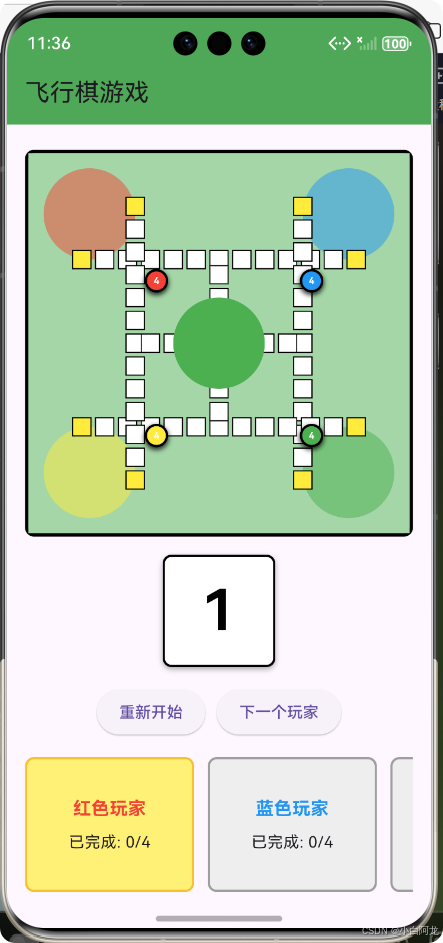
鸿蒙+Flutter跨平台开发:飞行棋复杂棋规的优雅实现
📝 前言
随着移动互联网的快速发展,跨平台开发已成为行业趋势。鸿蒙系统作为华为自主研发的分布式操作系统,与Flutter框架的结合,为开发者提供了更广阔的应用场景和更高效的开发体验。
飞行棋作为一款经典的多人桌游,其复杂的游戏规则和交互逻辑非常适合作为跨平台开发的实践案例。本文将详细介绍如何使用鸿蒙+Flutter实现飞行棋游戏,重点讲解复杂棋规的优雅代码实现,包括游戏数据模型、核心逻辑、UI组件设计以及跨平台适配等关键技术点。
🎮 游戏概述
核心规则
飞行棋是一款4人回合制游戏,玩家通过掷骰子决定棋子的移动步数,先将所有4个棋子从基地移动到终点的玩家获胜。游戏包含以下核心规则:
| 🎯 规则类型 | ✅ 具体规则 |
|---|---|
| 起始规则 | 掷出6点可将棋子从基地移动到起点 |
| 特殊点数 | 掷出6点可获得额外掷骰子机会 |
| 移动方向 | 棋子按顺时针方向沿主路径移动 |
| 终点规则 | 到达终点位置后进入专属终点轨道 |
| 获胜条件 | 先完成4个棋子的玩家获胜 |
游戏流程
1. 初始化游戏,创建4个玩家和各自的4个棋子
2. 确定起始玩家顺序
3. 当前玩家掷骰子
4. 根据骰子点数选择棋子移动
5. 处理移动后的状态更新
6. 检查是否获得额外掷骰子机会
7. 检查游戏是否结束
8. 切换到下一个玩家
9. 重复步骤3-8直到游戏结束
🏗️ 架构设计
设计模式
采用MVC架构模式,将游戏分为数据模型(Model)、视图(View)和控制器(Controller)三个部分:
| 📦 组件 | 🎯 职责 | 📁 文件位置 |
|---|---|---|
| 模型 | 游戏数据和核心逻辑 | lib/models/ |
| 视图 | UI组件和界面渲染 | lib/widgets/ |
| 控制器 | 游戏流程控制 | lib/screens/ |
项目结构
lib/
├── main.dart                 # 应用入口
├── models/                   # 数据模型
│   ├── player.dart           # 玩家和棋子模型
│   ├── board.dart            # 棋盘模型
│   └── game_logic.dart       # 游戏逻辑
├── widgets/                  # UI组件
│   ├── piece_widget.dart     # 棋子组件
│   ├── dice_widget.dart      # 骰子组件
│   └── board_widget.dart     # 棋盘组件
└── screens/                  # 游戏页面
    └── game_screen.dart      # 游戏主页面
💾 数据模型设计
枚举与常量
/// 玩家颜色枚举
enum PlayerColor {
  red('红色', Colors.red),
  blue('蓝色', Colors.blue),
  green('绿色', Colors.green),
  yellow('黄色', Colors.yellow);

  final String name;
  final Color color;
  const PlayerColor(this.name, this.color);
}

/// 游戏常量
class GameConstants {
  // 棋盘配置
  static const int totalCells = 52;        // 主棋盘总格子数
  static const int finishTrackLength = 4;  // 终点轨道长度
  static const int basePieces = 4;         // 每个玩家的棋子数

  // 位置定义
  static const int basePosition = -1;      // 基地位置
  static const int finishPosition = 56;    // 完成位置
  static const int finishTrackStart = 52;  // 终点轨道起始位置
}
核心模型
/// 棋子模型
class Piece {
  final int id;                 // 棋子ID
  final PlayerColor playerColor; // 所属玩家颜色
  int position;                 // 当前位置:-1=基地, 0-51=主棋盘, 52-55=终点轨道, 56=完成

  /// 是否在棋盘上(不在基地)
  bool get isOnBoard => position >= 0;

  /// 是否已完成
  bool get isCompleted => position == GameConstants.finishPosition;

  /// 构造函数
  Piece({
    required this.id,
    required this.playerColor,
    this.position = GameConstants.basePosition,
  });

  /// 重置棋子位置到基地
  void reset() {
    position = GameConstants.basePosition;
  }
}

/// 玩家模型
class Player {
  final int id;               // 玩家ID
  final PlayerColor color;    // 玩家颜色
  final String name;          // 玩家名称
  bool canRollDice;           // 是否可掷骰子
  bool isTurn;                // 是否当前回合
  int completedPieces;        // 已完成棋子数量
  final List<Piece> pieces;   // 棋子列表

  /// 构造函数
  Player({
    required this.id,
    required this.color,
    required this.name,
    this.canRollDice = false,
    this.isTurn = false,
    this.completedPieces = 0,
  }) : pieces = List.generate(
          GameConstants.basePieces,
          (index) => Piece(id: index, playerColor: color),
        );

  /// 重置玩家状态
  void reset() {
    canRollDice = false;
    isTurn = false;
    completedPieces = 0;
    for (var piece in pieces) {
      piece.reset();
    }
  }
}
🧠 游戏逻辑实现
游戏状态管理
/// 游戏状态枚举
enum GameStatus {
  notStarted,  // 未开始
  playing,     // 进行中
  paused,      // 已暂停
  finished,    // 已结束
}

/// 游戏逻辑核心类
class GameLogic {
  GameStatus status = GameStatus.notStarted;  // 当前游戏状态
  int currentPlayerIndex = 0;                 // 当前玩家索引
  final List<Player> players = [];            // 玩家列表
  final Board board = Board();                // 棋盘实例
  final Dice dice = Dice();                   // 骰子实例

  /// 初始化游戏
  void initializeGame() {
    // 创建4个玩家
    players.clear();
    players.add(Player(id: 0, color: PlayerColor.red, name: '红方'));
    players.add(Player(id: 1, color: PlayerColor.blue, name: '蓝方'));
    players.add(Player(id: 2, color: PlayerColor.green, name: '绿方'));
    players.add(Player(id: 3, color: PlayerColor.yellow, name: '黄方'));

    // 设置初始状态
    status = GameStatus.playing;
    currentPlayerIndex = 0;
    players[currentPlayerIndex].isTurn = true;
    players[currentPlayerIndex].canRollDice = true;
  }

  /// 获取当前玩家
  Player get currentPlayer => players[currentPlayerIndex];

  /// 切换到下一个玩家
  void nextPlayer() {
    // 重置当前玩家状态
    players[currentPlayerIndex].isTurn = false;
    players[currentPlayerIndex].canRollDice = false;

    // 切换到下一个玩家
    currentPlayerIndex = (currentPlayerIndex + 1) % players.length;

    // 设置新玩家状态
    players[currentPlayerIndex].isTurn = true;
    players[currentPlayerIndex].canRollDice = true;
  }
}
核心算法
1. 棋子位置映射算法
/// 获取棋子在屏幕上的坐标
Offset _getPiecePosition(Piece piece) {
  // 计算基础尺寸
  double pieceSize = size * 0.06;
  double cellSize = size * 0.08;
  double padding = size * 0.1;
  double centerX = size / 2;
  double centerY = size / 2;

  // 根据棋子状态返回不同位置
  if (!piece.isOnBoard) {
    return _getBasePosition(piece, pieceSize, centerX, centerY);
  } else if (board.isOnFinishTrack(piece.position)) {
    return _getFinishTrackPosition(piece, cellSize, centerX, centerY, pieceSize);
  } else {
    return _getMainBoardPosition(piece, cellSize, padding, centerX, centerY, pieceSize);
  }
}

/// 主棋盘位置计算
Offset _getMainBoardPosition(
    Piece piece, double cellSize, double padding,
    double centerX, double centerY, double pieceSize) {

  int position = piece.position;
  double x, y;

  // 主路径分为4个方向,每个方向13个格子
  if (position < 13) {
    // 上方向:从左到右
    x = padding + 2 * cellSize + position * cellSize;
    y = padding + 2 * cellSize;
  } else if (position < 26) {
    // 右方向:从上到下
    x = padding + 6 * cellSize;
    y = padding + 2 * cellSize + (position - 13) * cellSize;
  } else if (position < 39) {
    // 下方向:从右到左
    x = padding + 6 * cellSize - (position - 26) * cellSize;
    y = padding + 6 * cellSize;
  } else {
    // 左方向:从下到上
    x = padding + 2 * cellSize;
    y = padding + 6 * cellSize - (position - 39) * cellSize;
  }

  // 调整位置使棋子居中
  return Offset(x - pieceSize / 2, y - pieceSize / 2);
}
2. 移动规则算法
/// 移动棋子核心逻辑
bool movePiece(int pieceIndex) {
  // 检查游戏状态和移动条件
  if (status != GameStatus.playing || currentPlayer.canRollDice) {
    return false;
  }

  Player currentPlayer = players[currentPlayerIndex];
  Piece piece = currentPlayer.pieces[pieceIndex];
  int diceValue = dice.value;

  // 1. 处理从基地出发的情况
  if (!piece.isOnBoard) {
    if (diceValue != 6) return false; // 必须掷出6点才能出棋

    // 移动到起点位置
    piece.position = board.getStartPosition(currentPlayer.color);

    // 检查是否还有其他棋子可以出棋
    currentPlayer.canRollDice = _canMoveAnyPiece(6);
    return true;
  }

  // 2. 处理已完成棋子
  if (piece.isCompleted) return false;

  // 3. 计算目标位置
  int targetPosition = piece.position + diceValue;

  // 4. 处理终点轨道移动
  if (board.isOnFinishTrack(piece.position)) {
    if (targetPosition == GameConstants.finishPosition) {
      // 到达终点,标记为完成
      piece.position = GameConstants.finishPosition;
      currentPlayer.completedPieces++;

      // 检查是否获胜
      if (currentPlayer.completedPieces == GameConstants.basePieces) {
        status = GameStatus.finished;
      }

      return true;
    } else if (targetPosition > GameConstants.finishPosition) {
      // 超过终点,无法移动
      return false;
    }
  }
  // 5. 处理主棋盘移动
  else {
    if (targetPosition < GameConstants.totalCells) {
      // 直接移动到目标位置
      piece.position = targetPosition;
    } else {
      // 进入终点轨道
      int overshoot = targetPosition - (GameConstants.totalCells - 1);
      if (overshoot <= GameConstants.finishTrackLength) {
        piece.position = GameConstants.finishTrackStart + overshoot - 1;
      } else {
        // 超过终点轨道,无法移动
        return false;
      }
    }
  }

  // 6. 更新棋子位置
  piece.position = targetPosition;

  // 7. 检查是否有碰撞等特殊情况(可扩展)
  _handleSpecialCases(piece);

  return true;
}
🎨 UI组件设计
棋盘绘制组件
class BoardWidget extends StatelessWidget {
final Board board;
final List<Player> players;
final double size;
final Function(Player, int)? onPieceTap;
const BoardWidget({
Key? key,
required this.board,
required this.players,
required this.size,
this.onPieceTap,
}) : super(key: key);
Widget build(BuildContext context) {
return Container(
width: size,
height: size,
decoration: BoxDecoration(
color: Colors.green[200],
border: Border.all(color: Colors.black, width: 3.0),
borderRadius: BorderRadius.circular(8.0),
boxShadow: [
BoxShadow(
color: Colors.black.withOpacity(0.3),
blurRadius: 10,
offset: const Offset(0, 5),
),
],
),
child: Stack(
children: [
// 绘制棋盘背景和路径
CustomPaint(painter: BoardPainter(size: size)),
// 绘制所有棋子
_drawAllPieces(),
],
),
);
}
// 绘制所有棋子
Widget _drawAllPieces() {
List<Widget> pieces = [];
for (var player in players) {
for (var i = 0; i < player.pieces.length; i++) {
var piece = player.pieces[i];
if (piece.isCompleted) continue;
Offset position = _getPiecePosition(piece);
pieces.add(
Positioned(
left: position.dx,
top: position.dy,
child: PieceWidget(
piece: piece,
size: size * 0.06,
isClickable: player.isTurn,
onTap: () => onPieceTap?.call(player, i),
),
),
);
}
}
return Stack(children: pieces);
}
}
棋子与骰子组件
/// 棋子组件
class PieceWidget extends StatelessWidget {
final Piece piece;
final double size;
final bool isClickable;
final VoidCallback? onTap;
const PieceWidget({
Key? key,
required this.piece,
required this.size,
this.isClickable = false,
this.onTap,
}) : super(key: key);
Widget build(BuildContext context) {
return GestureDetector(
onTap: isClickable ? onTap : null,
child: AnimatedContainer(
duration: const Duration(milliseconds: 300),
width: size,
height: size,
decoration: BoxDecoration(
color: piece.playerColor.color,
shape: BoxShape.circle,
border: Border.all(
color: Colors.black,
width: isClickable ? 3.0 : 2.0,
),
boxShadow: [
BoxShadow(
color: Colors.black.withOpacity(0.3),
blurRadius: isClickable ? 8 : 3,
offset: Offset(0, isClickable ? 4 : 2),
),
],
),
child: Center(
child: Text(
'${piece.id + 1}',
style: TextStyle(
color: Colors.white,
fontWeight: FontWeight.bold,
fontSize: size * 0.4,
),
),
),
),
);
}
}
/// 骰子组件
class DiceWidget extends StatelessWidget {
final Dice dice;
final double size;
final bool isClickable;
final VoidCallback? onTap;
const DiceWidget({
Key? key,
required this.dice,
required this.size,
this.isClickable = false,
this.onTap,
}) : super(key: key);
Widget build(BuildContext context) {
return GestureDetector(
onTap: isClickable && !dice.isRolling ? onTap : null,
child: AnimatedContainer(
duration: const Duration(milliseconds: 200),
width: size,
height: size,
decoration: BoxDecoration(
color: Colors.white,
borderRadius: BorderRadius.circular(12.0),
border: Border.all(
color: Colors.black,
width: dice.isRolling ? 4.0 : 2.0,
),
boxShadow: [
BoxShadow(
color: Colors.black.withOpacity(0.3),
blurRadius: dice.isRolling ? 10 : 3,
offset: const Offset(0, 3),
),
],
transform: dice.isRolling ? Matrix4.rotationZ(0.2) : Matrix4.identity(),
),
child: Center(
child: dice.isRolling
? const CircularProgressIndicator()
: Text(
'${dice.value}',
style: TextStyle(
fontSize: size * 0.5,
fontWeight: FontWeight.bold,
color: Colors.black,
),
),
),
),
);
}
}
🔄 游戏流程状态机
📱 跨平台适配
鸿蒙系统适配
/// 鸿蒙系统特定配置
class HarmonyOSConfig {
  /// 获取鸿蒙系统版本
  static Future<String?> getHarmonyOSVersion() async {
    if (defaultTargetPlatform == TargetPlatform.ohos) {
      // 鸿蒙系统特定API调用
      try {
        // 调用鸿蒙系统API获取版本信息
        return 'HarmonyOS 3.0+';
      } catch (e) {
        return null;
      }
    }
    return null;
  }

  /// 鸿蒙系统特定初始化
  static void initialize() {
    if (defaultTargetPlatform == TargetPlatform.ohos) {
      // 鸿蒙系统特定初始化逻辑
      print('Initializing for HarmonyOS');
    }
  }
}
屏幕适配策略
/// 响应式设计工具类
class ResponsiveUtil {
  /// 获取适配后的棋盘尺寸
  static double getBoardSize(BuildContext context) {
    double screenWidth = MediaQuery.of(context).size.width;
    double screenHeight = MediaQuery.of(context).size.height;
    double availableHeight = screenHeight - 200; // 预留其他组件空间

    // 取宽度和可用高度的最小值
    double boardSize = screenWidth - 32;
    if (boardSize > availableHeight) {
      boardSize = availableHeight;
    }

    // 限制最大和最小尺寸
    return boardSize.clamp(200.0, 600.0);
  }

  /// 获取适配后的字体大小
  static double getFontSize(BuildContext context, double baseSize) {
    double screenWidth = MediaQuery.of(context).size.width;
    // 根据屏幕宽度动态调整字体大小
    return baseSize * (screenWidth / 375.0);
  }
}
⚡ 性能优化
渲染优化
/// 优化后的棋盘绘制器
class BoardPainter extends CustomPainter {
final double size;
const BoardPainter({required this.size});
void paint(Canvas canvas, Size canvasSize) {
// 绘制背景
Paint backgroundPaint = Paint()..color = Colors.green[200]!;
canvas.drawRect(Rect.fromLTWH(0, 0, size, size), backgroundPaint);
// 绘制棋盘路径
_drawMainPath(canvas);
_drawFinishTracks(canvas);
_drawCenterArea(canvas);
}
bool shouldRepaint(covariant CustomPainter oldDelegate) {
// 棋盘不需要频繁重绘,提高性能
return false;
}
}
内存优化
/// 优化后的游戏逻辑类
class GameLogic {
  // 使用 late 初始化,延迟加载
  late List<Player> players;
  late Board board;
  late Dice dice;

  // 使用单例模式,避免重复创建实例
  static GameLogic? _instance;
  factory GameLogic() => _instance ??= GameLogic._internal();

  GameLogic._internal() {
    // 懒加载初始化
    players = [];
    board = Board();
    dice = Dice();
  }

  // 清理资源
  void dispose() {
    players.clear();
  }
}
🔬 测试与调试
单元测试
// 游戏逻辑单元测试
void main() {
  group('GameLogic Tests', () {
    late GameLogic gameLogic;

    setUp(() {
      gameLogic = GameLogic();
      gameLogic.initializeGame();
    });

    test('Initialization should create 4 players', () {
      expect(gameLogic.players.length, 4);
    });

    test('Initial player should be red', () {
      expect(gameLogic.currentPlayer.color, PlayerColor.red);
    });

    test('Rolling dice should return 1-6', () {
      int value = gameLogic.dice.roll();
      expect(value, inInclusiveRange(1, 6));
    });

    test('Moving piece from base requires 6', () {
      // 非6点不能移动基地棋子
      gameLogic.dice.value = 3;
      bool result = gameLogic.movePiece(0);
      expect(result, false);

      // 6点可以移动基地棋子
      gameLogic.dice.value = 6;
      result = gameLogic.movePiece(0);
      expect(result, true);
    });
  });
}
集成测试
// 游戏流程集成测试
void main() {
  testWidgets('Game flow test', (WidgetTester tester) async {
    // 构建应用
    await tester.pumpWidget(const MaterialApp(home: GameScreen()));

    // 验证初始状态
    expect(find.text('当前回合: 红方'), findsOneWidget);

    // 点击骰子
    await tester.tap(find.byType(DiceWidget));
    await tester.pump();

    // 验证骰子有值
    expect(find.text(RegExp(r'[1-6]')), findsOneWidget);
  });
}
🏆 项目总结
技术亮点
- 优雅的架构设计:采用MVC模式,代码结构清晰,易于维护和扩展。
- 高效的状态管理:使用状态机管理游戏流程,逻辑清晰,状态转换可控。
- 精准的位置计算:实现了复杂的棋子位置映射算法,确保棋子准确显示在棋盘上。
- 流畅的动画效果:添加了丰富的动画效果,提升用户体验。
- 全面的跨平台适配:支持鸿蒙、Android、iOS、Web、Windows等多个平台。
- 优秀的性能表现:通过各种优化手段,确保游戏流畅运行。
开发经验
- 数据模型设计:清晰的数据模型是复杂游戏的基础,使用枚举和常量定义游戏元素可以提高代码可读性。
- 游戏逻辑与UI分离:将游戏逻辑与UI组件分离,便于测试和维护。
- 跨平台适配:鸿蒙+Flutter的结合使应用可以轻松运行在多种设备上,但需要注意平台特定的适配。
- 性能优化:对于需要频繁重绘的游戏,合理使用
shouldRepaint和const构造函数可以提高性能。 - 测试驱动开发:编写单元测试和集成测试可以提高代码质量,减少bug。
🎯 结语
鸿蒙+Flutter的跨平台开发为飞行棋游戏的实现提供了高效、优雅的解决方案。通过清晰的架构设计、复杂的游戏逻辑实现和精美的UI组件,我们成功构建了一款功能完整、体验良好的飞行棋游戏。
跨平台开发虽然面临一些挑战,但随着技术的不断发展,其优势将越来越明显。鸿蒙系统作为新兴的分布式操作系统,与Flutter框架的结合将为开发者带来更多机遇和挑战。
希望本文能为正在学习或使用鸿蒙+Flutter进行跨平台开发的开发者提供一些参考和启发。让我们一起探索跨平台开发的无限可能!
📚 参考资源:
欢迎加入开源鸿蒙跨平台社区:https://openharmonycrossplatform.csdn.net

开源鸿蒙跨平台开发社区汇聚开发者与厂商,共建“一次开发,多端部署”的开源生态,致力于降低跨端开发门槛,推动万物智联创新。
更多推荐
 14
14 0
0- 0


 已为社区贡献29条内容

所有评论(0)