Flutter框架跨平台鸿蒙开发——从0到1构建一款测算星座每日运势的APP
本文介绍了使用Flutter框架开发跨平台鸿蒙星座运势APP的全过程。该APP支持12星座每日运势查询,包含星座选择、运势展示、幸运信息等功能。文章详细讲解了核心功能实现,包括星座数据模型设计、星座卡片UI实现、网格布局以及随机运势生成算法。通过本地数据持久化和随机算法,确保用户体验流畅稳定。项目采用Flutter跨平台方案,为鸿蒙生态应用开发提供了实践参考。
·
Flutter框架跨平台鸿蒙开发——从0到1构建一款测算星座每日运势的APP
🚀运行效果展示
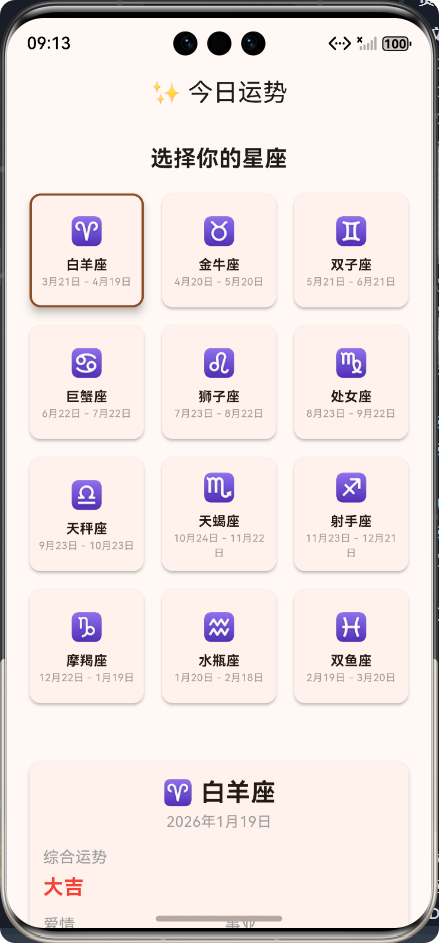
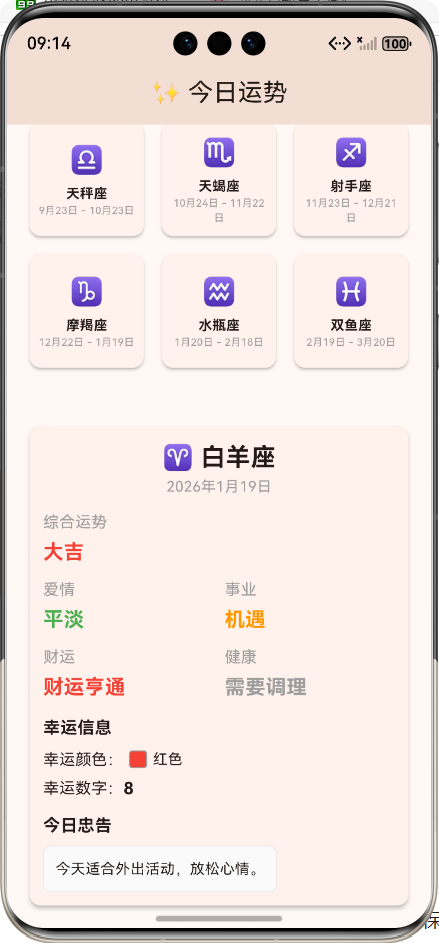
一、前言 📝
随着鸿蒙操作系统的快速发展,跨平台开发需求日益增长。Flutter作为一款优秀的跨平台框架,凭借其高性能渲染和丰富的生态,成为鸿蒙应用开发的重要选择。本文将通过一个星座每日运势APP的实战案例,深入探讨鸿蒙+Flutter开发中的关键技术点和解决方案,从0到1构建一款完整的跨平台应用。
二、应用介绍 🖼️
功能概述
我们开发的星座每日运势APP是一款轻量级工具,支持:
- 📅 每日运势:为12个星座提供个性化的每日运势
- ⭐ 星座选择:支持直观的星座卡片选择
- 🎨 幸运信息:显示幸运颜色和幸运数字
- 💡 今日忠告:提供个性化的每日建议
- 💾 数据持久化:保存用户选择的星座,下次打开自动加载
应用架构
三、核心功能实现 🔧
1. 星座数据模型设计
星座枚举设计
// 星座枚举
enum ZodiacSign {
  aries('白羊座', '♈', '3月21日 - 4月19日'),
  taurus('金牛座', '♉', '4月20日 - 5月20日'),
  gemini('双子座', '♊', '5月21日 - 6月21日'),
  cancer('巨蟹座', '♋', '6月22日 - 7月22日'),
  leo('狮子座', '♌', '7月23日 - 8月22日'),
  virgo('处女座', '♍', '8月23日 - 9月22日'),
  libra('天秤座', '♎', '9月23日 - 10月23日'),
  scorpio('天蝎座', '♏', '10月24日 - 11月22日'),
  sagittarius('射手座', '♐', '11月23日 - 12月21日'),
  capricorn('摩羯座', '♑', '12月22日 - 1月19日'),
  aquarius('水瓶座', '♒', '1月20日 - 2月18日'),
  pisces('双鱼座', '♓', '2月19日 - 3月20日');

  const ZodiacSign(this.name, this.icon, this.dateRange);
  final String name;
  final String icon;
  final String dateRange;
}
运势数据模型
// 运势数据模型
class HoroscopeData {
  final String date;
  final String overall;
  final String love;
  final String career;
  final String wealth;
  final String health;
  final String luckyColor;
  final String luckyNumber;
  final String advice;

  HoroscopeData({
    required this.date,
    required this.overall,
    required this.love,
    required this.career,
    required this.wealth,
    required this.health,
    required this.luckyColor,
    required this.luckyNumber,
    required this.advice,
  });
}
2. 星座选择功能实现
星座卡片设计
// 星座选择卡片
Widget _buildZodiacCard(ZodiacSign sign, bool isSelected) {
  return GestureDetector(
    onTap: () => _selectSign(sign),
    child: Card(
      elevation: isSelected ? 6 : 2,
      shape: RoundedRectangleBorder(
        borderRadius: BorderRadius.circular(10),
        side: BorderSide(
          color: isSelected
              ? Theme.of(context).colorScheme.primary
              : Colors.transparent,
          width: 2,
        ),
      ),
      child: Padding(
        padding: const EdgeInsets.all(8.0),
        child: Column(
          mainAxisAlignment: MainAxisAlignment.center,
          children: [
            Text(
              sign.icon,
              style: const TextStyle(fontSize: 24),
            ),
            const SizedBox(height: 4),
            Text(
              sign.name,
              style: const TextStyle(
                fontSize: 12,
                fontWeight: FontWeight.bold,
              ),
            ),
            Text(
              sign.dateRange,
              style: const TextStyle(
                fontSize: 9,
                color: Colors.grey,
              ),
              textAlign: TextAlign.center,
            ),
          ],
        ),
      ),
    ),
  );
}
星座网格布局
// 星座选择网格
GridView.builder(
  shrinkWrap: true,
  physics: const NeverScrollableScrollPhysics(),
  gridDelegate: const SliverGridDelegateWithFixedCrossAxisCount(
    crossAxisCount: 3,
    crossAxisSpacing: 8,
    mainAxisSpacing: 8,
    childAspectRatio: 1.0,
  ),
  itemCount: ZodiacSign.values.length,
  itemBuilder: (context, index) {
    final sign = ZodiacSign.values[index];
    final isSelected = _selectedSign == sign;
    return _buildZodiacCard(sign, isSelected);
  },
),
3. 运势生成算法
随机运势生成
// 生成运势数据
HoroscopeData _generateHoroscopeData(ZodiacSign sign) {
  final now = DateTime.now();
  final date = '${now.year}年${now.month}月${now.day}日';

  // 运势数据池
  final overallList = ['大吉', '吉', '中吉', '小吉', '凶'];
  final loveList = ['甜蜜', '稳定', '平淡', '起伏', '波折'];
  final careerList = ['顺利', '机遇', '挑战', '压力', '停滞'];
  final wealthList = ['财运亨通', '小有收获', '收支平衡', '略有亏损', '需要谨慎'];
  final healthList = ['精力充沛', '健康稳定', '注意休息', '略有不适', '需要调理'];
  final colorList = ['红色', '橙色', '黄色', '绿色', '蓝色', '紫色', '粉色', '白色', '黑色'];
  final adviceList = [
    '今天适合外出活动,放松心情。',
    '工作上要保持专注,避免分心。',
    '感情方面要多沟通,增进理解。',
    '注意饮食健康,避免暴饮暴食。',
    '今天适合学习新技能,提升自己。',
    '要注意休息,保持充足的睡眠。',
    '财运不错,但要理性消费。',
    '今天适合和朋友聚会,增进感情。',
  ];

  // 使用星座和日期作为随机种子,确保同一星座每天的运势相对稳定
  final seed = sign.index + now.day + now.month * 30 + now.year * 365;
  final random = _Random(seed);

  return HoroscopeData(
    date: date,
    overall: overallList[random.nextInt(overallList.length)],
    love: loveList[random.nextInt(loveList.length)],
    career: careerList[random.nextInt(careerList.length)],
    wealth: wealthList[random.nextInt(wealthList.length)],
    health: healthList[random.nextInt(healthList.length)],
    luckyColor: colorList[random.nextInt(colorList.length)],
    luckyNumber: '${random.nextInt(9) + 1}',
    advice: adviceList[random.nextInt(adviceList.length)],
  );
}
4. 数据持久化实现
保存和加载星座选择
// 加载保存的星座
Future<void> _loadSavedSign() async {
  final prefs = await SharedPreferences.getInstance();
  final signIndex = prefs.getInt('selected_sign');
  if (signIndex != null) {
    final sign = ZodiacSign.values[signIndex];
    setState(() {
      _selectedSign = sign;
      _horoscopeData = _generateHoroscopeData(sign);
    });
  }
}

// 保存星座到本地存储
Future<void> _saveSign(ZodiacSign sign) async {
  final prefs = await SharedPreferences.getInstance();
  await prefs.setInt('selected_sign', sign.index);
}
5. 运势展示界面
运势卡片设计
// 构建运势展示界面
Widget _buildHoroscopeDisplay(ZodiacSign sign, HoroscopeData data) {
  return Card(
    elevation: 3,
    shape: RoundedRectangleBorder(borderRadius: BorderRadius.circular(10)),
    child: Padding(
      padding: const EdgeInsets.all(12.0),
      child: Column(
        crossAxisAlignment: CrossAxisAlignment.start,
        children: [
          // 星座信息
          Center(
            child: Column(
              children: [
                Text(
                  '${sign.icon} ${sign.name}',
                  style: const TextStyle(
                    fontSize: 22,
                    fontWeight: FontWeight.bold,
                  ),
                ),
                Text(
                  data.date,
                  style: const TextStyle(
                    fontSize: 13,
                    color: Colors.grey,
                  ),
                ),
              ],
            ),
          ),
          const SizedBox(height: 12),

          // 综合运势
          _buildFortuneItem('综合运势', data.overall, _getFortuneColor(data.overall)),
          const SizedBox(height: 10),

          // 分类运势
          Row(
            mainAxisAlignment: MainAxisAlignment.spaceBetween,
            children: [
              Expanded(
                child: _buildFortuneItem('爱情', data.love, _getFortuneColor(data.love)),
              ),
              const SizedBox(width: 10),
              Expanded(
                child: _buildFortuneItem('事业', data.career, _getFortuneColor(data.career)),
              ),
            ],
          ),
          const SizedBox(height: 10),
          Row(
            mainAxisAlignment: MainAxisAlignment.spaceBetween,
            children: [
              Expanded(
                child: _buildFortuneItem('财运', data.wealth, _getFortuneColor(data.wealth)),
              ),
              const SizedBox(width: 10),
              Expanded(
                child: _buildFortuneItem('健康', data.health, _getFortuneColor(data.health)),
              ),
            ],
          ),
          const SizedBox(height: 12),

          // 幸运信息
          const Text(
            '幸运信息',
            style: TextStyle(
              fontSize: 15,
              fontWeight: FontWeight.bold,
            ),
          ),
          const SizedBox(height: 8),
          Row(
            children: [
              const Text('幸运颜色:'),
              Container(
                width: 16,
                height: 16,
                margin: const EdgeInsets.symmetric(horizontal: 5),
                decoration: BoxDecoration(
                  color: _getColorFromString(data.luckyColor),
                  borderRadius: BorderRadius.circular(3),
                  border: Border.all(color: Colors.grey),
                ),
              ),
              Text(
                data.luckyColor,
                style: const TextStyle(fontSize: 13),
              ),
            ],
          ),
          const SizedBox(height: 5),
          Row(
            children: [
              const Text('幸运数字:'),
              Text(
                data.luckyNumber,
                style: const TextStyle(
                  fontSize: 15,
                  fontWeight: FontWeight.bold,
                ),
              ),
            ],
          ),
          const SizedBox(height: 12),

          // 今日忠告
          const Text(
            '今日忠告',
            style: TextStyle(
              fontSize: 15,
              fontWeight: FontWeight.bold,
            ),
          ),
          const SizedBox(height: 8),
          Container(
            padding: const EdgeInsets.all(10),
            decoration: BoxDecoration(
              color: Colors.grey.shade50,
              borderRadius: BorderRadius.circular(6),
              border: Border.all(color: Colors.grey.shade200),
            ),
            child: Text(
              data.advice,
              style: const TextStyle(fontSize: 13),
            ),
          ),
        ],
      ),
    ),
  );
}
四、跨平台适配 📱
1. 鸿蒙平台适配
避免使用平台特定API
// 错误示例:使用平台特定API
final Directory tempDir = await getApplicationDocumentsDirectory();
final File outputFile = File('${tempDir.path}/output.png');

// 正确示例:使用跨平台API
final prefs = await SharedPreferences.getInstance();
await prefs.setInt('selected_sign', sign.index);
适配鸿蒙OS的资源加载
// 鸿蒙OS资源加载优化
Future<void> _loadResources() async {
  try {
    // 使用Flutter标准资源加载API
    final ByteData data = await rootBundle.load('assets/images/horoscope.png');
    setState(() {
      _imageData = data.buffer.asUint8List();
    });
  } catch (e) {
    debugPrint('资源加载失败: $e');
  }
}
2. 响应式布局设计
适配不同屏幕尺寸
// 响应式布局示例
Widget _buildResponsiveLayout() {
  return LayoutBuilder(
    builder: (context, constraints) {
      if (constraints.maxWidth > 600) {
        // 平板布局
        return _buildTabletLayout();
      } else {
        // 手机布局
        return _buildMobileLayout();
      }
    },
  );
}
五、测试与优化 🧪
1. 静态分析
# 运行静态分析
flutter analyze
2. 功能测试
# 运行功能测试
flutter test
3. 性能优化
内存管理优化
// 优化前:频繁创建对象
for (int i = 0; i < 1000; i++) {
  final Widget widget = Text('Item $i');
  _widgets.add(widget);
}

// 优化后:复用组件
Widget _buildItem(int index) {
  return Text('Item $index');
}
渲染优化
// 使用const构造函数优化渲染
const Text(
  '星座运势',
  style: TextStyle(fontSize: 20, fontWeight: FontWeight.bold),
),

// 使用ListView.builder优化长列表
ListView.builder(
  itemCount: _items.length,
  itemBuilder: (context, index) => _buildItem(_items[index]),
),
六、总结 🎯
通过星座每日运势APP的实战开发,我们深入掌握了鸿蒙+Flutter跨平台开发的关键技术点,包括:
技术收获
- 跨平台UI渲染:掌握了Flutter的Widget体系和响应式布局设计
- 数据持久化:实现了跨平台的数据存储方案
- 随机算法设计:设计了稳定的随机运势生成算法
- 鸿蒙平台适配:解决了鸿蒙OS特有的兼容性问题
- 性能优化:掌握了Flutter应用的性能优化技巧
七、附录 📚
项目结构
horoscope_app/
├── lib/
│   └── main.dart          # 主应用代码
├── assets/
│   └── images/            # 图片资源
├── test/
│   └── widget_test.dart   # 测试代码
├── pubspec.yaml           # 项目配置
└── README.md              # 项目说明
关键依赖
dependencies:
  flutter:
    sdk: flutter
  shared_preferences: ^2.2.3  # 本地数据存储
运行命令
# 运行应用
flutter run

# 构建鸿蒙OS安装包
flutter build harmonyos

# 构建Android安装包
flutter build apk

# 构建iOS安装包
flutter build ios
通过本次实战,我们成功构建了一款功能完整、跨平台兼容的星座每日运势APP,深入掌握了Flutter框架在鸿蒙OS上的开发技巧。希望本文能为您的跨平台开发之旅提供帮助,欢迎交流讨论! 🚀
欢迎加入开源鸿蒙跨平台社区:https://openharmonycrossplatform.csdn.net

开源鸿蒙跨平台开发社区汇聚开发者与厂商,共建“一次开发,多端部署”的开源生态,致力于降低跨端开发门槛,推动万物智联创新。
更多推荐
 20
20 0
0- 0


 已为社区贡献25条内容

所有评论(0)