Flutter 框架跨平台鸿蒙开发 - 单词背诵应用开发教程
数据模型:Word模型设计和序列化记忆曲线:艾宾浩斯遗忘曲线算法等级系统:7级记忆等级管理智能复习:自动计算复习时间学习统计:详细的数据分析单词卡片:翻转式卡片交互数据持久化:SharedPreferences本地存储可视化图表:等级分布柱状图复杂算法的实现(记忆曲线)时间计算和管理数据统计和分析卡片式UI设计本地数据持久化Material 3设计规范学习类应用开发模式。
Flutter单词背诵应用开发教程
项目简介
单词背诵是一款基于艾宾浩斯遗忘曲线的智能单词记忆应用,帮助用户科学高效地背诵单词。本项目使用Flutter实现了完整的单词卡片、记忆曲线、学习统计等功能,让背单词变得更加轻松有趣。
运行效果图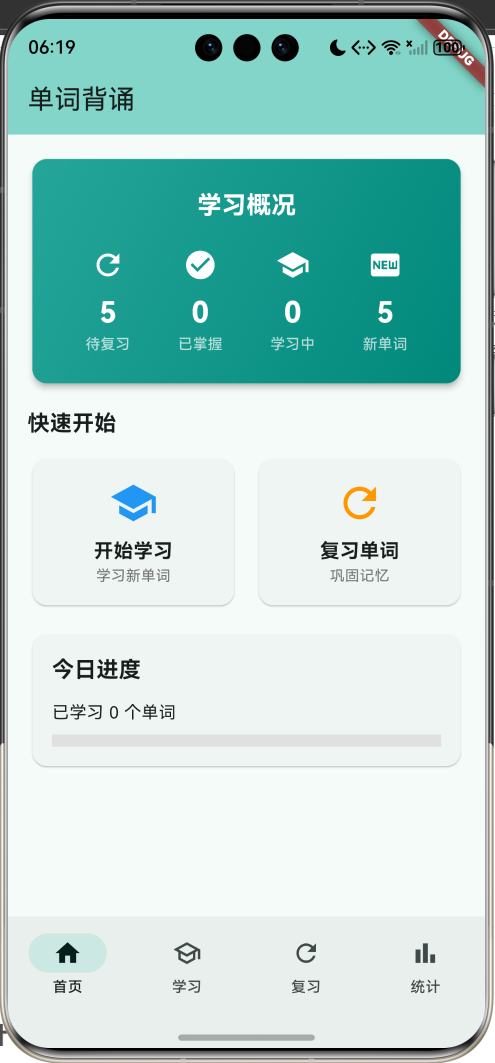
核心特性
- 单词卡片:翻转式单词卡片展示
- 记忆曲线:基于艾宾浩斯遗忘曲线
- 智能复习:自动计算复习时间
- 学习统计:详细的学习数据分析
- 等级系统:7级记忆等级管理
- 分类管理:多种单词分类
- 进度追踪:实时学习进度显示
- 准确率统计:记录学习准确率
- 数据持久化:本地存储学习记录
- 可视化图表:等级分布柱状图
技术架构
数据模型设计
单词模型
class Word {
  final String id;              // 唯一标识
  final String word;            // 单词
  final String phonetic;        // 音标
  final String translation;     // 翻译
  final List<String> examples;  // 例句
  final String category;        // 分类
  int reviewCount;              // 复习次数
  int correctCount;             // 正确次数
  DateTime? lastReviewTime;     // 上次复习时间
  DateTime? nextReviewTime;     // 下次复习时间
  int level;                    // 记忆等级 0-6

  double get accuracy => reviewCount == 0 ? 0 : correctCount / reviewCount;
  bool get needsReview => nextReviewTime == null || DateTime.now().isAfter(nextReviewTime!);
}
字段说明:
id:单词唯一标识(使用时间戳)word:英文单词phonetic:国际音标translation:中文翻译examples:例句列表category:单词分类(CET-4、CET-6等)reviewCount:总复习次数correctCount:正确次数lastReviewTime:上次复习时间nextReviewTime:下次复习时间level:记忆等级(0-6级)
计算属性:
accuracy:准确率(正确次数/总次数)needsReview:是否需要复习
单词分类:
| 分类 | 说明 | 词汇量 |
|---|---|---|
| CET-4 | 大学英语四级 | ~4500词 |
| CET-6 | 大学英语六级 | ~5500词 |
| 考研 | 研究生入学考试 | ~5500词 |
| 托福 | TOEFL | ~8000词 |
| 雅思 | IELTS | ~8000词 |
| 日常 | 日常用语 | 自定义 |
记忆曲线管理器
艾宾浩斯遗忘曲线
class MemoryCurveManager {
  // 艾宾浩斯遗忘曲线间隔(分钟)
  static const List<int> intervals = [
    5,      // Level 0: 5分钟
    30,     // Level 1: 30分钟
    720,    // Level 2: 12小时
    1440,   // Level 3: 1天
    2880,   // Level 4: 2天
    10080,  // Level 5: 7天
    20160,  // Level 6: 14天
  ];

  static DateTime calculateNextReview(int level) {
    if (level >= intervals.length) {
      level = intervals.length - 1;
    }
    return DateTime.now().add(Duration(minutes: intervals[level]));
  }

  static void updateWordProgress(Word word, bool isCorrect) {
    word.reviewCount++;
    word.lastReviewTime = DateTime.now();

    if (isCorrect) {
      word.correctCount++;
      word.level = (word.level + 1).clamp(0, intervals.length - 1);
    } else {
      word.level = max(0, word.level - 1);
    }

    word.nextReviewTime = calculateNextReview(word.level);
  }
}
记忆曲线原理:
艾宾浩斯遗忘曲线表明,遗忘在学习之后立即开始,而且遗忘的速度并不均匀。最初遗忘速度很快,以后逐渐缓慢。
复习间隔设计:
| 等级 | 间隔时间 | 说明 |
|---|---|---|
| Level 0 | 5分钟 | 刚学习,短期记忆 |
| Level 1 | 30分钟 | 初步记忆 |
| Level 2 | 12小时 | 当天复习 |
| Level 3 | 1天 | 次日复习 |
| Level 4 | 2天 | 短期巩固 |
| Level 5 | 7天 | 中期巩固 |
| Level 6 | 14天 | 长期记忆 |
等级更新规则:
- 回答正确:等级+1(最高6级)
- 回答错误:等级-1(最低0级)
- 达到6级视为已掌握
状态管理
class _VocabularyHomePageState extends State<VocabularyHomePage> {
  int _selectedIndex = 0;              // 当前选中的底部导航索引
  List<Word> words = [];               // 所有单词列表
  String selectedCategory = '全部';    // 当前选中的分类

  final List<String> categories = [    // 分类列表
    '全部', 'CET-4', 'CET-6', '考研', '托福', '雅思', '日常',
  ];
}
状态变量说明:
_selectedIndex:底部导航栏当前页面索引(0-3)words:所有单词列表selectedCategory:当前筛选的分类categories:可选的分类列表
核心功能实现
1. 数据持久化
Future<void> _loadData() async {
  final prefs = await SharedPreferences.getInstance();
  final wordsData = prefs.getStringList('words') ?? [];
  setState(() {
    words = wordsData.map((json) => Word.fromJson(jsonDecode(json))).toList();
  });
}

Future<void> _saveData() async {
  final prefs = await SharedPreferences.getInstance();
  final wordsData = words.map((w) => jsonEncode(w.toJson())).toList();
  await prefs.setStringList('words', wordsData);
}
存储策略:
- 使用
SharedPreferences进行本地存储 - 单词列表序列化为JSON字符串数组
- 应用启动时自动加载数据
- 数据变更时立即保存
JSON序列化:
Map<String, dynamic> toJson() {
  return {
    'id': id,
    'word': word,
    'phonetic': phonetic,
    'translation': translation,
    'examples': examples,
    'category': category,
    'reviewCount': reviewCount,
    'correctCount': correctCount,
    'lastReviewTime': lastReviewTime?.toIso8601String(),
    'nextReviewTime': nextReviewTime?.toIso8601String(),
    'level': level,
  };
}

factory Word.fromJson(Map<String, dynamic> json) {
  return Word(
    id: json['id'],
    word: json['word'],
    phonetic: json['phonetic'],
    translation: json['translation'],
    examples: List<String>.from(json['examples']),
    category: json['category'],
    reviewCount: json['reviewCount'] ?? 0,
    correctCount: json['correctCount'] ?? 0,
    lastReviewTime: json['lastReviewTime'] != null
        ? DateTime.parse(json['lastReviewTime'])
        : null,
    nextReviewTime: json['nextReviewTime'] != null
        ? DateTime.parse(json['nextReviewTime'])
        : null,
    level: json['level'] ?? 0,
  );
}
2. 记忆曲线计算
static DateTime calculateNextReview(int level) {
  if (level >= intervals.length) {
    level = intervals.length - 1;
  }
  return DateTime.now().add(Duration(minutes: intervals[level]));
}
计算逻辑:
- 根据当前等级获取对应的间隔时间
- 如果等级超出范围,使用最大等级
- 当前时间加上间隔时间得到下次复习时间
示例:
- Level 0:当前时间 + 5分钟
- Level 3:当前时间 + 1天
- Level 6:当前时间 + 14天
3. 学习进度更新
static void updateWordProgress(Word word, bool isCorrect) {
  word.reviewCount++;
  word.lastReviewTime = DateTime.now();

  if (isCorrect) {
    word.correctCount++;
    word.level = (word.level + 1).clamp(0, intervals.length - 1);
  } else {
    word.level = max(0, word.level - 1);
  }

  word.nextReviewTime = calculateNextReview(word.level);
}
更新流程:
- 复习次数+1
- 更新上次复习时间
- 如果回答正确:
- 正确次数+1
- 等级+1(最高6级)
- 如果回答错误:
- 等级-1(最低0级)
- 计算下次复习时间
4. 需要复习判断
bool get needsReview {
  if (nextReviewTime == null) return true;
  return DateTime.now().isAfter(nextReviewTime!);
}
判断逻辑:
- 如果从未复习过(nextReviewTime为null),需要复习
- 如果当前时间已超过下次复习时间,需要复习
- 否则不需要复习
5. 单词卡片翻转
class _WordCardViewState extends State<WordCardView> {
  bool showTranslation = false;

  Widget _buildWordCard(Word word) {
    return Card(
      child: Column(
        children: [
          Text(word.word, style: TextStyle(fontSize: 36)),
          Text(word.phonetic),
          if (showTranslation) ...[
            Text(word.translation),
            ...word.examples.map((e) => Text('• $e')),
          ] else ...[
            ElevatedButton(
              onPressed: () {
                setState(() {
                  showTranslation = true;
                });
              },
              child: Text('显示释义'),
            ),
          ],
        ],
      ),
    );
  }
}
翻转逻辑:
- 初始状态只显示单词和音标
- 点击"显示释义"按钮
- 显示翻译和例句
- 显示"认识"和"不认识"按钮
6. 学习统计
final needsReviewCount = words.where((w) => w.needsReview).length;
final masteredCount = words.where((w) => w.level >= 5).length;
final learningCount = words.where((w) => w.reviewCount > 0 && w.level < 5).length;
final newCount = words.where((w) => w.reviewCount == 0).length;
统计指标:
- 待复习:需要复习的单词数量
- 已掌握:等级≥5的单词数量
- 学习中:已复习但未掌握的单词
- 新单词:从未复习过的单词
7. 准确率计算
double get accuracy {
  if (reviewCount == 0) return 0;
  return correctCount / reviewCount;
}

final avgAccuracy = words.isEmpty
    ? 0.0
    : words.fold<double>(0, (sum, w) => sum + w.accuracy) / words.length;
计算公式:
单词准确率 = 正确次数 / 总复习次数
平均准确率 = 所有单词准确率之和 / 单词总数
8. 今日进度统计
final today = DateTime.now();
final todayWords = words.where((w) {
  if (w.lastReviewTime == null) return false;
  final reviewDate = w.lastReviewTime!;
  return reviewDate.year == today.year &&
      reviewDate.month == today.month &&
      reviewDate.day == today.day;
}).toList();
统计逻辑:
- 获取当前日期
- 筛选上次复习时间为今天的单词
- 统计数量
- 显示进度条
UI组件设计
1. 学习概况卡片
Widget _buildSummaryCard(int needsReview, int mastered, int learning, int newWords) {
  return Card(
    child: Container(
      decoration: BoxDecoration(
        gradient: LinearGradient(
          colors: [Colors.teal.shade400, Colors.teal.shade600],
        ),
      ),
      child: Column(
        children: [
          Text('学习概况', style: TextStyle(color: Colors.white)),
          Row(
            mainAxisAlignment: MainAxisAlignment.spaceAround,
            children: [
              _buildStatItem('待复习', '$needsReview', Icons.refresh),
              _buildStatItem('已掌握', '$mastered', Icons.check_circle),
              _buildStatItem('学习中', '$learning', Icons.school),
              _buildStatItem('新单词', '$newWords', Icons.fiber_new),
            ],
          ),
        ],
      ),
    ),
  );
}
卡片特性:
- 渐变青色背景
- 4个统计指标
- 图标+数值+标签
- 白色文字高对比度
布局结构:
┌─────────────────────────────────┐
│        学习概况                  │
│  🔄 5   ✓ 12   📚 8   🆕 25    │
│ 待复习  已掌握  学习中  新单词   │
└─────────────────────────────────┘
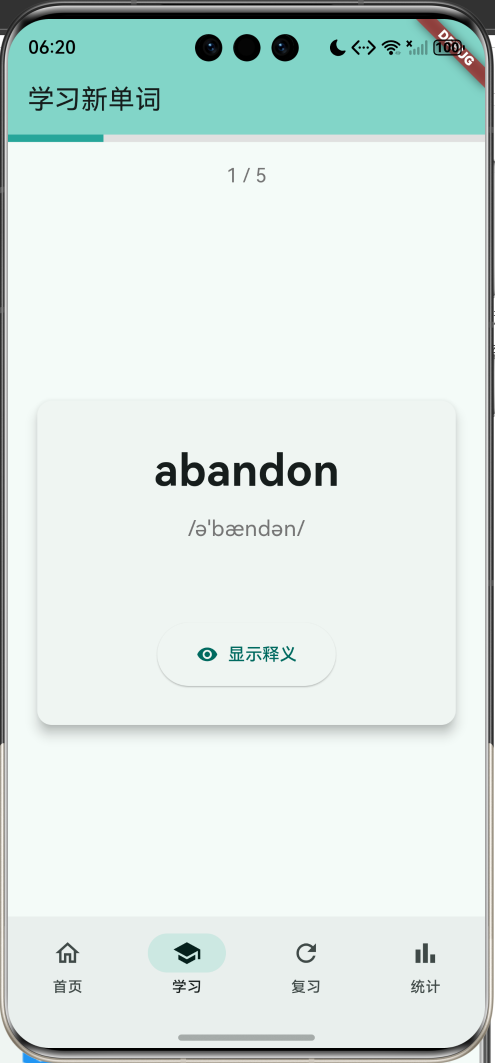
2. 单词卡片
Widget _buildWordCard(Word word) {
  return Card(
    elevation: 8,
    child: Container(
      padding: EdgeInsets.all(32),
      child: Column(
        children: [
          Text(word.word, style: TextStyle(fontSize: 36, fontWeight: FontWeight.bold)),
          Text(word.phonetic, style: TextStyle(fontSize: 18, color: Colors.grey)),
          if (showTranslation) ...[
            Text(word.translation, style: TextStyle(fontSize: 20)),
            Divider(),
            Text('例句', style: TextStyle(fontWeight: FontWeight.bold)),
            ...word.examples.map((e) => Text('• $e')),
            Chip(label: Text(word.category)),
          ] else ...[
            ElevatedButton.icon(
              onPressed: () => setState(() => showTranslation = true),
              icon: Icon(Icons.visibility),
              label: Text('显示释义'),
            ),
          ],
        ],
      ),
    ),
  );
}
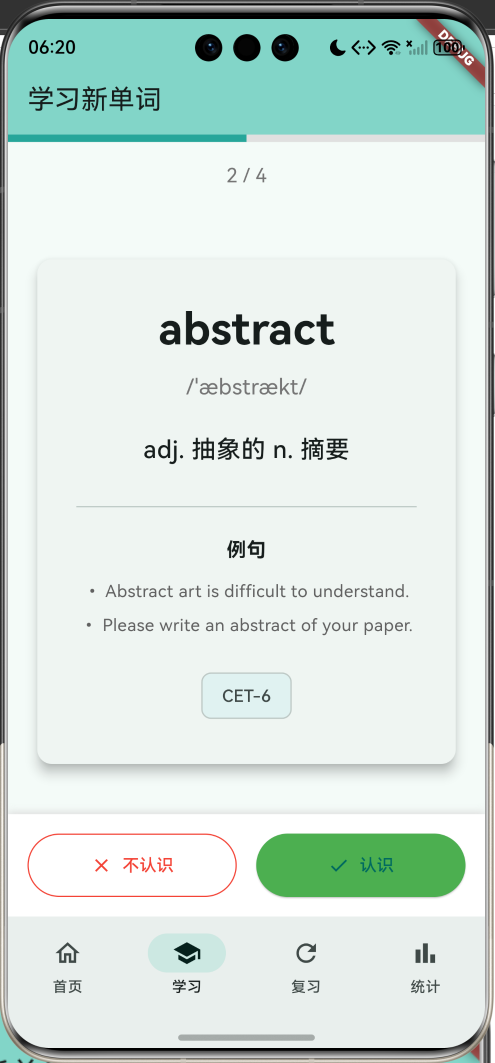
卡片状态:
正面(未翻转):
┌─────────────────────┐
│                     │
│     abandon         │
│   /əˈbændən/       │
│                     │
│  [显示释义]         │
│                     │
└─────────────────────┘
背面(已翻转):
┌─────────────────────┐
│     abandon         │
│   /əˈbændən/       │
│  v. 放弃;抛弃      │
│  ─────────────      │
│      例句           │
│  • He abandoned...  │
│  • They abandoned...│
│    [CET-4]          │
└─────────────────────┘
3. 操作按钮
Widget _buildActionButtons() {
  return Row(
    children: [
      Expanded(
        child: OutlinedButton.icon(
          onPressed: () => _nextWord(false),
          icon: Icon(Icons.close, color: Colors.red),
          label: Text('不认识', style: TextStyle(color: Colors.red)),
          style: OutlinedButton.styleFrom(
            side: BorderSide(color: Colors.red),
          ),
        ),
      ),
      SizedBox(width: 16),
      Expanded(
        child: ElevatedButton.icon(
          onPressed: () => _nextWord(true),
          icon: Icon(Icons.check),
          label: Text('认识'),
          style: ElevatedButton.styleFrom(
            backgroundColor: Colors.green,
          ),
        ),
      ),
    ],
  );
}
按钮特性:
- 左侧:红色边框按钮(不认识)
- 右侧:绿色填充按钮(认识)
- 图标+文字
- 等宽布局
4. 等级分布图表
Widget _buildLevelDistribution() {
  final levelCounts = List.generate(7, (level) {
    return words.where((w) => w.level == level).length;
  });

  return SizedBox(
    height: 200,
    child: Row(
      crossAxisAlignment: CrossAxisAlignment.end,
      mainAxisAlignment: MainAxisAlignment.spaceAround,
      children: List.generate(7, (index) {
        final maxCount = levelCounts.reduce((a, b) => a > b ? a : b);
        final height = maxCount > 0
            ? (levelCounts[index] / maxCount * 150).clamp(10.0, 150.0)
            : 10.0;
        return Column(
          mainAxisAlignment: MainAxisAlignment.end,
          children: [
            if (levelCounts[index] > 0)
              Text('${levelCounts[index]}'),
            Container(
              width: 30,
              height: height,
              decoration: BoxDecoration(
                color: Colors.teal.shade400,
                borderRadius: BorderRadius.circular(4),
              ),
            ),
            Text('L$index'),
          ],
        );
      }),
    ),
  );
}
图表特性:
- 柱状图展示
- 7个等级(L0-L6)
- 自动缩放
- 显示具体数量
5. 进度条
LinearProgressIndicator(
  value: (currentIndex + 1) / widget.words.length,
  minHeight: 6,
  backgroundColor: Colors.grey.shade300,
  valueColor: AlwaysStoppedAnimation<Color>(Colors.teal.shade400),
)
进度显示:
- 顶部进度条
- 当前进度/总数
- 青色进度条
- 实时更新
功能扩展建议
1. 语音朗读
import 'package:flutter_tts/flutter_tts.dart';

class TextToSpeechManager {
  final FlutterTts tts = FlutterTts();

  Future<void> init() async {
    await tts.setLanguage('en-US');
    await tts.setSpeechRate(0.5);
    await tts.setVolume(1.0);
    await tts.setPitch(1.0);
  }

  Future<void> speak(String text) async {
    await tts.speak(text);
  }

  Future<void> stop() async {
    await tts.stop();
  }
}

Widget _buildWordCardWithAudio(Word word) {
  return Column(
    children: [
      Text(word.word),
      IconButton(
        icon: Icon(Icons.volume_up),
        onPressed: () => ttsManager.speak(word.word),
      ),
    ],
  );
}
语音功能:
- 单词发音
- 例句朗读
- 语速调节
- 音量控制
2. 拼写测试
class SpellingTest extends StatefulWidget {
final Word word;
State<SpellingTest> createState() => _SpellingTestState();
}
class _SpellingTestState extends State<SpellingTest> {
final TextEditingController _controller = TextEditingController();
bool? isCorrect;
void _checkSpelling() {
setState(() {
isCorrect = _controller.text.toLowerCase() == widget.word.word.toLowerCase();
});
}
Widget build(BuildContext context) {
return Column(
children: [
Text(widget.word.translation),
Text(widget.word.phonetic),
TextField(
controller: _controller,
decoration: InputDecoration(
labelText: '请拼写单词',
suffixIcon: IconButton(
icon: Icon(Icons.check),
onPressed: _checkSpelling,
),
),
),
if (isCorrect != null)
Text(
isCorrect! ? '正确!' : '错误,正确答案是:${widget.word.word}',
style: TextStyle(
color: isCorrect! ? Colors.green : Colors.red,
),
),
],
);
}
}
拼写测试功能:
- 根据释义拼写
- 实时检查
- 错误提示
- 统计正确率
3. 选择题模式
class MultipleChoiceTest extends StatefulWidget {
final Word word;
final List<Word> options;
State<MultipleChoiceTest> createState() => _MultipleChoiceTestState();
}
class _MultipleChoiceTestState extends State<MultipleChoiceTest> {
String? selectedAnswer;
bool showResult = false;
List<String> get shuffledOptions {
final options = [
widget.word.translation,
...widget.options.map((w) => w.translation),
];
options.shuffle();
return options;
}
Widget build(BuildContext context) {
return Column(
children: [
Text(widget.word.word, style: TextStyle(fontSize: 32)),
Text(widget.word.phonetic),
SizedBox(height: 20),
...shuffledOptions.map((option) {
final isCorrect = option == widget.word.translation;
final isSelected = option == selectedAnswer;
return RadioListTile<String>(
title: Text(option),
value: option,
groupValue: selectedAnswer,
onChanged: showResult ? null : (value) {
setState(() {
selectedAnswer = value;
});
},
tileColor: showResult && isSelected
? (isCorrect ? Colors.green.shade100 : Colors.red.shade100)
: null,
);
}),
ElevatedButton(
onPressed: selectedAnswer == null || showResult
? null
: () {
setState(() {
showResult = true;
});
},
child: Text('提交'),
),
],
);
}
}
选择题功能:
- 4选1模式
- 随机选项顺序
- 答案提示
- 正确率统计
4. 单词本管理
class WordBook {
  final String id;
  final String name;
  final String description;
  final List<String> wordIds;
  final DateTime createTime;

  WordBook({
    required this.id,
    required this.name,
    required this.description,
    required this.wordIds,
    required this.createTime,
  });
}

class WordBookManager {
  List<WordBook> books = [];

  void createBook(String name, String description) {
    books.add(WordBook(
      id: DateTime.now().millisecondsSinceEpoch.toString(),
      name: name,
      description: description,
      wordIds: [],
      createTime: DateTime.now(),
    ));
  }

  void addWordToBook(String bookId, String wordId) {
    final book = books.firstWhere((b) => b.id == bookId);
    if (!book.wordIds.contains(wordId)) {
      book.wordIds.add(wordId);
    }
  }

  void removeWordFromBook(String bookId, String wordId) {
    final book = books.firstWhere((b) => b.id == bookId);
    book.wordIds.remove(wordId);
  }

  List<Word> getBookWords(String bookId, List<Word> allWords) {
    final book = books.firstWhere((b) => b.id == bookId);
    return allWords.where((w) => book.wordIds.contains(w.id)).toList();
  }
}
单词本功能:
- 创建自定义单词本
- 添加/移除单词
- 单词本学习
- 单词本管理
5. 学习计划
class StudyPlan {
  final String id;
  final String name;
  final int dailyGoal;
  final DateTime startDate;
  final DateTime? endDate;
  final List<String> categories;

  StudyPlan({
    required this.id,
    required this.name,
    required this.dailyGoal,
    required this.startDate,
    this.endDate,
    required this.categories,
  });

  int getDaysRemaining() {
    if (endDate == null) return -1;
    return endDate!.difference(DateTime.now()).inDays;
  }

  double getProgress(int completedWords) {
    if (endDate == null) return 0;
    final totalDays = endDate!.difference(startDate).inDays;
    final totalGoal = dailyGoal * totalDays;
    return completedWords / totalGoal;
  }
}

Widget _buildStudyPlanCard(StudyPlan plan, int todayCompleted) {
  return Card(
    child: Padding(
      padding: EdgeInsets.all(16),
      child: Column(
        crossAxisAlignment: CrossAxisAlignment.start,
        children: [
          Text(plan.name, style: TextStyle(fontSize: 18, fontWeight: FontWeight.bold)),
          SizedBox(height: 8),
          Text('每日目标:${plan.dailyGoal}个单词'),
          Text('今日进度:$todayCompleted / ${plan.dailyGoal}'),
          SizedBox(height: 8),
          LinearProgressIndicator(
            value: todayCompleted / plan.dailyGoal,
          ),
          if (plan.endDate != null)
            Text('剩余${plan.getDaysRemaining()}天'),
        ],
      ),
    ),
  );
}
学习计划功能:
- 设置每日目标
- 计划时间范围
- 进度追踪
- 完成提醒
6. 词根词缀
class WordRoot {
  final String root;
  final String meaning;
  final List<String> examples;

  WordRoot({
    required this.root,
    required this.meaning,
    required this.examples,
  });
}

class WordRootManager {
  final Map<String, WordRoot> roots = {
    'dict': WordRoot(
      root: 'dict',
      meaning: '说,讲',
      examples: ['dictionary', 'predict', 'contradict'],
    ),
    'port': WordRoot(
      root: 'port',
      meaning: '拿,运',
      examples: ['transport', 'export', 'import'],
    ),
    // 更多词根...
  };

  List<WordRoot> findRoots(String word) {
    final foundRoots = <WordRoot>[];
    for (final entry in roots.entries) {
      if (word.contains(entry.key)) {
        foundRoots.add(entry.value);
      }
    }
    return foundRoots;
  }
}

Widget _buildWordRootInfo(Word word) {
  final roots = wordRootManager.findRoots(word.word);

  if (roots.isEmpty) return SizedBox.shrink();

  return Card(
    child: Padding(
      padding: EdgeInsets.all(16),
      child: Column(
        crossAxisAlignment: CrossAxisAlignment.start,
        children: [
          Text('词根词缀', style: TextStyle(fontWeight: FontWeight.bold)),
          ...roots.map((root) {
            return Column(
              crossAxisAlignment: CrossAxisAlignment.start,
              children: [
                Text('${root.root} = ${root.meaning}'),
                Text('相关词:${root.examples.join(", ")}'),
              ],
            );
          }),
        ],
      ),
    ),
  );
}
词根词缀功能:
- 词根分析
- 词缀说明
- 相关词汇
- 记忆技巧
7. 打卡系统
class CheckInManager {
  List<DateTime> checkInDates = [];

  bool isCheckedInToday() {
    final today = DateTime.now();
    return checkInDates.any((date) {
      return date.year == today.year &&
          date.month == today.month &&
          date.day == today.day;
    });
  }

  void checkIn() {
    if (!isCheckedInToday()) {
      checkInDates.add(DateTime.now());
    }
  }

  int getContinuousDays() {
    if (checkInDates.isEmpty) return 0;

    checkInDates.sort((a, b) => b.compareTo(a));
    int days = 1;

    for (int i = 0; i < checkInDates.length - 1; i++) {
      final diff = checkInDates[i].difference(checkInDates[i + 1]).inDays;
      if (diff == 1) {
        days++;
      } else {
        break;
      }
    }

    return days;
  }
}

Widget _buildCheckInCard() {
  final continuousDays = checkInManager.getContinuousDays();
  final isCheckedIn = checkInManager.isCheckedInToday();

  return Card(
    child: Padding(
      padding: EdgeInsets.all(16),
      child: Column(
        children: [
          Text('连续打卡', style: TextStyle(fontSize: 18)),
          Text('$continuousDays', style: TextStyle(fontSize: 48, fontWeight: FontWeight.bold)),
          Text('天'),
          SizedBox(height: 16),
          ElevatedButton(
            onPressed: isCheckedIn ? null : () => checkInManager.checkIn(),
            child: Text(isCheckedIn ? '今日已打卡' : '打卡'),
          ),
        ],
      ),
    ),
  );
}
打卡功能:
- 每日打卡
- 连续天数
- 打卡日历
- 打卡奖励
8. 数据导出
import 'dart:io';
import 'package:path_provider/path_provider.dart';
import 'package:csv/csv.dart';

class DataExporter {
  Future<String> exportToCSV(List<Word> words) async {
    final rows = [
      ['单词', '音标', '翻译', '分类', '复习次数', '正确次数', '等级', '准确率'],
      ...words.map((w) => [
        w.word,
        w.phonetic,
        w.translation,
        w.category,
        w.reviewCount.toString(),
        w.correctCount.toString(),
        w.level.toString(),
        '${(w.accuracy * 100).toStringAsFixed(1)}%',
      ]),
    ];

    final csv = const ListToCsvConverter().convert(rows);

    final directory = await getApplicationDocumentsDirectory();
    final file = File('${directory.path}/vocabulary_data.csv');
    await file.writeAsString(csv);

    return file.path;
  }

  Future<String> exportLearningReport(List<Word> words) async {
    final totalWords = words.length;
    final masteredWords = words.where((w) => w.level >= 5).length;
    final totalReviews = words.fold<int>(0, (sum, w) => sum + w.reviewCount);
    final avgAccuracy = words.isEmpty
        ? 0.0
        : words.fold<double>(0, (sum, w) => sum + w.accuracy) / words.length;

    final report = '''
学习报告
生成时间:${DateTime.now()}

总体情况:
- 总单词数:$totalWords
- 已掌握:$masteredWords (${(masteredWords / totalWords * 100).toStringAsFixed(1)}%)
- 总复习次数:$totalReviews
- 平均准确率:${(avgAccuracy * 100).toStringAsFixed(1)}%

等级分布:
${List.generate(7, (level) {
  final count = words.where((w) => w.level == level).length;
  return '- Level $level: $count个单词';
}).join('\n')}

分类统计:
${_getCategoryStats(words)}
    ''';

    final directory = await getApplicationDocumentsDirectory();
    final file = File('${directory.path}/learning_report.txt');
    await file.writeAsString(report);

    return file.path;
  }

  String _getCategoryStats(List<Word> words) {
    final categoryMap = <String, int>{};
    for (final word in words) {
      categoryMap[word.category] = (categoryMap[word.category] ?? 0) + 1;
    }
    return categoryMap.entries
        .map((e) => '- ${e.key}: ${e.value}个单词')
        .join('\n');
  }
}
导出功能:
- CSV格式导出
- 学习报告生成
- 数据备份
- 分享功能
数据流程图
记忆曲线流程
艾宾浩斯遗忘曲线
理论基础
艾宾浩斯遗忘曲线(Ebbinghaus Forgetting Curve)描述了人类大脑对新事物遗忘的规律:
- 20分钟后:遗忘42%
- 1小时后:遗忘56%
- 1天后:遗忘74%
- 1周后:遗忘77%
- 1个月后:遗忘79%
复习策略
根据遗忘曲线,最佳复习时间点:
- 第一次复习:学习后5分钟
- 第二次复习:学习后30分钟
- 第三次复习:学习后12小时
- 第四次复习:学习后1天
- 第五次复习:学习后2天
- 第六次复习:学习后7天
- 第七次复习:学习后14天
记忆巩固
// 记忆强度计算
double calculateMemoryStrength(Word word) {
  if (word.lastReviewTime == null) return 0;

  final daysSinceReview = DateTime.now()
      .difference(word.lastReviewTime!)
      .inDays;

  // 基于等级和时间的记忆强度
  final baseStrength = word.level / 6.0;
  final timeDecay = exp(-daysSinceReview / 7.0);

  return baseStrength * timeDecay;
}
性能优化
1. 列表优化
ListView.builder(
  itemCount: words.length,
  itemBuilder: (context, index) {
    return WordCard(word: words[index]);
  },
  cacheExtent: 500,
)
2. 图片缓存
import 'package:cached_network_image/cached_network_image.dart';

Widget _buildWordImage(String imageUrl) {
  return CachedNetworkImage(
    imageUrl: imageUrl,
    placeholder: (context, url) => CircularProgressIndicator(),
    errorWidget: (context, url, error) => Icon(Icons.error),
  );
}
3. 数据预加载
class WordPreloader {
  Future<void> preloadWords(List<Word> words) async {
    // 预加载下一批单词
    final nextWords = words.take(10).toList();

    for (final word in nextWords) {
      // 预加载图片、音频等资源
      await precacheImage(NetworkImage(word.imageUrl), context);
    }
  }
}
测试建议
1. 单元测试
import 'package:flutter_test/flutter_test.dart';

void main() {
  group('记忆曲线测试', () {
    test('计算下次复习时间', () {
      final nextReview = MemoryCurveManager.calculateNextReview(0);
      final expected = DateTime.now().add(Duration(minutes: 5));

      expect(nextReview.difference(expected).inMinutes, lessThan(1));
    });

    test('等级更新 - 正确', () {
      final word = Word(
        id: '1',
        word: 'test',
        phonetic: '/test/',
        translation: '测试',
        examples: [],
        category: 'CET-4',
        level: 2,
      );

      MemoryCurveManager.updateWordProgress(word, true);

      expect(word.level, 3);
      expect(word.reviewCount, 1);
      expect(word.correctCount, 1);
    });

    test('等级更新 - 错误', () {
      final word = Word(
        id: '1',
        word: 'test',
        phonetic: '/test/',
        translation: '测试',
        examples: [],
        category: 'CET-4',
        level: 2,
      );

      MemoryCurveManager.updateWordProgress(word, false);

      expect(word.level, 1);
      expect(word.reviewCount, 1);
      expect(word.correctCount, 0);
    });
  });

  group('准确率计算测试', () {
    test('准确率', () {
      final word = Word(
        id: '1',
        word: 'test',
        phonetic: '/test/',
        translation: '测试',
        examples: [],
        category: 'CET-4',
        reviewCount: 10,
        correctCount: 8,
      );

      expect(word.accuracy, 0.8);
    });
  });
}
2. Widget测试
void main() {
  testWidgets('单词卡片显示测试', (WidgetTester tester) async {
    final word = Word(
      id: '1',
      word: 'abandon',
      phonetic: '/əˈbændən/',
      translation: 'v. 放弃;抛弃',
      examples: ['He abandoned his wife.'],
      category: 'CET-4',
    );

    await tester.pumpWidget(
      MaterialApp(
        home: Scaffold(
          body: WordCard(word: word),
        ),
      ),
    );

    expect(find.text('abandon'), findsOneWidget);
    expect(find.text('/əˈbændən/'), findsOneWidget);
  });
}
最佳实践
1. 代码组织
// 将常量提取到单独文件
class AppConstants {
  static const List<int> memoryIntervals = [5, 30, 720, 1440, 2880, 10080, 20160];
  static const int masteredLevel = 5;
  static const int dailyGoal = 20;
}

// 使用扩展方法
extension WordExtension on Word {
  bool isMastered() => level >= AppConstants.masteredLevel;

  String get statusText {
    if (reviewCount == 0) return '新单词';
    if (isMastered()) return '已掌握';
    return '学习中';
  }
}
2. 错误处理
class ErrorHandler {
  static void handle(BuildContext context, dynamic error) {
    String message = '操作失败';

    if (error is FormatException) {
      message = '数据格式错误';
    } else if (error is Exception) {
      message = error.toString();
    }

    ScaffoldMessenger.of(context).showSnackBar(
      SnackBar(
        content: Text(message),
        backgroundColor: Colors.red,
      ),
    );
  }
}
项目结构
lib/
├── main.dart
├── models/
│   ├── word.dart
│   ├── word_book.dart
│   └── study_plan.dart
├── screens/
│   ├── home_page.dart
│   ├── study_page.dart
│   ├── review_page.dart
│   └── stats_page.dart
├── widgets/
│   ├── word_card.dart
│   ├── summary_card.dart
│   └── level_chart.dart
├── services/
│   ├── memory_curve_manager.dart
│   ├── storage_service.dart
│   └── tts_service.dart
└── utils/
    ├── constants.dart
    └── extensions.dart
依赖包
dependencies:
  flutter:
    sdk: flutter
  shared_preferences: ^2.2.2      # 本地存储

  # 可选扩展
  flutter_tts: ^4.0.2             # 语音朗读
  audioplayers: ^6.0.0            # 音频播放
  path_provider: ^2.1.2           # 文件路径
  csv: ^6.0.0                     # CSV导出
  share_plus: ^7.2.2              # 分享功能
学习建议
1. 制定计划
- 设定每日目标(建议20-50个)
- 固定学习时间
- 循序渐进
2. 学习方法
- 先看单词,尝试回忆
- 查看释义和例句
- 大声朗读
- 联想记忆
3. 复习策略
- 严格按照记忆曲线复习
- 重点复习易错单词
- 定期回顾已掌握单词
4. 记忆技巧
- 词根词缀法
- 联想记忆法
- 场景记忆法
- 对比记忆法
总结
本项目实现了一个功能完整的单词背诵应用,涵盖以下核心技术:
- 数据模型:Word模型设计和序列化
- 记忆曲线:艾宾浩斯遗忘曲线算法
- 等级系统:7级记忆等级管理
- 智能复习:自动计算复习时间
- 学习统计:详细的数据分析
- 单词卡片:翻转式卡片交互
- 数据持久化:SharedPreferences本地存储
- 可视化图表:等级分布柱状图
通过本教程,你可以学习到:
- 复杂算法的实现(记忆曲线)
- 时间计算和管理
- 数据统计和分析
- 卡片式UI设计
- 本地数据持久化
- Material 3设计规范
- 学习类应用开发模式
这个项目可以作为学习Flutter应用开发的实用案例,通过扩展语音朗读、拼写测试、词根词缀等功能,可以打造更加专业的单词学习平台。
单词学习方法论
SMART原则
- Specific(具体的):明确学习目标
- Measurable(可衡量的):设定量化指标
- Achievable(可实现的):目标切实可行
- Relevant(相关的):与考试或工作相关
- Time-bound(有时限的):设定完成期限
学习周期
- 输入阶段:学习新单词
- 巩固阶段:按曲线复习
- 应用阶段:实际使用
- 检验阶段:测试评估
效果评估
- 每周测试
- 月度总结
- 调整策略
- 持续改进
欢迎加入开源鸿蒙跨平台社区:https://openharmonycrossplatform.csdn.net

开源鸿蒙跨平台开发社区汇聚开发者与厂商,共建“一次开发,多端部署”的开源生态,致力于降低跨端开发门槛,推动万物智联创新。
更多推荐
 13
13 0
0- 0


 已为社区贡献30条内容

所有评论(0)