React Native for OpenHarmony 实战:阶乘计算实现
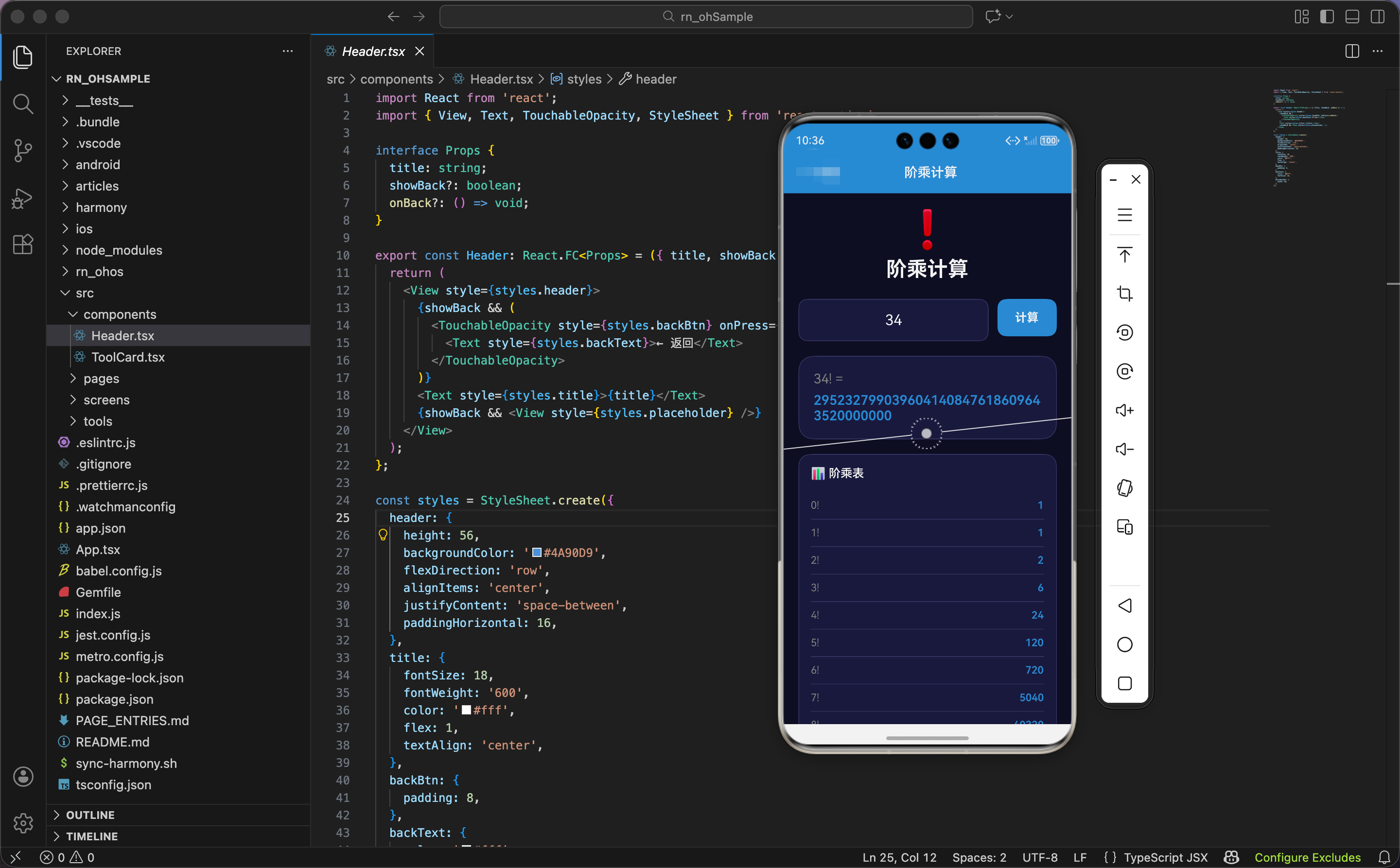
今天我们用 React Native 实现一个阶乘计算工具,支持大数计算,显示计算步骤和阶乘表。
状态设计
import React, { useState, useRef, useEffect } from 'react';
import { View, Text, TextInput, TouchableOpacity, StyleSheet, ScrollView, Animated } from 'react-native';

export const Factorial: React.FC = () => {
  const [number, setNumber] = useState('');
  const [result, setResult] = useState<{ factorial: string; steps: string[] } | null>(null);

  const buttonAnim = useRef(new Animated.Value(1)).current;
  const resultAnim = useRef(new Animated.Value(0)).current;
  const tableAnims = useRef(Array(11).fill(0).map(() => new Animated.Value(0))).current;
状态设计包含输入数字、计算结果、动画值。
输入数字:number 是字符串类型,存储用户输入的数字。
计算结果:result 是一个对象或 null:
factorial:字符串类型,阶乘结果steps:字符串数组,计算步骤
为什么阶乘结果用字符串?因为阶乘增长非常快,JavaScript 的 Number 类型最大安全整数是 2^53 - 1(约 9 千万亿)。20! 就已经超过这个值了。用 BigInt 计算,转成字符串显示,避免精度丢失。
三个动画值:
buttonAnim:按钮的缩放动画resultAnim:结果卡片的缩放和透明度动画tableAnims:阶乘表的动画数组,11 个元素(0! 到 10!)
为什么阶乘表用 11 个动画值?因为要显示 0! 到 10! 共 11 个阶乘。用 Array(11).fill(0).map(() => new Animated.Value(0)) 创建 11 个初始值为 0 的动画值。
阶乘表动画初始化
  useEffect(() => {
    tableAnims.forEach((anim, i) => {
      setTimeout(() => {
        Animated.spring(anim, { toValue: 1, friction: 5, useNativeDriver: true }).start();
      }, i * 50);
    });
  }, []);
组件挂载时,初始化阶乘表的动画。
遍历动画数组:用 forEach 遍历 tableAnims,i 是索引。
延迟动画:用 setTimeout 延迟 i * 50 毫秒后启动动画。第一行延迟 0ms,第二行延迟 50ms,第三行延迟 100ms,依次类推。
弹簧动画:从 0 到 1,friction: 5 让弹簧有明显回弹,行从小到大弹出。
为什么用延迟动画?因为要让阶乘表的行依次出现,而不是同时出现。延迟时间 i * 50 让每行间隔 50ms 出现,营造"加载"效果。
阶乘计算函数
  const factorial = (n: number): bigint => {
    if (n <= 1) return BigInt(1);
    return BigInt(n) * factorial(n - 1);
  };
递归计算阶乘,返回 BigInt 类型。
递归终止条件:如果 n <= 1,返回 BigInt(1)。0! = 1,1! = 1。
递归计算:BigInt(n) * factorial(n - 1),把 n 转成 BigInt,乘以 (n-1) 的阶乘。
为什么用递归?因为阶乘的定义就是递归的:n! = n × (n-1)!。递归代码简洁,直接对应数学定义。
为什么用 BigInt?因为阶乘增长非常快,普通数字类型会溢出。BigInt 是 JavaScript 的大整数类型,可以表示任意大的整数,不会溢出。
举例:计算 5!
factorial(5)=BigInt(5) * factorial(4)factorial(4)=BigInt(4) * factorial(3)factorial(3)=BigInt(3) * factorial(2)factorial(2)=BigInt(2) * factorial(1)factorial(1)=BigInt(1)- 回溯:2 × 1 = 2,3 × 2 = 6,4 × 6 = 24,5 × 24 = 120
计算函数
  const calculate = () => {
    Animated.sequence([
      Animated.timing(buttonAnim, { toValue: 0.9, duration: 100, useNativeDriver: true }),
      Animated.spring(buttonAnim, { toValue: 1, friction: 3, useNativeDriver: true }),
    ]).start();

    const num = parseInt(number);
    if (isNaN(num) || num < 0 || num > 170) {
      setResult({ factorial: '请输入0-170之间的数', steps: [] });
      return;
    }
计算按钮点击时,触发动画,验证输入,计算阶乘。
按钮动画:序列动画,先缩小到 90%(100ms),再弹回到 100%。营造"按下"的感觉。
解析数字:parseInt(number) 把字符串转成整数。
验证输入:
isNaN(num):不是数字num < 0:负数num > 170:超过 170
如果验证失败,显示错误信息,直接返回。
为什么限制最大值为 170?因为 171! 约等于 1.24 × 10^309,超过 JavaScript 的 Number.MAX_VALUE(约 1.8 × 10^308)。虽然 BigInt 可以计算更大的数,但显示和处理会很慢,用户体验差。170! 已经是 308 位数字,足够大了。
生成计算步骤
    resultAnim.setValue(0);
    Animated.spring(resultAnim, { toValue: 1, friction: 5, useNativeDriver: true }).start();

    const fact = factorial(num);
    const steps: string[] = [];
    if (num <= 10) {
      let step = `${num}! = `;
      for (let i = num; i >= 1; i--) {
        step += `${i}`;
        if (i > 1) step += ' × ';
      }
      steps.push(step);
    }
    setResult({ factorial: fact.toString(), steps });
  };
触发结果动画,计算阶乘,生成计算步骤。
结果动画:重置动画值为 0,然后弹簧动画到 1。结果卡片从小到大弹出。
计算阶乘:调用 factorial(num) 计算阶乘,返回 BigInt 类型。
生成步骤:
- 只在
num <= 10时生成步骤 - 从
num到 1,用×连接 - 比如 5! = 5 × 4 × 3 × 2 × 1
为什么只在 num <= 10 时生成步骤?因为步骤太长会影响显示。11! = 11 × 10 × 9 × … × 1,已经很长了。更大的数字步骤会更长,显示不下,也没有参考价值。
转成字符串:fact.toString() 把 BigInt 转成字符串,存储到结果中。
阶乘表数据
  const examples = [
    { n: 0, f: '1' }, { n: 1, f: '1' }, { n: 2, f: '2' }, { n: 3, f: '6' },
    { n: 4, f: '24' }, { n: 5, f: '120' }, { n: 6, f: '720' }, { n: 7, f: '5040' },
    { n: 8, f: '40320' }, { n: 9, f: '362880' }, { n: 10, f: '3628800' },
  ];
阶乘表数据,0! 到 10! 的结果。
为什么用硬编码?因为这些数据是固定的,不需要计算。硬编码比每次计算更快,也更简洁。
为什么只显示到 10!?因为 10! = 3628800,已经是 7 位数字。11! = 39916800,8 位数字。更大的数字显示会很长,影响美观。
界面渲染:头部和输入
  return (
    <ScrollView style={styles.container}>
      <View style={styles.header}>
        <Text style={styles.headerIcon}>❗</Text>
        <Text style={styles.headerTitle}>阶乘计算</Text>
      </View>

      <View style={styles.inputSection}>
        <View style={styles.inputWrapper}>
          <TextInput style={styles.input} value={number} onChangeText={setNumber} keyboardType="numeric" placeholder="输入 0-170" placeholderTextColor="#666" />
        </View>
        <Animated.View style={{ transform: [{ scale: buttonAnim }] }}>
          <TouchableOpacity style={styles.btn} onPress={calculate} activeOpacity={0.8}>
            <Text style={styles.btnText}>计算</Text>
          </TouchableOpacity>
        </Animated.View>
      </View>
头部显示标题,输入区域包含输入框和按钮。
头部:
- 图标:❗感叹号(阶乘符号)
- 标题:阶乘计算
输入区域:
- 输入框:
keyboardType="numeric"弹出数字键盘,textAlign: 'center'居中对齐,占位符"输入 0-170" - 按钮:应用缩放动画,点击时缩小再弹回
为什么用感叹号图标?因为阶乘的数学符号就是感叹号(!)。5! 表示 5 的阶乘。用感叹号图标让用户一眼看出这是阶乘工具。
结果显示
      {result && (
        <Animated.View style={[styles.result, { transform: [{ scale: resultAnim }], opacity: resultAnim }]}>
          <Text style={styles.resultLabel}>{number}! =</Text>
          <Text style={styles.resultValue} selectable>{result.factorial}</Text>
          {result.steps.length > 0 && <Text style={styles.steps}>{result.steps[0]}</Text>}
        </Animated.View>
      )}
结果卡片显示阶乘结果和计算步骤。
条件渲染:只有 result 不为 null 时才显示。
动画:
- 缩放:从 0 到 1
- 透明度:从 0 到 1
标签:显示"n! =“,比如"5! =”。
结果:
- 蓝色文字,加粗
selectable:可选择,用户可以复制
为什么结果可选择?因为阶乘结果可能很长(比如 100! 有 158 位数字),用户可能需要复制。selectable 让文字可以长按选择和复制。
计算步骤:只在 steps 数组不为空时显示,灰色小字。
阶乘表
      <View style={styles.table}>
        <Text style={styles.tableTitle}>📊 阶乘表</Text>
        {examples.map(({ n, f }, i) => (
          <Animated.View key={n} style={[styles.tableRow, {
            transform: [{ scale: tableAnims[i] }],
            opacity: tableAnims[i],
          }]}>
            <Text style={styles.tableN}>{n}!</Text>
            <Text style={styles.tableF}>{f}</Text>
          </Animated.View>
        ))}
      </View>
阶乘表显示 0! 到 10! 的结果。
标题:📊 阶乘表
遍历数据:用 map 遍历 examples 数组,生成表格行。
动画:
- 缩放:从 0 到 1
- 透明度:从 0 到 1
表格行:
- 左边:n!(灰色)
- 右边:结果(蓝色加粗)
- 底部边框分隔
为什么显示阶乘表?因为阶乘表有参考价值。用户可以看到"常见数字的阶乘是多少",也可以用来验证计算结果。比如用户输入 5,看到结果是 120,再看阶乘表,发现 5! = 120,增加信任感。
公式说明
      <View style={styles.info}>
        <Text style={styles.infoTitle}>💡 阶乘公式</Text>
        <Text style={styles.infoText}>n! = n × (n-1) × (n-2) × ... × 2 × 1</Text>
        <Text style={styles.infoText}>0! = 1 (定义)</Text>
      </View>
    </ScrollView>
  );
};
公式说明区域显示阶乘的数学公式。
两条公式:
- 通用公式:n! = n × (n-1) × (n-2) × … × 2 × 1
- 特殊情况:0! = 1(定义)
为什么显示公式?因为公式能帮助用户理解阶乘。很多人知道阶乘,但不知道具体公式。显示公式让用户学习数学知识,增加工具的教育价值。
为什么强调 0! = 1?因为 0! = 1 是定义,不是计算出来的。很多人觉得 0! 应该是 0,但数学上定义 0! = 1,这样很多公式才能成立(比如组合数公式)。
鸿蒙 ArkTS 对比:阶乘计算
@State number: string = ''
@State result: { factorial: string, steps: string[] } | null = null

factorial(n: number): bigint {
  if (n <= 1) return BigInt(1)
  return BigInt(n) * this.factorial(n - 1)
}

calculate() {
  const num = parseInt(this.number)
  if (isNaN(num) || num < 0 || num > 170) {
    this.result = { factorial: '请输入0-170之间的数', steps: [] }
    return
  }

  const fact = this.factorial(num)
  const steps: string[] = []
  if (num <= 10) {
    let step = `${num}! = `
    for (let i = num; i >= 1; i--) {
      step += `${i}`
      if (i > 1) step += ' × '
    }
    steps.push(step)
  }
  this.result = { factorial: fact.toString(), steps }
}
ArkTS 中的阶乘计算逻辑完全一样。核心是递归计算,用 BigInt 处理大数。parseInt()、isNaN()、BigInt()、toString() 都是标准 JavaScript API,跨平台通用。
为什么算法跨平台通用?因为阶乘计算是纯数学问题,不涉及 UI、动画、平台 API。只要语言支持递归和大整数,就能实现阶乘计算。
样式定义
const styles = StyleSheet.create({
  container: { flex: 1, backgroundColor: '#0f0f23', padding: 20 },
  header: { alignItems: 'center', marginBottom: 24 },
  headerIcon: { fontSize: 50, marginBottom: 8 },
  headerTitle: { fontSize: 28, fontWeight: '700', color: '#fff' },
  inputSection: { flexDirection: 'row', marginBottom: 20 },
  inputWrapper: { flex: 1, backgroundColor: '#1a1a3e', borderRadius: 12, marginRight: 12, borderWidth: 1, borderColor: '#3a3a6a' },
  input: { padding: 16, fontSize: 20, color: '#fff', textAlign: 'center' },
  btn: { backgroundColor: '#4A90D9', paddingHorizontal: 24, paddingVertical: 16, borderRadius: 12, justifyContent: 'center' },
  btnText: { color: '#fff', fontWeight: '700', fontSize: 16 },
  result: { backgroundColor: '#1a1a3e', padding: 20, borderRadius: 20, marginBottom: 20, borderWidth: 1, borderColor: '#3a3a6a' },
  resultLabel: { fontSize: 18, color: '#888' },
  resultValue: { fontSize: 18, fontWeight: '600', color: '#4A90D9', marginTop: 8 },
  steps: { fontSize: 14, color: '#666', marginTop: 12 },
  table: { backgroundColor: '#1a1a3e', padding: 16, borderRadius: 16, marginBottom: 20, borderWidth: 1, borderColor: '#3a3a6a' },
  tableTitle: { fontSize: 16, fontWeight: '600', marginBottom: 16, color: '#fff' },
  tableRow: { flexDirection: 'row', justifyContent: 'space-between', paddingVertical: 10, borderBottomWidth: 1, borderBottomColor: '#3a3a6a' },
  tableN: { color: '#888', fontSize: 14 },
  tableF: { color: '#4A90D9', fontWeight: '600', fontSize: 14 },
  info: { backgroundColor: '#1a1a3e', padding: 16, borderRadius: 16, borderWidth: 1, borderColor: '#3a3a6a' },
  infoTitle: { fontSize: 16, fontWeight: '600', marginBottom: 12, color: '#fff' },
  infoText: { fontSize: 14, color: '#888', marginBottom: 6 },
});
容器用深蓝黑色背景。输入框居中对齐,字号 20。结果卡片显示标签、结果、步骤。阶乘表用两列布局,左边灰色,右边蓝色。公式说明用列表布局。
小结
这个阶乘计算工具展示了递归算法和大数处理的实现。用递归计算阶乘,用 BigInt 处理大数,避免溢出。限制最大值为 170,防止计算太慢。阶乘表用延迟动画依次出现,营造加载效果。
欢迎加入开源鸿蒙跨平台社区:https://openharmonycrossplatform.csdn.net

开源鸿蒙跨平台开发社区汇聚开发者与厂商,共建“一次开发,多端部署”的开源生态,致力于降低跨端开发门槛,推动万物智联创新。
更多推荐

 18
18 0
0- 0


 已为社区贡献16条内容

所有评论(0)