Flutter for OpenHarmony 教育百科实战:底部导航
本文介绍了Flutter中实现底部导航的几种方法。重点讲解了使用Material 3风格的NavigationBar组件,通过IndexedStack保持页面状态,避免切换时重建。文章对比了传统BottomNavigationBar的区别,并展示了如何自定义导航栏样式、添加徽章提示以及处理Android返回键逻辑。关键点包括:使用const优化性能,IndexedStack保持页面状态,Navig
底部导航是移动应用最常见的导航方式。用户通过点击底部的Tab快速切换不同功能模块,不用层层返回。教育百科App有5个主要Tab:首页、探索、问答、收藏和我的。
今天来聊聊怎么实现这个底部导航,以及一些容易踩的坑。
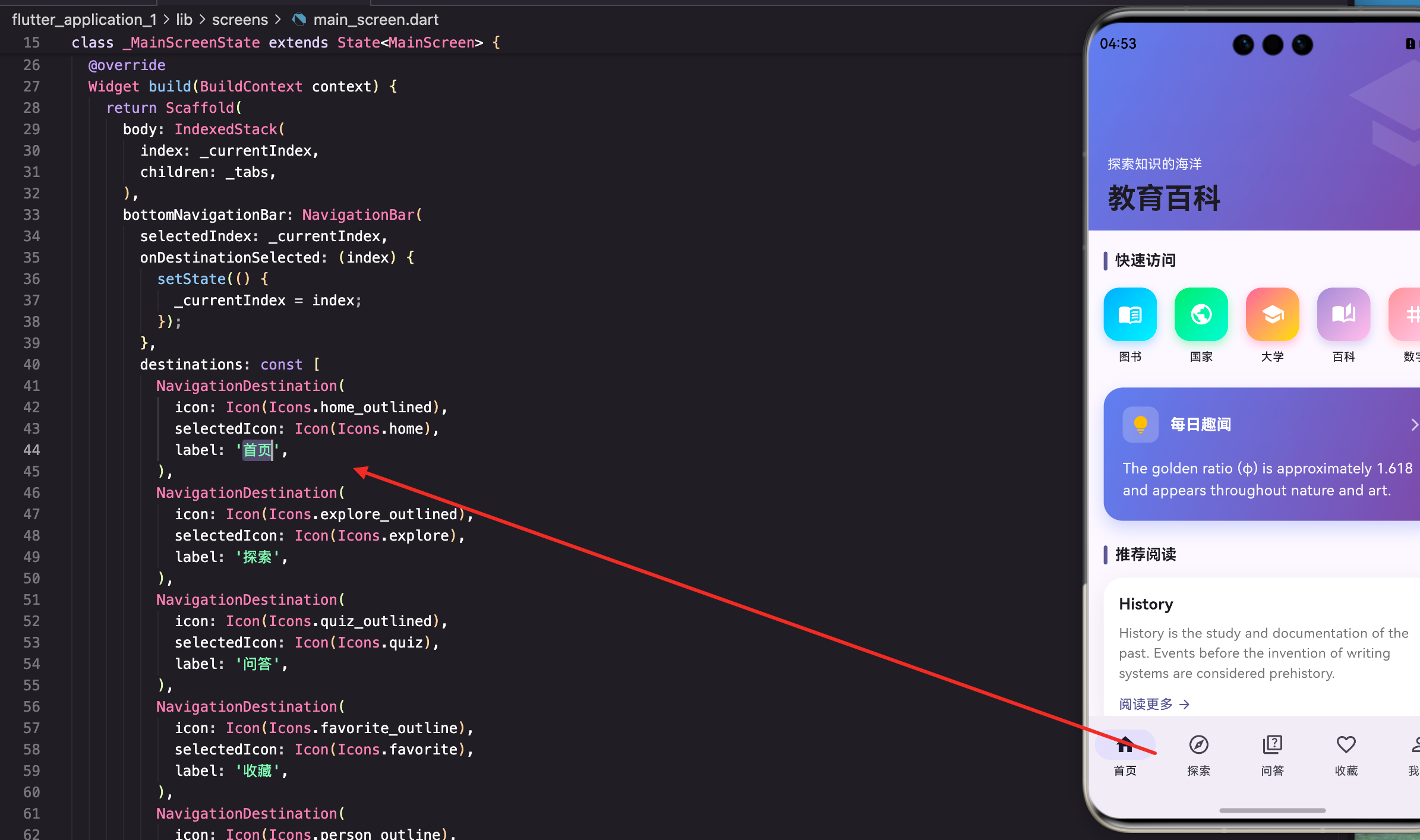
MainScreen的结构
主屏幕负责管理底部导航和页面切换:
class MainScreen extends StatefulWidget {
const MainScreen({super.key});
State<MainScreen> createState() => _MainScreenState();
}
class _MainScreenState extends State<MainScreen> {
int _currentIndex = 0;
final List<Widget> _pages = const [
HomeTab(),
ExploreTab(),
QuizTab(),
FavoritesTab(),
ProfileTab(),
];
_currentIndex记录当前选中的Tab索引,从0开始。_pages是所有Tab页面的列表,顺序要和底部导航项一致。
为什么用const?
这些页面组件本身是StatefulWidget,它们的状态由各自的State管理。在这里用const可以避免每次重建MainScreen时重新创建页面实例。
使用NavigationBar
Material 3推荐使用NavigationBar:
Widget build(BuildContext context) {
return Scaffold(
body: IndexedStack(
index: _currentIndex,
children: _pages,
),
bottomNavigationBar: NavigationBar(
selectedIndex: _currentIndex,
onDestinationSelected: (index) {
setState(() {
_currentIndex = index;
});
},
destinations: const [
NavigationDestination(
icon: Icon(Icons.home_outlined),
selectedIcon: Icon(Icons.home),
label: '首页',
),
NavigationDestination(
icon: Icon(Icons.explore_outlined),
selectedIcon: Icon(Icons.explore),
label: '探索',
),
NavigationDestination(
icon: Icon(Icons.quiz_outlined),
selectedIcon: Icon(Icons.quiz),
label: '问答',
),
NavigationDestination(
icon: Icon(Icons.favorite_outline),
selectedIcon: Icon(Icons.favorite),
label: '收藏',
),
NavigationDestination(
icon: Icon(Icons.person_outline),
selectedIcon: Icon(Icons.person),
label: '我的',
),
],
),
);
}
NavigationBar是Material 3的底部导航组件,视觉效果更现代。每个NavigationDestination有未选中图标、选中图标和标签。
IndexedStack的作用
IndexedStack是关键组件:
IndexedStack(
  index: _currentIndex,
  children: _pages,
)
IndexedStack会同时创建所有子页面,但只显示index指定的那个。切换Tab时,其他页面的状态会保持,不会被销毁重建。
这意味着什么?
用户在首页滚动到某个位置,切换到探索Tab再切回来,首页还是之前的滚动位置。如果用普通的条件渲染(比如_currentIndex == 0 ? HomeTab() : ...),每次切换都会重建页面,状态就丢失了。
使用传统的BottomNavigationBar
如果不想用Material 3风格,可以用传统的BottomNavigationBar:
bottomNavigationBar: BottomNavigationBar(
  currentIndex: _currentIndex,
  onTap: (index) {
    setState(() {
      _currentIndex = index;
    });
  },
  type: BottomNavigationBarType.fixed,
  items: const [
    BottomNavigationBarItem(
      icon: Icon(Icons.home_outlined),
      activeIcon: Icon(Icons.home),
      label: '首页',
    ),
    BottomNavigationBarItem(
      icon: Icon(Icons.explore_outlined),
      activeIcon: Icon(Icons.explore),
      label: '探索',
    ),
    // ... 其他项
  ],
),
注意几个区别:
- 回调是
onTap而不是onDestinationSelected- 图标属性是
activeIcon而不是selectedIcon- 需要设置
type: BottomNavigationBarType.fixed,不然超过3个项目时标签会隐藏
自定义导航栏样式
NavigationBar可以自定义样式:
NavigationBar(
  backgroundColor: Theme.of(context).colorScheme.surface,
  indicatorColor: Theme.of(context).colorScheme.primaryContainer,
  labelBehavior: NavigationDestinationLabelBehavior.alwaysShow,
  height: 65,
  selectedIndex: _currentIndex,
  onDestinationSelected: (index) {
    setState(() => _currentIndex = index);
  },
  destinations: [...],
)
backgroundColor:导航栏背景色indicatorColor:选中项的指示器颜色labelBehavior:标签显示方式,alwaysShow表示始终显示height:导航栏高度
带徽章的导航项
显示未读消息或收藏数量:
NavigationDestination(
  icon: Badge(
    label: Text('$unreadCount'),
    isLabelVisible: unreadCount > 0,
    child: const Icon(Icons.favorite_outline),
  ),
  selectedIcon: Badge(
    label: Text('$unreadCount'),
    isLabelVisible: unreadCount > 0,
    child: const Icon(Icons.favorite),
  ),
  label: '收藏',
),
Badge组件在图标右上角显示数字徽章。
isLabelVisible控制是否显示,数量为0时隐藏。
要获取收藏数量,需要从Provider读取:
Widget build(BuildContext context) {
final favCount = Provider.of<FavoritesProvider>(context).count;
return Scaffold(
// ...
bottomNavigationBar: NavigationBar(
destinations: [
// ... 其他项
NavigationDestination(
icon: Badge(
label: Text('$favCount'),
isLabelVisible: favCount > 0,
child: const Icon(Icons.favorite_outline),
),
// ...
),
],
),
);
}
处理Android返回键
在Android上,用户按返回键的预期行为是:如果不在首页,先回到首页;如果已经在首页,才退出应用。
Widget build(BuildContext context) {
return PopScope(
canPop: _currentIndex == 0,
onPopInvokedWithResult: (didPop, result) {
if (!didPop && _currentIndex != 0) {
setState(() {
_currentIndex = 0;
});
}
},
child: Scaffold(
// ...
),
);
}
PopScope是Flutter 3.16引入的新组件,替代了之前的WillPopScope。canPop为true时允许返回,为false时拦截返回操作。
如果用的是旧版Flutter,用WillPopScope:
WillPopScope(
  onWillPop: () async {
    if (_currentIndex != 0) {
      setState(() => _currentIndex = 0);
      return false;  // 不退出
    }
    return true;  // 退出
  },
  child: Scaffold(...),
)
PageView vs IndexedStack
除了IndexedStack,还可以用PageView:
final _pageController = PageController();
Widget build(BuildContext context) {
return Scaffold(
body: PageView(
controller: _pageController,
onPageChanged: (index) {
setState(() => _currentIndex = index);
},
children: _pages,
),
bottomNavigationBar: NavigationBar(
selectedIndex: _currentIndex,
onDestinationSelected: (index) {
_pageController.animateToPage(
index,
duration: const Duration(milliseconds: 300),
curve: Curves.easeInOut,
);
},
destinations: [...],
),
);
}
void dispose() {
_pageController.dispose();
super.dispose();
}
PageView支持手势滑动切换Tab,而且切换时有动画效果。但需要额外管理PageController。
选择哪个?
- IndexedStack:简单,状态保持好,但所有页面都会被创建
- PageView:支持滑动,有动画,但需要管理Controller
教育百科用的是IndexedStack,因为不需要滑动切换,而且5个页面都比较轻量。
懒加载优化
IndexedStack会同时创建所有页面,如果页面很重,可能影响启动速度。可以用懒加载优化:
class _MainScreenState extends State<MainScreen> {
int _currentIndex = 0;
final Set<int> _loadedPages = {0}; // 记录已加载的页面
Widget _buildPage(int index) {
if (!_loadedPages.contains(index)) {
return const SizedBox(); // 未加载的页面返回空
}
switch (index) {
case 0: return const HomeTab();
case 1: return const ExploreTab();
case 2: return const QuizTab();
case 3: return const FavoritesTab();
case 4: return const ProfileTab();
default: return const SizedBox();
}
}
Widget build(BuildContext context) {
return Scaffold(
body: IndexedStack(
index: _currentIndex,
children: List.generate(5, _buildPage),
),
bottomNavigationBar: NavigationBar(
selectedIndex: _currentIndex,
onDestinationSelected: (index) {
setState(() {
_currentIndex = index;
_loadedPages.add(index); // 标记为已加载
});
},
destinations: [...],
),
);
}
}
只有用户切换到某个Tab时才创建对应的页面。首次启动只创建首页,其他页面在需要时才创建。
写在最后
底部导航是移动应用的标准导航方式。NavigationBar是Material 3推荐的组件,视觉效果更现代。IndexedStack保持页面状态,让用户切换Tab时不会丢失之前的操作。
处理返回键是Android上的重要细节,用户期望按返回键先回到首页。徽章功能可以显示未读数量,提醒用户有新内容。
下一篇我们来看按地区浏览功能,了解如何实现分类浏览。
本文是Flutter for OpenHarmony教育百科实战系列的第二十四篇,后续会持续更新更多内容。
欢迎加入开源鸿蒙跨平台社区:https://openharmonycrossplatform.csdn.net

开源鸿蒙跨平台开发社区汇聚开发者与厂商,共建“一次开发,多端部署”的开源生态,致力于降低跨端开发门槛,推动万物智联创新。
更多推荐
 7
7 0
0- 0


 已为社区贡献24条内容

所有评论(0)