Flutter 框架跨平台鸿蒙开发 - 打造随机抽奖/点名器应用
override},加权随机算法:根据权重计算中奖概率动画组合:旋转 + 缩放动画批量操作:批量导入参与者防重复机制:可选是否允许重复中奖数据持久化:SharedPreferences存储通过本项目,你不仅学会了如何实现抽奖应用,还掌握了Flutter中随机算法、动画设计、数据管理的核心技术。这些知识可以应用到更多场景,如游戏开发、互动应用等领域。公平、公正、公开,让抽奖更有趣!
Flutter实战:打造随机抽奖/点名器应用
前言
随机抽奖和点名是日常生活中常见的需求。本文将带你从零开始,使用Flutter开发一个功能完整的随机抽奖应用,支持权重设置、防重复、历史记录等功能。
应用特色
- 🎰 加权随机:支持设置中奖概率权重
- 🔄 旋转动画:炫酷的抽奖动画效果
- 🚫 防重复抽取:可选是否允许重复中奖
- 📊 批量抽取:一次抽取多个中奖者
- 📝 批量导入:快速添加多个参与者
- 📜 历史记录:保存所有抽奖记录
- 🔄 重置功能:清除抽取状态
- 💾 数据持久化:本地存储所有数据
- 📈 实时统计:显示总人数、已抽取、剩余
- 🌓 深色模式:自动适配系统主题
效果展示
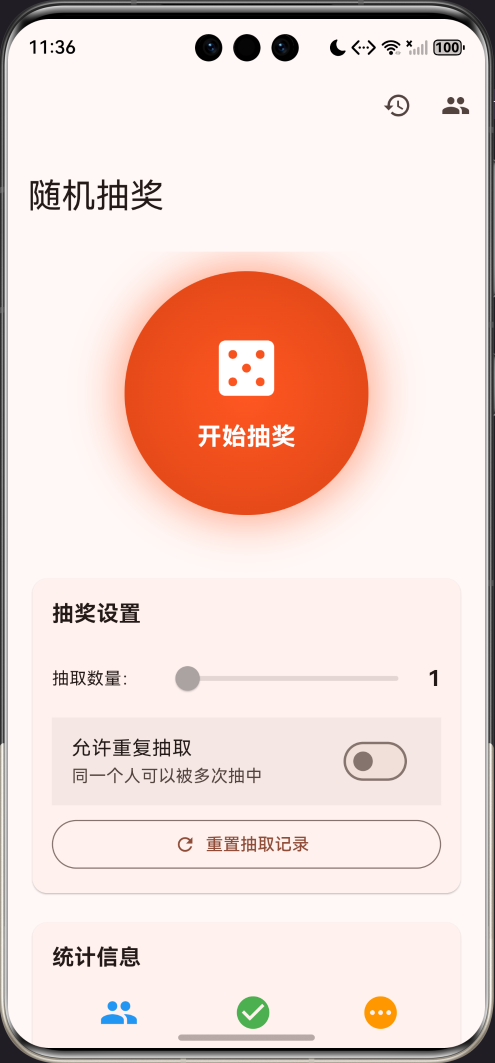
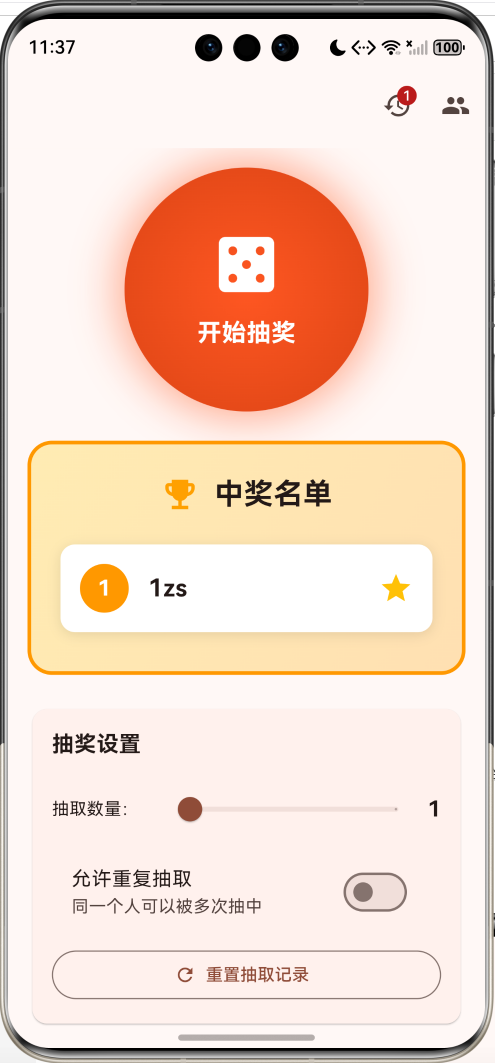
数据模型设计
1. 参与者模型
class Participant {
  String id;
  String name;
  int weight;        // 权重(中奖概率)
  bool isSelected;   // 是否已被抽中

  Participant({
    required this.id,
    required this.name,
    this.weight = 1,
    this.isSelected = false,
  });
}
2. 抽奖记录模型
class LotteryRecord {
  DateTime timestamp;
  List<String> winners;

  LotteryRecord({
    required this.timestamp,
    required this.winners,
  });
}
核心功能实现
1. 加权随机算法
这是本应用的核心算法,根据权重随机选择参与者:
List<Participant> _weightedRandomSelection(
    List<Participant> participants, int count) {
  final random = Random();
  final selected = <Participant>[];
  final available = List<Participant>.from(participants);

  for (int i = 0; i < count && available.isNotEmpty; i++) {
    // 计算总权重
    final totalWeight = available.fold(0, (sum, p) => sum + p.weight);

    // 生成随机数
    var randomValue = random.nextInt(totalWeight);

    // 根据权重选择
    Participant? selectedParticipant;
    for (var participant in available) {
      randomValue -= participant.weight;
      if (randomValue < 0) {
        selectedParticipant = participant;
        break;
      }
    }

    if (selectedParticipant != null) {
      selected.add(selectedParticipant);
      available.remove(selectedParticipant);
    }
  }

  return selected;
}
算法原理:
- 计算所有参与者的总权重
- 生成0到总权重之间的随机数
- 遍历参与者,依次减去权重
- 当随机数小于0时,选中当前参与者
示例:
- 张三权重3,李四权重2,王五权重1
- 总权重 = 6
- 随机数 = 4
- 4 - 3 = 1(张三)
- 1 - 2 = -1(李四被选中)
2. 抽奖动画
使用AnimationController实现旋转和缩放动画:
void _initAnimation() {
  _animationController = AnimationController(
    duration: const Duration(milliseconds: 2000),
    vsync: this,
  );

  // 旋转动画:旋转8圈
  _rotationAnimation = Tween<double>(begin: 0, end: 8 * pi).animate(
    CurvedAnimation(parent: _animationController, curve: Curves.easeInOut),
  );

  // 缩放动画:先放大后缩小
  _scaleAnimation = TweenSequence<double>([
    TweenSequenceItem(
      tween: Tween<double>(begin: 1.0, end: 1.3),
      weight: 1,
    ),
    TweenSequenceItem(
      tween: Tween<double>(begin: 1.3, end: 1.0),
      weight: 1,
    ),
  ]).animate(
    CurvedAnimation(parent: _animationController, curve: Curves.easeInOut),
  );

  // 动画完成后执行抽奖
  _animationController.addStatusListener((status) {
    if (status == AnimationStatus.completed) {
      _performDraw();
    }
  });
}
3. 防重复抽取
void _startDraw() {
  // 获取可用参与者
  final availableParticipants = _allowRepeat
      ? _participants
      : _participants.where((p) => !p.isSelected).toList();

  // 检查是否有可用参与者
  if (availableParticipants.isEmpty) {
    ScaffoldMessenger.of(context).showSnackBar(
      const SnackBar(content: Text('所有人都已被抽中,请重置或允许重复抽取')),
    );
    return;
  }

  // 检查抽取数量
  if (_drawCount > availableParticipants.length) {
    ScaffoldMessenger.of(context).showSnackBar(
      SnackBar(
        content: Text('抽取数量不能超过可用人数(${availableParticipants.length})')
      ),
    );
    return;
  }

  // 开始抽奖
  setState(() {
    _isDrawing = true;
    _currentWinners = [];
  });

  _animationController.reset();
  _animationController.forward();
}
4. 批量导入
void _batchAdd() {
  final controller = TextEditingController();
  showDialog(
    context: context,
    builder: (context) => AlertDialog(
      title: const Text('批量添加'),
      content: Column(
        mainAxisSize: MainAxisSize.min,
        children: [
          const Text('每行一个姓名'),
          TextField(
            controller: controller,
            decoration: const InputDecoration(
              hintText: '张三\n李四\n王五',
              border: OutlineInputBorder(),
            ),
            maxLines: 10,
          ),
        ],
      ),
      actions: [
        FilledButton(
          onPressed: () {
            // 按行分割,过滤空行
            final names = controller.text
                .split('\n')
                .map((s) => s.trim())
                .where((s) => s.isNotEmpty)
                .toList();

            if (names.isNotEmpty) {
              setState(() {
                for (var name in names) {
                  _participants.add(Participant(
                    id: DateTime.now().millisecondsSinceEpoch.toString() +
                        names.indexOf(name).toString(),
                    name: name,
                  ));
                }
              });
              Navigator.pop(context);
            }
          },
          child: const Text('添加'),
        ),
      ],
    ),
  );
}
UI组件设计
1. 抽奖按钮
Widget _buildDrawButton() {
  return AnimatedBuilder(
    animation: _animationController,
    builder: (context, child) {
      return Transform.rotate(
        angle: _rotationAnimation.value,
        child: Transform.scale(
          scale: _scaleAnimation.value,
          child: GestureDetector(
            onTap: _isDrawing ? null : _startDraw,
            child: Container(
              width: 200,
              height: 200,
              decoration: BoxDecoration(
                shape: BoxShape.circle,
                gradient: RadialGradient(
                  colors: [
                    Colors.deepOrange,
                    Colors.deepOrange.shade700,
                  ],
                ),
                boxShadow: [
                  BoxShadow(
                    color: Colors.deepOrange.withOpacity(0.5),
                    blurRadius: 30,
                    spreadRadius: 5,
                  ),
                ],
              ),
              child: Column(
                mainAxisAlignment: MainAxisAlignment.center,
                children: [
                  Icon(
                    _isDrawing ? Icons.hourglass_empty : Icons.casino,
                    size: 60,
                    color: Colors.white,
                  ),
                  Text(
                    _isDrawing ? '抽取中...' : '开始抽奖',
                    style: const TextStyle(
                      fontSize: 20,
                      fontWeight: FontWeight.bold,
                      color: Colors.white,
                    ),
                  ),
                ],
              ),
            ),
          ),
        ),
      );
    },
  );
}
2. 中奖名单显示
Widget _buildWinnersDisplay() {
  return Container(
    padding: const EdgeInsets.all(24),
    decoration: BoxDecoration(
      gradient: LinearGradient(
        colors: [
          Colors.amber.shade100,
          Colors.orange.shade100,
        ],
      ),
      borderRadius: BorderRadius.circular(20),
      border: Border.all(color: Colors.orange, width: 3),
    ),
    child: Column(
      children: [
        Row(
          mainAxisAlignment: MainAxisAlignment.center,
          children: [
            Icon(Icons.emoji_events, color: Colors.amber.shade700, size: 32),
            const SizedBox(width: 12),
            const Text(
              '中奖名单',
              style: TextStyle(fontSize: 24, fontWeight: FontWeight.bold),
            ),
          ],
        ),
        const SizedBox(height: 16),
        ..._currentWinners.asMap().entries.map((entry) {
          return Container(
            padding: const EdgeInsets.all(16),
            decoration: BoxDecoration(
              color: Colors.white,
              borderRadius: BorderRadius.circular(12),
            ),
            child: Row(
              children: [
                // 排名
                Container(
                  width: 40,
                  height: 40,
                  decoration: const BoxDecoration(
                    color: Colors.orange,
                    shape: BoxShape.circle,
                  ),
                  child: Center(
                    child: Text(
                      '${entry.key + 1}',
                      style: const TextStyle(
                        color: Colors.white,
                        fontWeight: FontWeight.bold,
                        fontSize: 18,
                      ),
                    ),
                  ),
                ),
                const SizedBox(width: 16),
                // 姓名
                Expanded(
                  child: Text(
                    entry.value,
                    style: const TextStyle(
                      fontSize: 20,
                      fontWeight: FontWeight.bold,
                    ),
                  ),
                ),
                // 星星图标
                const Icon(Icons.star, color: Colors.amber, size: 28),
              ],
            ),
          );
        }),
      ],
    ),
  );
}
3. 统计信息
Widget _buildStatistics(int selectedCount) {
  return Card(
    child: Padding(
      padding: const EdgeInsets.all(16),
      child: Row(
        mainAxisAlignment: MainAxisAlignment.spaceAround,
        children: [
          _buildStatItem(
            '总人数',
            _participants.length.toString(),
            Icons.people,
            Colors.blue,
          ),
          _buildStatItem(
            '已抽取',
            selectedCount.toString(),
            Icons.check_circle,
            Colors.green,
          ),
          _buildStatItem(
            '剩余',
            (_participants.length - selectedCount).toString(),
            Icons.pending,
            Colors.orange,
          ),
        ],
      ),
    ),
  );
}

Widget _buildStatItem(
    String label, String value, IconData icon, Color color) {
  return Column(
    children: [
      Icon(icon, color: color, size: 32),
      const SizedBox(height: 8),
      Text(
        value,
        style: TextStyle(
          fontSize: 24,
          fontWeight: FontWeight.bold,
          color: color,
        ),
      ),
      Text(label, style: TextStyle(fontSize: 14, color: Colors.grey.shade600)),
    ],
  );
}
技术要点详解
1. 加权随机算法
权重越大,被选中的概率越高:
| 参与者 | 权重 | 概率 |
|---|---|---|
| 张三 | 3 | 50% (3/6) |
| 李四 | 2 | 33.3% (2/6) |
| 王五 | 1 | 16.7% (1/6) |
2. TweenSequence动画
实现先放大后缩小的效果:
TweenSequence<double>([
  TweenSequenceItem(
    tween: Tween<double>(begin: 1.0, end: 1.3),
    weight: 1,  // 前50%时间
  ),
  TweenSequenceItem(
    tween: Tween<double>(begin: 1.3, end: 1.0),
    weight: 1,  // 后50%时间
  ),
])
3. AnimationStatusListener
监听动画完成事件:
_animationController.addStatusListener((status) {
  if (status == AnimationStatus.completed) {
    // 动画完成后执行抽奖
    _performDraw();
  }
});
4. Slider滑块
调整抽取数量:
Slider(
  value: _drawCount.toDouble(),
  min: 1,
  max: min(_participants.length, 10).toDouble(),
  divisions: min(_participants.length, 10) - 1,
  label: _drawCount.toString(),
  onChanged: (value) {
    setState(() {
      _drawCount = value.toInt();
    });
  },
)
功能扩展建议
1. 音效和震动
import 'package:audioplayers/audioplayers.dart';
import 'package:vibration/vibration.dart';

Future<void> _playDrawSound() async {
  final player = AudioPlayer();
  await player.play(AssetSource('sounds/lottery.mp3'));
}

Future<void> _vibrate() async {
  if (await Vibration.hasVibrator() ?? false) {
    Vibration.vibrate(duration: 500);
  }
}
2. 导出结果
import 'package:share_plus/share_plus.dart';

void _shareResults() {
  final text = '''
抽奖结果
时间:${DateTime.now()}

中奖名单:
${_currentWinners.asMap().entries.map((e) => '${e.key + 1}. ${e.value}').join('\n')}
  ''';

  Share.share(text);
}
3. 自定义动画
class LotteryAnimation extends StatelessWidget {
final Animation<double> animation;
final List<String> names;
Widget build(BuildContext context) {
return AnimatedBuilder(
animation: animation,
builder: (context, child) {
final index = (animation.value * names.length).floor() % names.length;
return Text(
names[index],
style: const TextStyle(fontSize: 48, fontWeight: FontWeight.bold),
);
},
);
}
}
4. 权重可视化
Widget _buildWeightBar(Participant participant, int totalWeight) {
  final percentage = (participant.weight / totalWeight * 100);

  return Column(
    children: [
      Text(participant.name),
      LinearProgressIndicator(
        value: participant.weight / totalWeight,
        minHeight: 20,
      ),
      Text('${percentage.toStringAsFixed(1)}%'),
    ],
  );
}
5. 分组抽奖
class Group {
  String name;
  List<Participant> participants;

  Group({required this.name, required this.participants});
}

List<Group> _groups = [];

void _drawByGroup(Group group) {
  final winners = _weightedRandomSelection(group.participants, _drawCount);
  // ...
}
使用场景
- 🎓 课堂点名:随机提问学生
- 🎁 抽奖活动:年会、活动抽奖
- 🎯 任务分配:随机分配任务
- 🎮 游戏选人:游戏中随机选择玩家
- 🏆 评选投票:随机抽取评委
- 👥 分组活动:随机分组
- 🎪 互动游戏:现场互动抽奖
常见问题解答
Q1: 如何确保抽奖的公平性?
A: 使用Dart的Random类,它基于伪随机数生成器,对于一般应用足够公平。如需更高安全性,可使用Random.secure()。
Q2: 权重如何影响中奖概率?
A: 权重为3的人中奖概率是权重为1的人的3倍。总概率 = 个人权重 / 所有人权重之和。
Q3: 如何实现必中功能?
A: 设置某人权重为极大值(如1000),或直接在代码中指定必中人员。
项目结构
lib/
├── main.dart                      # 主程序入口
├── models/
│   ├── participant.dart          # 参与者模型
│   └── lottery_record.dart       # 抽奖记录模型
├── screens/
│   ├── lottery_page.dart         # 主页面
│   ├── participants_page.dart    # 参与者管理页
│   └── history_page.dart         # 历史记录页
├── widgets/
│   ├── draw_button.dart          # 抽奖按钮
│   ├── winners_display.dart      # 中奖名单
│   └── statistics_card.dart      # 统计卡片
└── utils/
    ├── lottery_algorithm.dart    # 抽奖算法
    └── storage_helper.dart       # 存储助手
总结
本文实现了一个功能完整的随机抽奖应用,涵盖了以下核心技术:
- 加权随机算法:根据权重计算中奖概率
- 动画组合:旋转 + 缩放动画
- 批量操作:批量导入参与者
- 防重复机制:可选是否允许重复中奖
- 数据持久化:SharedPreferences存储
通过本项目,你不仅学会了如何实现抽奖应用,还掌握了Flutter中随机算法、动画设计、数据管理的核心技术。这些知识可以应用到更多场景,如游戏开发、互动应用等领域。
公平、公正、公开,让抽奖更有趣!
欢迎加入开源鸿蒙跨平台社区:https://openharmonycrossplatform.csdn.net

开源鸿蒙跨平台开发社区汇聚开发者与厂商,共建“一次开发,多端部署”的开源生态,致力于降低跨端开发门槛,推动万物智联创新。
更多推荐
 2
2 0
0- 0


 已为社区贡献10条内容

所有评论(0)