flutter_for_openharmony口腔护理app实战+健康评分实现
口腔健康评分系统摘要 本文介绍了一个口腔护理App的健康评分功能实现方案。该系统通过四个维度(刷牙习惯、清洁程度、饮食习惯、定期检查)评估用户口腔健康状况,采用Flutter框架开发,主要特点包括: 评分算法:每个维度满分100分,综合评分为四项平均值,四舍五入取整 可视化展示: 环形进度条直观显示总分 动态颜色区分健康等级(高分绿色/低分红色) 中心区域突出显示具体分数 交互设计: 分项评分列表
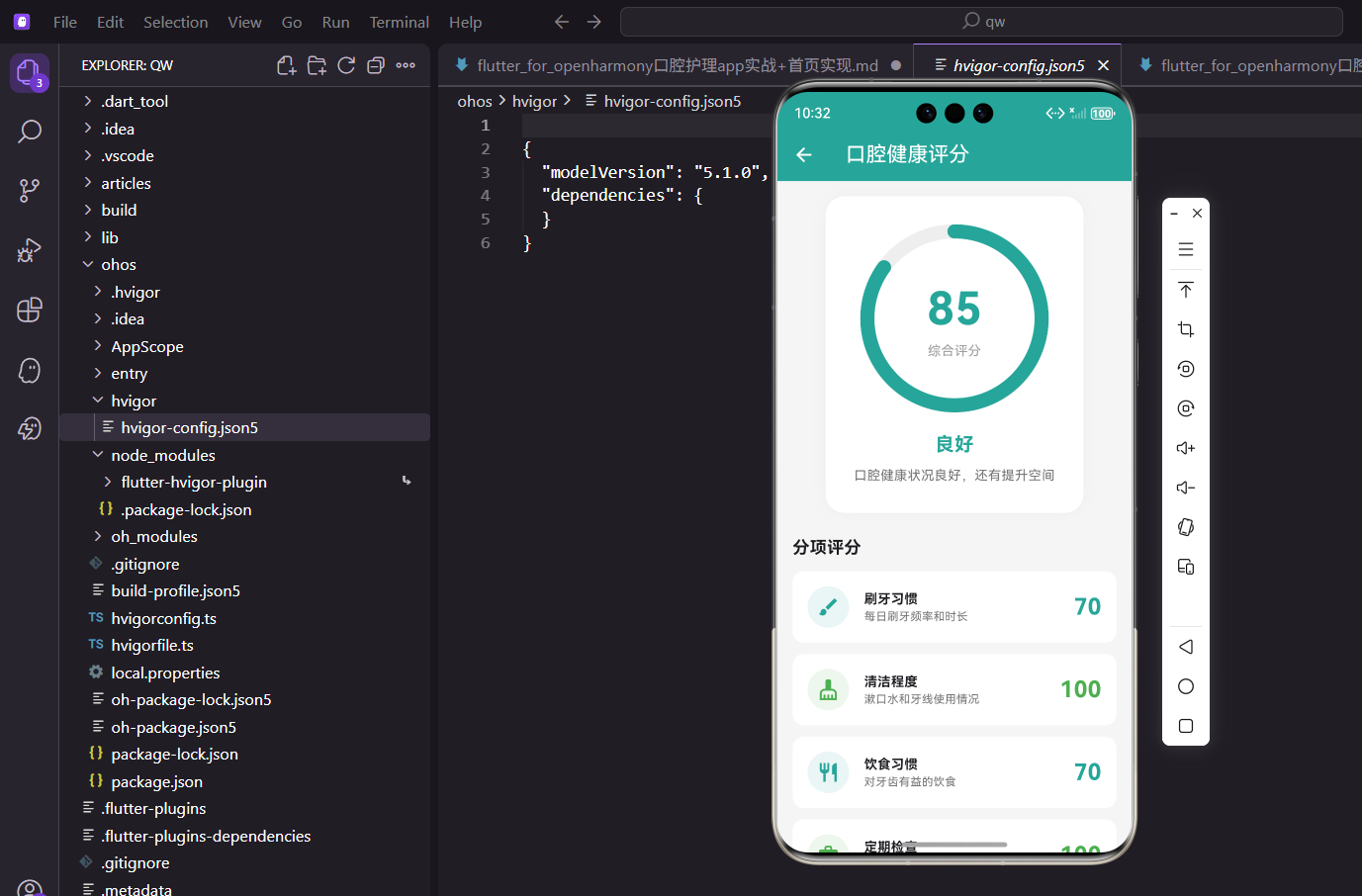
健康评分页面是口腔护理App的数据分析核心,通过综合评估用户的护理习惯,给出一个直观的健康分数。这个功能帮助用户了解自己的口腔健康状况,并提供针对性的改善建议。
评分系统的设计思路
健康评分从四个维度评估用户的口腔健康:刷牙习惯、清洁程度、饮食习惯、定期检查。每个维度满分100分,综合评分取四个维度的平均值。这种多维度评估比单一指标更全面,能够帮助用户发现自己的薄弱环节。
依赖导入
import 'package:flutter/material.dart';
import 'package:provider/provider.dart';
Flutter核心库和Provider状态管理。
Provider用于获取用户的护理记录数据。
import 'package:percent_indicator/circular_percent_indicator.dart';
环形进度指示器组件。
用于显示综合评分,视觉效果直观。
import '../../providers/app_provider.dart';
AppProvider存储了所有护理记录数据。
评分计算需要基于这些历史数据。
页面基础结构
class HealthScorePage extends StatelessWidget {
  const HealthScorePage({super.key});
健康评分页面使用StatelessWidget。
所有数据都来自Provider,页面本身不需要维护状态。
Widget build(BuildContext context) {
return Scaffold(
appBar: AppBar(title: const Text('口腔健康评分')),
body: Consumer<AppProvider>(
builder: (context, provider, _) {
Consumer监听AppProvider的数据变化。
当用户添加新记录时,评分会自动更新。
评分计算
          final brushScore = _calculateBrushScore(provider);
          final cleanScore = _calculateCleanScore(provider);
          final habitScore = _calculateHabitScore(provider);
          final checkScore = _calculateCheckScore(provider);

          final totalScore = ((brushScore + cleanScore + habitScore + checkScore) / 4).round();
分别计算四个维度的评分。
综合评分是四个维度的平均值,round()四舍五入取整。
综合评分卡片
          return SingleChildScrollView(
            padding: const EdgeInsets.all(16),
            child: Column(
              children: [
                Container(
                  padding: const EdgeInsets.all(30),
                  decoration: BoxDecoration(
                    color: Colors.white,
                    borderRadius: BorderRadius.circular(20),
                    boxShadow: [BoxShadow(color: Colors.grey.shade200, blurRadius: 10)],
                  ),
综合评分卡片使用白色背景,大圆角设计。
30像素内边距让内容更有呼吸感。
                  child: Column(
                    children: [
                      CircularPercentIndicator(
                        radius: 100,
                        lineWidth: 15,
                        percent: totalScore / 100,
大尺寸环形进度条,半径100像素。
percent是0-1之间的值,所以要除以100。
                        center: Column(
                          mainAxisAlignment: MainAxisAlignment.center,
                          children: [
                            Text(
                              '$totalScore',
                              style: const TextStyle(fontSize: 48, fontWeight: FontWeight.bold, color: Color(0xFF26A69A)),
                            ),
                            const Text('综合评分', style: TextStyle(color: Colors.grey)),
                          ],
                        ),
环形中间显示分数和标签。
48像素超大字体让分数非常醒目。
                        progressColor: _getScoreColor(totalScore),
                        backgroundColor: Colors.grey.shade200,
                        circularStrokeCap: CircularStrokeCap.round,
                      ),
进度条颜色根据分数动态变化。
高分绿色,低分红色,直观反映健康状况。
评分等级显示
                      const SizedBox(height: 20),
                      Text(
                        _getScoreLevel(totalScore),
                        style: TextStyle(
                          fontSize: 20,
                          fontWeight: FontWeight.bold,
                          color: _getScoreColor(totalScore),
                        ),
                      ),
显示评分等级文字,如"优秀"、"良好"等。
颜色与进度条一致,形成视觉统一。
                      const SizedBox(height: 8),
                      Text(
                        _getScoreAdvice(totalScore),
                        style: TextStyle(color: Colors.grey.shade600),
                        textAlign: TextAlign.center,
                      ),
                    ],
                  ),
                ),
显示针对当前评分的建议文字。
居中对齐,灰色字体作为辅助信息。
分项评分列表
                const SizedBox(height: 24),
                const Align(
                  alignment: Alignment.centerLeft,
                  child: Text('分项评分', style: TextStyle(fontSize: 18, fontWeight: FontWeight.bold)),
                ),
                const SizedBox(height: 12),

                _buildScoreItem('刷牙习惯', brushScore, Icons.brush, '每日刷牙频率和时长'),
                _buildScoreItem('清洁程度', cleanScore, Icons.cleaning_services, '漱口水和牙线使用情况'),
                _buildScoreItem('饮食习惯', habitScore, Icons.restaurant, '对牙齿有益的饮食'),
                _buildScoreItem('定期检查', checkScore, Icons.medical_services, '口腔检查频率'),
四个维度的分项评分。
每项显示名称、分数、图标和说明文字。
改善建议区域
                Container(
                  padding: const EdgeInsets.all(16),
                  decoration: BoxDecoration(
                    color: const Color(0xFF26A69A).withOpacity(0.1),
                    borderRadius: BorderRadius.circular(12),
                  ),
                  child: Column(
                    crossAxisAlignment: CrossAxisAlignment.start,
                    children: [
                      const Row(
                        children: [
                          Icon(Icons.tips_and_updates, color: Color(0xFF26A69A)),
                          SizedBox(width: 8),
                          Text('改善建议', style: TextStyle(fontWeight: FontWeight.bold, fontSize: 16)),
                        ],
                      ),
改善建议区域使用浅绿色背景。
灯泡图标暗示这是提示信息。
                      const SizedBox(height: 12),
                      ..._getImprovementSuggestions(brushScore, cleanScore, habitScore, checkScore),
                    ],
                  ),
                ),
              ],
            ),
          );
        },
      ),
    );
  }
根据各项评分动态生成改善建议。
只显示需要改善的项目,已经做得好的不显示。
刷牙习惯评分计算
  int _calculateBrushScore(AppProvider provider) {
    final weeklyData = provider.getWeeklyBrushData();
    final avgPerDay = weeklyData.reduce((a, b) => a + b) / 7;
    if (avgPerDay >= 3) return 100;
    if (avgPerDay >= 2) return 85;
    if (avgPerDay >= 1) return 70;
    return 50;
  }
基于最近一周的刷牙数据计算评分。
每天刷3次满分,2次85分,1次70分,不刷50分。
清洁程度评分计算
  int _calculateCleanScore(AppProvider provider) {
    int score = 60;
    if (provider.mouthwashRecords.isNotEmpty) score += 20;
    if (provider.flossRecords.isNotEmpty) score += 20;
    return score;
  }
基础分60分,使用漱口水加20分,使用牙线加20分。
鼓励用户使用多种清洁工具。
饮食习惯评分计算
  int _calculateHabitScore(AppProvider provider) {
    final goodCount = provider.dietRecords.where((d) => d.category == 'good').length;
    final badCount = provider.dietRecords.where((d) => d.category == 'bad').length;
    if (badCount == 0 && goodCount > 0) return 100;
    if (goodCount > badCount * 2) return 85;
    if (goodCount > badCount) return 70;
    return 60;
  }
根据有益和有害饮食的比例计算评分。
没有有害饮食且有有益饮食满分。
定期检查评分计算
  int _calculateCheckScore(AppProvider provider) {
    if (provider.checkRecords.isEmpty) return 50;
    final lastCheck = provider.checkRecords.first.date;
    final daysSince = DateTime.now().difference(lastCheck).inDays;
    if (daysSince <= 90) return 100;
    if (daysSince <= 180) return 85;
    if (daysSince <= 365) return 70;
    return 50;
  }
根据最近一次检查的时间计算评分。
3个月内检查满分,半年内85分,一年内70分。
颜色和等级辅助方法
  Color _getScoreColor(int score) {
    if (score >= 90) return Colors.green;
    if (score >= 70) return const Color(0xFF26A69A);
    if (score >= 50) return Colors.orange;
    return Colors.red;
  }

  String _getScoreLevel(int score) {
    if (score >= 90) return '优秀';
    if (score >= 70) return '良好';
    if (score >= 50) return '一般';
    return '需改善';
  }
根据分数返回对应的颜色和等级文字。
阶梯式划分,界限清晰。
分项评分组件
  Widget _buildScoreItem(String title, int score, IconData icon, String subtitle) {
    return Container(
      margin: const EdgeInsets.only(bottom: 12),
      padding: const EdgeInsets.all(16),
      decoration: BoxDecoration(
        color: Colors.white,
        borderRadius: BorderRadius.circular(12),
      ),
每个分项是一个白色圆角卡片。
底部12像素间距让卡片之间有分隔。
      child: Row(
        children: [
          Container(
            padding: const EdgeInsets.all(10),
            decoration: BoxDecoration(
              color: _getScoreColor(score).withOpacity(0.1),
              shape: BoxShape.circle,
            ),
            child: Icon(icon, color: _getScoreColor(score)),
          ),
左侧图标,颜色根据分数变化。
浅色圆形背景让图标更突出。
          const SizedBox(width: 16),
          Expanded(
            child: Column(
              crossAxisAlignment: CrossAxisAlignment.start,
              children: [
                Text(title, style: const TextStyle(fontWeight: FontWeight.bold)),
                Text(subtitle, style: TextStyle(color: Colors.grey.shade600, fontSize: 12)),
              ],
            ),
          ),
          Text(
            '$score',
            style: TextStyle(
              fontSize: 24,
              fontWeight: FontWeight.bold,
              color: _getScoreColor(score),
            ),
          ),
        ],
      ),
    );
  }
中间显示标题和说明,右侧显示分数。
分数使用24像素大字体,颜色与图标一致。
改善建议生成
  List<Widget> _getImprovementSuggestions(int brush, int clean, int habit, int check) {
    List<Widget> suggestions = [];

    if (brush < 85) {
      suggestions.add(const Padding(
        padding: EdgeInsets.only(bottom: 8),
        child: Text('• 建议每天刷牙3次,每次2-3分钟'),
      ));
    }
根据各项评分动态生成建议。
只有分数低于85的项目才显示建议。
    if (clean < 85) {
      suggestions.add(const Padding(
        padding: EdgeInsets.only(bottom: 8),
        child: Text('• 建议每天使用牙线和漱口水'),
      ));
    }
    if (habit < 85) {
      suggestions.add(const Padding(
        padding: EdgeInsets.only(bottom: 8),
        child: Text('• 减少含糖食物摄入,多吃对牙齿有益的食物'),
      ));
    }
    if (check < 85) {
      suggestions.add(const Padding(
        padding: EdgeInsets.only(bottom: 8),
        child: Text('• 建议每半年进行一次口腔检查'),
      ));
    }
针对不同维度给出具体的改善建议。
建议内容实用且可操作。
    if (suggestions.isEmpty) {
      suggestions.add(const Text('继续保持良好的口腔护理习惯!'));
    }

    return suggestions;
  }
}
如果所有项目都达标,显示鼓励文字。
小结
健康评分页面通过四个维度全面评估用户的口腔健康状况,综合评分直观展示整体水平。分项评分让用户了解各方面的具体情况,改善建议提供针对性的指导。评分计算基于用户的实际护理记录,数据真实可信。颜色编码让用户一眼就能判断健康状况,整个页面的设计注重信息的可读性和实用性。
欢迎加入开源鸿蒙跨平台社区:https://openharmonycrossplatform.csdn.net

开源鸿蒙跨平台开发社区汇聚开发者与厂商,共建“一次开发,多端部署”的开源生态,致力于降低跨端开发门槛,推动万物智联创新。
更多推荐
 8
8 0
0- 0


 已为社区贡献6条内容

所有评论(0)