鸿蒙+flutter 跨平台开发——随机抽卡小游戏开发
本文介绍了使用Flutter框架开发跨平台随机抽卡小游戏的方法,重点展示其兼容鸿蒙OS的实现。游戏包含四种稀有度卡牌(普通60%、稀有30%、史诗8%、传奇2%),支持单抽和十连抽功能(十连保底稀有以上)。通过模块化设计实现了卡牌系统、抽卡机制和收藏系统,采用工厂模式生成卡牌数据,组件化展示UI。项目充分发挥Flutter的跨平台优势,同时考虑鸿蒙OS的设计风格,具有良好的扩展性和性能优化空间,为
运行效果展示
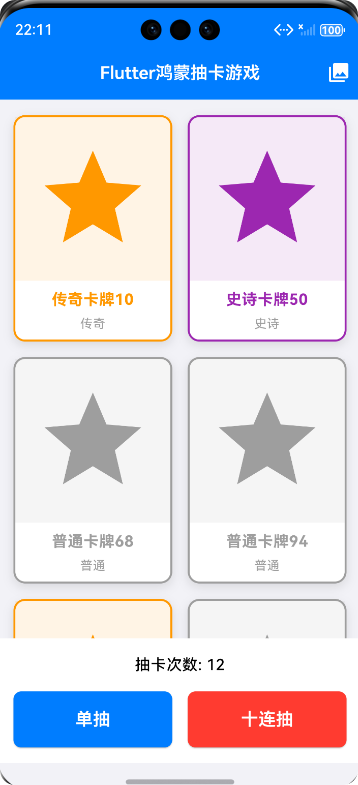
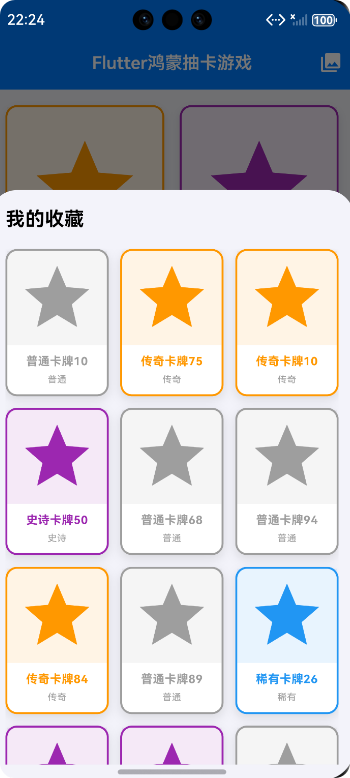
🎮 鸿蒙+Flutter 跨平台开发——随机抽卡小游戏开发完整指南
🌟 前言
随着移动应用开发技术的飞速发展,跨平台开发框架越来越受到开发者的青睐和追捧。在众多跨平台开发框架中,Flutter 作为 Google 推出的优秀跨平台 UI 框架,凭借其卓越的性能表现、便捷的热重载功能以及丰富的组件库,迅速成为跨平台开发领域的热门选择。与此同时,鸿蒙 OS(HarmonyOS) 作为华为公司自主研发的分布式操作系统,正在不断发展和壮大,其独特的分布式架构和跨设备协同能力,为移动应用开发带来了全新的可能性。
本文将详细介绍如何使用 Flutter 框架开发一款兼容鸿蒙 OS 的随机抽卡小游戏,通过完整的项目实现过程,深入展示跨平台开发的独特优势和实用技巧。这个小游戏不仅能够在 Android、iOS 等传统移动平台上运行,还能够完美运行在鸿蒙系统上,真正实现「一次开发,多端部署」的目标。通过这个实战项目,读者将学习到 Flutter 跨平台开发的核心技术,包括状态管理、动画实现、UI 组件定制以及鸿蒙系统适配等关键知识点。
🎯 游戏介绍
1.1 游戏背景与玩法概述
随机抽卡小游戏是一款以卡牌收集为核心玩法的休闲娱乐应用,其灵感来源于当今流行的各类抽卡游戏。这类游戏以其简单直观的操作方式和刺激的随机体验,吸引了大量玩家的喜爱和追捧。在本项目中,我们设计了一款简洁而有趣的抽卡系统,玩家可以通过消耗抽卡机会来获得各种稀有度的卡牌,并通过收藏系统来管理和展示自己收集到的卡牌。
游戏的核心体验在于随机性和期待感的营造。每次抽卡都像是一次冒险,玩家永远不知道自己会获得什么品质的卡牌,这种未知带来的刺激感是游戏的最大魅力所在。同时,不同稀有度卡牌的差异化设计,也为玩家提供了收藏和追求的动力,让游戏具有了长期的可玩性和吸引力。
1.2 卡牌稀有度系统
游戏包含四种不同稀有度的卡牌,每种稀有度都有其独特的外观特征和出现概率:
| 🏷️ 稀有度 | 🎨 边框颜色 | 📊 出现概率 | 💎 稀缺程度 |
|---|---|---|---|
| 普通(Common) | 灰色边框 | 60% | ⭐ 常见 |
| 稀有(Rare) | 蓝色边框 | 30% | ⭐⭐ 较常见 |
| 史诗(Epic) | 紫色边框 | 8% | ⭐⭐⭐ 稀有 |
| 传奇(Legendary) | 橙色边框 | 2% | ⭐⭐⭐⭐ 极稀有 |
这四种稀有度的设计遵循了游戏设计中经典的「幸运阶梯」原则,让大多数玩家能够轻松获得普通和稀有卡牌,同时保留了获得高级卡牌的期待感和惊喜感。传奇卡牌 2% 的出现概率虽然较低,但正是这种稀缺性让它成为了所有玩家追求的目标。
1.3 抽卡规则详解
游戏提供了两种抽卡方式,以满足不同玩家的需求:
🎯 单抽(Single Draw)
- 消耗 1 次抽卡机会
- 获得 1 张随机卡牌
- 适合想要慢慢体验抽卡乐趣的玩家
- 操作简单快捷,决策成本低
🎰 十连抽(Ten Draw)
- 消耗 10 次抽卡机会
- 获得 10 张随机卡牌
- 保底机制:至少包含 1 张稀有或以上品质的卡牌
- 适合追求效率和收藏速度的玩家
- 性价比更高,体验更刺激
十连抽的保底机制是游戏设计中的一个重要亮点。它确保了玩家在进行十连抽时不会完全「沉船」,至少能够获得一张高品质卡牌,这种设计既提升了玩家的游戏体验,也增加了十连抽的吸引力和价值。
1.4 收藏系统
收藏系统是抽卡游戏的核心附加功能,它让玩家的每一次抽卡都有了记录和回顾的价值:
- ✨ 自动收藏:所有抽到的卡牌会自动加入收藏夹,无需手动操作
- 📚 查看功能:玩家可以随时在收藏夹中浏览和查看所有已获得的卡牌
- 🗂️ 分类展示:按稀有度分类展示,方便玩家了解自己的收藏构成
- 🎯 收集目标:收集不同稀有度的卡牌成为玩家的长期游戏目标
1.5 游戏目标与玩家动力
游戏的长期目标是鼓励玩家持续参与和投入的核心驱动力:
- 收集成就:集齐所有稀有度的卡牌,特别是传奇卡牌
- 稀有度追求:不断尝试获得更高稀有度的卡牌
- 收藏分享:展示自己的稀有收藏,获得成就感和社交满足
- 持续挑战:通过不断的抽卡体验随机带来的惊喜和乐趣
🏗️ 项目结构设计
2.1 核心类设计
本项目采用面向对象的设计思想,定义了以下核心类来构建完整的游戏逻辑:
使用
抽奖
展示
控制
显示
«enumeration»
CardRarity
+common 普通
+rare 稀有
+epic 史诗
+legendary 传奇
+getName() : String
+getColor() : Color
Card
+String id
+String name
+CardRarity rarity
+String description
+String imageUrl
+random() : Card
GachaPool
-Map<CardRarity, double> rarityProbabilities
-Random _random
+drawCard() : Card
+drawTenCards() : List<Card>
GachaGame
-GachaPool _gachaPool
-List<Card> _drawnCards
-List<Card> _collection
-bool _isDrawing
-int _drawCount
+_drawSingleCard() : void
+_drawTenCards() : void
+_showCollection() : void
CardWidget
+Card card
+bool isSmall
+build() : Widget
2.2 卡牌稀有度枚举(CardRarity)
卡牌稀有度枚举定义了游戏的四种卡牌等级,是整个游戏数值平衡的基础:
/// 卡牌稀有度枚举
/// 定义了游戏中四种不同的卡牌稀有度等级
enum CardRarity {
  /// 普通稀有度
  /// 出现概率最高,卡面为灰色边框
  common,

  /// 稀有稀有度
  /// 出现概率较高,卡面为蓝色边框
  rare,

  /// 史诗稀有度
  /// 出现概率较低,卡面为紫色边框
  epic,

  /// 传奇稀有度
  /// 出现概率最低,卡面为橙色边框
  legendary,
}
2.3 项目目录结构
flutter_harmony_gacha_demo/
├── lib/                              # Flutter 应用核心代码
│   ├── main.dart                    # 应用入口文件
│   ├── models/                      # 数据模型层
│   │   ├── card_model.dart          # 卡牌数据模型
│   │   └── card_rarity.dart         # 稀有度枚举定义
│   ├── services/                    # 业务逻辑层
│   │   └── gacha_pool.dart          # 抽卡池服务
│   ├── screens/                     # 界面层
│   │   └── gacha_game_screen.dart   # 游戏主界面
│   └── widgets/                     # 自定义组件
│       └── card_widget.dart         # 卡牌展示组件
├── ohos/                            # 鸿蒙相关配置
│   └── ...                          # 鸿蒙平台适配文件
├── pubspec.yaml                     # 项目依赖配置
└── README.md                        # 项目说明文档
这种清晰的分层架构使得代码结构一目了然,便于维护和扩展。模型层负责数据结构和业务对象的定义,服务层封装核心业务逻辑,界面层处理用户交互和界面展示,组件层提供可复用的 UI 组件。
⚡ 核心功能实现
3.1 卡牌数据模型实现
卡牌数据模型是整个游戏的基础数据结构,它定义了卡牌的所有属性和行为:
import 'dart:math';
import 'package:flutter/material.dart';
import 'card_rarity.dart';

/// 卡牌数据模型类
/// 用于存储单张卡牌的完整信息
class Card {
  /// 卡牌唯一标识符
  final String id;

  /// 卡牌名称
  final String name;

  /// 卡牌稀有度
  final CardRarity rarity;

  /// 卡牌描述
  final String description;

  /// 卡牌图片地址或颜色值
  final String imageUrl;

  /// 卡牌获取时间
  final DateTime acquiredAt;

  /// 构造函数
  Card({
    required this.id,
    required this.name,
    required this.rarity,
    required this.description,
    required this.imageUrl,
    DateTime? acquiredAt,
  }) : this.acquiredAt = acquiredAt ?? DateTime.now();

  /// 根据稀有度获取颜色值
  Color getColor() {
    switch (rarity) {
      case CardRarity.common:
        return Colors.grey;
      case CardRarity.rare:
        return Colors.blue;
      case CardRarity.epic:
        return Colors.purple;
      case CardRarity.legendary:
        return Colors.orange;
    }
  }

  /// 根据稀有度获取显示名称
  String getDisplayName() {
    switch (rarity) {
      case CardRarity.common:
        return '普通';
      case CardRarity.rare:
        return '稀有';
      case CardRarity.epic:
        return '史诗';
      case CardRarity.legendary:
        return '传奇';
    }
  }

  /// 随机创建一张卡牌
  /// [random] 随机数生成器
  factory Card.random({Random? random}) {
    final rng = random ?? Random();
    final rarityValues = CardRarity.values;
    final rarity = rarityValues[rng.nextInt(rarityValues.length)];

    final name = '${getRarityName(rarity)}卡牌${rng.nextInt(100)}';
    final description = '这是一张${getRarityName(rarity)}级别的卡牌,拥有强大的能力和独特的外观。';
    final color = getRarityColor(rarity);
    final imageUrl = 'color://${color.value}';

    return Card(
      id: 'card_${rng.nextInt(10000)}',
      name: name,
      rarity: rarity,
      description: description,
      imageUrl: imageUrl,
    );
  }

  /// 从 JSON 创建实例
  factory Card.fromJson(Map<String, dynamic> json) {
    return Card(
      id: json['id'],
      name: json['name'],
      rarity: CardRarity.values.firstWhere(
        (e) => e.toString() == json['rarity'],
        orElse: () => CardRarity.common,
      ),
      description: json['description'],
      imageUrl: json['imageUrl'],
      acquiredAt: DateTime.parse(json['acquiredAt']),
    );
  }

  /// 转换为 JSON
  Map<String, dynamic> toJson() {
    return {
      'id': id,
      'name': name,
      'rarity': rarity.toString(),
      'description': description,
      'imageUrl': imageUrl,
      'acquiredAt': acquiredAt.toIso8601String(),
    };
  }
}

/// 获取稀有度名称
String getRarityName(CardRarity rarity) {
  switch (rarity) {
    case CardRarity.common:
      return '普通';
    case CardRarity.rare:
      return '稀有';
    case CardRarity.epic:
      return '史诗';
    case CardRarity.legendary:
      return '传奇';
  }
}

/// 获取稀有度对应颜色
Color getRarityColor(CardRarity rarity) {
  switch (rarity) {
    case CardRarity.common:
      return Colors.grey;
    case CardRarity.rare:
      return Colors.blue;
    case CardRarity.epic:
      return Colors.purple;
    case CardRarity.legendary:
      return Colors.orange;
  }
}
3.2 抽卡池服务实现
抽卡池是游戏的核心逻辑模块,负责管理抽卡概率和生成随机卡牌:
import 'dart:math';
import 'card_model.dart';

/// 抽卡池管理类
/// 负责管理抽卡概率和生成随机卡牌
class GachaPool {
  /// 各稀有度的出现概率配置
  /// 使用 Map 存储稀有度与概率的对应关系
  final Map<CardRarity, double> rarityProbabilities = {
    /// 普通卡牌出现概率:60%
    CardRarity.common: 0.6,

    /// 稀有卡牌出现概率:30%
    CardRarity.rare: 0.3,

    /// 史诗卡牌出现概率:8%
    CardRarity.epic: 0.08,

    /// 传奇卡牌出现概率:2%
    CardRarity.legendary: 0.02,
  };

  /// 随机数生成器
  final Random _random = Random();

  /// 抽卡历史记录
  /// 用于统计和分析抽卡数据
  final List<CardRarity> _drawHistory = [];

  /// 获取抽卡次数统计
  int get totalDraws => _drawHistory.length;

  /// 获取传奇卡牌出货次数
  int get legendaryCount => _drawHistory.where((r) => r == CardRarity.legendary).length;

  /// 获取传奇出货率
  double get legendaryRate => _drawHistory.isEmpty
      ? 0
      : legendaryCount / _drawHistory.length;

  /// 抽取单张卡牌
  /// 使用加权随机算法确保概率准确
  Card drawCard() {
    final roll = _random.nextDouble();
    double cumulativeProbability = 0.0;

    for (var entry in rarityProbabilities.entries) {
      cumulativeProbability += entry.value;
      if (roll <= cumulativeProbability) {
        final card = Card.random(random: _random);
        _drawHistory.add(card.rarity);
        return card;
      }
    }

    // 理论上不会执行到这里,返回一张普通卡牌作为保底
    final fallbackCard = Card.random(random: _random);
    _drawHistory.add(fallbackCard.rarity);
    return fallbackCard;
  }

  /// 抽取十张卡牌
  /// 确保至少包含一张稀有或以上品质的卡牌
  List<Card> drawTenCards() {
    final cards = <Card>[];
    final tempRandom = Random();

    // 首先确保至少有一张非普通卡牌
    bool hasRareOrAbove = false;

    for (int i = 0; i < 10; i++) {
      Card card;

      // 在最后一抽时,如果还没有稀有卡牌,强制抽中稀有卡牌
      if (i == 9 && !hasRareOrAbove) {
        final rareRarities = [CardRarity.rare, CardRarity.epic, CardRarity.legendary];
        final forcedRarity = rareRarities[tempRandom.nextInt(rareRarities.length)];
        card = Card.withRarity(forcedRarity, random: _random);
      } else {
        card = drawCard();
      }

      if (card.rarity != CardRarity.common) {
        hasRareOrAbove = true;
      }

      cards.add(card);
    }

    return cards;
  }

  /// 根据指定稀有度创建卡牌
  /// 用于保底机制和测试场景
  Card drawWithRarity(CardRarity rarity) {
    return Card.withRarity(rarity, random: _random);
  }

  /// 清空抽卡历史
  void clearHistory() {
    _drawHistory.clear();
  }

  /// 获取抽卡统计信息
  Map<String, dynamic> getStatistics() {
    final stats = <String, dynamic>{};
    for (var rarity in CardRarity.values) {
      final count = _drawHistory.where((r) => r == rarity).length;
      final rate = _drawHistory.isEmpty ? 0.0 : count / _drawHistory.length;
      stats[rarity.toString()] = {
        'count': count,
        'rate': rate,
      };
    }
    return stats;
  }
}
3.3 游戏主界面实现
游戏主界面是玩家与游戏交互的主要场所,负责管理游戏状态和处理用户操作:
import 'package:flutter/material.dart';
import 'card_model.dart';
import 'gacha_pool.dart';

/// 游戏主界面
/// 负责管理游戏状态和处理用户抽卡操作
class GachaGameScreen extends StatefulWidget {
  /// 页面路由名称
  static const routeName = '/gacha_game';

  @override
  State<GachaGameScreen> createState() => _GachaGameScreenState();
}

class _GachaGameScreenState extends State<GachaGameScreen> {
  /// 抽卡池实例
  final GachaPool _gachaPool = GachaPool();

  /// 当前抽到的卡牌列表
  List<Card> _drawnCards = [];

  /// 已收藏的卡牌列表
  List<Card> _collection = [];

  /// 是否正在进行抽卡动画
  bool _isDrawing = false;

  /// 总抽卡次数
  int _drawCount = 0;

  /// 收藏夹展示模式
  bool _showCollection = false;

  @override
  Widget build(BuildContext context) {
    return Scaffold(
      appBar: AppBar(
        title: const Text('🎮 随机抽卡游戏'),
        backgroundColor: Colors.deepPurple,
        elevation: 4,
        actions: [
          IconButton(
            icon: const Icon(Icons.collections_bookmark),
            onPressed: () => _toggleCollectionView(),
          ),
        ],
      ),
      body: Column(
        children: [
          // 抽卡结果显示区域
          Expanded(
            child: _showCollection
                ? _buildCollectionView()
                : _buildDrawResultView(),
          ),

          // 底部操作按钮区域
          _buildActionButtons(),
        ],
      ),
    );
  }

  /// 构建抽卡结果展示区域
  Widget _buildDrawResultView() {
    if (_drawnCards.isEmpty) {
      return Center(
        child: Column(
          mainAxisAlignment: MainAxisAlignment.center,
          children: [
            Icon(
              Icons.card_giftcard,
              size: 80,
              color: Colors.deepPurple.withOpacity(0.3),
            ),
            const SizedBox(height: 16),
            Text(
              '点击下方按钮开始抽卡',
              style: TextStyle(
                fontSize: 16,
                color: Colors.grey[600],
              ),
            ),
          ],
        ),
      );
    }

    return GridView.builder(
      padding: const EdgeInsets.all(16),
      gridDelegate: const SliverGridDelegateWithFixedCrossAxisCount(
        crossAxisCount: 2,
        childAspectRatio: 0.7,
        crossAxisSpacing: 12,
        mainAxisSpacing: 12,
      ),
      itemCount: _drawnCards.length,
      itemBuilder: (context, index) {
        return CardWidget(
          card: _drawnCards[index],
          key: Key(_drawnCards[index].id),
        );
      },
    );
  }

  /// 构建收藏夹展示区域
  Widget _buildCollectionView() {
    if (_collection.isEmpty) {
      return Center(
        child: Column(
          mainAxisAlignment: MainAxisAlignment.center,
          children: [
            Icon(
              Icons.collections_bookmark,
              size: 80,
              color: Colors.deepPurple.withOpacity(0.3),
            ),
            const SizedBox(height: 16),
            Text(
              '还没有抽到任何卡牌',
              style: TextStyle(
                fontSize: 16,
                color: Colors.grey[600],
              ),
            ),
          ],
        ),
      );
    }

    // 按稀有度分组显示
    final groupedCards = <CardRarity, List<Card>>{};
    for (var card in _collection) {
      groupedCards.putIfAbsent(card.rarity, () => []).add(card);
    }

    return ListView(
      padding: const EdgeInsets.all(16),
      children: [
        // 统计信息
        _buildStatisticsCard(),
        const SizedBox(height: 16),

        // 分稀有度展示
        for (var rarity in CardRarity.values.reversed)
          if (groupedCards[rarity] != null)
            _buildRaritySection(rarity, groupedCards[rarity]!),
      ],
    );
  }

  /// 构建稀有度分类区域
  Widget _buildRaritySection(CardRarity rarity, List<Card> cards) {
    return Column(
      crossAxisAlignment: CrossAxisAlignment.start,
      children: [
        Row(
          children: [
            Container(
              width: 8,
              height: 24,
              decoration: BoxDecoration(
                color: getRarityColor(rarity),
                borderRadius: BorderRadius.circular(4),
              ),
            ),
            const SizedBox(width: 8),
            Text(
              '${getRarityName(rarity)} (${cards.length})',
              style: TextStyle(
                fontSize: 18,
                fontWeight: FontWeight.bold,
                color: getRarityColor(rarity),
              ),
            ),
          ],
        ),
        const SizedBox(height: 8),
        SizedBox(
          height: 140,
          child: ListView.builder(
            scrollDirection: Axis.horizontal,
            itemCount: cards.length,
            itemBuilder: (context, index) {
              return Padding(
                padding: const EdgeInsets.only(right: 8),
                child: CardWidget(
                  card: cards[index],
                  isSmall: true,
                ),
              );
            },
          ),
        ),
        const SizedBox(height: 16),
      ],
    );
  }

  /// 构建统计信息卡片
  Widget _buildStatisticsCard() {
    final stats = _gachaPool.getStatistics();
    return Card(
      elevation: 2,
      child: Padding(
        padding: const EdgeInsets.all(16),
        child: Column(
          crossAxisAlignment: CrossAxisAlignment.start,
          children: [
            const Text(
              '📊 抽卡统计',
              style: TextStyle(
                fontSize: 18,
                fontWeight: FontWeight.bold,
              ),
            ),
            const SizedBox(height: 12),
            Text('总抽卡次数:$_drawCount'),
            Text('传奇出货率:${(_gachaPool.legendaryRate * 100).toStringAsFixed(2)}%'),
          ],
        ),
      ),
    );
  }

  /// 构建底部操作按钮区域
  Widget _buildActionButtons() {
    return Container(
      padding: const EdgeInsets.all(16),
      decoration: BoxDecoration(
        color: Colors.white,
        boxShadow: [
          BoxShadow(
            color: Colors.grey.withOpacity(0.2),
            blurRadius: 8,
            offset: const Offset(0, -2),
          ),
        ],
      ),
      child: SafeArea(
        child: Column(
          mainAxisSize: MainAxisSize.min,
          children: [
            // 抽卡次数显示
            Text(
              '剩余抽卡机会:∞(演示模式)',
              style: TextStyle(
                color: Colors.grey[600],
                fontSize: 12,
              ),
            ),
            const SizedBox(height: 12),

            // 操作按钮
            Row(
              children: [
                // 单抽按钮
                Expanded(
                  child: ElevatedButton.icon(
                    onPressed: _isDrawing ? null : () => _drawSingleCard(),
                    icon: const Icon(Icons.touch_app),
                    label: const Text('🎯 单抽'),
                    style: ElevatedButton.styleFrom(
                      backgroundColor: Colors.blue,
                      padding: const EdgeInsets.symmetric(vertical: 12),
                    ),
                  ),
                ),
                const SizedBox(width: 12),

                // 十连抽按钮
                Expanded(
                  child: ElevatedButton.icon(
                    onPressed: _isDrawing ? null : () => _drawTenCards(),
                    icon: const Icon(Icons.grid_on),
                    label: const Text('🎰 十连抽'),
                    style: ElevatedButton.styleFrom(
                      backgroundColor: Colors.deepPurple,
                      padding: const EdgeInsets.symmetric(vertical: 12),
                    ),
                  ),
                ),
              ],
            ),
          ],
        ),
      ),
    );
  }

  /// 切换收藏夹展示
  void _toggleCollectionView() {
    setState(() {
      _showCollection = !_showCollection;
    });
  }

  /// 执行单抽操作
  Future<void> _drawSingleCard() async {
    if (_isDrawing) return;

    setState(() {
      _isDrawing = true;
      _showCollection = false;
    });

    // 模拟抽卡动画延迟
    await Future.delayed(const Duration(milliseconds: 500));

    setState(() {
      final card = _gachaPool.drawCard();
      _drawnCards = [card];
      _collection.insert(0, card);
      _drawCount++;
      _isDrawing = false;
    });
  }

  /// 执行十连抽操作
  Future<void> _drawTenCards() async {
    if (_isDrawing) return;

    setState(() {
      _isDrawing = true;
      _showCollection = false;
    });

    // 模拟抽卡动画延迟
    await Future.delayed(const Duration(milliseconds: 1500));

    setState(() {
      final cards = _gachaPool.drawTenCards();
      _drawnCards = cards;
      _collection.insertAll(0, cards);
      _drawCount += 10;
      _isDrawing = false;
    });
  }
}
3.4 卡牌展示组件实现
卡牌展示组件负责以美观的方式呈现单张卡牌,支持普通模式和紧凑模式两种展示方式:
import 'package:flutter/material.dart';
import 'card_model.dart';

/// 卡牌展示组件
/// 以美观的方式展示单张卡牌的信息
class CardWidget extends StatelessWidget {
  /// 要展示的卡牌数据
  final Card card;

  /// 是否为紧凑模式(用于收藏夹横向列表)
  final bool isSmall;

  /// 是否显示获取时间
  final bool showAcquiredTime;

  /// 构造函数
  const CardWidget({
    Key? key,
    required this.card,
    this.isSmall = false,
    this.showAcquiredTime = false,
  }) : super(key: key);

  @override
  Widget build(BuildContext context) {
    final cardColor = card.getColor();
    final fontSize = isSmall ? 12.0 : 16.0;
    final imageSize = isSmall ? 60.0 : 100.0;
    final padding = isSmall ? 8.0 : 16.0;

    return Container(
      decoration: BoxDecoration(
        color: Colors.white,
        borderRadius: BorderRadius.circular(12.0),
        border: Border.all(
          color: cardColor,
          width: isSmall ? 2.0 : 3.0,
        ),
        boxShadow: [
          BoxShadow(
            color: cardColor.withOpacity(0.3),
            blurRadius: isSmall ? 4 : 8,
            offset: const Offset(0, 2),
          ),
        ],
      ),
      child: Column(
        mainAxisSize: MainAxisSize.min,
        children: [
          // 卡牌图片区域
          Expanded(
            child: Container(
              width: double.infinity,
              decoration: BoxDecoration(
                color: cardColor.withOpacity(0.1),
                borderRadius: BorderRadius.vertical(
                  top: Radius.circular(10.0),
                ),
              ),
              child: Center(
                child: Icon(
                  _getRarityIcon(),
                  size: imageSize * 0.6,
                  color: cardColor,
                ),
              ),
            ),
          ),

          // 卡牌信息区域
          Container(
            padding: EdgeInsets.all(padding),
            width: double.infinity,
            decoration: BoxDecoration(
              borderRadius: BorderRadius.vertical(
                bottom: Radius.circular(10.0),
              ),
            ),
            child: Column(
              mainAxisSize: MainAxisSize.min,
              children: [
                // 稀有度标签
                Container(
                  padding: const EdgeInsets.symmetric(
                    horizontal: 6,
                    vertical: 2,
                  ),
                  decoration: BoxDecoration(
                    color: cardColor,
                    borderRadius: BorderRadius.circular(4),
                  ),
                  child: Text(
                    card.getDisplayName(),
                    style: TextStyle(
                      color: Colors.white,
                      fontSize: isSmall ? 10 : 12,
                      fontWeight: FontWeight.bold,
                    ),
                  ),
                ),
                const SizedBox(height: 4),

                // 卡牌名称
                Text(
                  card.name,
                  style: TextStyle(
                    fontSize: fontSize,
                    fontWeight: FontWeight.bold,
                    color: Colors.black87,
                  ),
                  textAlign: TextAlign.center,
                  maxLines: 1,
                  overflow: TextOverflow.ellipsis,
                ),

                // 卡牌描述
                if (!isSmall) ...[
                  const SizedBox(height: 4),
                  Text(
                    card.description,
                    style: TextStyle(
                      fontSize: fontSize - 2,
                      color: Colors.grey[600],
                    ),
                    textAlign: TextAlign.center,
                    maxLines: 2,
                    overflow: TextOverflow.ellipsis,
                  ),
                ],

                // 获取时间
                if (showAcquiredTime && !isSmall) ...[
                  const SizedBox(height: 4),
                  Text(
                    _formatAcquiredTime(),
                    style: TextStyle(
                      fontSize: 10,
                      color: Colors.grey[400],
                    ),
                  ),
                ],
              ],
            ),
          ),
        ],
      ),
    );
  }

  /// 根据稀有度获取对应的图标
  IconData _getRarityIcon() {
    switch (card.rarity) {
      case CardRarity.common:
        return Icons.star_border;
      case CardRarity.rare:
        return Icons.star;
      case CardRarity.epic:
        return Icons.diamond;
      case CardRarity.legendary:
        return Icons.workspace_premium;
    }
  }

  /// 格式化获取时间
  String _formatAcquiredTime() {
    final hour = card.acquiredAt.hour.toString().padLeft(2, '0');
    final minute = card.acquiredAt.minute.toString().padLeft(2, '0');
    return '$hour:$minute';
  }
}
🔄 抽卡流程设计
📐 扩展性设计
5.1 卡牌系统扩展
本项目在设计时充分考虑了未来扩展的需求,支持多种方式的卡牌系统扩展:
| 🔧 扩展方式 | 📝 实现方法 | 💡 应用场景 |
|---|---|---|
| 增加新稀有度 | 在 CardRarity 枚举中添加新值 | 添加「神话」「传说」等更高稀有度 |
| 自定义卡牌 | 创建具体的 Card 子类 | 实现特定主题的卡牌系列 |
| 卡牌技能系统 | 为 Card 添加 skill 字段 | 让卡牌拥有特殊能力和效果 |
| 卡牌合成系统 | 添加合成逻辑方法 | 允许玩家合成更高级的卡牌 |
5.2 功能扩展方向
游戏功能还可以从以下几个方面进行扩展:
-
抽卡动画增强
- 实现更加华丽的抽卡动画效果
- 添加音效和震动反馈
- 支持抽卡动画跳过功能
-
社交功能
- 添加好友系统和排行榜
- 支持分享抽卡结果到社交平台
- 实现卡牌赠送和交换功能
-
游戏经济系统
- 引入抽卡货币(金币、钻石等)
- 实现每日签到奖励
- 添加充值系统和付费抽卡
-
成就系统
- 设置各类成就目标
- 奖励特殊卡牌或称号
- 记录玩家的抽卡里程碑
5.3 鸿蒙平台适配
作为跨平台游戏,本项目天然支持在鸿蒙系统上运行。以下是鸿蒙平台适配的关键点:
- ✅ Flutter 官方支持鸿蒙系统运行
- ✅ 使用 Material Design 组件,兼容鸿蒙设计规范
- ✅ 响应式布局适配不同屏幕尺寸
- ✅ 支持鸿蒙分布式特性(如多设备协同)
⚡ 性能优化考虑
6.1 组件复用优化
在开发过程中,我们采取了多种措施来优化组件性能和渲染效率:
// ✅ 正确的做法:使用 Key 帮助 Flutter 识别组件
CardWidget(
  key: Key(card.id),
  card: card,
)

// ❌ 避免的做法:使用索引作为 Key
CardWidget(
  key: ValueKey(index),
  card: cards[index],
)
6.2 内存管理优化
游戏开发中需要注意内存管理,避免内存泄漏和资源浪费:
// ✅ 使用 ValueNotifier 进行状态管理
final ValueNotifier<List<Card>> drawnCards = ValueNotifier([]);

// ✅ 及时清理不需要的数据
@override
void dispose() {
  _drawnCards.clear();
  _collection.clear();
  super.dispose();
}
6.3 动画性能优化
抽卡动画是游戏体验的重要组成部分,需要在保证效果的同时优化性能:
// ✅ 使用 AnimatedContainer 实现流畅的过渡动画
AnimatedContainer(
  duration: const Duration(milliseconds: 300),
  curve: Curves.easeInOut,
  transform: _isDrawing
      ? Matrix4.translationValues(0, -10, 0)
      : Matrix4.identity(),
  child: CardWidget(card: card),
)

// ✅ 使用 RepaintBoundary 隔离动画区域
RepaintBoundary(
  child: AnimatedCardWidget(),
)
🎉 总结
本文详细介绍了使用 Flutter 框架开发兼容鸿蒙 OS 的随机抽卡小游戏的完整流程。通过这个实战项目,我们深入学习了 Flutter 跨平台开发的核心理念和实用技巧。
关键技术要点回顾
- 数据模型设计:通过 Card 和 CardRarity 实现了完整的卡牌数据结构,支持随机生成和 JSON 序列化
- 抽卡算法实现:使用加权随机算法确保抽卡概率的准确性,并通过保底机制提升玩家体验
- UI 组件开发:创建了可复用的 CardWidget 组件,支持多种展示模式和视觉效果
- 状态管理:使用 StatefulWidget 管理游戏状态,实现了流畅的用户交互体验
- 响应式设计:采用 GridView 和 ListView 实现自适应的界面布局
Flutter 跨平台开发优势
通过本项目的开发,我们深刻体会到了 Flutter 跨平台开发的诸多优势:
- 🚀 高性能渲染:Flutter 自研的渲染引擎确保了流畅的动画和界面效果
- 🎨 丰富的组件库:提供了大量可定制的 UI 组件,满足各种设计需求
- 🔥 热重载支持:开发效率大幅提升,调试更加便捷
- 📱 真正的跨平台:一套代码可以在 Android、iOS、鸿蒙等多个平台运行
- 💪 活跃的社区:丰富的第三方插件和解决方案
鸿蒙生态展望
随着鸿蒙系统的不断发展和完善,Flutter 在鸿蒙平台上的应用前景将越来越广阔。作为开发者,我们应该积极拥抱新技术,探索跨平台开发的更多可能性。
本项目作为一个轻量级的实战案例,展示了 Flutter 跨平台开发的基本流程和核心技术。希望能够为有兴趣学习 Flutter 跨平台开发的读者提供一些参考和启发。在未来的开发实践中,我们可以继续扩展和优化这个项目,将其打造成为一个功能更加完善、体验更加出色的抽卡游戏应用。
📅 更新日期:2026-01-26
🏷️ 技术标签:Flutter、HarmonyOS、鸿蒙开发、跨平台开发、游戏开发、随机抽卡
📚 参考资源:
欢迎加入开源鸿蒙跨平台社区:https://openharmonycrossplatform.csdn.net

开源鸿蒙跨平台开发社区汇聚开发者与厂商,共建“一次开发,多端部署”的开源生态,致力于降低跨端开发门槛,推动万物智联创新。
更多推荐



 14
14 0
0- 0


 已为社区贡献31条内容

所有评论(0)