Flutter 框架跨平台鸿蒙开发 - 打造带账单分摊功能的记账本,支持多人AA与智能结算
数据建模:设计灵活的数据结构,同时支持普通记账和分摊场景分摊算法:通过余额计算和贪心策略,生成最优结算方案列表分组:使用 Map 按日期分组,配合 SliverList 实现分组列表滑动操作:Dismissible 组件实现滑动删除本地存储:SharedPreferences + JSON 序列化实现数据持久化账单分摊功能特别适合朋友聚餐、合租、旅行等多人共同消费的场景,自动计算谁该给谁转多少钱,
Flutter实战:打造带账单分摊功能的记账本,支持多人AA与智能结算
聚餐、旅行、合租…生活中经常需要多人分摊费用。本文将用Flutter实现一款功能完善的记账本应用,不仅支持日常收支记录,还能智能计算多人分摊和最优结算方案。
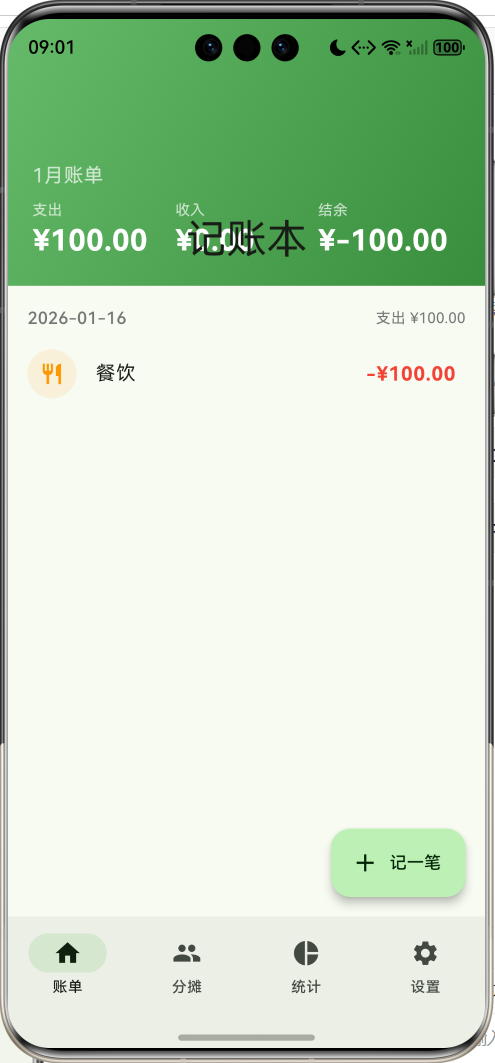
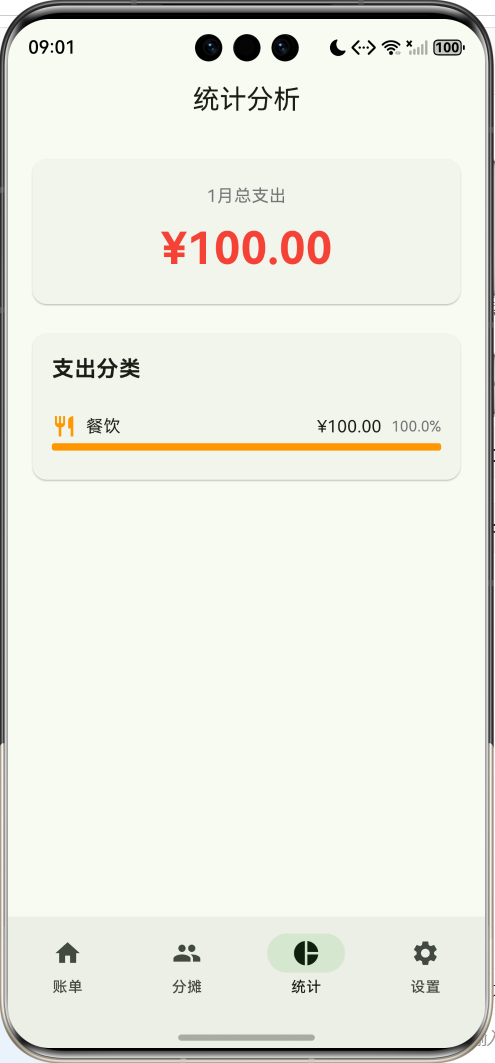
效果预览图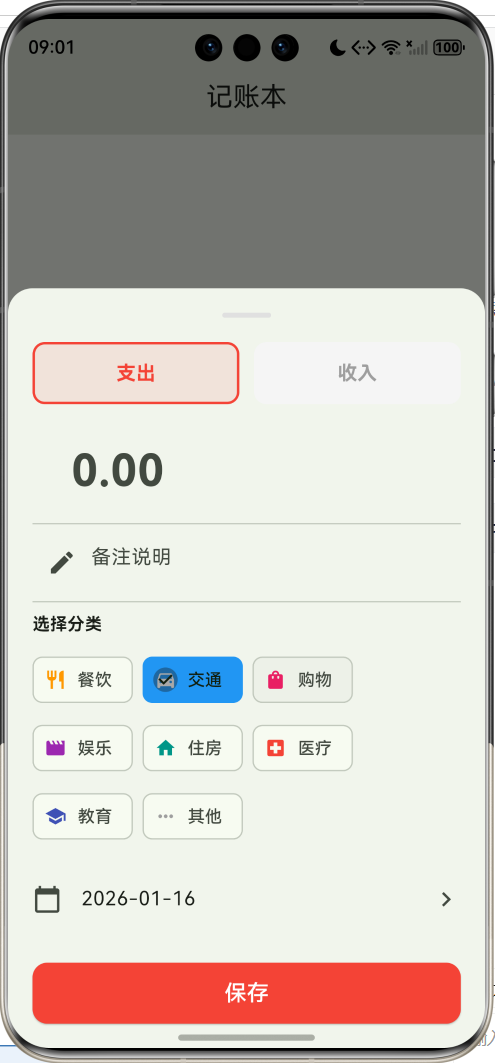


功能特性
- 💰 收支记录:支持多种分类的收入/支出记录
- 👥 多人分摊:指定付款人和参与者,自动计算人均费用
- 🧮 智能结算:自动生成最优还款方案
- 📊 统计分析:按分类展示支出占比
- 💾 本地存储:数据持久化到本地
应用架构
数据模型设计
账单记录
每条账单记录包含基本信息和分摊信息:
class BillRecord {
  final String id;           // 唯一标识
  final String title;        // 标题/备注
  final double amount;       // 金额
  final String category;     // 分类
  final bool isExpense;      // 是否支出
  final DateTime date;       // 日期
  final List<String> participants;  // 参与分摊的人
  final String payer;        // 付款人

  BillRecord({
    required this.id,
    required this.title,
    required this.amount,
    required this.category,
    required this.isExpense,
    required this.date,
    this.participants = const [],
    this.payer = '',
  });

  // JSON序列化
  Map<String, dynamic> toJson() => {
    'id': id,
    'title': title,
    'amount': amount,
    'category': category,
    'isExpense': isExpense,
    'date': date.toIso8601String(),
    'participants': participants,
    'payer': payer,
  };

  factory BillRecord.fromJson(Map<String, dynamic> json) => BillRecord(
    id: json['id'],
    title: json['title'],
    amount: json['amount'],
    category: json['category'],
    isExpense: json['isExpense'],
    date: DateTime.parse(json['date']),
    participants: List<String>.from(json['participants'] ?? []),
    payer: json['payer'] ?? '',
  );
}
分类数据
预定义支出和收入的分类,每个分类包含名称、图标和颜色:
class CategoryData {
  static const List<Map<String, dynamic>> expenseCategories = [
    {'name': '餐饮', 'icon': Icons.restaurant, 'color': Colors.orange},
    {'name': '交通', 'icon': Icons.directions_car, 'color': Colors.blue},
    {'name': '购物', 'icon': Icons.shopping_bag, 'color': Colors.pink},
    {'name': '娱乐', 'icon': Icons.movie, 'color': Colors.purple},
    {'name': '住房', 'icon': Icons.home, 'color': Colors.teal},
    {'name': '医疗', 'icon': Icons.local_hospital, 'color': Colors.red},
    {'name': '教育', 'icon': Icons.school, 'color': Colors.indigo},
    {'name': '其他', 'icon': Icons.more_horiz, 'color': Colors.grey},
  ];

  static const List<Map<String, dynamic>> incomeCategories = [
    {'name': '工资', 'icon': Icons.work, 'color': Colors.green},
    {'name': '奖金', 'icon': Icons.card_giftcard, 'color': Colors.amber},
    {'name': '投资', 'icon': Icons.trending_up, 'color': Colors.blue},
    {'name': '兼职', 'icon': Icons.laptop, 'color': Colors.cyan},
    {'name': '其他', 'icon': Icons.more_horiz, 'color': Colors.grey},
  ];
}
分类图标一览:
| 类型 | 分类 | 图标 | 颜色 |
|---|---|---|---|
| 支出 | 餐饮 | 🍽️ | 橙色 |
| 支出 | 交通 | 🚗 | 蓝色 |
| 支出 | 购物 | 🛍️ | 粉色 |
| 支出 | 娱乐 | 🎬 | 紫色 |
| 支出 | 住房 | 🏠 | 青色 |
| 收入 | 工资 | 💼 | 绿色 |
| 收入 | 奖金 | 🎁 | 琥珀色 |
| 收入 | 投资 | 📈 | 蓝色 |
账单分摊算法
核心概念
分摊计算涉及三个关键概念:
余额=实际支付金额−应付金额 余额 = 实际支付金额 - 应付金额 余额=实际支付金额−应付金额
- 余额 > 0:说明多付了,别人欠他钱
- 余额 < 0:说明少付了,他欠别人钱
余额计算
// 计算每个人的收支情况
final Map<String, double> paid = {};     // 每人支付的总额
final Map<String, double> shouldPay = {}; // 每人应付的总额

for (var m in members) {
  paid[m] = 0;
  shouldPay[m] = 0;
}

// 遍历所有分摊记录
for (var r in splitRecords) {
  // 付款人支付了全部金额
  paid[r.payer] = (paid[r.payer] ?? 0) + r.amount;

  // 每个参与者应付的金额(平均分摊)
  final perPerson = r.amount / r.participants.length;
  for (var p in r.participants) {
    shouldPay[p] = (shouldPay[p] ?? 0) + perPerson;
  }
}

// 计算余额
final Map<String, double> balance = {};
for (var m in members) {
  balance[m] = (paid[m] ?? 0) - (shouldPay[m] ?? 0);
}
最优结算算法
结算的目标是让所有人的余额归零,即欠钱的人把钱还给被欠钱的人。
List<Map<String, dynamic>> _calculateSettlements(Map<String, double> balance) {
  final settlements = <Map<String, dynamic>>[];
  final debtors = <String>[];   // 欠钱的人(余额为负)
  final creditors = <String>[]; // 被欠钱的人(余额为正)

  // 分类
  balance.forEach((name, amount) {
    if (amount < -0.01) debtors.add(name);
    if (amount > 0.01) creditors.add(name);
  });

  // 欠钱的人依次还给被欠钱的人
  for (var debtor in debtors) {
    var debt = -(balance[debtor] ?? 0);  // 欠款金额(取正)

    for (var creditor in creditors) {
      if (debt <= 0.01) break;  // 已还清

      var credit = balance[creditor] ?? 0;  // 债权金额
      if (credit <= 0.01) continue;  // 该债权人已收齐

      // 转账金额 = min(欠款, 债权)
      var amount = debt < credit ? debt : credit;

      // 记录结算方案
      settlements.add({
        'from': debtor,
        'to': creditor,
        'amount': amount,
      });

      // 更新余额
      balance[debtor] = (balance[debtor] ?? 0) + amount;
      balance[creditor] = (balance[creditor] ?? 0) - amount;
      debt -= amount;
    }
  }

  return settlements;
}
分摊示例
假设三人聚餐,消费情况如下:
| 项目 | 金额 | 付款人 | 参与者 |
|---|---|---|---|
| 午餐 | ¥300 | 小明 | 小明、小红、小刚 |
| 晚餐 | ¥450 | 小红 | 小明、小红、小刚 |
| 零食 | ¥60 | 小刚 | 小明、小刚 |
计算过程:
小明paid=300,小明should=100+150+30=280小红paid=450,小红should=100+150=250小刚paid=60,小刚should=100+150+30=280 \begin{aligned} 小明_{paid} &= 300, \quad 小明_{should} = 100 + 150 + 30 = 280 \\ 小红_{paid} &= 450, \quad 小红_{should} = 100 + 150 = 250 \\ 小刚_{paid} &= 60, \quad 小刚_{should} = 100 + 150 + 30 = 280 \end{aligned} 小明paid小红paid小刚paid=300,小明should=100+150+30=280=450,小红should=100+150=250=60,小刚should=100+150+30=280
余额:
- 小明:300−280=+20300 - 280 = +20300−280=+20(被欠20元)
- 小红:450−250=+200450 - 250 = +200450−250=+200(被欠200元)
- 小刚:60−280=−22060 - 280 = -22060−280=−220(欠220元)
结算方案:
- 小刚 → 小明:¥20
- 小刚 → 小红:¥200
UI组件实现
账单列表(按日期分组)
Widget build(BuildContext context) {
  // 按日期分组
  final grouped = <String, List<BillRecord>>{};
  for (var r in records) {
    final key = '${r.date.year}-${r.date.month}-${r.date.day}';
    grouped.putIfAbsent(key, () => []).add(r);
  }

  return CustomScrollView(
    slivers: [
      // 顶部统计卡片
      SliverAppBar(
        expandedHeight: 180,
        flexibleSpace: FlexibleSpaceBar(
          background: Container(
            decoration: BoxDecoration(
              gradient: LinearGradient(
                colors: [Colors.green[400]!, Colors.green[700]!],
              ),
            ),
            child: Column(
              children: [
                Text('本月支出: ¥${monthExpense.toStringAsFixed(2)}'),
                Text('本月收入: ¥${monthIncome.toStringAsFixed(2)}'),
                Text('结余: ¥${(monthIncome - monthExpense).toStringAsFixed(2)}'),
              ],
            ),
          ),
        ),
      ),
      // 账单列表
      SliverList(
        delegate: SliverChildBuilderDelegate(
          (context, index) {
            final dateKey = sortedKeys[index];
            final dayRecords = grouped[dateKey]!;
            return Column(
              children: [
                // 日期标题
                Text(dateKey),
                // 当日账单
                ...dayRecords.map((r) => _buildRecordTile(r)),
              ],
            );
          },
          childCount: sortedKeys.length,
        ),
      ),
    ],
  );
}
添加账单表单
支持收入/支出切换、分类选择、日期选择、分摊设置:
class AddBillSheet extends StatefulWidget {
final List<String> members;
final Function(BillRecord) onSave;
Widget build(BuildContext context) {
return Column(
children: [
// 收入/支出切换
Row(
children: [
_buildTypeButton('支出', true, Colors.red),
_buildTypeButton('收入', false, Colors.green),
],
),
// 金额输入
TextField(
controller: _amountController,
keyboardType: TextInputType.numberWithOptions(decimal: true),
style: TextStyle(fontSize: 36, fontWeight: FontWeight.bold),
decoration: InputDecoration(prefixText: '¥ '),
),
// 分类选择
Wrap(
children: categories.map((c) => ChoiceChip(
avatar: Icon(c['icon']),
label: Text(c['name']),
selected: _category == c['name'],
onSelected: (_) => setState(() => _category = c['name']),
)).toList(),
),
// 分摊设置(仅支出且有多人时显示)
if (_isExpense && members.length > 1)
SwitchListTile(
title: Text('开启分摊'),
value: _enableSplit,
onChanged: (v) => setState(() => _enableSplit = v),
),
],
);
}
}
滑动删除
使用 Dismissible 组件实现滑动删除:
Widget _buildRecordTile(BillRecord record) {
  return Dismissible(
    key: Key(record.id),
    direction: DismissDirection.endToStart,
    background: Container(
      alignment: Alignment.centerRight,
      padding: const EdgeInsets.only(right: 20),
      color: Colors.red,
      child: const Icon(Icons.delete, color: Colors.white),
    ),
    onDismissed: (_) => onDelete(record.id),
    child: ListTile(
      leading: CircleAvatar(
        child: Icon(categoryIcon),
      ),
      title: Text(record.title),
      trailing: Text(
        '${record.isExpense ? '-' : '+'}¥${record.amount}',
        style: TextStyle(
          color: record.isExpense ? Colors.red : Colors.green,
        ),
      ),
    ),
  );
}
数据持久化
使用 SharedPreferences 存储账单数据和成员列表:
Future<void> _loadData() async {
  final prefs = await SharedPreferences.getInstance();

  // 加载账单记录
  final recordsJson = prefs.getString('bill_records');
  if (recordsJson != null) {
    final List<dynamic> list = jsonDecode(recordsJson);
    _records = list.map((e) => BillRecord.fromJson(e)).toList();
  }

  // 加载成员列表
  final membersJson = prefs.getString('members');
  if (membersJson != null) {
    _members = List<String>.from(jsonDecode(membersJson));
  }
}

Future<void> _saveData() async {
  final prefs = await SharedPreferences.getInstance();
  await prefs.setString(
    'bill_records',
    jsonEncode(_records.map((e) => e.toJson()).toList()),
  );
  await prefs.setString('members', jsonEncode(_members));
}
统计分析
按分类统计本月支出,计算各分类占比:
Widget build(BuildContext context) {
  // 筛选本月支出记录
  final monthRecords = records.where((r) =>
    r.date.year == now.year &&
    r.date.month == now.month &&
    r.isExpense
  );

  // 按分类汇总
  final Map<String, double> categoryStats = {};
  for (var r in monthRecords) {
    categoryStats[r.category] =
      (categoryStats[r.category] ?? 0) + r.amount;
  }

  // 计算总额和占比
  final total = categoryStats.values.fold(0.0, (sum, v) => sum + v);

  return ListView(
    children: categoryStats.entries.map((e) {
      final percent = total > 0 ? e.value / total : 0.0;
      return Row(
        children: [
          Text(e.key),
          LinearProgressIndicator(value: percent),
          Text('${(percent * 100).toStringAsFixed(1)}%'),
        ],
      );
    }).toList(),
  );
}
页面导航结构
状态管理流程
扩展建议
- 预算管理:设置月度预算,超支提醒
- 图表可视化:饼图、折线图展示趋势
- 导出功能:导出为Excel或PDF
- 云同步:多设备数据同步
- 周期账单:自动记录固定支出(房租、会员等)
- 多币种:支持外币记账和汇率换算
- 标签系统:自定义标签,灵活分类
项目依赖
dependencies:
  flutter:
    sdk: flutter
  shared_preferences: ^2.2.2
项目结构
lib/
└── main.dart
    ├── BillRecord          # 账单数据模型
    ├── CategoryData        # 分类数据
    ├── AccountBookApp      # 主应用(状态管理)
    ├── AddBillSheet        # 添加账单表单
    ├── HomePage            # 账单列表页
    ├── SplitPage           # 分摊结算页
    ├── StatsPage           # 统计分析页
    └── SettingsPage        # 设置页
总结
这个记账本应用展示了几个实用的开发技巧:
- 数据建模:设计灵活的数据结构,同时支持普通记账和分摊场景
- 分摊算法:通过余额计算和贪心策略,生成最优结算方案
- 列表分组:使用 Map 按日期分组,配合 SliverList 实现分组列表
- 滑动操作:Dismissible 组件实现滑动删除
- 本地存储:SharedPreferences + JSON 序列化实现数据持久化
账单分摊功能特别适合朋友聚餐、合租、旅行等多人共同消费的场景,自动计算谁该给谁转多少钱,省去手动算账的麻烦。
欢迎加入开源鸿蒙跨平台社区:https://openharmonycrossplatform.csdn.net

开源鸿蒙跨平台开发社区汇聚开发者与厂商,共建“一次开发,多端部署”的开源生态,致力于降低跨端开发门槛,推动万物智联创新。
更多推荐


 15
15 0
0- 0


 已为社区贡献30条内容

所有评论(0)