flutter_for_openharmony猫咪管家app实战+成长记录实现
本文介绍了如何实现一个猫咪成长记录功能,主要包含四个部分:1) 页面整体采用ScrollView布局,分为猫咪信息卡片、生命阶段进度条和里程碑时间线三部分;2) 猫咪信息卡片展示名字、品种、性别和出生日期等基本信息;3) 生命阶段进度条根据月龄动态显示当前阶段(幼猫期/青年期/成年期/老年期)及对应养护建议;4) 里程碑时间线记录重要成长节点,如断奶、绝育等。通过颜色区分不同生命阶段,并提供了实用
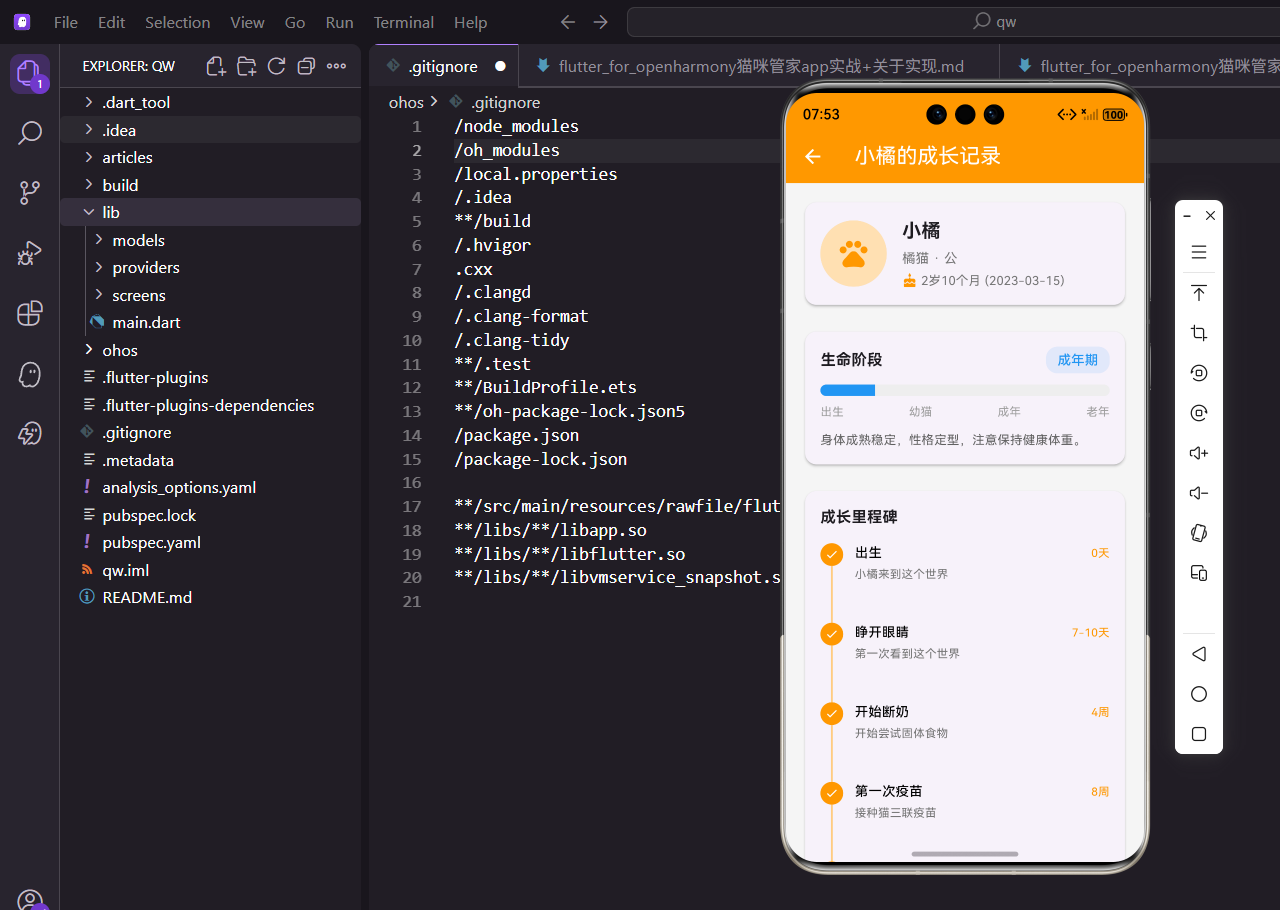
养猫的人都知道,猫咪从小奶猫到成年的变化特别大。今天来实现一个成长记录功能,把猫咪的成长里程碑都记录下来,以后翻看也是满满的回忆。
一、页面整体结构
成长记录页面需要接收一个猫咪对象:
class GrowthMilestoneScreen extends StatelessWidget {
  final CatModel cat;

  const GrowthMilestoneScreen({super.key, required this.cat});
用
required修饰参数,确保调用时必须传入猫咪数据。
StatelessWidget 就够用了,这个页面不需要内部状态。
页面主体用 SingleChildScrollView 包裹:
Widget build(BuildContext context) {
final milestones = _generateMilestones(cat);
return Scaffold(
appBar: AppBar(
title: Text('${cat.name}的成长记录'),
),
body: SingleChildScrollView(
padding: EdgeInsets.all(16.w),
标题栏显示猫咪名字,让用户知道看的是哪只猫。
内容可能很长,用 SingleChildScrollView 支持滚动。
内容区域分三个部分:
child: Column(
  children: [
    _buildCatHeader(),
    SizedBox(height: 20.h),
    _buildAgeProgress(),
    SizedBox(height: 20.h),
    _buildMilestoneTimeline(milestones),
  ],
),
顶部是猫咪信息卡片,中间是生命阶段进度条,底部是里程碑时间线。
用 SizedBox 控制间距,比 Padding 更直观。
二、猫咪信息头部
头部卡片展示基本信息:
Widget _buildCatHeader() {
  return Card(
    child: Padding(
      padding: EdgeInsets.all(16.w),
      child: Row(
        children: [
          CircleAvatar(
            radius: 35.r,
            backgroundColor: Colors.orange[100],
            child: Icon(Icons.pets, size: 35.sp, color: Colors.orange),
          ),
圆形头像用橙色背景配爪印图标,风格统一。
.r是 ScreenUtil 的半径适配单位。
猫咪名字和品种:
Expanded(
  child: Column(
    crossAxisAlignment: CrossAxisAlignment.start,
    children: [
      Text(
        cat.name,
        style: TextStyle(fontSize: 20.sp, fontWeight: FontWeight.bold),
      ),
      SizedBox(height: 4.h),
      Text(
        '${cat.breed} · ${cat.gender}',
        style: TextStyle(fontSize: 14.sp, color: Colors.grey[600]),
      ),
Expanded 让文字区域自适应宽度,长名字也不会溢出。
品种和性别用中点分隔,信息紧凑。
出生日期显示:
Row(
  children: [
    Icon(Icons.cake, size: 16.sp, color: Colors.orange),
    SizedBox(width: 4.w),
    Text(
      '${cat.ageString} (${DateFormat('yyyy-MM-dd').format(cat.birthDate)})',
      style: TextStyle(fontSize: 13.sp, color: Colors.grey[600]),
    ),
  ],
),
蛋糕图标表示生日,直观易懂。
同时显示年龄和具体日期,信息完整。
三、生命阶段进度条
根据月龄判断生命阶段:
Widget _buildAgeProgress() {
  final ageMonths = cat.ageInMonths;
  final lifeStage = _getLifeStage(ageMonths);
  final progress = (ageMonths / 180).clamp(0.0, 1.0);
假设猫咪寿命 15 年(180 个月),计算进度百分比。
clamp确保值在 0 到 1 之间,防止溢出。
阶段标签显示:
Row(
  mainAxisAlignment: MainAxisAlignment.spaceBetween,
  children: [
    Text('生命阶段', style: TextStyle(fontSize: 16.sp, fontWeight: FontWeight.bold)),
    Container(
      padding: EdgeInsets.symmetric(horizontal: 12.w, vertical: 4.h),
      decoration: BoxDecoration(
        color: lifeStage['color'].withOpacity(0.1),
        borderRadius: BorderRadius.circular(12.r),
      ),
      child: Text(
        lifeStage['name'],
        style: TextStyle(color: lifeStage['color'], fontWeight: FontWeight.w500),
      ),
    ),
  ],
),
右边的标签用对应阶段的颜色,视觉上很直观。
背景用 10% 透明度,不会太抢眼。
进度条组件:
ClipRRect(
  borderRadius: BorderRadius.circular(8.r),
  child: LinearProgressIndicator(
    value: progress,
    minHeight: 12.h,
    backgroundColor: Colors.grey[200],
    valueColor: AlwaysStoppedAnimation(lifeStage['color']),
  ),
),
ClipRRect 给进度条加圆角,更美观。
颜色随生命阶段变化,幼猫是粉色,成年是蓝色。
阶段刻度标注:
Row(
  mainAxisAlignment: MainAxisAlignment.spaceBetween,
  children: [
    Text('出生', style: TextStyle(fontSize: 12.sp, color: Colors.grey)),
    Text('幼猫', style: TextStyle(fontSize: 12.sp, color: Colors.grey)),
    Text('成年', style: TextStyle(fontSize: 12.sp, color: Colors.grey)),
    Text('老年', style: TextStyle(fontSize: 12.sp, color: Colors.grey)),
  ],
),
四个刻度均匀分布,让用户知道当前处于哪个阶段。
字号小一点,不抢进度条的视觉焦点。
阶段描述文字:
Text(
  lifeStage['description'],
  style: TextStyle(fontSize: 13.sp, color: Colors.grey[700]),
),
每个阶段有对应的养护建议,实用性强。
比如幼猫期提示需要高营养食物。
四、生命阶段判断逻辑
根据月龄返回阶段信息:
Map<String, dynamic> _getLifeStage(int ageMonths) {
  if (ageMonths < 6) {
    return {
      'name': '幼猫期',
      'color': Colors.pink,
      'description': '快速成长阶段,好奇心强,需要高营养食物和充足睡眠。',
    };
  } else if (ageMonths < 24) {
    return {
      'name': '青年期',
      'color': Colors.green,
      'description': '活力充沛,喜欢玩耍和探索,是建立良好习惯的关键时期。',
    };
0-6 个月是幼猫期,6-24 个月是青年期。
每个阶段配不同颜色,一眼就能区分。
成年期和中年期:
} else if (ageMonths < 84) {
  return {
    'name': '成年期',
    'color': Colors.blue,
    'description': '身体成熟稳定,性格定型,注意保持健康体重。',
  };
} else if (ageMonths < 132) {
  return {
    'name': '中年期',
    'color': Colors.orange,
    'description': '开始出现老化迹象,需要定期体检,关注关节和牙齿健康。',
  };
2-7 岁是成年期,7-11 岁是中年期。
中年期用橙色提醒主人多关注健康。
老年期:
} else {
  return {
    'name': '老年期',
    'color': Colors.purple,
    'description': '需要更多关爱和医疗关注,提供舒适的生活环境。',
  };
}
11 岁以上进入老年期,紫色代表需要特别照顾。
描述文字给出实用的养护建议。
五、里程碑时间线
生成里程碑数据:
List<Map<String, dynamic>> _generateMilestones(CatModel cat) {
  final ageMonths = cat.ageInMonths;

  return [
    {
      'title': '出生',
      'age': '0天',
      'description': '${cat.name}来到这个世界',
      'isPast': true,
    },
    {
      'title': '睁开眼睛',
      'age': '7-10天',
      'description': '第一次看到这个世界',
      'isPast': ageMonths >= 0,
    },
每个里程碑包含标题、年龄、描述和是否已过。
出生这个节点永远是已完成状态。
断奶和疫苗节点:
{
  'title': '开始断奶',
  'age': '4周',
  'description': '开始尝试固体食物',
  'isPast': ageMonths >= 1,
},
{
  'title': '第一次疫苗',
  'age': '8周',
  'description': '接种猫三联疫苗',
  'isPast': ageMonths >= 2,
},
4 周开始断奶,8 周打第一针疫苗。
这些都是养猫的重要时间节点。
绝育和成年节点:
{
  'title': '适合绝育',
  'age': '6个月',
  'description': '达到绝育手术的适宜年龄',
  'isPast': ageMonths >= 6,
},
{
  'title': '成年',
  'age': '1岁',
  'description': '身体发育基本完成',
  'isPast': ageMonths >= 12,
},
6 个月可以考虑绝育,1 岁算成年。
这些知识对新手铲屎官很有帮助。
六、时间线 UI 实现
时间线容器:
Widget _buildMilestoneTimeline(List<Map<String, dynamic>> milestones) {
  return Card(
    child: Padding(
      padding: EdgeInsets.all(16.w),
      child: Column(
        crossAxisAlignment: CrossAxisAlignment.start,
        children: [
          Text('成长里程碑', style: TextStyle(fontSize: 16.sp, fontWeight: FontWeight.bold)),
          SizedBox(height: 16.h),
用 Card 包裹整个时间线,有层次感。
标题加粗,和内容区分开。
遍历渲染里程碑:
...milestones.asMap().entries.map((entry) {
  final index = entry.key;
  final milestone = entry.value;
  final isLast = index == milestones.length - 1;
  final isPast = milestone['isPast'] as bool;
asMap().entries可以同时拿到索引和值。
需要知道是否是最后一项,来决定是否画连接线。
左侧圆点和连接线:
Column(
  children: [
    Container(
      width: 24.w,
      height: 24.h,
      decoration: BoxDecoration(
        color: isPast ? Colors.orange : Colors.grey[300],
        shape: BoxShape.circle,
      ),
      child: Icon(
        isPast ? Icons.check : Icons.circle,
        size: 14.sp,
        color: Colors.white,
      ),
    ),
    if (!isLast)
      Container(
        width: 2.w,
        height: 60.h,
        color: isPast ? Colors.orange[200] : Colors.grey[300],
      ),
  ],
),
已完成的节点是橙色带勾,未完成的是灰色圆点。
最后一个节点不画连接线。
右侧内容区域:
Expanded(
  child: Padding(
    padding: EdgeInsets.only(bottom: 16.h),
    child: Column(
      crossAxisAlignment: CrossAxisAlignment.start,
      children: [
        Row(
          mainAxisAlignment: MainAxisAlignment.spaceBetween,
          children: [
            Text(
              milestone['title'],
              style: TextStyle(
                fontSize: 14.sp,
                fontWeight: FontWeight.w500,
                color: isPast ? Colors.black : Colors.grey,
              ),
            ),
已完成的标题是黑色,未完成的是灰色。
视觉上能快速区分当前进度。
年龄和描述:
Text(
  milestone['age'],
  style: TextStyle(
    fontSize: 12.sp,
    color: isPast ? Colors.orange : Colors.grey,
  ),
),
年龄标签放在右边,已完成的用橙色高亮。
描述文字用小字号,补充说明这个节点的意义。
七、整体布局细节
Row 布局组合:
return Row(
  crossAxisAlignment: CrossAxisAlignment.start,
  children: [
    Column(
      children: [
        // 圆点
        // 连接线
      ],
    ),
    SizedBox(width: 12.w),
    Expanded(
      child: // 内容区域
    ),
  ],
);
crossAxisAlignment 设为 start,让圆点和文字顶部对齐。
中间留 12 的间距,不会太挤。
描述文字样式:
Text(
  milestone['description'],
  style: TextStyle(
    fontSize: 12.sp,
    color: isPast ? Colors.grey[600] : Colors.grey[400],
  ),
),
已完成的描述颜色深一点,未完成的淡一点。
这种渐变效果让时间线更有层次。
小结
成长记录功能把猫咪的一生划分成清晰的阶段,配合时间线展示重要里程碑。对于新手铲屎官来说,这些节点提醒很实用,知道什么时候该打疫苗、什么时候可以绝育。代码上主要用了条件渲染和 Map 数据结构,逻辑清晰易维护。
欢迎加入开源鸿蒙跨平台社区:https://openharmonycrossplatform.csdn.net

开源鸿蒙跨平台开发社区汇聚开发者与厂商,共建“一次开发,多端部署”的开源生态,致力于降低跨端开发门槛,推动万物智联创新。
更多推荐

 19
19 0
0- 0


 已为社区贡献31条内容

所有评论(0)