Flutter for OpenHarmony垃圾分类指南App实战:答题结果实现
答题结果页实现摘要 答题结果页展示用户答题成绩并提供反馈。页面从路由参数获取分数,计算答对题数和正确率,使用不同图标和颜色区分成绩等级(满分奖杯、80%以上庆祝、60%以上点赞、60%以下学习)。核心组件包括:醒目的分数显示、正确率进度条、动态评价文案(含emoji)和操作按钮(再来一次/返回首页)。实现细节:禁用返回按钮强制使用底部导航;分数计算每题10分;防御性路由参数处理;记录成绩用于统计。
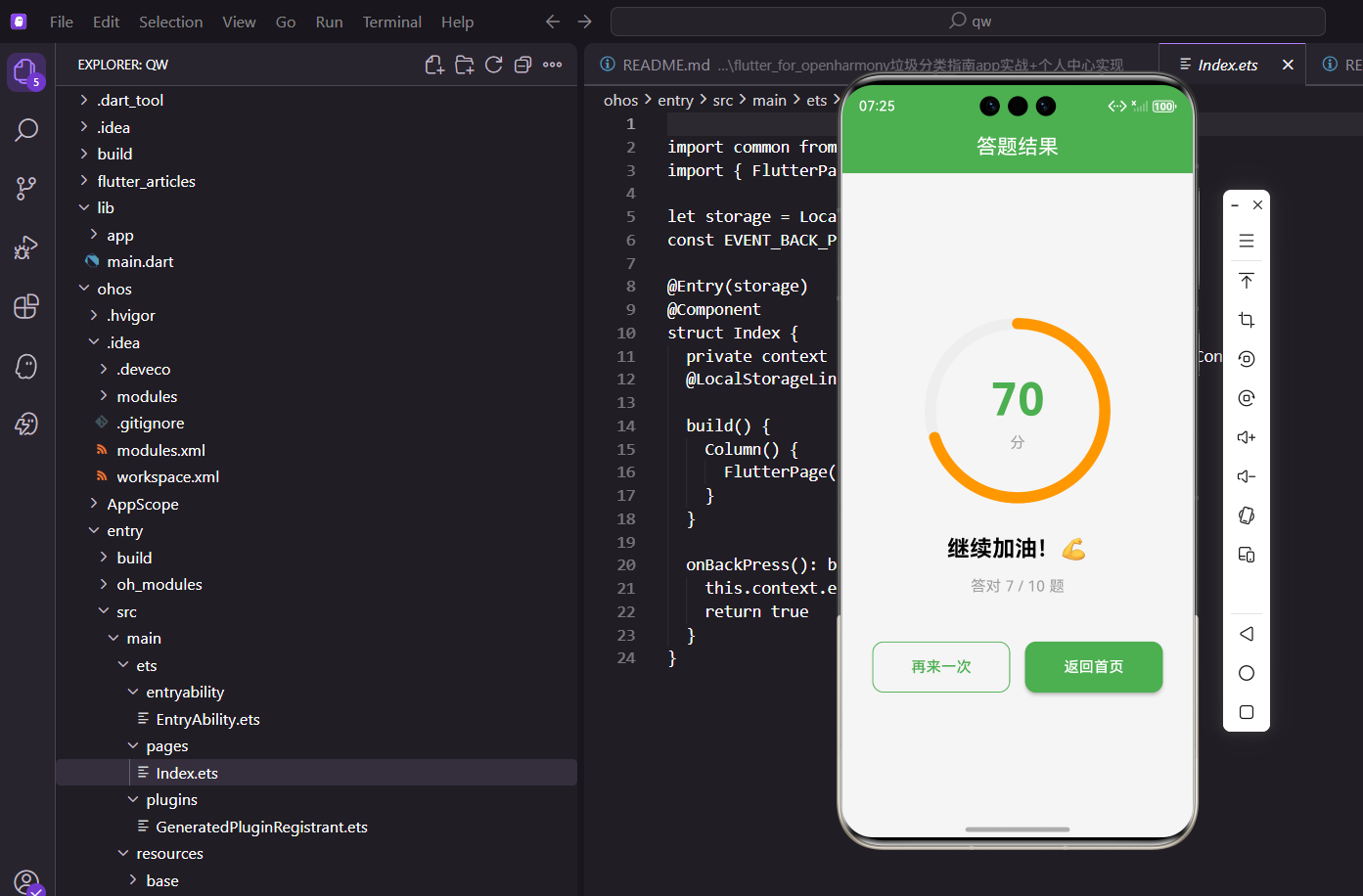
答完题总得有个结果页吧,告诉用户答对了多少、得了多少分。这个页面除了展示成绩,还得给用户一些情绪价值——答得好要夸一夸,答得不好也要鼓励一下。
页面数据获取
结果页的数据主要来自两个地方:路由参数传过来的分数,以及控制器里的题目总数。
class QuizResultPage extends StatelessWidget {
const QuizResultPage({super.key});
Widget build(BuildContext context) {
// 从路由参数获取分数
final int score = Get.arguments ?? 0;
final guideController = Get.find<GuideController>();
final profileController = Get.find<ProfileController>();
// 记录这次答题的分数
profileController.addQuizScore(score);
进入结果页时会调用addQuizScore把这次的分数记录下来,用于统计用户的答题历史。Get.arguments ?? 0是个防御性写法,万一参数没传过来就用0。
接下来计算一些展示需要的数据:
    // 计算答题数据
    final totalQuestions = guideController.questions.length;
    final correctCount = score ~/ 10;  // 每题10分
    final percent = totalQuestions > 0 ? correctCount / totalQuestions : 0.0;
    final isPerfect = percent == 1.0;
计算逻辑:假设每题10分,那答对的题数就是总分除以10。
~/是Dart的整除运算符,结果是整数。percent是正确率,用于进度环的显示。
页面骨架
    return Scaffold(
      appBar: AppBar(
        title: const Text('答题结果'),
        // 禁用返回按钮
        automaticallyImplyLeading: false,
      ),
      body: Center(
        child: SingleChildScrollView(
          padding: EdgeInsets.all(32.w),
          child: Column(
            mainAxisAlignment: MainAxisAlignment.center,
            children: [
              // 结果图标或动画
              _buildResultIcon(isPerfect, percent),
              SizedBox(height: 24.h),
              // 分数显示
              _buildScoreDisplay(score, percent),
              SizedBox(height: 16.h),
              // 结果文案
              _buildResultMessage(percent),
              SizedBox(height: 12.h),
              // 答题统计
              Text(
                '答对 $correctCount / $totalQuestions 题',
                style: TextStyle(fontSize: 16.sp, color: Colors.grey),
              ),
              SizedBox(height: 48.h),
              // 操作按钮
              _buildActionButtons(guideController),
            ],
          ),
        ),
      ),
    );
  }
automaticallyImplyLeading: false禁用了AppBar左边的返回按钮。因为这是答题流程的终点,不希望用户点返回又回到答题页,而是通过底部的按钮来决定下一步操作。
结果图标
根据成绩显示不同的图标:
Widget _buildResultIcon(bool isPerfect, double percent) {
  IconData icon;
  Color color;

  if (isPerfect) {
    icon = Icons.emoji_events;
    color = Colors.amber;
  } else if (percent >= 0.8) {
    icon = Icons.celebration;
    color = Colors.green;
  } else if (percent >= 0.6) {
    icon = Icons.thumb_up;
    color = Colors.orange;
  } else {
    icon = Icons.school;
    color = Colors.blue;
  }

  return Container(
    width: 100.w,
    height: 100.w,
    decoration: BoxDecoration(
      color: color.withOpacity(0.1),
      shape: BoxShape.circle,
    ),
    child: Icon(icon, size: 56.sp, color: color),
  );
}
- 满分:奖杯图标,金色
- 80%以上:庆祝图标,绿色
- 60%-80%:点赞图标,橙色
- 60%以下:学习图标,蓝色
分数显示
页面最醒目的就是中间的分数显示:
Widget _buildScoreDisplay(int score, double percent) {
  return Column(
    children: [
      // 大号分数
      Text(
        '$score',
        style: TextStyle(
          fontSize: 72.sp,
          fontWeight: FontWeight.bold,
          color: _getScoreColor(percent),
        ),
      ),
      Text(
        '分',
        style: TextStyle(fontSize: 20.sp, color: Colors.grey),
      ),
      SizedBox(height: 16.h),
      // 进度条
      SizedBox(
        width: 200.w,
        child: ClipRRect(
          borderRadius: BorderRadius.circular(4.r),
          child: LinearProgressIndicator(
            value: percent,
            backgroundColor: Colors.grey.shade200,
            valueColor: AlwaysStoppedAnimation(_getScoreColor(percent)),
            minHeight: 8.h,
          ),
        ),
      ),
    ],
  );
}
分数用超大字号显示,非常醒目。下面的进度条直观展示正确率。
结果文案
分数下面是一句评价语,根据成绩给出不同的反馈:
Widget _buildResultMessage(double percent) {
  String message;
  String emoji;

  if (percent >= 0.8) {
    message = '太棒了!你已经是垃圾分类达人了';
    emoji = '🎉';
  } else if (percent >= 0.6) {
    message = '不错哦!继续加油';
    emoji = '💪';
  } else {
    message = '还需努力!多学习一下吧';
    emoji = '📚';
  }

  return Column(
    children: [
      Text(emoji, style: TextStyle(fontSize: 32.sp)),
      SizedBox(height: 8.h),
      Text(
        message,
        style: TextStyle(fontSize: 18.sp, fontWeight: FontWeight.w500),
        textAlign: TextAlign.center,
      ),
    ],
  );
}
小细节:文案里加了emoji表情,让页面更有活力。这种小细节能提升用户的情绪体验。
底部操作按钮
底部放了两个按钮:再来一次和返回首页。
Widget _buildActionButtons(GuideController guideController) {
  return Row(
    children: [
      // 再来一次
      Expanded(
        child: OutlinedButton(
          onPressed: () {
            guideController.startQuiz();
            Get.offNamed(Routes.quiz);
          },
          style: OutlinedButton.styleFrom(
            padding: EdgeInsets.symmetric(vertical: 16.h),
            side: const BorderSide(color: AppTheme.primaryColor),
            shape: RoundedRectangleBorder(
              borderRadius: BorderRadius.circular(12.r),
            ),
          ),
          child: Text('再来一次', style: TextStyle(fontSize: 16.sp)),
        ),
      ),
      SizedBox(width: 16.w),
      // 返回首页
      Expanded(
        child: ElevatedButton(
          onPressed: () => Get.offAllNamed(Routes.main),
          style: ElevatedButton.styleFrom(
            backgroundColor: AppTheme.primaryColor,
            padding: EdgeInsets.symmetric(vertical: 16.h),
            shape: RoundedRectangleBorder(
              borderRadius: BorderRadius.circular(12.r),
            ),
          ),
          child: Text(
            '返回首页',
            style: TextStyle(fontSize: 16.sp, color: Colors.white),
          ),
        ),
      ),
    ],
  );
}
"再来一次"用的是OutlinedButton,视觉上是次要按钮。点击后先重置答题状态,再跳转到答题页。
"返回首页"用的是ElevatedButton,视觉上是主要按钮。Get.offAllNamed会清空整个导航栈,直接回到首页,这样用户点返回键就会退出App而不是回到答题流程。
颜色映射方法
根据正确率返回不同的颜色:
Color _getScoreColor(double percent) {
  if (percent >= 0.8) return Colors.green;
  if (percent >= 0.6) return Colors.orange;
  return Colors.red;
}
- 80%以上:绿色,表示优秀
- 60%-80%:橙色,表示及格
- 60%以下:红色,表示需要加油
设计思考
结果页的设计有几个要点:
1. 信息层次清晰:最重要的是分数,所以放在最中间最大;其次是评价语;再次是具体答对题数;最后是操作按钮。
2. 情绪引导:不管答得好不好,都给正面的反馈。答得好就夸奖,答得不好就鼓励,不要让用户感到挫败。
3. 明确的下一步:用户看完结果后,要么想再试一次,要么想回去。两个按钮覆盖了这两种需求。
4. 数据记录:进入结果页就把分数记录下来,这样即使用户直接退出App,这次的答题记录也不会丢失。
分数记录的实现
ProfileController里的分数记录逻辑:
class ProfileController extends GetxController {
  final quizScores = <int>[].obs;

  /// 添加答题分数
  void addQuizScore(int score) {
    quizScores.add(score);
    // 只保留最近20次的记录
    if (quizScores.length > 20) {
      quizScores.removeAt(0);
    }
    _saveQuizScores();
  }

  /// 获取平均分
  double get averageScore {
    if (quizScores.isEmpty) return 0;
    return quizScores.reduce((a, b) => a + b) / quizScores.length;
  }

  /// 获取最高分
  int get highestScore {
    if (quizScores.isEmpty) return 0;
    return quizScores.reduce((a, b) => a > b ? a : b);
  }
}
这些统计数据可以在个人中心展示,让用户看到自己的答题历史和进步。
导航栈的处理
结果页的导航处理有讲究:
// 再来一次:替换当前页面
Get.offNamed(Routes.quiz);

// 返回首页:清空整个导航栈
Get.offAllNamed(Routes.main);
为什么用offNamed而不是toNamed:
toNamed会把新页面压入栈顶,导航栈变成:首页 → 答题 → 结果 → 答题offNamed会替换当前页面,导航栈变成:首页 → 答题 → 答题- 用
offNamed可以避免导航栈无限增长
为什么返回首页用offAllNamed:
- 清空整个导航栈,只留下首页
- 用户点返回键会直接退出App,而不是回到答题流程
- 这是答题流程的终点,应该给用户一个干净的结束
动画效果的考虑
结果页可以加一些动画让体验更好:
// 分数数字的动画效果
class AnimatedScore extends StatefulWidget {
final int score;
_AnimatedScoreState createState() => _AnimatedScoreState();
}
class _AnimatedScoreState extends State<AnimatedScore>
with SingleTickerProviderStateMixin {
late AnimationController _controller;
late Animation<int> _animation;
void initState() {
super.initState();
_controller = AnimationController(
duration: Duration(milliseconds: 1500),
vsync: this,
);
_animation = IntTween(begin: 0, end: widget.score).animate(
CurvedAnimation(parent: _controller, curve: Curves.easeOut),
);
_controller.forward();
}
Widget build(BuildContext context) {
return AnimatedBuilder(
animation: _animation,
builder: (context, child) {
return Text('${_animation.value}');
},
);
}
}
分数从0逐渐增加到最终值,这种动画能增加用户的期待感和成就感。
分享功能的扩展
结果页还可以加分享功能:
Widget _buildShareButton(int score, double percent) {
  return IconButton(
    icon: Icon(Icons.share),
    onPressed: () {
      final message = percent >= 0.8
          ? '我在垃圾分类答题中获得了$score分,你也来试试吧!'
          : '我正在学习垃圾分类,一起来挑战吧!';
      Share.share(message);
    },
  );
}
分享功能可以增加App的传播,让更多人参与垃圾分类学习。
与成就系统的联动
答题结果可以和成就系统联动:
void _checkAchievements(int score, double percent) {
  final achievementController = Get.find<AchievementController>();

  // 首次答题
  achievementController.unlock('first_quiz');

  // 满分成就
  if (percent == 1.0) {
    achievementController.unlock('perfect_score');
  }

  // 连续答题成就
  achievementController.incrementQuizCount();
}
成就系统能增加用户的粘性,让他们有动力继续使用App。
这个结果页虽然简单,但把答题流程画上了一个完整的句号。用户体验的闭环很重要,有始有终才能让用户感到满足。
欢迎加入开源鸿蒙跨平台社区:https://openharmonycrossplatform.csdn.net

开源鸿蒙跨平台开发社区汇聚开发者与厂商,共建“一次开发,多端部署”的开源生态,致力于降低跨端开发门槛,推动万物智联创新。
更多推荐

 7
7 0
0- 0


 已为社区贡献4条内容

所有评论(0)