OpenHarmony 与 Flutter 的完美融合:打造现代化个人财务管理应用(更新:月度统计页面)(1.5.0版本)
·
更新概述
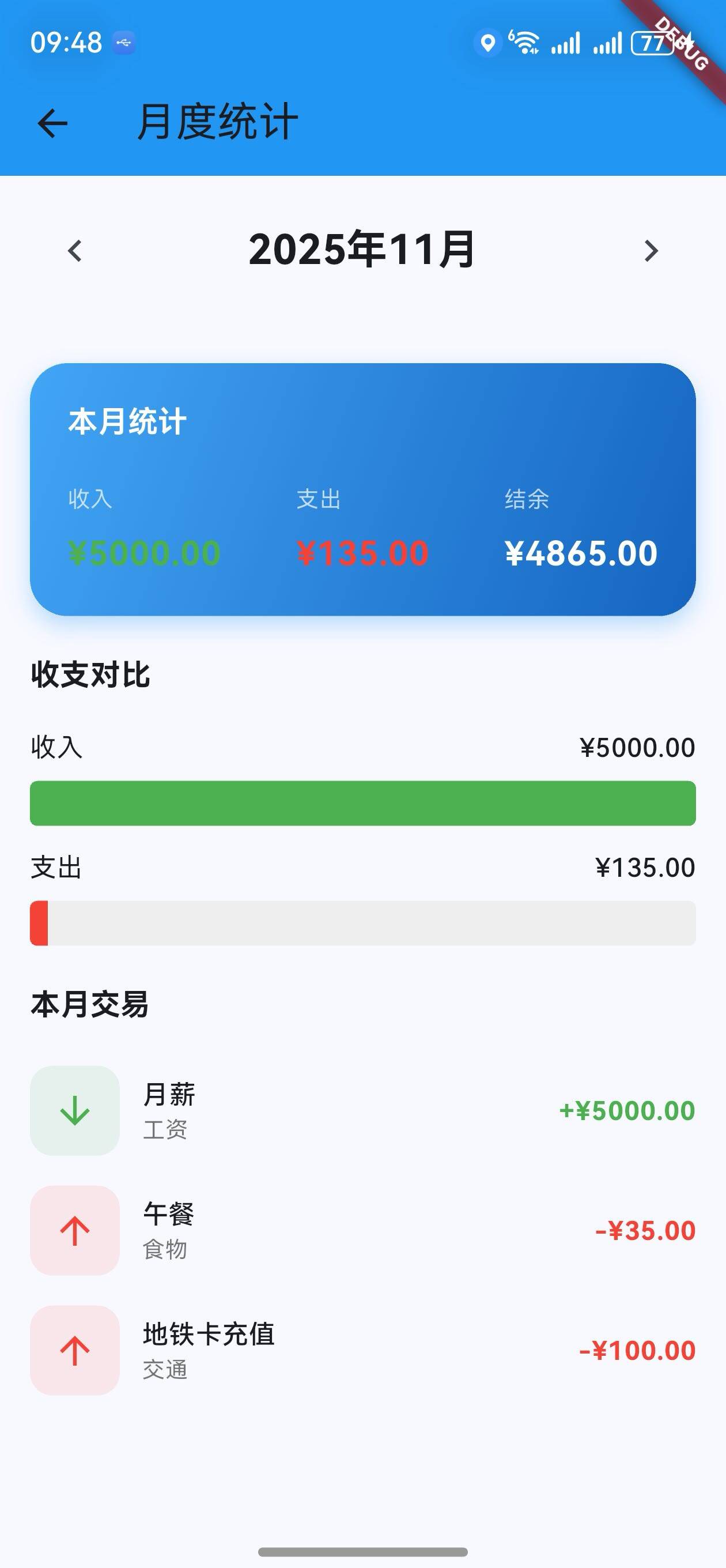
v1.5.0 版本为 OpenHarmony 钱包应用增加了一个独立的月度统计页面。用户现在可以查看每个月的详细统计数据,包括收入、支出、结余以及收支对比图表。这是应用的第一个多页面功能,提供了更深层次的数据分析。
核心功能更新
1. 月度统计页面
页面结构
/// 月度统计页面
class MonthlyStatsPage extends StatefulWidget {
final List<wallet.Transaction> transactions;
final double initialBalance;
const MonthlyStatsPage({
Key? key,
required this.transactions,
required this.initialBalance,
}) : super(key: key);
State<MonthlyStatsPage> createState() => _MonthlyStatsPageState();
}
说明:
- 接收交易列表和初始余额作为参数
- 使用
StatefulWidget管理月份选择状态 - 支持在不同月份之间切换
月份选择
late DateTime _selectedMonth;
void initState() {
super.initState();
_selectedMonth = DateTime.now(); // 默认为当前月份
}
/// 上一个月
void _previousMonth() {
setState(() {
_selectedMonth = DateTime(
_selectedMonth.year,
_selectedMonth.month - 1,
);
});
}
/// 下一个月
void _nextMonth() {
setState(() {
_selectedMonth = DateTime(
_selectedMonth.year,
_selectedMonth.month + 1,
);
});
}
说明:
- 初始化为当前月份
- 支持前后月份导航
- 每次切换都会触发 UI 更新
月份交易过滤
/// 获取指定月份的交易
List<wallet.Transaction> _getMonthTransactions() {
  return widget.transactions.where((t) {
    return t.date.year == _selectedMonth.year &&
        t.date.month == _selectedMonth.month;
  }).toList();
}
说明:
- 按年份和月份过滤交易
- 返回该月份的所有交易列表
2. 月度统计计算
统计数据计算
/// 计算月度统计
Map<String, double> _calculateMonthStats() {
  final monthTransactions = _getMonthTransactions();
  Map<String, double> stats = {
    '收入': 0.0,
    '支出': 0.0,
  };

  for (var transaction in monthTransactions) {
    if (transaction.type == wallet.TransactionType.income) {
      stats['收入'] = stats['收入']! + transaction.amount;
    } else {
      stats['支出'] = stats['支出']! + transaction.amount;
    }
  }

  return stats;
}
说明:
- 分别计算收入和支出总额
- 返回包含收入和支出的 Map
- 结余 = 收入 - 支出
页面构建
Widget build(BuildContext context) {
final monthStats = _calculateMonthStats();
final monthTransactions = _getMonthTransactions();
final income = monthStats['收入']!;
final expense = monthStats['支出']!;
final balance = income - expense;
return Scaffold(
appBar: AppBar(
title: const Text('月度统计'),
elevation: 0,
backgroundColor: Colors.blue,
),
body: SingleChildScrollView(
child: Column(
children: [
_buildMonthSelector(),
const SizedBox(height: 20),
_buildMonthStatsCard(income, expense, balance),
const SizedBox(height: 20),
_buildIncomeExpenseChart(income, expense),
const SizedBox(height: 20),
_buildMonthTransactionList(monthTransactions),
],
),
),
);
}
说明:
- 计算本月的统计数据
- 按顺序显示:月份选择器、统计卡片、图表、交易列表
3. 月度统计卡片
统计卡片设计
/// 构建月度统计卡片
Widget _buildMonthStatsCard(double income, double expense, double balance) {
  return Padding(
    padding: const EdgeInsets.symmetric(horizontal: 16),
    child: Container(
      padding: const EdgeInsets.all(20),
      decoration: BoxDecoration(
        gradient: LinearGradient(
          colors: [Colors.blue.shade400, Colors.blue.shade800],
          begin: Alignment.topLeft,
          end: Alignment.bottomRight,
        ),
        borderRadius: BorderRadius.circular(20),
        boxShadow: [
          BoxShadow(
            color: Colors.blue.withOpacity(0.3),
            blurRadius: 10,
            offset: const Offset(0, 5),
          ),
        ],
      ),
      child: Column(
        crossAxisAlignment: CrossAxisAlignment.start,
        children: [
          Text(
            '本月统计',
            style: Theme.of(context).textTheme.titleMedium?.copyWith(
                  color: Colors.white,
                  fontWeight: FontWeight.bold,
                ),
          ),
          const SizedBox(height: 20),
          Row(
            mainAxisAlignment: MainAxisAlignment.spaceBetween,
            children: [
              _buildStatItem('收入', income, Colors.green),
              _buildStatItem('支出', expense, Colors.red),
              _buildStatItem('结余', balance, Colors.white),
            ],
          ),
        ],
      ),
    ),
  );
}
说明:
- 蓝色渐变背景,与应用主题一致
- 显示三个关键数据:收入、支出、结余
- 使用不同颜色区分(绿色收入、红色支出、白色结余)
统计项组件
/// 构建统计项
Widget _buildStatItem(String label, double amount, Color color) {
  return Column(
    crossAxisAlignment: CrossAxisAlignment.start,
    children: [
      Text(
        label,
        style: const TextStyle(
          color: Colors.white70,
          fontSize: 12,
        ),
      ),
      const SizedBox(height: 8),
      Text(
        '¥${amount.toStringAsFixed(2)}',
        style: TextStyle(
          color: color,
          fontSize: 18,
          fontWeight: FontWeight.bold,
        ),
      ),
    ],
  );
}
说明:
- 标签显示在上方,金额显示在下方
- 金额使用对应的颜色显示
- 两位小数格式化
4. 收支对比图表
图表组件
/// 构建收支对比图表
Widget _buildIncomeExpenseChart(double income, double expense) {
  final maxValue = math.max(income, expense);
  final incomeRatio = maxValue > 0 ? income / maxValue : 0.0;
  final expenseRatio = maxValue > 0 ? expense / maxValue : 0.0;

  return Padding(
    padding: const EdgeInsets.symmetric(horizontal: 16),
    child: Column(
      crossAxisAlignment: CrossAxisAlignment.start,
      children: [
        Text(
          '收支对比',
          style: Theme.of(context).textTheme.titleMedium?.copyWith(
                fontWeight: FontWeight.bold,
              ),
        ),
        const SizedBox(height: 16),
        _buildBarChart('收入', income, incomeRatio, Colors.green),
        const SizedBox(height: 12),
        _buildBarChart('支出', expense, expenseRatio, Colors.red),
      ],
    ),
  );
}
说明:
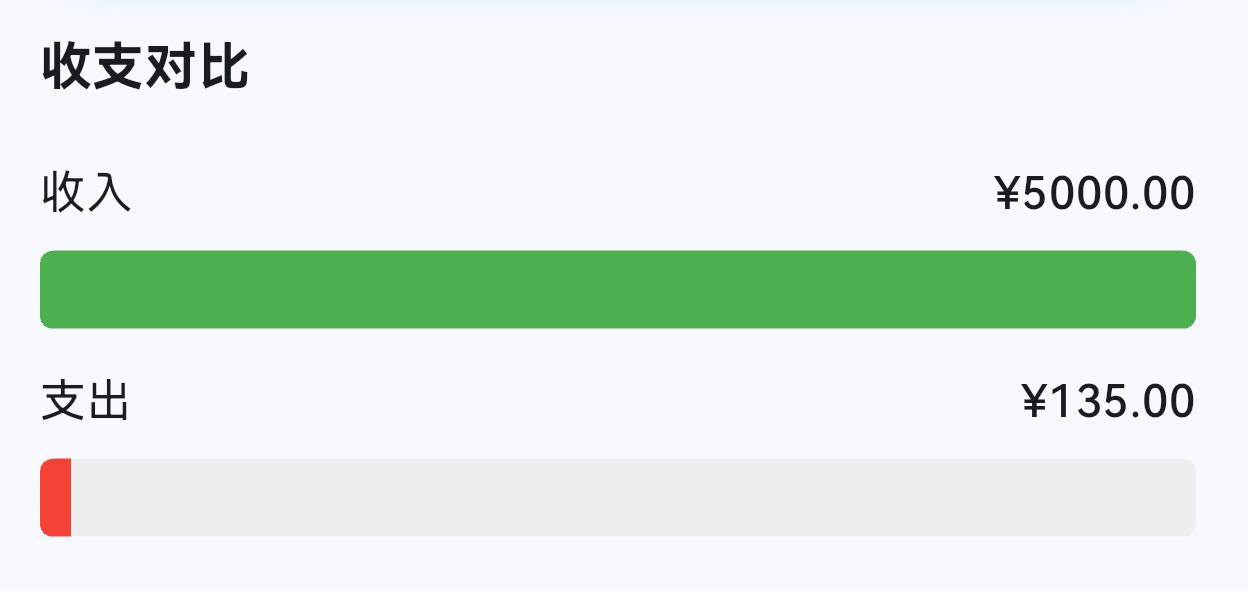
- 计算最大值用于归一化
- 计算收入和支出的比例(0-1)
- 显示两条对比柱状图
柱状图组件
/// 构建柱状图
Widget _buildBarChart(
  String label,
  double amount,
  double ratio,
  Color color,
) {
  return Column(
    crossAxisAlignment: CrossAxisAlignment.start,
    children: [
      Row(
        mainAxisAlignment: MainAxisAlignment.spaceBetween,
        children: [
          Text(label, style: const TextStyle(fontSize: 14)),
          Text(
            '¥${amount.toStringAsFixed(2)}',
            style: const TextStyle(
              fontSize: 14,
              fontWeight: FontWeight.w500,
            ),
          ),
        ],
      ),
      const SizedBox(height: 8),
      ClipRRect(
        borderRadius: BorderRadius.circular(4),
        child: LinearProgressIndicator(
          value: ratio,
          minHeight: 24,
          backgroundColor: Colors.grey.shade200,
          valueColor: AlwaysStoppedAnimation<Color>(color),
        ),
      ),
    ],
  );
}
说明:
- 显示标签和具体金额
- 进度条长度代表相对大小
- 使用颜色区分收入和支出
5. 月度交易列表
交易列表组件
/// 构建月度交易列表
Widget _buildMonthTransactionList(List<wallet.Transaction> transactions) {
  if (transactions.isEmpty) {
    return Padding(
      padding: const EdgeInsets.all(32),
      child: Center(
        child: Text(
          '该月暂无交易',
          style: Theme.of(context).textTheme.bodyMedium?.copyWith(
                color: Colors.grey,
              ),
        ),
      ),
    );
  }

  return Padding(
    padding: const EdgeInsets.symmetric(horizontal: 16),
    child: Column(
      crossAxisAlignment: CrossAxisAlignment.start,
      children: [
        Text(
          '本月交易',
          style: Theme.of(context).textTheme.titleMedium?.copyWith(
                fontWeight: FontWeight.bold,
              ),
        ),
        const SizedBox(height: 12),
        ListView.builder(
          shrinkWrap: true,
          physics: const NeverScrollableScrollPhysics(),
          itemCount: transactions.length,
          itemBuilder: (context, index) {
            final transaction = transactions[index];
            final isIncome = transaction.type == wallet.TransactionType.income;
            final color = isIncome ? Colors.green : Colors.red;

            return Padding(
              padding: const EdgeInsets.symmetric(vertical: 8),
              child: Row(
                children: [
                  Container(
                    width: 48,
                    height: 48,
                    decoration: BoxDecoration(
                      color: color.withOpacity(0.1),
                      borderRadius: BorderRadius.circular(12),
                    ),
                    child: Icon(
                      isIncome ? Icons.arrow_downward : Icons.arrow_upward,
                      color: color,
                    ),
                  ),
                  const SizedBox(width: 12),
                  Expanded(
                    child: Column(
                      crossAxisAlignment: CrossAxisAlignment.start,
                      children: [
                        Text(
                          transaction.title,
                          style: const TextStyle(
                            fontSize: 14,
                            fontWeight: FontWeight.w500,
                          ),
                        ),
                        Text(
                          transaction.category,
                          style: TextStyle(
                            fontSize: 12,
                            color: Colors.grey.shade600,
                          ),
                        ),
                      ],
                    ),
                  ),
                  Text(
                    '${isIncome ? '+' : '-'}¥${transaction.amount.toStringAsFixed(2)}',
                    style: TextStyle(
                      fontSize: 14,
                      fontWeight: FontWeight.bold,
                      color: color,
                    ),
                  ),
                ],
              ),
            );
          },
        ),
      ],
    ),
  );
}
说明:
- 显示该月份的所有交易
- 每条交易显示:图标、标题、分类、金额
- 收入显示绿色向下箭头,支出显示红色向上箭头
6. 导航集成
主页面导航按钮
appBar: AppBar(
  title: const Text('OpenHarmony 钱包'),
  elevation: 0,
  backgroundColor: Colors.blue,
  actions: [
    IconButton(
      icon: const Icon(Icons.bar_chart),
      onPressed: () {
        Navigator.push(
          context,
          MaterialPageRoute(
            builder: (context) => MonthlyStatsPage(
              transactions: _transactions,
              initialBalance: 5000.0,
            ),
          ),
        );
      },
    ),
  ],
),
说明:
- 在主页面 AppBar 右侧添加图表按钮
- 点击按钮导航到月度统计页面
- 传递交易列表和初始余额
UI 变化
主页面变化
- AppBar 右侧:新增图表图标按钮
- 功能:点击可进入月度统计页面
月度统计页面布局
┌─────────────────────────────────┐
│  月度统计        [返回按钮]      │
├─────────────────────────────────┤
│  < 2024年12月 >                 │
├─────────────────────────────────┤
│  ┌─────────────────────────┐   │
│  │  本月统计               │   │
│  │  收入: ¥5000  支出: ¥135 │   │
│  │  结余: ¥4865            │   │
│  └─────────────────────────┘   │
├─────────────────────────────────┤
│  收支对比                        │
│  收入 [████████████░░░░] ¥5000  │
│  支出 [██░░░░░░░░░░░░░░] ¥135   │
├─────────────────────────────────┤
│  本月交易                        │
│  ⬇ 月薪      工资    +¥5000     │
│  ⬆ 午餐      食物    -¥35       │
│  ⬆ 地铁充值  交通    -¥100      │
└─────────────────────────────────┘
技术实现细节
多页面导航
Navigator.push(
  context,
  MaterialPageRoute(
    builder: (context) => MonthlyStatsPage(
      transactions: _transactions,
      initialBalance: 5000.0,
    ),
  ),
);
说明:
- 使用
Navigator.push()进行页面导航 MaterialPageRoute提供默认的页面转换动画- 自动添加返回按钮
日期计算
DateTime(
  _selectedMonth.year,
  _selectedMonth.month - 1,  // 上一个月
)
说明:
- 使用
DateTime构造函数创建新日期 - 月份为 0 时自动回到上一年的 12 月
- 月份为 13 时自动进入下一年的 1 月
数据过滤
return t.date.year == _selectedMonth.year &&
    t.date.month == _selectedMonth.month;
说明:
- 同时检查年份和月份
- 确保只获取指定月份的交易
版本对比
| 功能 | v1.0.0 | v1.1.0 | v1.2.0 | v1.3.0 | v1.4.0 | v1.5.0 |
|---|---|---|---|---|---|---|
| 基础交易管理 | ✅ | ✅ | ✅ | ✅ | ✅ | ✅ |
| 余额显示 | ✅ | ✅ | ✅ | ✅ | ✅ | ✅ |
| 快速操作按钮 | ✅ | ✅ | ✅ | ✅ | ✅ | ✅ |
| 分类统计 | ✅ | ✅ | ✅ | ✅ | ✅ | ✅ |
| 搜索功能 | ❌ | ✅ | ✅ | ✅ | ✅ | ✅ |
| 分类筛选 | ❌ | ✅ | ✅ | ✅ | ✅ | ✅ |
| 日期范围筛选 | ❌ | ❌ | ✅ | ✅ | ✅ | ✅ |
| 饼图可视化 | ❌ | ❌ | ❌ | ✅ | ✅ | ✅ |
| 进度条统计 | ❌ | ❌ | ❌ | ✅ | ✅ | ✅ |
| 金额范围筛选 | ❌ | ❌ | ❌ | ❌ | ✅ | ✅ |
| 月度统计页面 | ❌ | ❌ | ❌ | ❌ | ❌ | ✅ |
| 月份导航 | ❌ | ❌ | ❌ | ❌ | ❌ | ✅ |
| 收支对比图表 | ❌ | ❌ | ❌ | ❌ | ❌ | ✅ |
| 多页面导航 | ❌ | ❌ | ❌ | ❌ | ❌ | ✅ |
下一步计划
v1.6.0 将继续增强功能,计划增加:
- 🎯 预算管理功能
- 📊 支出趋势分析
- 💾 数据导出功能
- 🏷️ 标签管理
感谢使用 OpenHarmony 钱包! 🎉
如有建议或问题,欢迎反馈。
欢迎加入开源鸿蒙跨平台社区:https://openharmonycrossplatform.csdn.net

开源鸿蒙跨平台开发社区汇聚开发者与厂商,共建“一次开发,多端部署”的开源生态,致力于降低跨端开发门槛,推动万物智联创新。
更多推荐


 30
30 0
0- 0


 已为社区贡献6条内容

所有评论(0)