Flutter for OpenHarmony游戏集合App实战之数独数字填入
本文介绍了数独游戏数字填入逻辑的实现方法。通过三个9x9数组(board、solution、fixed)管理游戏状态,使用回溯算法生成完整数独后随机挖空40格作为题目。玩家填入数字时进行行、列、宫格验证,正确则更新棋盘并检查胜利条件,错误则累计错误次数。文章详细讲解了回溯填充、数字验证、挖空算法、胜利判断等核心逻辑,并提供了错误处理和游戏结束机制。该实现支持动态生成不同数独题目,确保每次游戏体验的
通过网盘分享的文件:game_flutter_openharmony.zip
链接: https://pan.baidu.com/s/1ryUS1A0zcvXGrDaStu530w 提取码: tqip
前言
上一篇讲了数独的格子高亮,这篇来聊聊数字填入的逻辑。
数独的核心玩法就是填数字。选中一个空格,点击数字按钮,数字就填进去了。但填入的数字对不对,要和答案比较。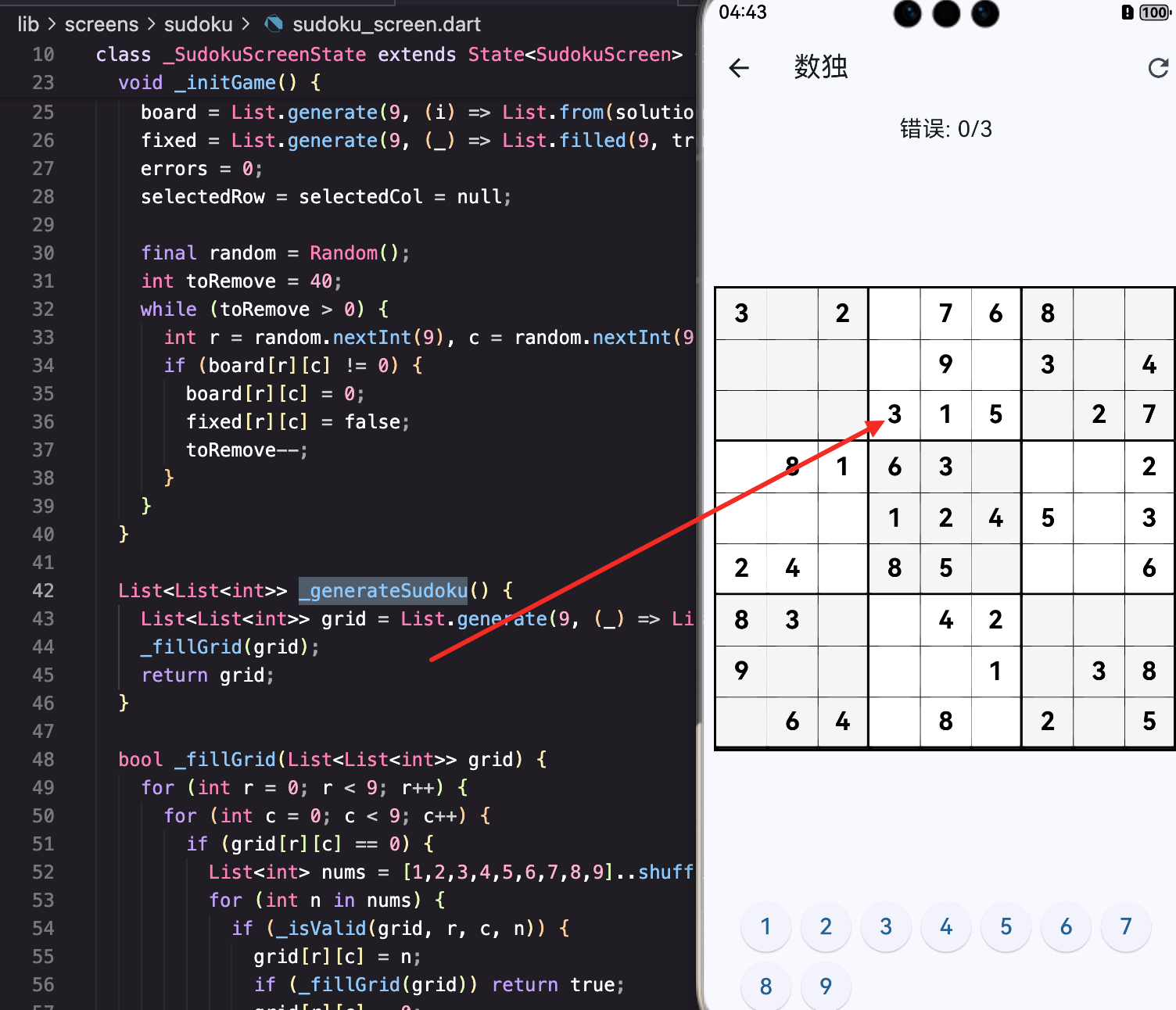
数据结构
late List<List<int>> board;
late List<List<int>> solution;
late List<List<bool>> fixed;
三个9x9的数组:
- board: 当前棋盘状态,0表示空
- solution: 正确答案
- fixed: 是否是固定格子(题目给的)
生成数独
void _initGame() {
  solution = _generateSudoku();
  board = List.generate(9, (i) => List.from(solution[i]));
先生成一个完整的数独答案,然后复制一份作为棋盘。
_generateSudoku
List<List<int>> _generateSudoku() {
  List<List<int>> grid = List.generate(9, (_) => List.filled(9, 0));
  _fillGrid(grid);
  return grid;
}
创建空棋盘,然后用回溯法填满。
_fillGrid回溯填充
bool _fillGrid(List<List<int>> grid) {
  for (int r = 0; r < 9; r++) {
    for (int c = 0; c < 9; c++) {
      if (grid[r][c] == 0) {
        List<int> nums = [1,2,3,4,5,6,7,8,9]..shuffle();
        for (int n in nums) {
          if (_isValid(grid, r, c, n)) {
            grid[r][c] = n;
            if (_fillGrid(grid)) return true;
            grid[r][c] = 0;
          }
        }
        return false;
      }
    }
  }
  return true;
}
经典的回溯算法:
- 找到第一个空格子
- 尝试填入1-9(随机顺序)
- 如果合法,递归填下一个
- 如果递归成功,返回true
- 如果递归失败,回溯(清零),尝试下一个数字
- 所有数字都试过了还不行,返回false
..shuffle()打乱数字顺序,这样每次生成的数独都不一样。
_isValid验证
bool _isValid(List<List<int>> grid, int row, int col, int num) {
  for (int i = 0; i < 9; i++) {
    if (grid[row][i] == num || grid[i][col] == num) return false;
  }
  int br = (row ~/ 3) * 3, bc = (col ~/ 3) * 3;
  for (int i = 0; i < 3; i++) {
    for (int j = 0; j < 3; j++) {
      if (grid[br + i][bc + j] == num) return false;
    }
  }
  return true;
}
数独的三个规则:
行检查
if (grid[row][i] == num) return false;
同一行不能有重复数字。
列检查
if (grid[i][col] == num) return false;
同一列不能有重复数字。
宫格检查
int br = (row ~/ 3) * 3, bc = (col ~/ 3) * 3;
for (int i = 0; i < 3; i++) {
  for (int j = 0; j < 3; j++) {
    if (grid[br + i][bc + j] == num) return false;
  }
}
同一个3x3宫格不能有重复数字。
(row ~/ 3) * 3计算宫格左上角的行号。比如row=5,5~/3=1,1*3=3,宫格从第3行开始。
挖空
final random = Random();
int toRemove = 40;
while (toRemove > 0) {
  int r = random.nextInt(9), c = random.nextInt(9);
  if (board[r][c] != 0) {
    board[r][c] = 0;
    fixed[r][c] = false;
    toRemove--;
  }
}
随机挖掉40个格子,这些就是玩家要填的。
为什么用while而不是for
if (board[r][c] != 0) {
随机位置可能重复选到已经挖空的格子,这时不计数,继续循环。
while循环直到挖够40个为止。
难度控制
挖空数量决定难度:
- 30个:简单
- 40个:中等
- 50个:困难
当前固定40个,可以改成可配置的。
填入数字
void _placeNumber(int num) {
  if (selectedRow == null || fixed[selectedRow!][selectedCol!]) return;
  setState(() {
    if (num == solution[selectedRow!][selectedCol!]) {
      board[selectedRow!][selectedCol!] = num;
      if (_checkWin()) _showWinDialog();
    } else {
      errors++;
      if (errors >= 3) _showGameOverDialog();
    }
  });
}
前置检查
if (selectedRow == null || fixed[selectedRow!][selectedCol!]) return;
没选中格子或选中的是固定格子,直接返回。
selectedRow!是非空断言,告诉编译器这里不会是null。
正确填入
if (num == solution[selectedRow!][selectedCol!]) {
  board[selectedRow!][selectedCol!] = num;
填入的数字和答案相同,写入board。
检查胜利
if (_checkWin()) _showWinDialog();
每次正确填入后检查是否完成。
错误处理
} else {
  errors++;
  if (errors >= 3) _showGameOverDialog();
}
填错了,错误次数加1。3次错误游戏结束。
注意:填错不会写入board,格子保持空白。
胜利检查
bool _checkWin() {
  for (int i = 0; i < 9; i++) {
    for (int j = 0; j < 9; j++) {
      if (board[i][j] != solution[i][j]) return false;
    }
  }
  return true;
}
遍历所有格子,只要有一个和答案不同就返回false。
全部相同返回true,游戏胜利。
胜利对话框
void _showWinDialog() {
  showDialog(context: context, builder: (_) => AlertDialog(
    title: const Text('恭喜!'), content: const Text('你完成了数独!'),
    actions: [TextButton(onPressed: () { Navigator.pop(context); setState(_initGame); }, child: const Text('再来一局'))],
  ));
}
弹出对话框,点击按钮开始新游戏。
游戏结束对话框
void _showGameOverDialog() {
  showDialog(context: context, builder: (_) => AlertDialog(
    title: const Text('游戏结束'), content: const Text('错误次数过多!'),
    actions: [TextButton(onPressed: () { Navigator.pop(context); setState(_initGame); }, child: const Text('重新开始'))],
  ));
}
3次错误后弹出,重新开始。
数字按钮
children: List.generate(9, (i) => SizedBox(
  width: 40, height: 40,
  child: ElevatedButton(
    onPressed: () => _placeNumber(i + 1),
    style: ElevatedButton.styleFrom(padding: EdgeInsets.zero),
    child: Text('${i + 1}', style: const TextStyle(fontSize: 18)),
  ),
)),
9个按钮,点击时调用_placeNumber(i + 1)。
i是0-8,加1变成1-9。
显示填入的数字
Text(
  board[r][c] == 0 ? '' : '${board[r][c]}',
  style: TextStyle(fontSize: 20, fontWeight: FontWeight.bold, color: fixed[r][c] ? Colors.black : Colors.blue),
),
board里的值显示出来,0显示空。
蓝色表示玩家填入的,黑色表示题目给的。
错误次数显示
Text('错误: $errors/3', style: const TextStyle(fontSize: 18)),
让玩家知道还能错几次。
可能的改进
显示错误位置
当前填错只是加错误次数,不告诉玩家哪里错了。可以改成:
} else {
  errors++;
  // 短暂显示错误数字,然后清除
  board[selectedRow!][selectedCol!] = num;
  setState(() {});
  Future.delayed(Duration(milliseconds: 500), () {
    board[selectedRow!][selectedCol!] = 0;
    setState(() {});
  });
}
提示功能
可以加一个提示按钮,自动填入一个正确数字:
void _hint() {
  for (int i = 0; i < 9; i++) {
    for (int j = 0; j < 9; j++) {
      if (board[i][j] == 0) {
        board[i][j] = solution[i][j];
        setState(() {});
        return;
      }
    }
  }
}
撤销功能
记录操作历史,支持撤销:
List<Map<String, int>> history = [];

void _placeNumber(int num) {
  // ... 填入逻辑 ...
  history.add({'row': selectedRow!, 'col': selectedCol!, 'value': num});
}

void _undo() {
  if (history.isEmpty) return;
  var last = history.removeLast();
  board[last['row']!][last['col']!] = 0;
  setState(() {});
}
小结
这篇讲了数独的数字填入,核心知识点:
- 回溯算法:生成完整数独
- _isValid验证:行、列、宫格三重检查
- 随机挖空:while循环确保挖够数量
- 答案比较:填入数字和solution比较
- 错误计数:3次错误游戏结束
- 胜利检查:board和solution完全相同
- 非空断言:selectedRow!告诉编译器不为null
数独的填入逻辑不复杂,关键是生成有效的数独题目和正确验证答案。
欢迎加入开源鸿蒙跨平台社区:https://openharmonycrossplatform.csdn.net

开源鸿蒙跨平台开发社区汇聚开发者与厂商,共建“一次开发,多端部署”的开源生态,致力于降低跨端开发门槛,推动万物智联创新。
更多推荐



 7
7 0
0- 0


 已为社区贡献30条内容

所有评论(0)