Flutter for OpenHarmony游戏集合App实战之炸金花筹码底池
炸金花除了比牌,还有一个重要元素——筹码。下注、跟注、加注,筹码在玩家和底池之间流动。这篇来聊聊筹码系统怎么做:底池显示、玩家筹码、下注操作。
通过网盘分享的文件:game_flutter_openharmony.zip
链接: https://pan.baidu.com/s/1ryUS1A0zcvXGrDaStu530w 提取码: tqip
前言
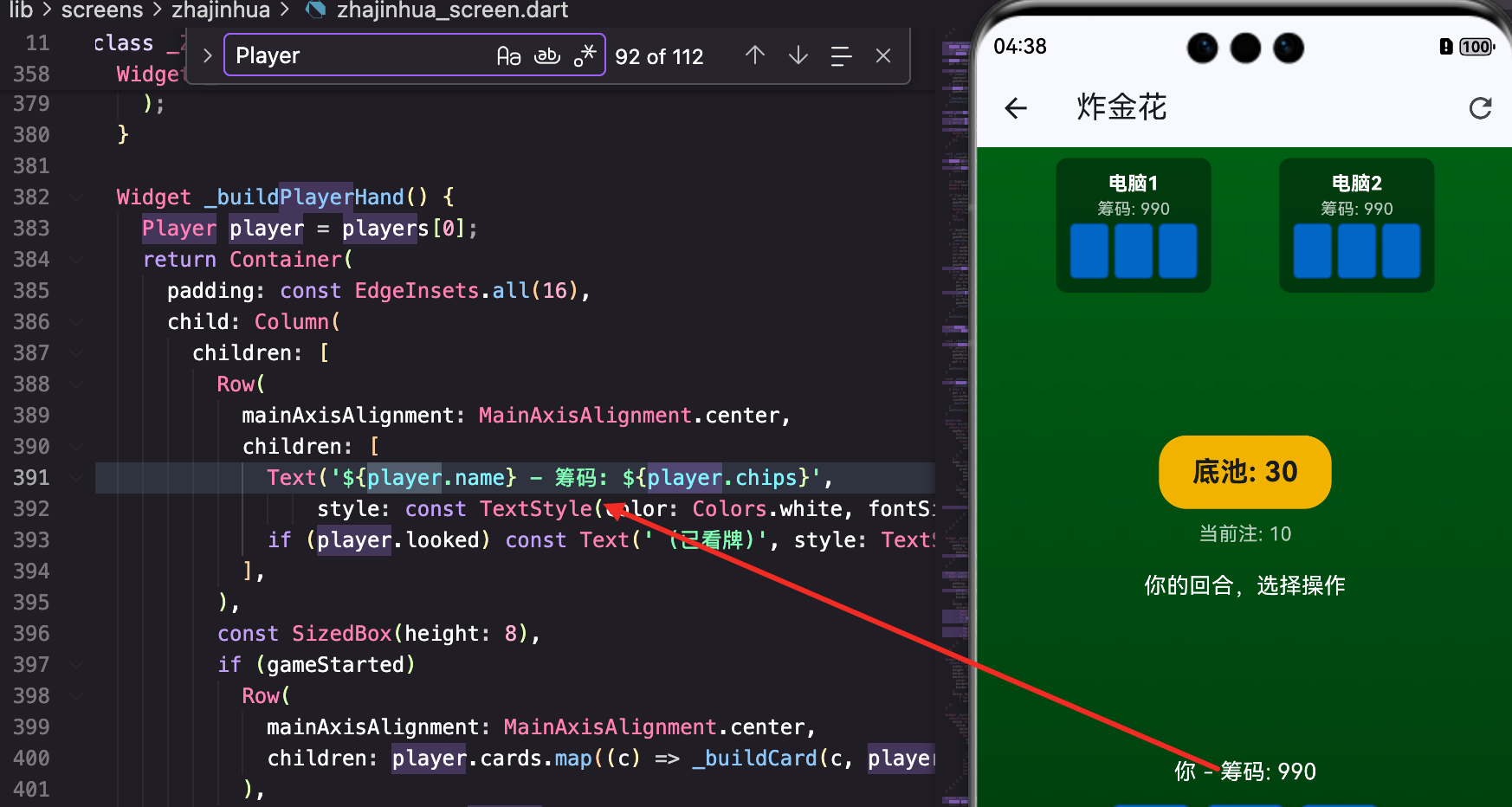
炸金花除了比牌,还有一个重要元素——筹码。下注、跟注、加注,筹码在玩家和底池之间流动。
这篇来聊聊筹码系统怎么做:底池显示、玩家筹码、下注操作。
玩家数据结构
class Player {
  String name;
  int chips;
  List<PokerCard> cards = [];
  bool isHuman;
  bool folded = false;
  bool looked = false;
  HandType handType = HandType.highCard;

  Player({required this.name, required this.chips, required this.isHuman});
}
每个玩家有这些属性:
- name: 名字,“你"或"电脑1”
- chips: 筹码数量
- cards: 手牌
- isHuman: 是否是真人玩家
- folded: 是否弃牌
- looked: 是否看过牌
- handType: 牌型
筹码用int存储,简单直接。初始每人1000筹码。
底池显示
底池在屏幕中央,很醒目:
Widget _buildPotInfo() {
  return Expanded(
    child: Center(
      child: Column(
        mainAxisAlignment: MainAxisAlignment.center,
        children: [
          Container(
            padding: const EdgeInsets.symmetric(horizontal: 24, vertical: 12),
            decoration: BoxDecoration(
              color: Colors.amber.withOpacity(0.9),
              borderRadius: BorderRadius.circular(20),
            ),
            child: Text('底池: $pot', style: const TextStyle(fontSize: 20, fontWeight: FontWeight.bold)),
          ),
底池容器
Container(
  padding: const EdgeInsets.symmetric(horizontal: 24, vertical: 12),
  decoration: BoxDecoration(
    color: Colors.amber.withOpacity(0.9),
    borderRadius: BorderRadius.circular(20),
  ),
金色背景,圆角20像素,像一个筹码堆的感觉。
Colors.amber.withOpacity(0.9)稍微透明一点,和背景融合得更好。
底池数字
child: Text('底池: $pot', style: const TextStyle(fontSize: 20, fontWeight: FontWeight.bold)),
大字号,加粗,让玩家一眼就能看到底池有多少。
当前注
          const SizedBox(height: 8),
          Text('当前注: $currentBet', style: const TextStyle(color: Colors.white70)),
底池下面显示当前注,告诉玩家跟注要多少钱。
白色半透明,次要信息。
游戏消息
          const SizedBox(height: 16),
          Text(gameMessage, style: const TextStyle(color: Colors.white, fontSize: 16)),
        ],
      ),
    ),
  );
}
显示游戏状态消息,比如"你的回合"、“电脑1跟注”、“你赢了”。
这个消息会随着游戏进程更新,让玩家知道发生了什么。
玩家筹码显示
玩家的筹码在手牌区域上方:
Text('${player.name} - 筹码: ${player.chips}',
    style: const TextStyle(color: Colors.white, fontSize: 16)),
简单的文字显示,名字和筹码数量。
对手的筹码在对手卡片里:
Text('筹码: ${player.chips}', style: const TextStyle(color: Colors.white70, fontSize: 12)),
字号小一点,因为对手卡片空间有限。
底注(Ante)
游戏开始时,每人先交底注:
void _dealCards() {
  // ... 发牌逻辑 ...

  // Ante
  for (var player in players) {
    player.chips -= 10;
    pot += 10;
  }
每人扣10筹码,加到底池。3个玩家就是30筹码的底池。
底注的作用是让底池一开始就有钱,激励玩家参与。
跟注操作
case 'follow':
  int betAmount = player.looked ? currentBet * 2 : currentBet;
  if (player.chips >= betAmount) {
    player.chips -= betAmount;
    pot += betAmount;
    gameMessage = '你跟注 $betAmount';
    _nextPlayer();
  }
  break;
看牌与不看牌的区别
int betAmount = player.looked ? currentBet * 2 : currentBet;
这是炸金花的特殊规则:
- 没看牌: 跟注只需要当前注的1倍
- 看过牌: 跟注需要当前注的2倍
所以不看牌有优势,但你不知道自己牌好不好。
筹码检查
if (player.chips >= betAmount) {
先检查筹码够不够。不够就不能跟注。
筹码转移
player.chips -= betAmount;
pot += betAmount;
从玩家扣钱,加到底池。这就是筹码的流动。
加注操作
case 'raise':
  int newBet = currentBet * 2;
  int betAmount = player.looked ? newBet * 2 : newBet;
  if (player.chips >= betAmount) {
    currentBet = newBet;
    player.chips -= betAmount;
    pot += betAmount;
    gameMessage = '你加注到 $newBet';
    _nextPlayer();
  }
  break;
加注金额
int newBet = currentBet * 2;
加注是把当前注翻倍。如果当前注是10,加注后变成20。
实际支付
int betAmount = player.looked ? newBet * 2 : newBet;
同样的规则,看过牌要付双倍。
更新当前注
currentBet = newBet;
加注后,当前注变成新的值,后面的玩家要按新的注来跟。
比牌操作
void _compareWith(Player opponent) {
  Player player = players[0];
  int compareCost = player.looked ? currentBet * 2 : currentBet;
  if (player.chips < compareCost) return;

  player.chips -= compareCost;
  pot += compareCost;
比牌也要付钱,金额和跟注一样。
比牌是炸金花的特色:不用等到最后,可以主动和某个对手比牌,输的人出局。
赢家获得底池
void _checkRoundEnd() {
  List<Player> active = _getActivePlayers();
  if (active.length == 1) {
    active[0].chips += pot;
    gameMessage = '${active[0].name} 获胜!赢得 $pot 筹码';
    roundOver = true;
    pot = 0;
  }
  setState(() {});
}
当只剩一个玩家没弃牌时,他赢得底池。
active[0].chips += pot;
底池的钱加到赢家的筹码里。
pot = 0;
底池清零,准备下一局。
操作按钮
Widget _buildActions() {
  Player player = players[0];
  bool isMyTurn = currentPlayerIndex == 0 && gameStarted && !roundOver && !player.folded;

  return Container(
    padding: const EdgeInsets.all(16),
    child: Column(
      children: [
        if (!gameStarted || roundOver)
          ElevatedButton(
            onPressed: roundOver ? _newRound : _dealCards,
            style: ElevatedButton.styleFrom(
              backgroundColor: Colors.amber,
              padding: const EdgeInsets.symmetric(horizontal: 40, vertical: 12),
            ),
            child: Text(roundOver ? '下一局' : '发牌', style: const TextStyle(fontSize: 18, color: Colors.black)),
          )
发牌/下一局按钮
游戏没开始或已结束时,显示一个大按钮。
金色背景,和底池呼应。
操作按钮组
        else if (isMyTurn)
          Wrap(
            spacing: 8,
            runSpacing: 8,
            alignment: WrapAlignment.center,
            children: [
              if (!player.looked)
                _actionButton('看牌', Colors.blue, () => _playerAction('look')),
              _actionButton('跟注', Colors.green, () => _playerAction('follow')),
              _actionButton('加注', Colors.orange, () => _playerAction('raise')),
              _actionButton('比牌', Colors.purple, () => _playerAction('compare')),
              _actionButton('弃牌', Colors.red, () => _playerAction('fold')),
            ],
          )
轮到玩家时,显示操作按钮。
用Wrap布局,按钮会自动换行,适应不同屏幕宽度。
按钮颜色
每个操作用不同颜色:
- 看牌: 蓝色,中性操作
- 跟注: 绿色,正常操作
- 加注: 橙色,激进操作
- 比牌: 紫色,特殊操作
- 弃牌: 红色,危险操作
颜色帮助玩家快速识别按钮。
看牌按钮的条件显示
if (!player.looked)
  _actionButton('看牌', Colors.blue, () => _playerAction('look')),
只有没看过牌时才显示看牌按钮。看过了就不需要了。
_actionButton组件
Widget _actionButton(String text, Color color, VoidCallback onPressed) {
  return ElevatedButton(
    onPressed: onPressed,
    style: ElevatedButton.styleFrom(backgroundColor: color),
    child: Text(text, style: const TextStyle(color: Colors.white)),
  );
}
封装了一个简单的按钮组件,接收文字、颜色、回调。
白色文字在彩色背景上很清晰。
AI的筹码操作
AI玩家也要操作筹码:
void _aiAction() {
  // ... AI决策逻辑 ...

  } else {
    int betAmount = ai.looked ? currentBet * 2 : currentBet;
    if (ai.chips >= betAmount) {
      ai.chips -= betAmount;
      pot += betAmount;
      gameMessage = '${ai.name} 跟注';
      _nextPlayer();
    } else {
      ai.folded = true;
      gameMessage = '${ai.name} 筹码不足,弃牌';
      _checkRoundEnd();
    }
  }
AI的筹码操作和玩家一样,扣钱加到底池。
如果筹码不够,AI会弃牌。
新一局的处理
void _newRound() {
  if (players.any((p) => p.chips <= 0)) {
    _initGame();
  } else {
    pot = 0;
    currentBet = 10;
    roundOver = false;
    _dealCards();
  }
  setState(() {});
}
破产检查
if (players.any((p) => p.chips <= 0)) {
  _initGame();
}
如果有玩家筹码归零,重新开始游戏(重置所有筹码)。
正常开始新一局
pot = 0;
currentBet = 10;
roundOver = false;
_dealCards();
底池清零,当前注重置为10,发新牌。
筹码不足的处理
if (player.chips >= betAmount) {
  // 执行操作
}
每次操作前都检查筹码是否足够。不够就不执行。
更好的做法是给用户提示:
if (player.chips < betAmount) {
  ScaffoldMessenger.of(context).showSnackBar(
    const SnackBar(content: Text('筹码不足')),
  );
  return;
}
但当前实现简化了,按钮点了没反应,玩家自己会意识到筹码不够。
小结
这篇讲了炸金花的筹码系统,核心知识点:
- Player类:chips属性存储筹码
- 底池显示:金色容器,大字号,居中
- 底注机制:游戏开始每人交10筹码
- 看牌规则:看过牌的玩家下注要翻倍
- 跟注/加注:从玩家扣钱,加到底池
- 赢家结算:底池的钱加到赢家筹码
- 操作按钮:不同颜色区分不同操作
- Wrap布局:按钮自动换行
- 筹码检查:操作前检查是否足够
筹码系统让炸金花有了博弈的感觉。不只是比牌大小,还要考虑下注策略。
欢迎加入开源鸿蒙跨平台社区:https://openharmonycrossplatform.csdn.net

开源鸿蒙跨平台开发社区汇聚开发者与厂商,共建“一次开发,多端部署”的开源生态,致力于降低跨端开发门槛,推动万物智联创新。
更多推荐

 9
9 0
0- 0


 已为社区贡献10条内容

所有评论(0)