Flutter for OpenHarmony 万能游戏库App实战 - 宝可梦列表实现
本文介绍了如何实现一个功能完整的宝可梦列表页面,主要包含以下核心功能: 无限滚动:通过ScrollController监听滚动位置,提前200像素触发加载更多数据 分页加载:使用offset和limit参数实现分页,初始加载20条数据 状态管理:区分初始加载和加载更多状态,优化用户体验 网格布局:采用2列网格,设置0.85的宽高比展示宝可梦卡片 辅助功能:包含搜索和分类按钮,支持下拉刷新操作 实现
宝可梦图鉴是一个很好的展示列表功能的场景。与首页的推荐列表不同,这里我们要展示所有的宝可梦,数量可能有几百只。这就涉及到分页加载、无限滚动、网格布局等高级列表技巧。这篇文章我们来实现一个功能完整的宝可梦列表页面,包括分页加载、下拉刷新、搜索和分类等功能。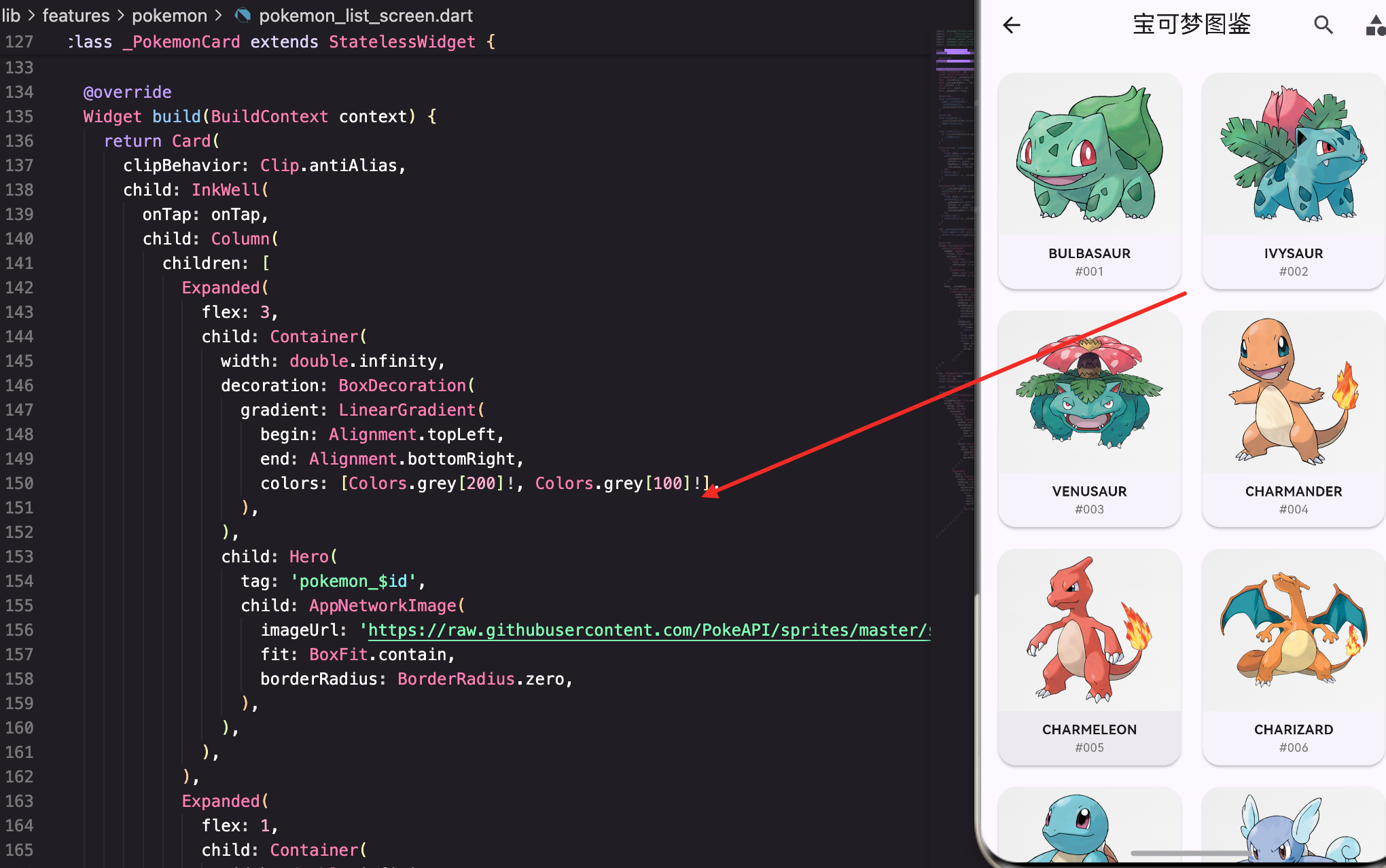
列表页面的整体设计
首先看看页面的整体结构。宝可梦列表需要支持多种操作:搜索、分类、刷新、加载更多。我们用一个StatefulWidget来管理这些状态:
class PokemonListScreen extends StatefulWidget {
const PokemonListScreen({super.key});
State<PokemonListScreen> createState() => _PokemonListScreenState();
}
class _PokemonListScreenState extends State<PokemonListScreen> {
final PokemonApi _api = PokemonApi();
final ScrollController _scrollController = ScrollController();
List<dynamic> _pokemonList = [];
bool _isLoading = true;
bool _isLoadingMore = false;
int _offset = 0;
final int _limit = 20;
bool _hasMore = true;
这里定义了很多状态变量。_isLoading表示初始加载状态,_isLoadingMore表示加载更多状态,这两个要分开,因为它们的UI表现不同。_offset和_limit用于分页,_hasMore标记是否还有更多数据。
生命周期管理
initState中初始化数据和监听器:
void initState() {
super.initState();
_loadPokemon();
_scrollController.addListener(_onScroll);
}
void dispose() {
_scrollController.dispose();
super.dispose();
}
在initState中调用_loadPokemon()加载初始数据,并给ScrollController添加监听器。这样当用户滚动到底部时能自动加载更多。
dispose中一定要释放ScrollController,否则会导致内存泄漏。这是StatefulWidget的最佳实践。
无限滚动的实现
_onScroll方法监听滚动事件,当用户滚动到接近底部时自动加载更多:
  void _onScroll() {
    if (_scrollController.position.pixels >= _scrollController.position.maxScrollExtent - 200) {
      _loadMore();
    }
  }
这里用了一个技巧:不是等到完全到底才加载,而是提前200像素就开始加载。这样用户滚动到底部时新数据已经加载好了,体验更流畅。
position.pixels是当前滚动位置,maxScrollExtent是最大可滚动距离。两者的差值小于200时就触发加载。
初始加载数据:
  Future<void> _loadPokemon() async {
    try {
      final data = await _api.getPokemonList(offset: 0, limit: _limit);
      setState(() {
        _pokemonList = data['results'] ?? [];
        _offset = _limit;
        _hasMore = data['next'] != null;
        _isLoading = false;
      });
    } catch (e) {
      setState(() => _isLoading = false);
    }
  }
初始加载时offset为0。加载成功后,_offset更新为_limit,这样下次加载时就能获取下一页的数据。
检查data[‘next’]是否为null来判断是否还有更多数据。PokeAPI会在最后一页返回null。
加载更多数据:
  Future<void> _loadMore() async {
    if (_isLoadingMore || !_hasMore) return;
    setState(() => _isLoadingMore = true);
    try {
      final data = await _api.getPokemonList(offset: _offset, limit: _limit);
      setState(() {
        _pokemonList.addAll(data['results'] ?? []);
        _offset += _limit;
        _hasMore = data['next'] != null;
        _isLoadingMore = false;
      });
    } catch (e) {
      setState(() => _isLoadingMore = false);
    }
  }
先检查是否已经在加载或没有更多数据,避免重复请求。然后用addAll把新数据追加到列表。
注意这里用的是addAll而不是赋值,这样能保留已有的数据。
提取宝可梦ID
PokeAPI返回的是宝可梦的URL,我们需要从URL中提取ID:
  int _getPokemonId(String url) {
    final parts = url.split('/');
    return int.parse(parts[parts.length - 2]);
  }
URL格式是
https://pokeapi.co/api/v2/pokemon/1/,最后一个/前面的数字就是ID。用split(‘/’)分割,然后取倒数第二个元素。
页面的UI构建
AppBar包含搜索和分类按钮:
Widget build(BuildContext context) {
return Scaffold(
appBar: AppBar(
title: const Text('宝可梦图鉴'),
actions: [
IconButton(
icon: const Icon(Icons.search),
onPressed: () => Navigator.push(context, MaterialPageRoute(builder: (_) => const PokemonSearchScreen())),
),
IconButton(
icon: const Icon(Icons.category),
onPressed: () => Navigator.push(context, MaterialPageRoute(builder: (_) => const PokemonTypesScreen())),
),
],
),
AppBar的actions中有两个按钮:搜索和分类。点击时分别导航到搜索页面和分类页面。这样设计很清晰,用户能快速找到想要的功能。
加载状态的处理:
      body: _isLoading
          ? const LoadingWidget(message: '加载宝可梦中...')
          : RefreshIndicator(
初始加载时显示LoadingWidget。加载完成后显示RefreshIndicator包装的GridView,这样用户可以下拉刷新。
网格布局的配置:
              child: GridView.builder(
                controller: _scrollController,
                padding: const EdgeInsets.all(12),
                gridDelegate: const SliverGridDelegateWithFixedCrossAxisCount(
                  crossAxisCount: 2,
                  childAspectRatio: 0.85,
                  crossAxisSpacing: 12,
                  mainAxisSpacing: 12,
                ),
用GridView.builder实现网格布局。crossAxisCount: 2表示每行2列。childAspectRatio: 0.85表示宽高比是0.85,这样卡片看起来稍微高一点,适合展示宝可梦的图片和名称。
把_scrollController传给GridView,这样才能监听滚动事件。
列表项的构建:
                itemCount: _pokemonList.length + (_isLoadingMore ? 1 : 0),
                itemBuilder: (context, index) {
                  if (index >= _pokemonList.length) {
                    return const Center(child: CircularProgressIndicator());
                  }
                  final pokemon = _pokemonList[index];
                  final id = _getPokemonId(pokemon['url']);
                  return _PokemonCard(
                    name: pokemon['name'],
                    id: id,
                    onTap: () => Navigator.push(context, MaterialPageRoute(builder: (_) => PokemonDetailScreen(pokemonId: id))),
                  );
                },
              ),
itemCount加上一个条件:如果正在加载更多,就多加一项用来显示loading圈。
当index超过列表长度时,显示CircularProgressIndicator。这样用户滚动到底部时能看到加载动画。
否则构建_PokemonCard,传入宝可梦的名称、ID和点击回调。
宝可梦卡片的设计
_PokemonCard是一个自定义组件,展示单个宝可梦的信息:
class _PokemonCard extends StatelessWidget {
final String name;
final int id;
final VoidCallback onTap;
const _PokemonCard({required this.name, required this.id, required this.onTap});
Widget build(BuildContext context) {
return Card(
clipBehavior: Clip.antiAlias,
child: InkWell(
onTap: onTap,
child: Column(
children: [
Expanded(
flex: 3,
child: Container(
width: double.infinity,
decoration: BoxDecoration(
gradient: LinearGradient(
begin: Alignment.topLeft,
end: Alignment.bottomRight,
colors: [Colors.grey[200]!, Colors.grey[100]!],
),
),
卡片用Column分为两部分:图片部分(3份)和文字部分(1份)。用Expanded和flex来控制比例。
图片部分有一个浅灰色的渐变背景,这样即使图片加载失败也不会显得很空。
Hero动画的使用:
                child: Hero(
                  tag: 'pokemon_$id',
                  child: AppNetworkImage(
                    imageUrl: 'https://raw.githubusercontent.com/PokeAPI/sprites/master/sprites/pokemon/other/official-artwork/$id.png',
                    fit: BoxFit.contain,
                    borderRadius: BorderRadius.zero,
                  ),
                ),
用Hero包装图片,这样点击卡片跳转到详情页时,图片会有一个平滑的过渡动画。tag要唯一,所以用’pokemon_$id’。
fit: BoxFit.contain让图片完整显示,不会被裁剪。
文字部分:
            Expanded(
              flex: 1,
              child: Container(
                width: double.infinity,
                padding: const EdgeInsets.symmetric(horizontal: 8, vertical: 4),
                child: Column(
                  mainAxisAlignment: MainAxisAlignment.center,
                  children: [
                    Text(
                      name.toUpperCase(),
                      style: const TextStyle(fontWeight: FontWeight.bold, fontSize: 12),
                      maxLines: 1,
                      overflow: TextOverflow.ellipsis,
                    ),
                    Text('#${id.toString().padLeft(3, '0')}', style: TextStyle(fontSize: 11, color: Colors.grey[600])),
                  ],
                ),
              ),
            ),
文字部分显示宝可梦的名称和编号。名称转成大写,这是宝可梦的传统展示方式。
编号用padLeft(3, ‘0’)补零,比如1变成001,这样看起来更专业。
用maxLines: 1和overflow: TextOverflow.ellipsis防止文字超出卡片。
API服务的设计
PokemonApi封装了所有宝可梦相关的API调用:
class PokemonApi {
  static const String baseUrl = 'https://pokeapi.co/api/v2';
  final ApiService _api = ApiService();

  Future<Map<String, dynamic>> getPokemonList({int offset = 0, int limit = 20}) async {
    final result = await _api.get('$baseUrl/pokemon?offset=$offset&limit=$limit');
    return result as Map<String, dynamic>;
  }

  Future<Map<String, dynamic>> getPokemonDetail(String nameOrId) async {
    final result = await _api.get('$baseUrl/pokemon/$nameOrId');
    return result as Map<String, dynamic>;
  }

  Future<Map<String, dynamic>> getPokemonSpecies(String nameOrId) async {
    final result = await _api.get('$baseUrl/pokemon-species/$nameOrId');
    return result as Map<String, dynamic>;
  }

  Future<Map<String, dynamic>> getTypeList() async {
    final result = await _api.get('$baseUrl/type');
    return result as Map<String, dynamic>;
  }

  Future<Map<String, dynamic>> getTypeDetail(String name) async {
    final result = await _api.get('$baseUrl/type/$name');
    return result as Map<String, dynamic>;
  }
}
这个类提供了多个方法来获取不同的宝可梦数据。getPokemonList用于列表页面,getPokemonDetail用于详情页面,getTypeList和getTypeDetail用于分类功能。
所有方法都返回Map<String, dynamic>,这样能灵活处理不同的数据结构。
通用的ApiService
ApiService是一个单例,负责所有的HTTP请求:
class ApiService {
  static final ApiService _instance = ApiService._internal();
  factory ApiService() => _instance;
  ApiService._internal();

  final http.Client _client = http.Client();
  static const Duration _timeout = Duration(seconds: 15);

  Future<dynamic> get(String url) async {
    try {
      final response = await _client
          .get(Uri.parse(url), headers: {
            'Accept': 'application/json',
            'User-Agent': 'GameHub/1.0',
          })
          .timeout(_timeout);
用单例模式确保整个App只有一个ApiService实例。这样能复用HTTP连接,提升性能。
设置了15秒的超时时间。如果请求超过15秒还没返回,就抛出TimeoutException。
错误处理:
      if (response.statusCode == 200) {
        return jsonDecode(response.body);
      } else if (response.statusCode == 404) {
        throw ApiException('资源未找到', response.statusCode);
      } else if (response.statusCode >= 500) {
        throw ApiException('服务器错误', response.statusCode);
      } else {
        throw ApiException('请求失败', response.statusCode);
      }
    } on TimeoutException {
      throw ApiException('请求超时,请检查网络连接', 0);
    } on FormatException {
      throw ApiException('数据格式错误', 0);
    } catch (e) {
      if (e is ApiException) rethrow;
      throw ApiException('网络连接失败: ${e.toString()}', 0);
    }
  }
}
根据不同的HTTP状态码返回不同的错误信息。这样上层代码能根据错误类型做出相应的处理。
单独处理TimeoutException和FormatException,这两个是最常见的网络错误。
性能优化的考虑
1. 分页加载
不是一次性加载所有宝可梦,而是分页加载。每页20个,这样初始加载速度快,用户体验更好。
2. 无限滚动
当用户滚动到接近底部时自动加载下一页,这样用户感觉不到分页的存在。
3. 图片优化
用Hero动画让图片过渡更流畅。图片URL指向GitHub上的高清立绘,而不是API返回的小图。
4. 状态分离
_isLoading和_isLoadingMore分开管理,这样能精确控制UI。初始加载时显示全屏loading,加载更多时只显示底部的loading圈。
5. 内存管理
及时释放ScrollController,避免内存泄漏。
总结
这篇文章我们实现了一个功能完整的宝可梦列表页面。涉及到的知识点包括:
- 分页加载 - 如何实现高效的分页机制
- 无限滚动 - 监听滚动事件,自动加载更多
- 网格布局 - 用GridView.builder实现高效的网格显示
- Hero动画 - 让页面过渡更流畅
- API设计 - 如何封装和管理API调用
- 错误处理 - 完善的错误处理机制
- 性能优化 - 内存管理、状态分离等
一个好的列表实现能让用户快速浏览大量数据,同时保持流畅的体验。这些技巧在很多App中都能用到。
欢迎加入开源鸿蒙跨平台社区:https://openharmonycrossplatform.csdn.net

开源鸿蒙跨平台开发社区汇聚开发者与厂商,共建“一次开发,多端部署”的开源生态,致力于降低跨端开发门槛,推动万物智联创新。
更多推荐
 9
9 0
0- 0


 已为社区贡献9条内容

所有评论(0)