rn_for_openharmony_steam资讯app实战-热销榜实现
React Native for OpenHarmony 实战:Steam 热销榜实现 本文介绍了使用 React Native for OpenHarmony 实现 Steam 热销榜页面的关键技术点: 数据获取:通过 featuredcategories API 获取 top_sellers 数据,游戏已按销量排序 排名展示:利用 map 的 index 参数为游戏名称添加排名前缀(如 &qu
React Native for OpenHarmony 实战:Steam 资讯 App 热销榜页面
案例开源地址:https://atomgit.com/nutpi/rn_openharmony_steam
热销榜是 Steam 上最受关注的榜单之一,能上榜的游戏要么是新出的爆款,要么是常年霸榜的经典。这篇文章来实现热销榜页面,重点聊聊排行榜展示的一些技巧。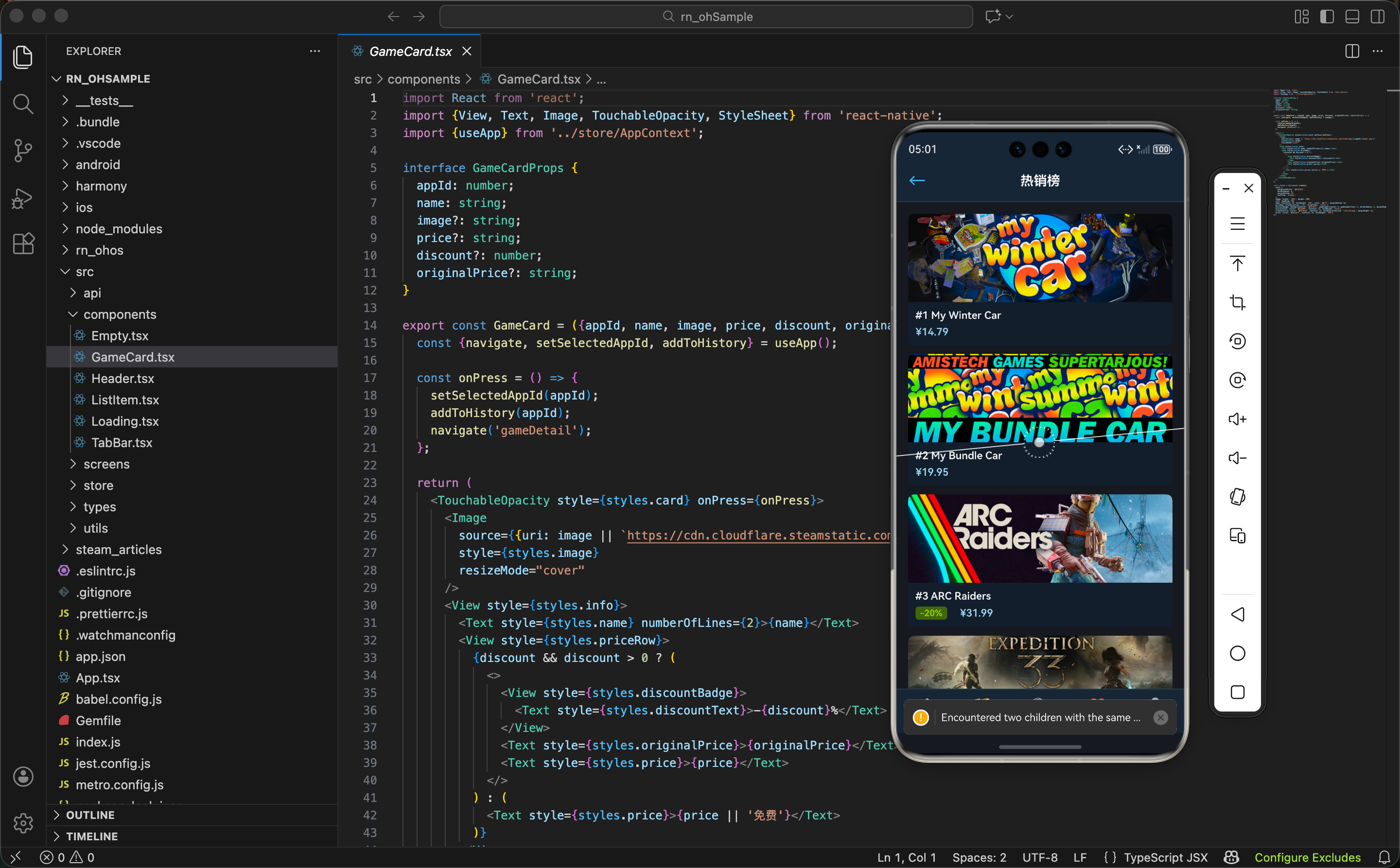
排行榜的特殊之处
热销榜和前面实现的精选、特惠页面有一个本质区别:它是有顺序的。
精选游戏和特惠游戏虽然也是列表,但用户不太关心它们的排列顺序。而热销榜不一样,第 1 名和第 10 名的含义完全不同,用户会特别关注排名靠前的游戏。
所以在 UI 设计上,我们需要突出显示排名信息,让用户一眼就能看出每个游戏的位置。
数据来源
热销榜数据同样来自 featuredcategories 接口,只是取的是 top_sellers 字段:
export const getFeaturedCategories = async () => {
  const res = await fetch(`${STORE_API}/featuredcategories`);
  return res.json();
};
返回数据中 top_sellers 的结构:
{
  "top_sellers": {
    "id": "top_sellers",
    "name": "热销商品",
    "items": [
      {
        "id": 730,
        "name": "Counter-Strike 2",
        "discounted": false,
        "discount_percent": 0,
        "original_price": null,
        "final_price": 0,
        "header_image": "https://cdn.xxx/xxx.jpg"
      },
      // ... 更多游戏
    ]
  }
}
items 数组中的游戏已经按销量排好序了,第一个就是销量冠军。这省去了我们在前端排序的麻烦。
注意:热销榜里很多游戏是免费游戏(比如 CS2、Dota 2),它们的
final_price是 0,original_price是 null。处理价格时要考虑这种情况。
排名展示的实现思路
怎么在 UI 上展示排名呢?有几种常见方案:
方案一:单独的排名组件
在 GameCard 左侧加一个排名数字,类似音乐榜单的样式。这种方案视觉效果好,但需要修改 GameCard 组件的布局。
方案二:排名徽章
在游戏封面图左上角叠加一个排名徽章。这种方案不需要改布局,但实现稍复杂。
方案三:名称前缀
最简单的方案,直接在游戏名称前面加上排名数字,比如 “#1 Counter-Strike 2”。
我们采用方案三,因为它实现简单,而且不需要修改通用的 GameCard 组件。毕竟 GameCard 在其他页面也要用,不应该为了热销榜的特殊需求去改动它。
利用 map 的 index 参数
JavaScript 的 map 方法除了返回当前元素,还能拿到当前索引。我们正好可以用这个索引来生成排名:
{games.map((game: any, index: number) => (
  <GameCard
    key={game.id}
    appId={game.id}
    name={`#${index + 1} ${game.name}`}
    // ...
  />
))}
这里 index 从 0 开始,所以排名要 index + 1。用模板字符串把排名和游戏名拼接起来,传给 GameCard 的 name 属性。
最终显示效果就是:
- #1 Counter-Strike 2
- #2 PUBG: BATTLEGROUNDS
- #3 Dota 2
- …
简单粗暴,但很有效。
热销榜页面完整实现
来看完整的代码实现:
import React, {useEffect, useState} from 'react';
import {View, ScrollView, StyleSheet} from 'react-native';
import {Header} from '../components/Header';
import {TabBar} from '../components/TabBar';
import {GameCard} from '../components/GameCard';
import {Loading} from '../components/Loading';
import {getFeaturedCategories} from '../api/steam';
引入部分和特惠页面一样,都是用 getFeaturedCategories 接口。
组件主体:
export const TopSellersScreen = () => {
  const [games, setGames] = useState<any[]>([]);
  const [loading, setLoading] = useState(true);

  useEffect(() => {
    getFeaturedCategories().then(data => {
      setGames(data?.top_sellers?.items || []);
      setLoading(false);
    }).catch(() => setLoading(false));
  }, []);
数据加载逻辑和之前的页面类似,区别在于数据提取路径是 data?.top_sellers?.items。
渲染部分:
  return (
    <View style={styles.container}>
      <Header title="热销榜" showBack />
      {loading ? <Loading /> : (
        <ScrollView style={styles.content}>
          {games.map((game: any, index: number) => (
            <GameCard
              key={game.id}
              appId={game.id}
              name={`#${index + 1} ${game.name}`}
              image={game.header_image}
              price={game.final_price ? `¥${(game.final_price / 100).toFixed(2)}` : '免费'}
              discount={game.discount_percent}
            />
          ))}
        </ScrollView>
      )}
      <TabBar />
    </View>
  );
};
重点看 map 的回调函数,它接收两个参数:
game:当前遍历到的游戏对象index:当前索引,从 0 开始
然后在 name 属性里拼接排名:
name={`#${index + 1} ${game.name}`}
价格处理:
price={game.final_price ? `¥${(game.final_price / 100).toFixed(2)}` : '免费'}
这里用了三元表达式:
final_price存在且不为 0 时,转换成元并显示- 否则显示"免费"
热销榜里免费游戏很多,这个处理很重要。
样式定义:
const styles = StyleSheet.create({
  container: {flex: 1, backgroundColor: '#171a21'},
  content: {flex: 1, padding: 16},
});
保持和其他列表页面一致的样式。
关于 key 的选择
在 map 渲染列表时,React 要求每个元素有唯一的 key。我们用的是 game.id:
<GameCard key={game.id} ... />
有人可能会想:既然有 index,为什么不用 index 做 key?
// 不推荐
<GameCard key={index} ... />
用 index 做 key 在某些场景下会有问题。比如列表数据发生变化(新增、删除、重排序)时,React 可能会复用错误的组件实例,导致状态混乱或不必要的重渲染。
而用 game.id 这种业务唯一标识做 key,React 能准确追踪每个元素,即使列表顺序变了也能正确处理。
经验法则:如果数据有唯一 ID,优先用 ID 做 key;只有在数据没有 ID 且列表不会变化时,才考虑用 index。
GameCard 组件的复用价值
在实现热销榜之前,我们已经在精选页面和特惠页面用过 GameCard 组件了。这里再来回顾一下它的设计,理解为什么它能在不同场景下复用。
interface GameCardProps {
  appId: number;
  name: string;
  image?: string;
  price?: string;
  discount?: number;
  originalPrice?: string;
}
这个 Props 设计有几个特点:
必选项最少化:只有 appId 和 name 是必传的,其他都是可选的。这样调用方可以根据自己的数据情况灵活传参。
图片有兜底:image 不传时会根据 appId 自动拼接 Steam CDN 地址,调用方不用操心图片 URL 的问题。
价格展示灵活:price、discount、originalPrice 三个属性配合使用,可以覆盖"免费"、“原价”、"打折"三种场景。
正是这种灵活的设计,让 GameCard 能在精选、特惠、热销等不同页面复用,而不需要为每个页面写一个专门的卡片组件。
免费游戏的特殊处理
热销榜有个特点:免费游戏占比很高。像 CS2、Dota 2、Apex Legends 这些常年霸榜的游戏都是免费的。
看一下 API 返回的免费游戏数据:
{
  "id": 730,
  "name": "Counter-Strike 2",
  "discounted": false,
  "discount_percent": 0,
  "original_price": null,
  "final_price": 0
}
注意几个字段的值:
discounted是false(没有打折,因为本来就免费)discount_percent是0original_price是null(没有原价)final_price是0(免费)
我们的价格处理逻辑要能正确处理这种情况:
price={game.final_price ? `¥${(game.final_price / 100).toFixed(2)}` : '免费'}
这里 game.final_price 为 0 时,JavaScript 会把它当作 falsy 值,所以会走到 '免费' 分支。这正好是我们想要的效果。
小坑提醒:如果你用
game.final_price !== undefined来判断,那0也会被当作有效价格,显示成 “¥0.00”,这就不太友好了。
排名样式的进阶优化
当前的排名展示比较朴素,如果想做得更好看,可以考虑以下优化:
前三名特殊样式
排行榜的前三名通常会有特殊待遇,比如金银铜的颜色区分。可以在 GameCard 里加个 rank 属性:
interface GameCardProps {
  // ...
  rank?: number;
}
然后根据 rank 值显示不同颜色的排名徽章:
const getRankColor = (rank: number) => {
  if (rank === 1) return '#FFD700'; // 金色
  if (rank === 2) return '#C0C0C0'; // 银色
  if (rank === 3) return '#CD7F32'; // 铜色
  return '#8f98a0'; // 默认灰色
};
排名数字单独展示
如果不想改 GameCard,也可以在热销榜页面自己渲染排名:
{games.map((game: any, index: number) => (
  <View key={game.id} style={styles.rankItem}>
    <Text style={styles.rankNumber}>#{index + 1}</Text>
    <View style={styles.cardWrapper}>
      <GameCard
        appId={game.id}
        name={game.name}
        // ...
      />
    </View>
  </View>
))}
这样排名数字和卡片是分开的,可以单独设置样式。
这些优化留给大家自己尝试,本文保持代码简洁。
性能考虑:ScrollView vs FlatList
热销榜的数据量通常在 10-20 条左右,用 ScrollView 完全没问题。但如果你想做一个更长的榜单(比如 Top 100),就需要考虑用 FlatList 了。
两者的区别:
ScrollView:一次性渲染所有子元素,简单直接,但数据量大时会有性能问题。
FlatList:虚拟列表,只渲染可视区域内的元素,适合长列表。
如果要换成 FlatList,代码改动不大:
<FlatList
  data={games}
  keyExtractor={item => item.id.toString()}
  renderItem={({item, index}) => (
    <GameCard
      appId={item.id}
      name={`#${index + 1} ${item.name}`}
      image={item.header_image}
      price={item.final_price ? `¥${(item.final_price / 100).toFixed(2)}` : '免费'}
      discount={item.discount_percent}
    />
  )}
  contentContainerStyle={styles.content}
/>
注意 FlatList 的 renderItem 回调参数是一个对象,包含 item 和 index,写法和 map 略有不同。
与首页的联动
回顾一下首页的快捷入口:
{[
  {name: 'featured', label: '精选', icon: '⭐'},
  {name: 'specials', label: '特惠', icon: '🏷️'},
  {name: 'topSellers', label: '热销', icon: '🔥'},
  {name: 'newReleases', label: '新品', icon: '🆕'},
].map(item => (
  <TouchableOpacity key={item.name} style={styles.quickLink} onPress={() => navigate(item.name)}>
    <Text style={styles.quickIcon}>{item.icon}</Text>
    <Text style={styles.quickLabel}>{item.label}</Text>
  </TouchableOpacity>
))}
用户点击"热销"图标时,会调用 navigate('topSellers'),然后 App 的路由系统会渲染 TopSellersScreen 组件。
这种设计让首页和各个子页面解耦,首页只负责导航,不关心子页面的具体实现。后续如果要修改热销榜的逻辑,只需要改 TopSellersScreen,不会影响首页。
完整代码
import React, {useEffect, useState} from 'react';
import {View, ScrollView, StyleSheet} from 'react-native';
import {Header} from '../components/Header';
import {TabBar} from '../components/TabBar';
import {GameCard} from '../components/GameCard';
import {Loading} from '../components/Loading';
import {getFeaturedCategories} from '../api/steam';

export const TopSellersScreen = () => {
  const [games, setGames] = useState<any[]>([]);
  const [loading, setLoading] = useState(true);

  useEffect(() => {
    getFeaturedCategories().then(data => {
      setGames(data?.top_sellers?.items || []);
      setLoading(false);
    }).catch(() => setLoading(false));
  }, []);

  return (
    <View style={styles.container}>
      <Header title="热销榜" showBack />
      {loading ? <Loading /> : (
        <ScrollView style={styles.content}>
          {games.map((game: any, index: number) => (
            <GameCard
              key={game.id}
              appId={game.id}
              name={`#${index + 1} ${game.name}`}
              image={game.header_image}
              price={game.final_price ? `¥${(game.final_price / 100).toFixed(2)}` : '免费'}
              discount={game.discount_percent}
            />
          ))}
        </ScrollView>
      )}
      <TabBar />
    </View>
  );
};

const styles = StyleSheet.create({
  container: {flex: 1, backgroundColor: '#171a21'},
  content: {flex: 1, padding: 16},
});
小结
热销榜页面的实现看似简单,但涉及到几个值得思考的点:
- 排行榜的特殊性:顺序很重要,需要在 UI 上体现排名
- map 的 index 参数:巧妙利用索引生成排名
- key 的选择:优先用业务 ID,避免用 index
- 组件复用 vs 定制:通过传参实现差异化,而不是修改通用组件
到这里,首页相关的四个列表页面(精选、特惠、热销、新品)的套路基本一致了。下一篇我们来实现新品上架页面,会有一些新的内容,敬请期待。
欢迎加入开源鸿蒙跨平台社区:https://openharmonycrossplatform.csdn.net

开源鸿蒙跨平台开发社区汇聚开发者与厂商,共建“一次开发,多端部署”的开源生态,致力于降低跨端开发门槛,推动万物智联创新。
更多推荐


 10
10 0
0- 0


 已为社区贡献10条内容

所有评论(0)