Flutter & OpenHarmony 运动App运动天气服务组件开发
本文介绍了运动天气服务组件的开发方案,包含Flutter和OpenHarmony平台的实现细节。Flutter部分设计了天气数据模型,提供温度、湿度等关键指标和运动建议功能;OpenHarmony部分实现了基于定位的天气API调用服务;还展示了Flutter天气卡片UI组件,直观呈现天气数据和运动建议。该组件能为运动App用户提供精准的天气信息和运动安全指导。
前言
天气信息对户外运动至关重要,温度、湿度、风速等因素直接影响运动体验和安全。本文将详细介绍如何在Flutter与OpenHarmony平台上实现运动天气服务组件,包括天气获取、运动建议、恶劣天气预警等功能模块的完整实现方案。
Flutter天气数据模型
class WeatherData {
  final double temperature;
  final double feelsLike;
  final int humidity;
  final double windSpeed;
  final String condition;
  final String icon;
  final int uvIndex;
  final double visibility;

  WeatherData({
    required this.temperature,
    required this.feelsLike,
    required this.humidity,
    required this.windSpeed,
    required this.condition,
    required this.icon,
    required this.uvIndex,
    required this.visibility,
  });

  String get runningAdvice {
    if (temperature < 0) return '气温过低,建议室内运动';
    if (temperature > 35) return '高温预警,避免户外运动';
    if (humidity > 85) return '湿度较高,注意补水';
    if (windSpeed > 10) return '风力较大,注意安全';
    if (uvIndex > 7) return '紫外线强,注意防晒';
    if (temperature >= 15 && temperature <= 25) return '适宜跑步的好天气';
    return '可以进行户外运动';
  }

  Color get adviceColor {
    if (temperature < 0 || temperature > 35 || windSpeed > 10) return Colors.red;
    if (humidity > 85 || uvIndex > 7) return Colors.orange;
    return Colors.green;
  }
}
天气数据模型包含运动相关的关键气象指标。temperature和feelsLike分别是实际温度和体感温度,humidity是湿度百分比,windSpeed是风速。runningAdvice属性根据各项指标生成运动建议,考虑了极端温度、高湿度、大风和强紫外线等不利因素。adviceColor根据建议的严重程度返回对应颜色,红色表示不建议运动,绿色表示适宜运动。
OpenHarmony天气获取服务
import http from '@ohos.net.http';
import geoLocationManager from '@ohos.geoLocationManager';

class WeatherService {
  private apiKey: string = 'your_api_key';

  async getCurrentWeather(): Promise<object | null> {
    try {
      let location = await this.getCurrentLocation();
      if (!location) return null;

      let httpRequest = http.createHttp();
      let response = await httpRequest.request(
        `https://api.weather.com/v1/current?lat=${location.latitude}&lon=${location.longitude}&key=${this.apiKey}`,
        { method: http.RequestMethod.GET }
      );

      httpRequest.destroy();

      if (response.responseCode === 200) {
        return JSON.parse(response.result as string);
      }
      return null;
    } catch (error) {
      console.error('获取天气失败: ' + error);
      return null;
    }
  }

  private async getCurrentLocation(): Promise<object | null> {
    try {
      let location = await geoLocationManager.getCurrentLocation({
        priority: geoLocationManager.LocationRequestPriority.ACCURACY,
        scenario: geoLocationManager.LocationRequestScenario.UNSET,
        maxAccuracy: 100,
        timeoutMs: 10000,
      });
      return { latitude: location.latitude, longitude: location.longitude };
    } catch (error) {
      return null;
    }
  }

  async getHourlyForecast(): Promise<Array<object>> {
    // 获取逐小时预报
    return [];
  }
}
天气获取服务结合定位和天气API获取当前位置的天气数据。getCurrentLocation方法获取用户当前位置的经纬度,getCurrentWeather方法使用位置信息调用天气API。这种基于位置的天气服务确保用户获得准确的本地天气信息。getHourlyForecast方法可以获取未来几小时的天气预报,帮助用户规划运动时间。
Flutter天气卡片组件
class WeatherCard extends StatelessWidget {
final WeatherData weather;
const WeatherCard({Key? key, required this.weather}) : super(key: key);
Widget build(BuildContext context) {
return Card(
margin: EdgeInsets.all(16),
child: Padding(
padding: EdgeInsets.all(16),
child: Column(
children: [
Row(
mainAxisAlignment: MainAxisAlignment.spaceBetween,
children: [
Column(
crossAxisAlignment: CrossAxisAlignment.start,
children: [
Text('${weather.temperature.toInt()}°', style: TextStyle(fontSize: 48, fontWeight: FontWeight.bold)),
Text('体感 ${weather.feelsLike.toInt()}°', style: TextStyle(color: Colors.grey)),
],
),
Column(
children: [
Text(weather.icon, style: TextStyle(fontSize: 48)),
Text(weather.condition),
],
),
],
),
SizedBox(height: 16),
Row(
mainAxisAlignment: MainAxisAlignment.spaceAround,
children: [
_buildInfoItem(Icons.water_drop, '${weather.humidity}%', '湿度'),
_buildInfoItem(Icons.air, '${weather.windSpeed.toInt()}m/s', '风速'),
_buildInfoItem(Icons.wb_sunny, '${weather.uvIndex}', 'UV'),
],
),
SizedBox(height: 16),
Container(
padding: EdgeInsets.all(12),
decoration: BoxDecoration(
color: weather.adviceColor.withOpacity(0.1),
borderRadius: BorderRadius.circular(8),
),
child: Row(
children: [
Icon(Icons.directions_run, color: weather.adviceColor),
SizedBox(width: 8),
Expanded(child: Text(weather.runningAdvice, style: TextStyle(color: weather.adviceColor))),
],
),
),
],
),
),
);
}
Widget _buildInfoItem(IconData icon, String value, String label) {
return Column(
children: [
Icon(icon, color: Colors.grey),
SizedBox(height: 4),
Text(value, style: TextStyle(fontWeight: FontWeight.bold)),
Text(label, style: TextStyle(fontSize: 12, color: Colors.grey)),
],
);
}
}
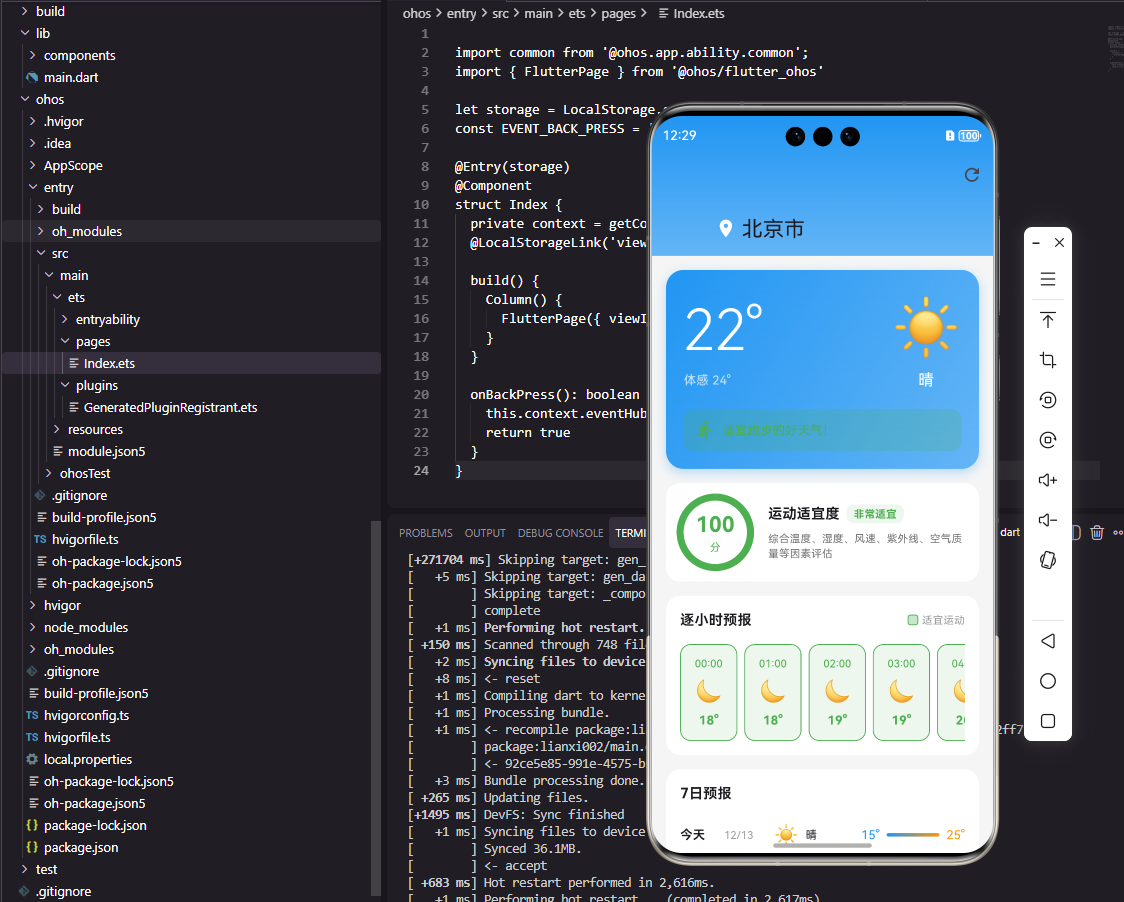
天气卡片组件展示当前天气和运动建议。左侧显示温度和体感温度,右侧显示天气图标和状况描述。中间行显示湿度、风速和紫外线指数三个关键指标。底部的建议区域根据天气条件给出运动建议,使用颜色区分建议的紧急程度。这种设计让用户一眼就能了解当前天气是否适合户外运动。
OpenHarmony天气预警服务
import notificationManager from '@ohos.notificationManager';

class WeatherAlertService {
  async checkAndAlert(weather: object): Promise<void> {
    let alerts: Array<string> = [];

    if (weather['temperature'] > 35) {
      alerts.push('高温预警:当前气温超过35°C,不建议户外运动');
    }
    if (weather['temperature'] < 0) {
      alerts.push('低温预警:当前气温低于0°C,注意保暖');
    }
    if (weather['windSpeed'] > 10) {
      alerts.push('大风预警:当前风速较大,户外运动请注意安全');
    }
    if (weather['uvIndex'] > 8) {
      alerts.push('紫外线预警:UV指数过高,请做好防晒措施');
    }

    for (let alert of alerts) {
      await this.sendAlert(alert);
    }
  }

  private async sendAlert(message: string): Promise<void> {
    let notificationRequest: notificationManager.NotificationRequest = {
      id: Date.now(),
      content: {
        notificationContentType: notificationManager.ContentType.NOTIFICATION_CONTENT_BASIC_TEXT,
        normal: {
          title: '⚠️ 天气预警',
          text: message,
        }
      }
    };

    await notificationManager.publish(notificationRequest);
  }
}
天气预警服务在检测到不利天气条件时发送通知。checkAndAlert方法检查多项天气指标,包括高温、低温、大风和强紫外线。每个预警条件触发时发送对应的通知消息。这种主动预警机制帮助用户避免在恶劣天气下运动,保障运动安全。
Flutter天气时间线组件
class WeatherTimeline extends StatelessWidget {
final List<HourlyWeather> hourlyData;
const WeatherTimeline({Key? key, required this.hourlyData}) : super(key: key);
Widget build(BuildContext context) {
return Column(
crossAxisAlignment: CrossAxisAlignment.start,
children: [
Padding(
padding: EdgeInsets.symmetric(horizontal: 16),
child: Text('逐小时预报', style: TextStyle(fontWeight: FontWeight.bold)),
),
SizedBox(height: 8),
SizedBox(
height: 100,
child: ListView.builder(
scrollDirection: Axis.horizontal,
padding: EdgeInsets.symmetric(horizontal: 16),
itemCount: hourlyData.length,
itemBuilder: (context, index) {
var hour = hourlyData[index];
bool isBestTime = hour.temperature >= 15 && hour.temperature <= 25 && hour.humidity < 80;
return Container(
width: 60,
margin: EdgeInsets.only(right: 8),
padding: EdgeInsets.all(8),
decoration: BoxDecoration(
color: isBestTime ? Colors.green.withOpacity(0.1) : Colors.grey[100],
borderRadius: BorderRadius.circular(12),
border: isBestTime ? Border.all(color: Colors.green) : null,
),
child: Column(
mainAxisAlignment: MainAxisAlignment.center,
children: [
Text(hour.time, style: TextStyle(fontSize: 12)),
SizedBox(height: 4),
Text(hour.icon, style: TextStyle(fontSize: 20)),
SizedBox(height: 4),
Text('${hour.temperature.toInt()}°', style: TextStyle(fontWeight: FontWeight.bold)),
],
),
);
},
),
),
],
);
}
}
class HourlyWeather {
final String time;
final double temperature;
final int humidity;
final String icon;
HourlyWeather({required this.time, required this.temperature, required this.humidity, required this.icon});
}
天气时间线组件展示未来几小时的天气变化。横向滚动列表显示每小时的时间、天气图标和温度。适宜运动的时段使用绿色边框高亮显示,帮助用户选择最佳运动时间。这种可视化的时间线让用户可以规划一天中的运动安排,避开不利天气时段。
总结
本文全面介绍了Flutter与OpenHarmony平台上运动天气服务组件的实现方案。从天气数据获取到运动建议生成,从天气展示到���警通知,涵盖了天气服务的各个方面。通过准确的天气信息和智能的运动建议,我们可以帮助用户选择最佳运动时机,保障户外运动的安全和体验。欢迎加入开源鸿蒙跨平台社区:https://openharmonycrossplatform.csdn.net

开源鸿蒙跨平台开发社区汇聚开发者与厂商,共建“一次开发,多端部署”的开源生态,致力于降低跨端开发门槛,推动万物智联创新。
更多推荐

 23
23 0
0- 0


 已为社区贡献26条内容

所有评论(0)