Flutter & OpenHarmony OA系统消息通知列表组件开发指南
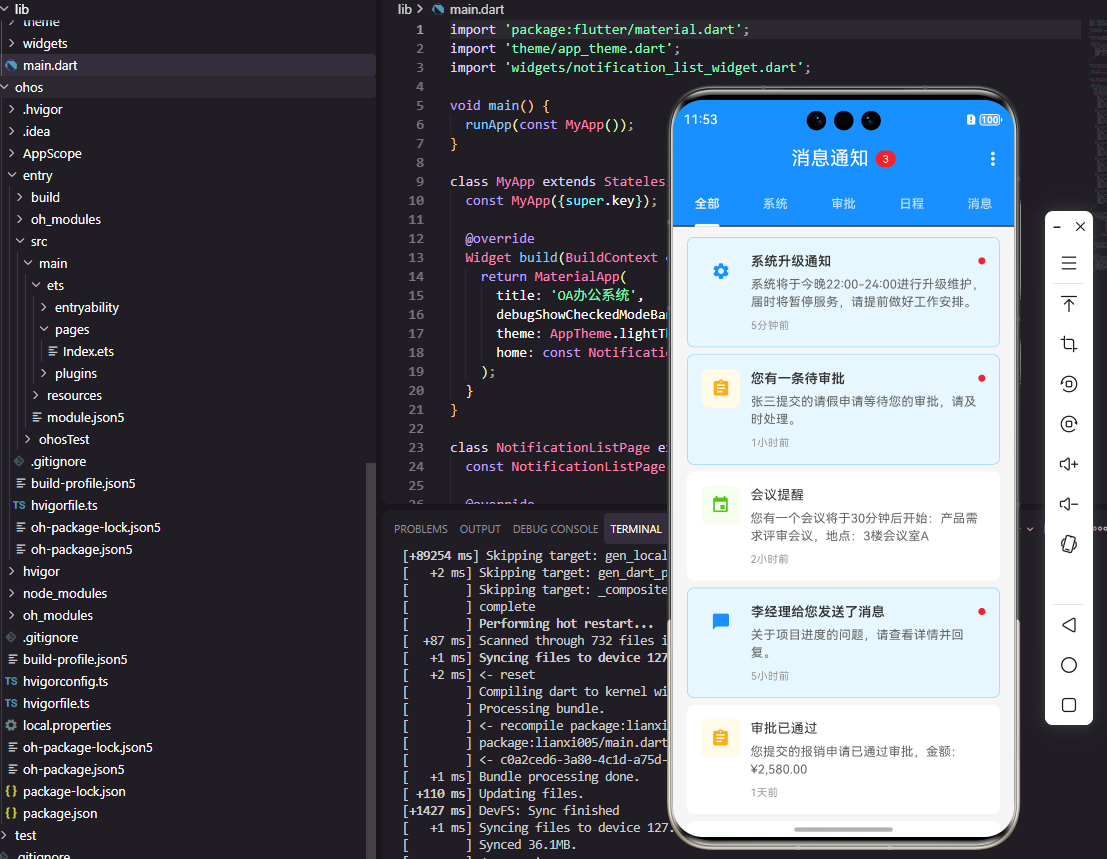
本文介绍了使用Flutter和OpenHarmony开发OA系统消息通知列表组件的实现方案。Flutter端采用分类Tab加列表结构,通过Dismissible实现左滑删除,使用ListTile展示消息内容;OpenHarmony端利用Tabs组件实现分类切换,通过@Builder构建消息卡片,支持左滑删除操作。两个平台均实现了消息分类展示、已读未读状态管理、点击查看详情等核心功能,为OA系统提供
前言
消息通知是OA系统中连接用户与系统的重要桥梁,它承担着传递审批提醒、会议通知、系统公告、任务分配等各类信息的职责。一个设计良好的消息通知列表组件需要支持消息分类、已读未读状态管理、批量操作、消息搜索等功能。本文将详细介绍如何使用Flutter和OpenHarmony开发一个功能完善的消息通知列表组件。
组件架构设计
消息通知列表组件的架构需要考虑消息类型的多样性和数据量的增长性。组件采用分类Tab加列表的结构,顶部Tab用于切换不同类型的消息,下方列表展示对应类型的消息内容。每条消息需要展示标题、摘要、时间、已读状态等信息,支持左滑删除、点击查看详情等交互。
Flutter端实现
定义消息类型枚举和数据模型:
enum MessageType { approval, meeting, announcement, task, system }

class NotificationMessage {
  final String id;
  final String title;
  final String summary;
  final MessageType type;
  final DateTime time;
  final bool isRead;
  final Map<String, dynamic>? extra;

  NotificationMessage({
    required this.id,
    required this.title,
    required this.summary,
    required this.type,
    required this.time,
    this.isRead = false,
    this.extra,
  });
}
消息数据模型使用枚举定义消息类型,extra字段用于存储不同类型消息的扩展数据。例如审批消息可能需要存储审批单ID,会议消息需要存储会议室信息等。这种设计使模型具有良好的扩展性。
消息列表组件的基础结构:
class NotificationListWidget extends StatefulWidget {
final List<NotificationMessage> messages;
final Function(NotificationMessage) onTap;
final Function(NotificationMessage) onDelete;
const NotificationListWidget({
Key? key,
required this.messages,
required this.onTap,
required this.onDelete,
}) : super(key: key);
State<NotificationListWidget> createState() => _NotificationListWidgetState();
}
组件接收消息列表和点击、删除回调函数。这种设计使组件专注于UI展示,业务逻辑如标记已读、删除消息等由父组件处理,实现了关注点分离。
分类Tab栏的实现:
TabBar(
  controller: _tabController,
  isScrollable: true,
  tabs: [
    Tab(text: '全部'),
    Tab(text: '审批'),
    Tab(text: '会议'),
    Tab(text: '公告'),
    Tab(text: '任务'),
  ],
)
TabBar用于切换不同类型的消息,isScrollable设为true使Tab可以水平滚动,适应更多分类的情况。每个Tab对应一种消息类型,用户可以快速定位到关心的消息类别。
消息卡片的构建:
Widget _buildMessageCard(NotificationMessage message) {
  return Dismissible(
    key: Key(message.id),
    direction: DismissDirection.endToStart,
    onDismissed: (_) => widget.onDelete(message),
    background: Container(
      color: Colors.red,
      alignment: Alignment.centerRight,
      padding: EdgeInsets.only(right: 16),
      child: Icon(Icons.delete, color: Colors.white),
    ),
    child: ListTile(
      leading: _buildTypeIcon(message.type),
      title: Text(message.title),
      subtitle: Text(message.summary, maxLines: 2),
      trailing: Text(_formatTime(message.time)),
      onTap: () => widget.onTap(message),
    ),
  );
}
Dismissible组件实现左滑删除功能,direction设置滑动方向,background定义滑动时显示的背景。ListTile展示消息的基本信息,leading显示消息类型图标,trailing显示时间。这种设计符合用户对消息列表的操作习惯。
OpenHarmony鸿蒙端实现
定义消息类型和数据接口:
type MessageType = 'approval' | 'meeting' | 'announcement' | 'task' | 'system'

interface NotificationMessage {
  id: string
  title: string
  summary: string
  type: MessageType
  time: number
  isRead: boolean
}
使用TypeScript的联合类型定义消息类型,interface定义消息数据结构。time使用时间戳格式,isRead标识消息是否已读,用于控制消息的视觉样式。
消息列表组件的基础结构:
@Component
struct NotificationList {
  @State currentTab: number = 0
  @Prop messages: NotificationMessage[] = []
  private onItemClick: (msg: NotificationMessage) => void = () => {}
  private onItemDelete: (msg: NotificationMessage) => void = () => {}
}
组件使用@State管理当前选中的Tab索引,@Prop接收消息列表数据。回调函数用于处理点击和删除操作,保持组件的纯展示特性。
分类Tab栏的实现:
Tabs({ barPosition: BarPosition.Start }) {
  TabContent() {
    this.MessageList(this.messages)
  }.tabBar('全部')

  TabContent() {
    this.MessageList(this.filterByType('approval'))
  }.tabBar('审批')

  TabContent() {
    this.MessageList(this.filterByType('meeting'))
  }.tabBar('会议')
}
.barMode(BarMode.Scrollable)
.onChange((index: number) => {
  this.currentTab = index
})
鸿蒙的Tabs组件提供了完整的Tab切换功能,TabContent定义每个Tab页的内容,tabBar设置Tab标题。barMode设置为Scrollable使Tab栏可以滚动,适应更多分类。onChange回调在Tab切换时触发。
消息卡片的构建:
@Builder
MessageCard(message: NotificationMessage) {
  Row() {
    this.TypeIcon(message.type)

    Column() {
      Text(message.title)
        .fontSize(16)
        .fontWeight(message.isRead ? FontWeight.Normal : FontWeight.Medium)
        .fontColor(message.isRead ? '#666666' : '#333333')

      Text(message.summary)
        .fontSize(14)
        .fontColor('#999999')
        .maxLines(2)
        .textOverflow({ overflow: TextOverflow.Ellipsis })
        .margin({ top: 4 })
    }
    .alignItems(HorizontalAlign.Start)
    .layoutWeight(1)
    .margin({ left: 12 })

    Text(this.formatTime(message.time))
      .fontSize(12)
      .fontColor('#CCCCCC')
  }
  .width('100%')
  .padding(16)
  .backgroundColor(message.isRead ? '#FAFAFA' : Color.White)
  .onClick(() => this.onItemClick(message))
}
消息卡片根据已读状态调整视觉样式,未读消息使用加粗字体和白色背景,已读消息使用普通字体和浅灰色背景。layoutWeight(1)使中间内容区域占据剩余空间,实现自适应布局。
左滑删除功能的实现:
ListItem() {
  this.MessageCard(message)
}
.swipeAction({
  end: this.DeleteButton(message)
})

@Builder
DeleteButton(message: NotificationMessage) {
  Button('删除')
    .backgroundColor('#F44336')
    .fontColor(Color.White)
    .height('100%')
    .onClick(() => this.onItemDelete(message))
}
鸿蒙的ListItem支持swipeAction属性实现滑动操作,end定义右滑时显示的内容。DeleteButton是一个自定义的删除按钮,点击后触发删除回调。这种声明式的API设计使滑动删除功能的实现非常简洁。
未读消息数量角标:
@Builder
TabBarWithBadge(title: string, count: number) {
  Column() {
    Badge({
      count: count,
      position: BadgePosition.RightTop,
      style: { badgeSize: 16, badgeColor: '#F44336' }
    }) {
      Text(title)
        .fontSize(14)
    }
  }
}
Badge组件用于显示未读消息数量,position设置角标位置,style自定义角标样式。这种设计让用户能够快速了解各类消息的未读数量,提高信息获取效率。
总结
本文详细介绍了Flutter和OpenHarmony平台上消息通知列表组件的开发方法。消息通知是OA系统中用户与系统交互的重要渠道,一个设计良好的消息列表可以帮助用户高效处理各类通知。两个平台都提供了丰富的组件来实现Tab切换、列表渲染、滑动操作等功能,开发者可以根据业务需求灵活组合使用。
欢迎加入开源鸿蒙跨平台社区:https://openharmonycrossplatform.csdn.net

开源鸿蒙跨平台开发社区汇聚开发者与厂商,共建“一次开发,多端部署”的开源生态,致力于降低跨端开发门槛,推动万物智联创新。
更多推荐

 5
5 0
0- 0


 已为社区贡献9条内容

所有评论(0)