创建目标模块 Cordova 与 OpenHarmony 混合开发实战
摘要:本文介绍了基于Cordova框架和OpenHarmony原生能力开发的喝茶目标创建模块。该模块提供目标模板选择、表单填写和数据验证功能,支持用户设置目标名称、描述、目标值和截止日期。实现流程包括表单初始化、数据验证和保存同步三个步骤,通过IndexedDB和原生插件实现数据存储。代码示例展示了HTML表单结构和JavaScript逻辑处理,包括模板应用、数据验证和Cordova原生调用等功能
📌 概述
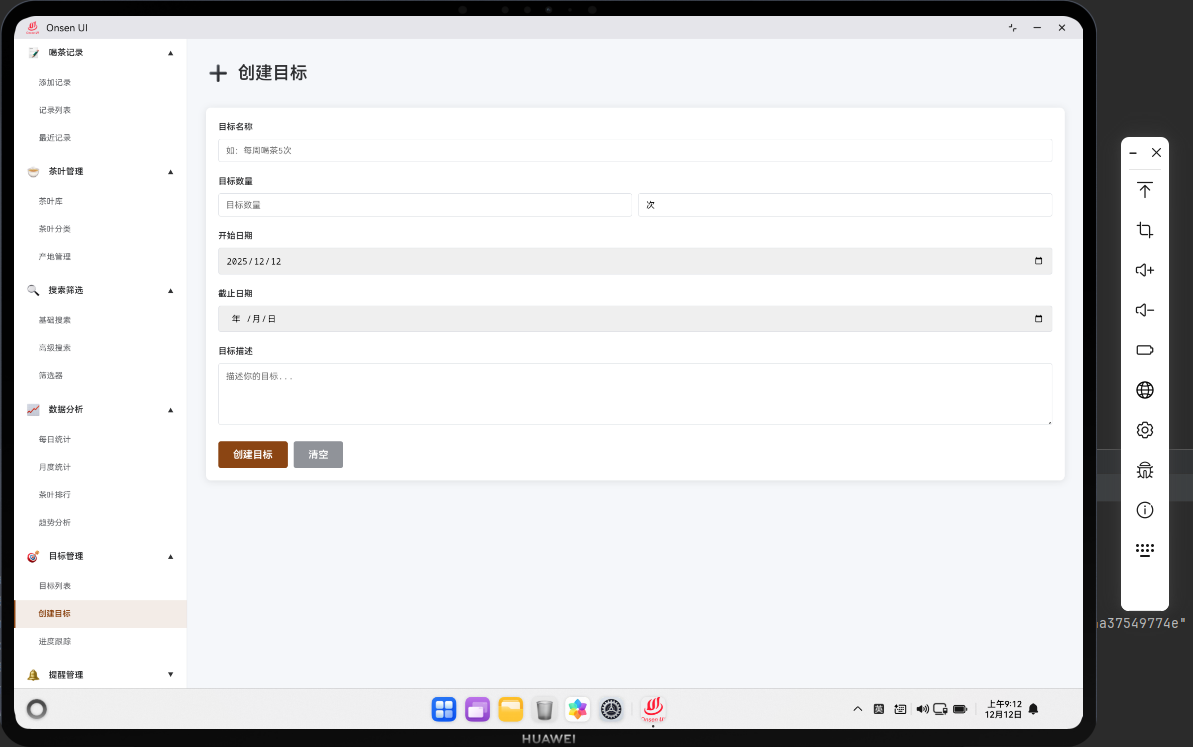
创建目标模块允许用户创建和编辑喝茶目标。该模块集成了 Cordova 框架与 OpenHarmony 原生能力,提供了完整的目标创建和编辑功能。用户可以设置目标名称、目标值、截止日期等信息。模块支持目标模板,帮助用户快速创建常见目标。
🔗 完整流程
第一步:目标表单初始化
当用户进入创建目标页面时,应用会加载目标模板列表。用户可以选择模板快速创建目标,或从空白表单开始。应用会显示当前日期作为默认值。
第二步:目标信息输入与验证
用户在表单中输入目标信息。应用会实时验证用户输入的数据,确保目标值、截止日期等信息有效。当用户输入不合法的数据时,应用会显示错误提示。
第三步:目标保存与同步
当用户点击保存按钮时,应用会进行最终的数据验证。如果所有字段都通过验证,应用会将目标保存到 IndexedDB 数据库中。同时,应用会通过 Cordova 调用原生插件,将数据同步到应用的关系型数据库中。
🔧 Web 代码实现
HTML 目标创建表单
<div id="create-goal-page" class="page">
    <div class="page-header">
        <h1>创建目标</h1>
    </div>

    <div class="template-selector">
        <label>选择模板:</label>
        <select id="goal-template" onchange="applyTemplate()">
            <option value="">空白目标</option>
            <option value="monthly-count">月度喝茶次数</option>
            <option value="monthly-expense">月度消费金额</option>
            <option value="weekly-count">周度喝茶次数</option>
        </select>
    </div>

    <form id="goal-form" class="form">
        <div class="form-group">
            <label for="goal-name">目标名称 *</label>
            <input type="text" id="goal-name" name="name" required>
        </div>

        <div class="form-group">
            <label for="goal-description">目标描述</label>
            <textarea id="goal-description" name="description" rows="3"></textarea>
        </div>

        <div class="form-group">
            <label for="goal-target-value">目标值 *</label>
            <input type="number" id="goal-target-value" name="targetValue" min="0" step="0.01" required>
        </div>

        <div class="form-group">
            <label for="goal-deadline">截止日期 *</label>
            <input type="date" id="goal-deadline" name="deadline" required>
        </div>

        <div class="form-actions">
            <button type="submit" class="btn btn-primary">保存目标</button>
            <button type="button" class="btn btn-secondary" onclick="navigateTo('goal-list')">取消</button>
        </div>
    </form>
</div>
创建目标页面包含模板选择器和目标表单。用户可以选择模板快速创建目标。
创建目标逻辑
const goalTemplates = {
    'monthly-count': {
        name: '月度喝茶目标',
        description: '每月喝茶次数目标',
        targetValue: 20,
        daysOffset: 30
    },
    'monthly-expense': {
        name: '月度消费目标',
        description: '每月消费金额目标',
        targetValue: 500,
        daysOffset: 30
    },
    'weekly-count': {
        name: '周度喝茶目标',
        description: '每周喝茶次数目标',
        targetValue: 5,
        daysOffset: 7
    }
};

function applyTemplate() {
    const templateId = document.getElementById('goal-template').value;

    if (!templateId) {
        document.getElementById('goal-form').reset();
        return;
    }

    const template = goalTemplates[templateId];
    if (template) {
        document.getElementById('goal-name').value = template.name;
        document.getElementById('goal-description').value = template.description;
        document.getElementById('goal-target-value').value = template.targetValue;

        // 计算截止日期
        const deadline = new Date();
        deadline.setDate(deadline.getDate() + template.daysOffset);
        document.getElementById('goal-deadline').value = deadline.toISOString().split('T')[0];
    }
}

async function handleCreateGoal(event) {
    event.preventDefault();

    const formData = new FormData(document.getElementById('goal-form'));
    const goalData = {
        name: formData.get('name'),
        description: formData.get('description'),
        targetValue: parseFloat(formData.get('targetValue')),
        deadline: formData.get('deadline'),
        currentValue: 0,
        createdAt: new Date().toISOString()
    };

    // 验证数据
    if (!goalData.name || goalData.targetValue <= 0 || !goalData.deadline) {
        showToast('请填写所有必填字段', 'warning');
        return;
    }

    try {
        const goalId = await db.addGoal(goalData);

        if (window.cordova) {
            cordova.exec(
                null, null,
                'TeaLogger',
                'logEvent',
                ['goal_created', { goalId: goalId, name: goalData.name }]
            );

            cordova.exec(
                null, null,
                'HapticFeedback',
                'vibrate',
                [{ type: 'success' }]
            );
        }

        showToast('目标已创建', 'success');
        setTimeout(() => navigateTo('goal-list'), 1000);
    } catch (error) {
        console.error('Failed to create goal:', error);
        showToast('创建失败,请重试', 'error');
    }
}

// 初始化表单
document.addEventListener('DOMContentLoaded', function() {
    const form = document.getElementById('goal-form');
    if (form) {
        form.addEventListener('submit', handleCreateGoal);

        // 设置默认截止日期为30天后
        const deadline = new Date();
        deadline.setDate(deadline.getDate() + 30);
        document.getElementById('goal-deadline').value = deadline.toISOString().split('T')[0];
    }
});
这段代码实现了创建目标功能。applyTemplate() 应用目标模板。handleCreateGoal() 处理表单提交并保存目标。
🔌 OpenHarmony 原生代码
目标验证与保存
// entry/src/main/ets/plugins/GoalValidator.ets
export class GoalValidator {
    static validateGoal(goal: Goal): ValidationResult {
        const errors: string[] = [];

        if (!goal.name || goal.name.trim() === '') {
            errors.push('目标名称不能为空');
        }

        if (goal.targetValue <= 0) {
            errors.push('目标值必须大于0');
        }

        if (!goal.deadline) {
            errors.push('截止日期不能为空');
        }

        const deadline = new Date(goal.deadline);
        const now = new Date();
        if (deadline <= now) {
            errors.push('截止日期必须晚于当前日期');
        }

        return {
            valid: errors.length === 0,
            errors: errors
        };
    }
}

interface Goal {
    name: string;
    description?: string;
    targetValue: number;
    deadline: string;
}

interface ValidationResult {
    valid: boolean;
    errors: string[];
}
这个类验证目标数据。validateGoal() 检查目标信息的有效性。
📝 总结
创建目标模块展示了如何在 Cordova 框架中实现目标创建功能。通过 Web 层的表单处理和模板支持,结合原生层的数据验证和保存,为用户提供了便捷的目标创建体验。
欢迎加入开源鸿蒙跨平台社区:https://openharmonycrossplatform.csdn.net

开源鸿蒙跨平台开发社区汇聚开发者与厂商,共建“一次开发,多端部署”的开源生态,致力于降低跨端开发门槛,推动万物智联创新。
更多推荐

 7
7 0
0- 0


 已为社区贡献12条内容

所有评论(0)