Flutter & OpenHarmony OA系统通讯录组件开发指南
本文介绍了使用Flutter和OpenHarmony开发高效通讯录组件的实现方案。Flutter端通过字母索引、分组展示和搜索过滤实现快速联系人查找,提供拨号/消息快捷操作。OpenHarmony端采用类似架构,支持搜索和滚动定位。组件设计注重性能优化,实现毫秒级搜索响应,提升企业内部沟通效率。
前言
通讯录是OA系统中的基础功能,它帮助员工快速查找同事联系方式、发起沟通协作。一个优秀的通讯录组件需要支持字母索引、搜索过滤、分组展示、快速拨号等功能。本文将详细介绍如何使用Flutter和OpenHarmony开发一个便捷高效的通讯录组件,提升企业内部沟通效率。
组件功能规划
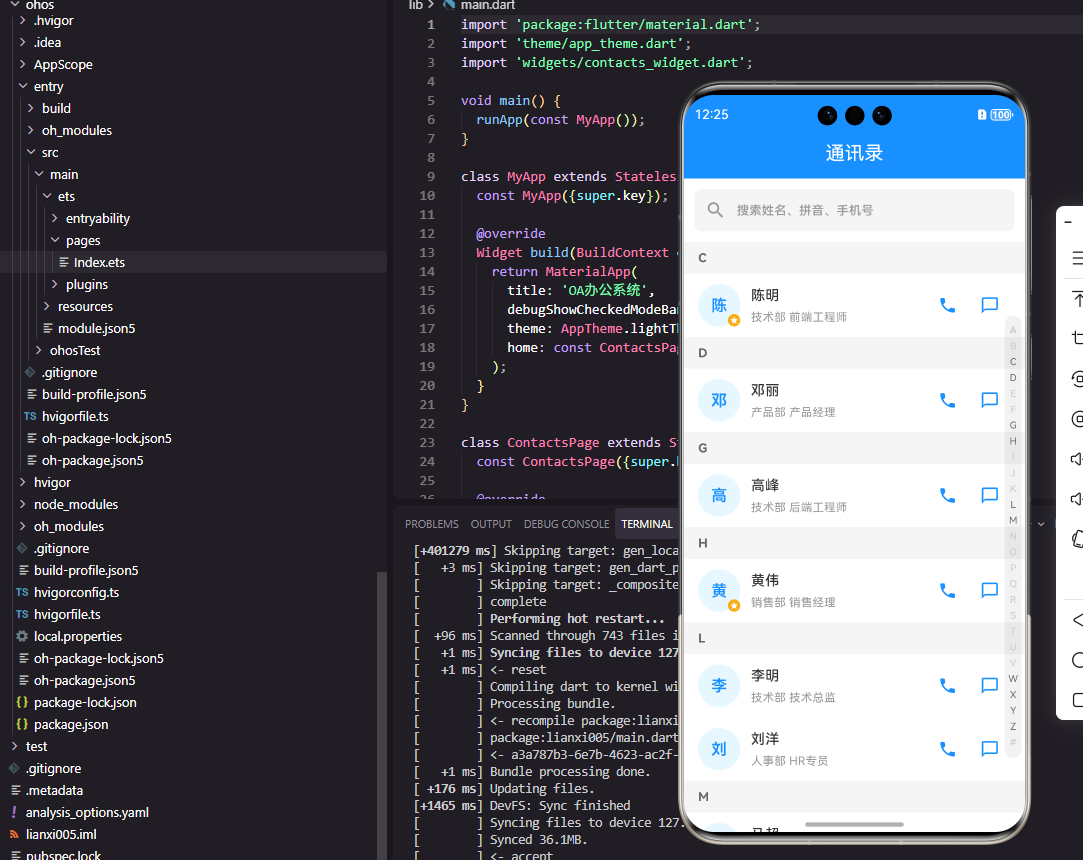
通讯录组件采用字母索引列表的经典设计,右侧显示字母导航条,点击或滑动可以快速定位到对应字母开头的联系人。支持按姓名、部门、手机号搜索,搜索结果实时过滤显示。联系人卡片显示头像、姓名、部门、职位等信息,支持点击拨打电话或发送消息。
Flutter端实现
定义联系人数据模型:
class Contact {
  final String id;
  final String name;
  final String pinyin;
  final String avatar;
  final String department;
  final String position;
  final String phone;
  final String email;

  Contact({
    required this.id,
    required this.name,
    required this.pinyin,
    required this.avatar,
    required this.department,
    required this.position,
    required this.phone,
    required this.email,
  });

  String get firstLetter => pinyin.isNotEmpty ? pinyin[0].toUpperCase() : '#';
}
联系人模型包含基本信息和拼音字段,pinyin用于字母索引和搜索排序。firstLetter计算属性获取拼音首字母,用于分组显示。非字母开头的联系人归入#分组。
通讯录组件的基础结构:
class ContactListWidget extends StatefulWidget {
final List<Contact> contacts;
final Function(Contact) onCall;
final Function(Contact) onMessage;
const ContactListWidget({
Key? key,
required this.contacts,
required this.onCall,
required this.onMessage,
}) : super(key: key);
State<ContactListWidget> createState() => _ContactListWidgetState();
}
组件接收联系人列表和操作回调函数,onCall处理拨打电话,onMessage处理发送消息。这种设计使组件专注于展示,通信功能由父组件实现。
状态类中的分组和搜索:
class _ContactListWidgetState extends State<ContactListWidget> {
  String _searchKeyword = '';
  final ScrollController _scrollController = ScrollController();

  Map<String, List<Contact>> get _groupedContacts {
    final filtered = widget.contacts.where((c) =>
      c.name.contains(_searchKeyword) ||
      c.phone.contains(_searchKeyword) ||
      c.department.contains(_searchKeyword)
    ).toList();

    final grouped = <String, List<Contact>>{};
    for (var contact in filtered) {
      final letter = contact.firstLetter;
      grouped.putIfAbsent(letter, () => []).add(contact);
    }
    return Map.fromEntries(
      grouped.entries.toList()..sort((a, b) => a.key.compareTo(b.key))
    );
  }

  List<String> get _letters => _groupedContacts.keys.toList();
}
_groupedContacts是计算属性,根据搜索关键词过滤并按首字母分组。putIfAbsent方法确保每个字母分组只创建一次。最后按字母顺序排序返回。
字母索引导航条:
Widget _buildAlphabetBar() {
  return Positioned(
    right: 4,
    top: 0,
    bottom: 0,
    child: GestureDetector(
      onVerticalDragUpdate: (details) {
        final index = (details.localPosition.dy / 20).floor();
        if (index >= 0 && index < _letters.length) {
          _scrollToLetter(_letters[index]);
        }
      },
      child: Column(
        mainAxisAlignment: MainAxisAlignment.center,
        children: _letters.map((letter) => GestureDetector(
          onTap: () => _scrollToLetter(letter),
          child: Container(
            width: 20,
            height: 20,
            alignment: Alignment.center,
            child: Text(letter, style: TextStyle(fontSize: 12, color: Colors.blue)),
          ),
        )).toList(),
      ),
    ),
  );
}
字母索引条固定在右侧,支持点击和滑动两种交互方式。onVerticalDragUpdate处理滑动手势,根据位置计算对应的字母并滚动到该位置。每个字母占据20像素高度。
联系人卡片:
Widget _buildContactCard(Contact contact) {
  return ListTile(
    leading: CircleAvatar(
      backgroundImage: NetworkImage(contact.avatar),
      child: contact.avatar.isEmpty ? Text(contact.name[0]) : null,
    ),
    title: Text(contact.name),
    subtitle: Text('${contact.department} · ${contact.position}'),
    trailing: Row(
      mainAxisSize: MainAxisSize.min,
      children: [
        IconButton(
          icon: Icon(Icons.phone, color: Colors.green),
          onPressed: () => widget.onCall(contact),
        ),
        IconButton(
          icon: Icon(Icons.message, color: Colors.blue),
          onPressed: () => widget.onMessage(contact),
        ),
      ],
    ),
  );
}
联系人卡片显示头像、姓名、部门职位信息,右侧有电话和消息两个快捷操作按钮。CircleAvatar在没有头像时显示姓名首字母作为占位。
OpenHarmony鸿蒙端实现
定义联系人数据接口:
interface Contact {
  id: string
  name: string
  pinyin: string
  avatar: string
  department: string
  position: string
  phone: string
  email: string
}
联系人接口包含基本信息和拼音字段,pinyin用于字母索引排序。
通讯录组件的基础结构:
@Component
struct ContactList {
  @Prop contacts: Contact[] = []
  @State searchKeyword: string = ''
  @State currentLetter: string = ''

  private onCall: (contact: Contact) => void = () => {}
  private onMessage: (contact: Contact) => void = () => {}

  private scroller: Scroller = new Scroller()
}
使用@State管理搜索关键词和当前字母,Scroller用于控制列表滚动。
搜索框:
@Builder
SearchBar() {
  Search({ placeholder: '搜索姓名、部门、手机号' })
    .width('100%')
    .height(40)
    .backgroundColor('#F5F5F5')
    .margin({ left: 16, right: 16, top: 8, bottom: 8 })
    .onChange((value: string) => {
      this.searchKeyword = value
    })
}
搜索框支持按姓名、部门、手机号搜索,onChange回调实时更新搜索关键词,列表会自动过滤显示匹配的联系人。
分组列表:
@Builder
GroupedList() {
  List({ scroller: this.scroller }) {
    ForEach(this.getGroupedContacts(), (group: { letter: string, contacts: Contact[] }) => {
      ListItemGroup({ header: this.GroupHeader(group.letter) }) {
        ForEach(group.contacts, (contact: Contact) => {
          ListItem() {
            this.ContactCard(contact)
          }
        })
      }
    })
  }
  .width('100%')
  .layoutWeight(1)
  .divider({ strokeWidth: 1, color: '#F0F0F0', startMargin: 72 })
  .onScrollIndex((start: number) => {
    this.updateCurrentLetter(start)
  })
}
分组列表使用ListItemGroup实现字母分组,header显示分组标题。divider设置分割线样式,startMargin留出头像位置。onScrollIndex监听滚动位置更新当前字母。
分组标题:
@Builder
GroupHeader(letter: string) {
  Text(letter)
    .fontSize(14)
    .fontColor('#999999')
    .width('100%')
    .padding({ left: 16, top: 8, bottom: 8 })
    .backgroundColor('#F5F5F5')
}
分组标题显示字母,使用灰色背景与联系人卡片区分。固定在分组顶部,滚动时会有吸顶效果。
联系人卡片:
@Builder
ContactCard(contact: Contact) {
  Row() {
    Image(contact.avatar || $r('app.media.default_avatar'))
      .width(48)
      .height(48)
      .borderRadius(24)

    Column() {
      Text(contact.name)
        .fontSize(16)
        .fontWeight(FontWeight.Medium)

      Text(`${contact.department} · ${contact.position}`)
        .fontSize(14)
        .fontColor('#999999')
        .margin({ top: 4 })
    }
    .alignItems(HorizontalAlign.Start)
    .layoutWeight(1)
    .margin({ left: 12 })

    Image($r('app.media.phone'))
      .width(24)
      .height(24)
      .onClick(() => this.onCall(contact))

    Image($r('app.media.message'))
      .width(24)
      .height(24)
      .margin({ left: 16 })
      .onClick(() => this.onMessage(contact))
  }
  .width('100%')
  .padding({ left: 16, right: 16, top: 12, bottom: 12 })
}
联系人卡片水平排列头像、信息和操作按钮。layoutWeight(1)使信息区域占据剩余空间。电话和消息图标点击触发对应操作。
字母索引条:
@Builder
AlphabetBar() {
  Column() {
    ForEach(this.getLetters(), (letter: string) => {
      Text(letter)
        .fontSize(10)
        .fontColor(this.currentLetter === letter ? '#1890FF' : '#999999')
        .fontWeight(this.currentLetter === letter ? FontWeight.Bold : FontWeight.Normal)
        .width(20)
        .height(18)
        .textAlign(TextAlign.Center)
        .onClick(() => this.scrollToLetter(letter))
    })
  }
  .position({ x: '95%', y: '50%' })
  .translate({ y: '-50%' })
  .gesture(
    PanGesture()
      .onActionUpdate((event: GestureEvent) => {
        const index = Math.floor(event.offsetY / 18)
        const letters = this.getLetters()
        if (index >= 0 && index < letters.length) {
          this.scrollToLetter(letters[index])
        }
      })
  )
}
字母索引条使用position定位在右侧中央,translate实现垂直居中。当前字母高亮显示,PanGesture处理滑动手势实现快速定位。
滚动到指定字母:
private scrollToLetter(letter: string) {
  this.currentLetter = letter
  const groups = this.getGroupedContacts()
  let index = 0
  for (const group of groups) {
    if (group.letter === letter) {
      this.scroller.scrollToIndex(index)
      break
    }
    index += group.contacts.length + 1
  }
}
scrollToLetter方法计算目标字母分组在列表中的索引位置,然后调用scroller.scrollToIndex滚动到该位置。索引计算需要累加之前所有分组的联系人数量加上分组标题。
总结
本文详细介绍了Flutter和OpenHarmony平台上通讯录组件的开发方法。通讯录是OA系统中的基础功能,字母索引和搜索过滤是提升用户体验的关键特性。两个平台都提供了列表分组和滚动控制的能力,开发者需要注意拼音转换和索引计算的逻辑处理。
欢迎加入开源鸿蒙跨平台社区:https://openharmonycrossplatform.csdn.net

开源鸿蒙跨平台开发社区汇聚开发者与厂商,共建“一次开发,多端部署”的开源生态,致力于降低跨端开发门槛,推动万物智联创新。
更多推荐
 17
17 0
0- 0


 已为社区贡献27条内容

所有评论(0)