Flutter & OpenHarmony 运动App运动计时器组件开发
跨平台运动计时器实现方案 本文介绍了Flutter与OpenHarmony平台运动计时器的实现方案。Flutter部分采用状态模型管理计时器状态,使用不可变对象确保UI响应性,通过计时器控制器实现精确计时逻辑。OpenHarmony部分利用系统时间服务获取准确时间,并集成振动反馈增强用户体验。计时器显示组件采用等宽字体和格式化时间显示,支持正计时、倒计时等多种模式。核心实现包括: Flutter状
前言
运动计时器是健身应用中不可或缺的基础组件,无论是跑步、游泳还是力量训练,用户都需要精确地记录运动时间。本文将详细介绍如何在Flutter与OpenHarmony平台上实现一个功能完善的运动计时器组件,包括正计时、倒计时、间歇训练计时、分段计时等多种模式的实现方案。
一个优秀的运动计时器不仅要准确计时,还要提供流畅的用户交互体验。用户在运动过程中可能无法仔细查看屏幕,因此计时器的显示要足够醒目,操作要足够简单。同时,后台计时能力也很重要,确保用户切换应用或锁屏后计时不会中断。
Flutter计时器状态模型
enum TimerState { idle, running, paused, finished }

class WorkoutTimerModel {
  final Duration elapsed;
  final Duration target;
  final TimerState state;
  final int currentLap;
  final List<Duration> lapTimes;

  WorkoutTimerModel({
    this.elapsed = Duration.zero,
    this.target = Duration.zero,
    this.state = TimerState.idle,
    this.currentLap = 1,
    this.lapTimes = const [],
  });

  WorkoutTimerModel copyWith({
    Duration? elapsed,
    Duration? target,
    TimerState? state,
    int? currentLap,
    List<Duration>? lapTimes,
  }) {
    return WorkoutTimerModel(
      elapsed: elapsed ?? this.elapsed,
      target: target ?? this.target,
      state: state ?? this.state,
      currentLap: currentLap ?? this.currentLap,
      lapTimes: lapTimes ?? this.lapTimes,
    );
  }
}
计时器状态模型是整个计时功能的核心数据结构。我们使用枚举定义了四种计时器状态:空闲、运行中、暂停和完成。模型包含已用时间、目标时间、当前状态、当前圈数和分段时间列表等属性。copyWith方法实现了不可变对象的更新模式,每次状态变化都创建新的对象实例,这种设计符合Flutter的状态管理最佳实践,能够确保UI正确响应状态变化。分段时间列表用于记录每一圈或每一组的完成时间,便于用户分析运动表现。
OpenHarmony系统时间服务
import systemDateTime from '@ohos.systemDateTime';

class TimeService {
  private startTimestamp: number = 0;
  private pausedDuration: number = 0;

  start(): void {
    this.startTimestamp = Date.now();
    this.pausedDuration = 0;
  }

  getElapsedMillis(): number {
    if (this.startTimestamp === 0) return 0;
    return Date.now() - this.startTimestamp - this.pausedDuration;
  }

  async getAccurateTime(): Promise<number> {
    try {
      let time = await systemDateTime.getCurrentTime(false);
      return time;
    } catch (error) {
      return Date.now();
    }
  }
}
时间服务负责提供准确的时间计算。我们记录开始时间戳和暂停累计时长,通过当前时间减去开始时间再减去暂停时长,得到实际运动时间。这种计算方式比使用定时器累加更加准确,不会因为系统负载导致时间漂移。OpenHarmony的systemDateTime模块可以获取更精确的系统时间,我们在getAccurateTime方法中使用它作为备选方案。通过try-catch处理可能的异常,确保即使系统服务不可用也能正常工作。
Flutter计时器显示组件
class TimerDisplay extends StatelessWidget {
final Duration duration;
final bool isLarge;
const TimerDisplay({
Key? key,
required this.duration,
this.isLarge = true,
}) : super(key: key);
Widget build(BuildContext context) {
String hours = duration.inHours.toString().padLeft(2, '0');
String minutes = (duration.inMinutes % 60).toString().padLeft(2, '0');
String seconds = (duration.inSeconds % 60).toString().padLeft(2, '0');
String millis = ((duration.inMilliseconds % 1000) ~/ 10).toString().padLeft(2, '0');
return Text(
'$hours:$minutes:$seconds.$millis',
style: TextStyle(
fontSize: isLarge ? 56 : 32,
fontWeight: FontWeight.bold,
fontFamily: 'monospace',
letterSpacing: 2,
),
);
}
}
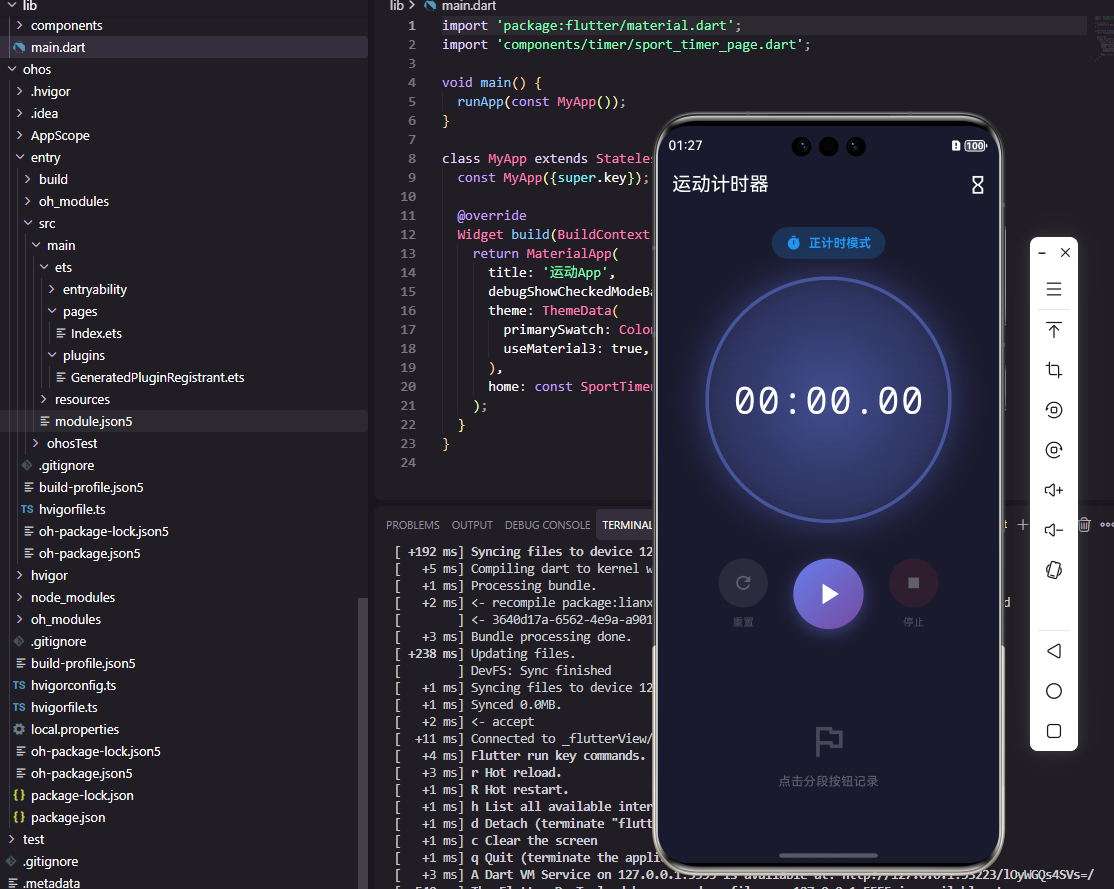
计时器显示组件负责将Duration对象格式化为可读的时间字符串。我们将时间分解为小时、分钟、秒和毫秒四个部分,每个部分使用padLeft确保始终显示两位数字,保持显示的一致性。毫秒部分只显示两位(百分之一秒),这是运动计时的常见精度。字体选择等宽字体(monospace),确保数字变化时不会导致文字跳动。letterSpacing增加字符间距,提升可读性。isLarge参数允许在不同场景使用不同大小的显示,主计时器使用大字体,分段时间使用小字体。
Flutter计时器控制器
class WorkoutTimerController extends ChangeNotifier {
Timer? _timer;
DateTime? _startTime;
Duration _elapsed = Duration.zero;
Duration _pausedElapsed = Duration.zero;
TimerState _state = TimerState.idle;
Duration get elapsed => _elapsed;
TimerState get state => _state;
void start() {
_startTime = DateTime.now();
_state = TimerState.running;
_timer = Timer.periodic(Duration(milliseconds: 10), (_) {
_elapsed = _pausedElapsed + DateTime.now().difference(_startTime!);
notifyListeners();
});
notifyListeners();
}
void pause() {
_timer?.cancel();
_pausedElapsed = _elapsed;
_state = TimerState.paused;
notifyListeners();
}
void reset() {
_timer?.cancel();
_elapsed = Duration.zero;
_pausedElapsed = Duration.zero;
_state = TimerState.idle;
notifyListeners();
}
void dispose() {
_timer?.cancel();
super.dispose();
}
}
计时器控制器管理计时的核心逻辑。我们使用Timer.periodic创建一个每10毫秒触发一次的定时器,在回调中计算已用时间并通知监听者更新UI。时间计算采用时间戳差值方式而非累加,确保长时间运行的准确性。pause方法保存当前已用时间到_pausedElapsed,下次继续时从这个值开始累加。reset方法清空所有状态,回到初始状态。dispose方法确保控制器销毁时取消定时器,避免内存泄漏。通过ChangeNotifier模式,UI组件可以自动响应状态变化。
OpenHarmony振动反馈服务
import vibrator from '@ohos.vibrator';

class HapticFeedbackService {
  async vibrateOnLap(): Promise<void> {
    try {
      await vibrator.startVibration({
        type: 'time',
        duration: 100,
      }, {
        id: 0,
        usage: 'alarm',
      });
    } catch (error) {
      console.error('振动失败: ' + error);
    }
  }

  async vibrateOnFinish(): Promise<void> {
    try {
      await vibrator.startVibration({
        type: 'time',
        duration: 500,
      }, {
        id: 0,
        usage: 'notification',
      });
    } catch (error) {
      console.error('振动失败: ' + error);
    }
  }
}
振动反馈在运动场景中非常重要,用户可能无法时刻关注屏幕,通过振动可以提醒用户计时事件。OpenHarmony的vibrator模块提供了设备振动控制能力。vibrateOnLap方法在用户记录分段时间时触发短振动(100毫秒),提供即时反馈。vibrateOnFinish方法在倒计时结束时触发长振动(500毫秒),确保用户注意到。vibration配置中type设为time表示按时长振动,usage设置振动的用途类型,系统会根据用途调整振动强度。异常处理确保振动功能不可用时不会影响主流程。
Flutter分段时间列表
class LapTimesList extends StatelessWidget {
final List<Duration> lapTimes;
const LapTimesList({Key? key, required this.lapTimes}) : super(key: key);
Widget build(BuildContext context) {
return ListView.builder(
shrinkWrap: true,
reverse: true,
itemCount: lapTimes.length,
itemBuilder: (context, index) {
int lapNumber = lapTimes.length - index;
Duration lapTime = lapTimes[lapTimes.length - 1 - index];
Duration? previousTotal = index < lapTimes.length - 1
? lapTimes.sublist(0, lapTimes.length - 1 - index).reduce((a, b) => a + b)
: Duration.zero;
Duration splitTime = lapTime;
return ListTile(
leading: CircleAvatar(
backgroundColor: Colors.blue,
child: Text('$lapNumber', style: TextStyle(color: Colors.white)),
),
title: Text(_formatDuration(splitTime)),
subtitle: Text('累计: ${_formatDuration(previousTotal + splitTime)}'),
);
},
);
}
String _formatDuration(Duration d) {
return '${d.inMinutes.toString().padLeft(2, '0')}:${(d.inSeconds % 60).toString().padLeft(2, '0')}.${((d.inMilliseconds % 1000) ~/ 10).toString().padLeft(2, '0')}';
}
}
分段时间列表展示每一圈或每一组的完成时间。我们使用ListView.builder高效渲染列表,reverse设为true使最新的分段显示在顶部,符合用户的查看习惯。每个列表项显示圈数、分段时间和累计时间,让用户可以比较不同圈次的表现。CircleAvatar显示圈数编号,视觉上清晰区分每一项。累计时间的计算通过对之前所有分段时间求和得到。这种设计帮助用户分析自己的配速变化,发现是否存在后程乏力或前程过快的问题。
OpenHarmony后台计时保持
import backgroundTaskManager from '@ohos.resourceschedule.backgroundTaskManager';
import wantAgent from '@ohos.app.ability.wantAgent';

class BackgroundTimerService {
  async requestBackgroundRunning(context: Context): Promise<void> {
    let wantAgentInfo: wantAgent.WantAgentInfo = {
      wants: [{
        bundleName: 'com.example.fitness',
        abilityName: 'MainAbility',
      }],
      operationType: wantAgent.OperationType.START_ABILITY,
      requestCode: 0,
    };

    let agent = await wantAgent.getWantAgent(wantAgentInfo);

    await backgroundTaskManager.startBackgroundRunning(
      context,
      backgroundTaskManager.BackgroundMode.TASK_KEEPING,
      agent
    );
  }

  async stopBackgroundRunning(context: Context): Promise<void> {
    await backgroundTaskManager.stopBackgroundRunning(context);
  }
}
后台计时保持确保用户切换应用或锁屏后计时不会中断。OpenHarmony的backgroundTaskManager模块提供了后台任务管理能力。我们使用TASK_KEEPING模式申请后台运行权限,这种模式适合需要持续运行的任务。wantAgent配置了点击通知时启动的页面,用户可以通过通知快速返回应用。申请后台运行后,系统会在通知栏显示应用正在后台运行的提示,让用户知道计时功能仍在工作。运动结束后应调用stopBackgroundRunning释放后台权限,节省系统资源。
Flutter倒计时组件
class CountdownTimer extends StatefulWidget {
final Duration targetDuration;
final VoidCallback onFinished;
const CountdownTimer({
Key? key,
required this.targetDuration,
required this.onFinished,
}) : super(key: key);
State<CountdownTimer> createState() => _CountdownTimerState();
}
class _CountdownTimerState extends State<CountdownTimer> {
late Duration _remaining;
Timer? _timer;
void initState() {
super.initState();
_remaining = widget.targetDuration;
}
void _startCountdown() {
_timer = Timer.periodic(Duration(seconds: 1), (_) {
setState(() {
if (_remaining.inSeconds > 0) {
_remaining = _remaining - Duration(seconds: 1);
} else {
_timer?.cancel();
widget.onFinished();
}
});
});
}
Widget build(BuildContext context) {
double progress = _remaining.inSeconds / widget.targetDuration.inSeconds;
return Column(
children: [
CircularProgressIndicator(value: progress, strokeWidth: 8),
SizedBox(height: 16),
Text('${_remaining.inMinutes}:${(_remaining.inSeconds % 60).toString().padLeft(2, '0')}', style: TextStyle(fontSize: 48)),
],
);
}
}
倒计时组件用于定时训练场景,如平板支撑、休息间隔等。与正计时不同,倒计时从目标时间递减到零。我们在initState中初始化剩余时间为目标时间,定时器每秒减少一秒,当剩余时间归零时取消定时器并触发onFinished回调。UI部分使用CircularProgressIndicator显示进度环,progress值从1递减到0,直观展示剩余时间比例。大字体显示剩余的分钟和秒数,让用户在运动中也能轻松看清。这种组件常用于HIIT训练、间歇跑等需要精确控制时间的训练方式。
Flutter间歇训练计时器
class IntervalTimerConfig {
  final Duration workDuration;
  final Duration restDuration;
  final int rounds;

  IntervalTimerConfig({
    required this.workDuration,
    required this.restDuration,
    required this.rounds,
  });
}

class IntervalTimerController extends ChangeNotifier {
  IntervalTimerConfig? _config;
  int _currentRound = 1;
  bool _isWorkPhase = true;
  Duration _phaseRemaining = Duration.zero;

  int get currentRound => _currentRound;
  bool get isWorkPhase => _isWorkPhase;
  Duration get phaseRemaining => _phaseRemaining;

  void configure(IntervalTimerConfig config) {
    _config = config;
    _currentRound = 1;
    _isWorkPhase = true;
    _phaseRemaining = config.workDuration;
    notifyListeners();
  }

  void switchPhase() {
    if (_isWorkPhase) {
      _isWorkPhase = false;
      _phaseRemaining = _config!.restDuration;
    } else {
      _isWorkPhase = true;
      _currentRound++;
      _phaseRemaining = _config!.workDuration;
    }
    notifyListeners();
  }
}
间歇训练计时器专为HIIT等间歇训练设计。配置类定义了运动时长、休息时长和总轮数三个参数。控制器管理当前轮数、当前阶段(运动或休息)和阶段剩余时间。configure方法初始化计时器,从第一轮的运动阶段开始。switchPhase方法在运动和休息阶段之间切换,运动阶段结束后进入休息阶段,休息阶段结束后进入下一轮的运动阶段。这种设计让用户可以专注于训练,不需要手动切换计时器,系统会自动引导完成整个间歇训练流程。
OpenHarmony音频提示服务
import media from '@ohos.multimedia.media';

class AudioPromptService {
  private audioPlayer: media.AudioPlayer | null = null;

  async initialize(): Promise<void> {
    this.audioPlayer = await media.createAudioPlayer();
  }

  async playStartSound(): Promise<void> {
    if (this.audioPlayer) {
      this.audioPlayer.src = 'file://system/etc/sounds/start.mp3';
      await this.audioPlayer.play();
    }
  }

  async playEndSound(): Promise<void> {
    if (this.audioPlayer) {
      this.audioPlayer.src = 'file://system/etc/sounds/end.mp3';
      await this.audioPlayer.play();
    }
  }

  release(): void {
    if (this.audioPlayer) {
      this.audioPlayer.release();
      this.audioPlayer = null;
    }
  }
}
音频提示在运动计时中起到重要的提醒作用,特别是当用户无法看屏幕时。OpenHarmony的media模块提供了音频播放能力。我们创建AudioPlayer实例来播放提示音,playStartSound在计时开始或运动阶段开始时播放,playEndSound在计时结束或休息阶段开始时播放。不同的提示音帮助用户区分不同的事件类型。release方法在不需要时释放播放器资源,避免内存泄漏。在实际应用中,可以让用户自定义提示音,或者使用语音播报当前状态。
总结
本文全面介绍了Flutter与OpenHarmony平台上运动计时器组件的实现方案。从基础的正计时到倒计时,从分段计时到间歇训练计时,从振动反馈到音频提示,涵盖了计时功能的各个方面。通过合理的状态管理和用户交互设计,我们可以构建出一个功能强大、体验流畅的运动计时模块,满足用户在各种运动场景下的计时需求。
欢迎加入开源鸿蒙跨平台社区:https://openharmonycrossplatform.csdn.net

开源鸿蒙跨平台开发社区汇聚开发者与厂商,共建“一次开发,多端部署”的开源生态,致力于降低跨端开发门槛,推动万物智联创新。
更多推荐

 28
28 0
0- 0


 已为社区贡献30条内容

所有评论(0)