Cordova与OpenHarmony运动目标管理系统
本文介绍了基于Cordova框架和OpenHarmony的运动目标管理系统实现方案。系统通过FitnessGoal类定义运动目标数据结构,包含目标名称、类型、进度等属性,并提供进度更新和过期检查功能。文章详细讲解了目标存储、进度追踪、可视化展示、提醒系统等核心模块的实现方法,包括使用IndexedDB存储目标数据、根据运动类型计算进度增量、生成可视化目标卡片、设置多级提醒机制等功能。该系统能够有效
欢迎大家加入开源鸿蒙跨平台开发者社区,一起共建开源鸿蒙跨平台生态。
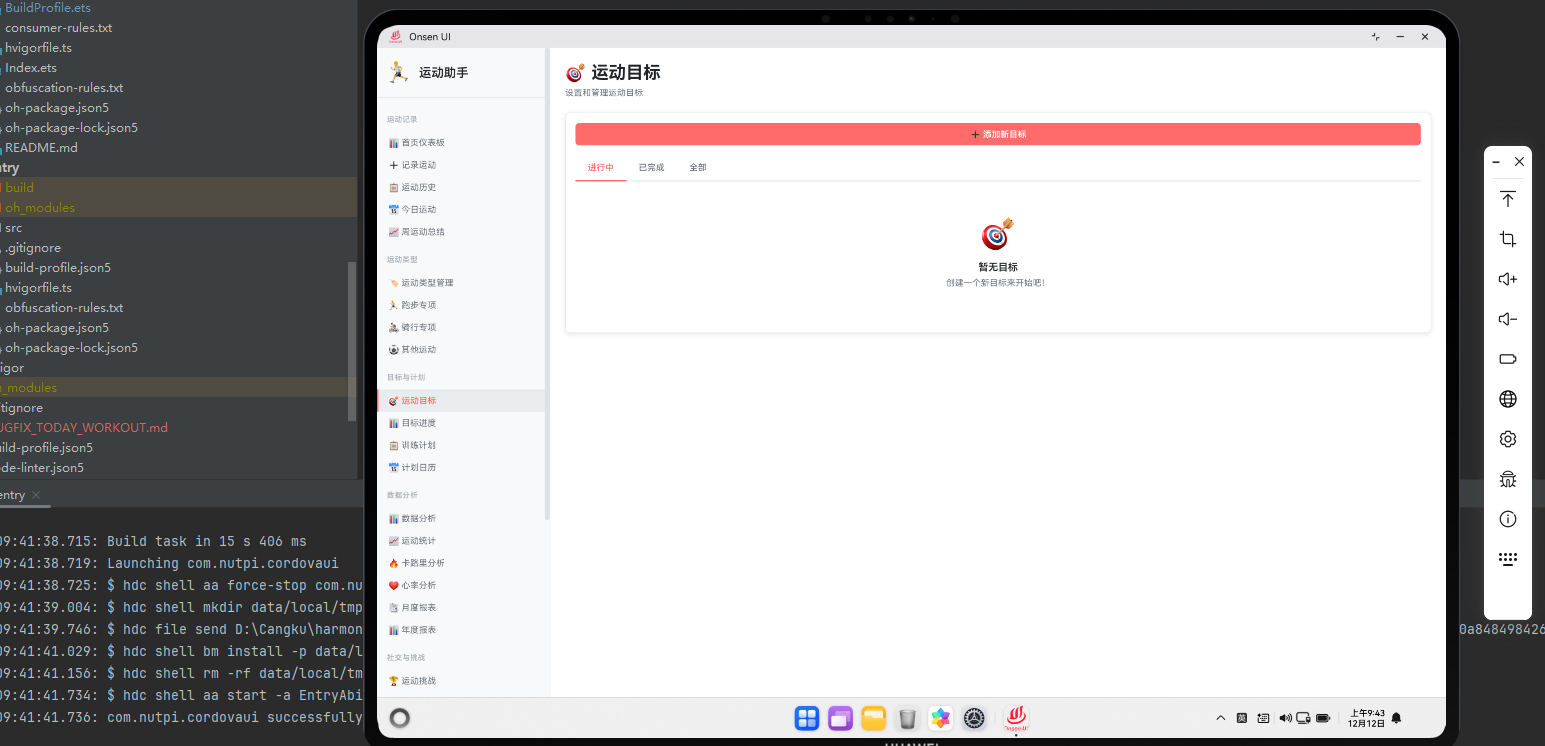
目标驱动的运动
运动目标是激励用户坚持运动的重要因素。通过Cordova框架与OpenHarmony的数据管理能力,我们可以构建一个完整的目标管理系统。本文将介绍这个系统的实现。
目标数据模型
class FitnessGoal {
  constructor(name, type, targetValue, deadline) {
    this.id = generateUUID();
    this.name = name;
    this.type = type; // 'distance', 'duration', 'calories', 'frequency'
    this.targetValue = targetValue;
    this.currentValue = 0;
    this.deadline = deadline;
    this.createdAt = new Date().getTime();
    this.status = 'active';
    this.progress = 0;
  }

  updateProgress(newValue) {
    this.currentValue = newValue;
    this.progress = (this.currentValue / this.targetValue) * 100;

    if (this.progress >= 100) {
      this.status = 'completed';
    }
  }

  isOverdue() {
    return new Date().getTime() > this.deadline && this.status !== 'completed';
  }
}
FitnessGoal类定义了运动目标的数据结构。每个目标包含名称、类型、目标值和截止日期等信息。通过updateProgress方法,我们可以实时更新目标的完成进度。isOverdue方法检查目标是否已过期。
目标存储与检索
async function saveGoal(goal) {
  const db = await openDatabase('SportsDB');
  const transaction = db.transaction(['goals'], 'readwrite');
  const store = transaction.objectStore('goals');

  const goalData = {
    id: goal.id,
    name: goal.name,
    type: goal.type,
    targetValue: goal.targetValue,
    currentValue: goal.currentValue,
    deadline: goal.deadline,
    status: goal.status,
    progress: goal.progress
  };

  store.add(goalData);

  return new Promise((resolve, reject) => {
    transaction.oncomplete = () => resolve(goal.id);
    transaction.onerror = () => reject(transaction.error);
  });
}
这段代码实现了目标的数据库存储。通过IndexedDB的事务机制,我们确保了数据的一致性。每个目标都被存储为一个完整的对象,包含所有必要的信息。
目标进度追踪
function trackGoalProgress(goal, newWorkoutData) {
  let progressIncrement = 0;

  switch(goal.type) {
    case 'distance':
      progressIncrement = newWorkoutData.distance;
      break;
    case 'duration':
      progressIncrement = newWorkoutData.duration;
      break;
    case 'calories':
      progressIncrement = newWorkoutData.calories;
      break;
    case 'frequency':
      progressIncrement = 1;
      break;
  }

  goal.updateProgress(goal.currentValue + progressIncrement);

  if (goal.progress >= 100) {
    triggerGoalCompletionNotification(goal);
  } else if (goal.progress >= 75) {
    triggerGoalAlmostCompleteNotification(goal);
  }

  return goal;
}
这个函数根据新的运动数据更新目标进度。根据目标类型的不同,我们计算相应的进度增量。当目标完成或即将完成时,系统会触发相应的通知。这种实时追踪方式能够激励用户坚持运动。
目标可视化展示
function renderGoalCard(goal) {
  const card = document.createElement('div');
  card.className = 'goal-card harmony-card';

  const progressPercentage = Math.min(goal.progress, 100);
  const daysRemaining = Math.ceil((goal.deadline - new Date().getTime()) / (1000 * 60 * 60 * 24));

  card.innerHTML = `
    <div class="goal-header">
      <h3>${goal.name}</h3>
      <span class="goal-status ${goal.status}">${goal.status}</span>
    </div>
    <div class="goal-progress">
      <div class="progress-bar">
        <div class="progress-fill" style="width: ${progressPercentage}%"></div>
      </div>
      <div class="progress-text">${goal.currentValue}/${goal.targetValue} ${getUnitForType(goal.type)}</div>
    </div>
    <div class="goal-deadline">
      剩余时间: ${daysRemaining} 天
    </div>
  `;

  return card;
}
目标卡片以可视化的方式展示目标信息。这个函数创建了一个包含目标名称、进度条、当前进度和剩余时间的卡片。通过这种直观的展示方式,用户能够清晰地了解自己的目标进度。
目标提醒系统
function setupGoalReminders(goal) {
  const reminders = [];

  // 50%进度提醒
  const fiftyPercentValue = goal.targetValue * 0.5;
  reminders.push({
    triggerValue: fiftyPercentValue,
    message: `你已完成50%的目标"${goal.name}",继续加油!`
  });

  // 75%进度提醒
  const seventyFivePercentValue = goal.targetValue * 0.75;
  reminders.push({
    triggerValue: seventyFivePercentValue,
    message: `你已完成75%的目标"${goal.name}",就快完成了!`
  });

  // 截止日期前3天提醒
  const threeDaysBeforeDeadline = goal.deadline - (3 * 24 * 60 * 60 * 1000);
  reminders.push({
    triggerTime: threeDaysBeforeDeadline,
    message: `目标"${goal.name}"还有3天就要截止了,加紧完成吧!`
  });

  reminders.forEach(reminder => scheduleReminder(reminder));
}
目标提醒系统在关键时刻提醒用户。这个函数设置了多个提醒点,包括50%、75%进度和截止日期前3天。通过这些提醒,用户能够及时了解自己的目标进度,并保持动力。
目标建议系统
function suggestGoals(userProfile) {
  const suggestions = [];

  if (userProfile.averageWeeklyDistance < 10) {
    suggestions.push(new FitnessGoal(
      '每周跑步10公里',
      'distance',
      10,
      new Date().getTime() + (30 * 24 * 60 * 60 * 1000)
    ));
  }

  if (userProfile.workoutFrequency < 3) {
    suggestions.push(new FitnessGoal(
      '每周运动3次',
      'frequency',
      3,
      new Date().getTime() + (30 * 24 * 60 * 60 * 1000)
    ));
  }

  if (userProfile.averageCaloriesBurned < 500) {
    suggestions.push(new FitnessGoal(
      '每次运动消耗500卡路里',
      'calories',
      500,
      new Date().getTime() + (30 * 24 * 60 * 60 * 1000)
    ));
  }

  return suggestions;
}
目标建议系统根据用户的运动历史提供个性化的目标建议。这个函数分析用户的运动数据,识别出可以改进的方面,并提出相应的目标。通过这种个性化的建议,用户能够制定更合理的运动计划。
目标完成奖励
function rewardGoalCompletion(goal) {
  const reward = {
    points: calculateRewardPoints(goal),
    badge: generateBadge(goal),
    achievement: recordAchievement(goal)
  };

  // 计算奖励积分
  function calculateRewardPoints(goal) {
    let basePoints = 100;
    const daysToComplete = (goal.deadline - goal.createdAt) / (1000 * 60 * 60 * 24);
    const completionBonus = Math.max(0, 50 - daysToComplete);
    return basePoints + completionBonus;
  }

  // 生成成就徽章
  function generateBadge(goal) {
    const badges = {
      'distance': '🏃 距离达人',
      'duration': '⏱️ 耐力王者',
      'calories': '🔥 燃脂专家',
      'frequency': '📅 坚持达人'
    };
    return badges[goal.type];
  }

  return reward;
}
目标完成奖励系统激励用户完成目标。这个函数计算奖励积分、生成成就徽章和记录成就。通过提供这些奖励,我们能够增强用户的成就感,激励他们继续运动。
总结
运动目标管理系统通过Cordova与OpenHarmony的结合,提供了完整的目标管理和激励机制。从目标创建到进度追踪,从可视化展示到智能提醒,这个系统为用户提供了全面的目标管理功能。通过个性化的建议和完成奖励,我们能够有效地激励用户坚持运动,实现自己的健身目标。

开源鸿蒙跨平台开发社区汇聚开发者与厂商,共建“一次开发,多端部署”的开源生态,致力于降低跨端开发门槛,推动万物智联创新。
更多推荐
 8
8 0
0- 0


 已为社区贡献4条内容

所有评论(0)