QT学习之搭建计算器
·
Qt 是一个1991年由Qt Company开发的跨平台C++图形用户界面应用程序开发框架。它既可以开发GUI程序,也可用于开发非GUI程序,比如控制台工具和服务器。Qt是面向对象的框架,Qt很容易扩展,并且允许真正地组件编程。2008年,Qt Company科技被诺基亚公司收购,Qt也因此成为诺基亚旗下的编程语言工具。2014年4月,跨平台集成开发环境Qt Creator 3.1.0正式发布,实现了对于iOS的完全支持,新增WinRT、Beautifier等插件,并对Android支持做出了调整,至此实现了全面支持iOS、Android、WP,它提供给应用程序开发者建立艺术级的图形用户界面所需的所有功能。基本上,Qt 同 X Window 上的 Motif,Openwin,GTK 等图形界面库和 Windows 平台上的 MFC,OWL,VCL,ATL 是同类型的东西。
优势
跨平台特性
Qt支持下述平台: MS/Windows - 95、98、NT4.0、ME、2000、XP 、 Vista、Win7、win8、win2008、win10 Unix/X11 -Linux、SunSolaris、HP-UX、CompaqTru64 UNIX、IBMAIX、SGI IRIX、FreeBSD、BSD/OS和其它很多X11平台 Macintosh -Mac OS X Embedded - 有帧缓冲(framebuffer)支持的嵌入式Linux平台,Windows CE、Symbian、Symbian^3、Symbian Anna、Symbian Belle、MeeGo、haiku-os。
成功案例
- Linux 桌面环境 KDE
- WPS Office 办公软件
- Skype 网络电话
- Google Earth 谷歌地图
- VLC 多媒体播放器
- VirtualBox 虚拟机
1.下载QT
第一步下载qt,网盘如下:
链接:https://pan.baidu.com/s/1DyaAD0v8nG2rSKbawCM-gw
提取码:0503 --来自百度网盘超级会员V5的分享
2.安装QT
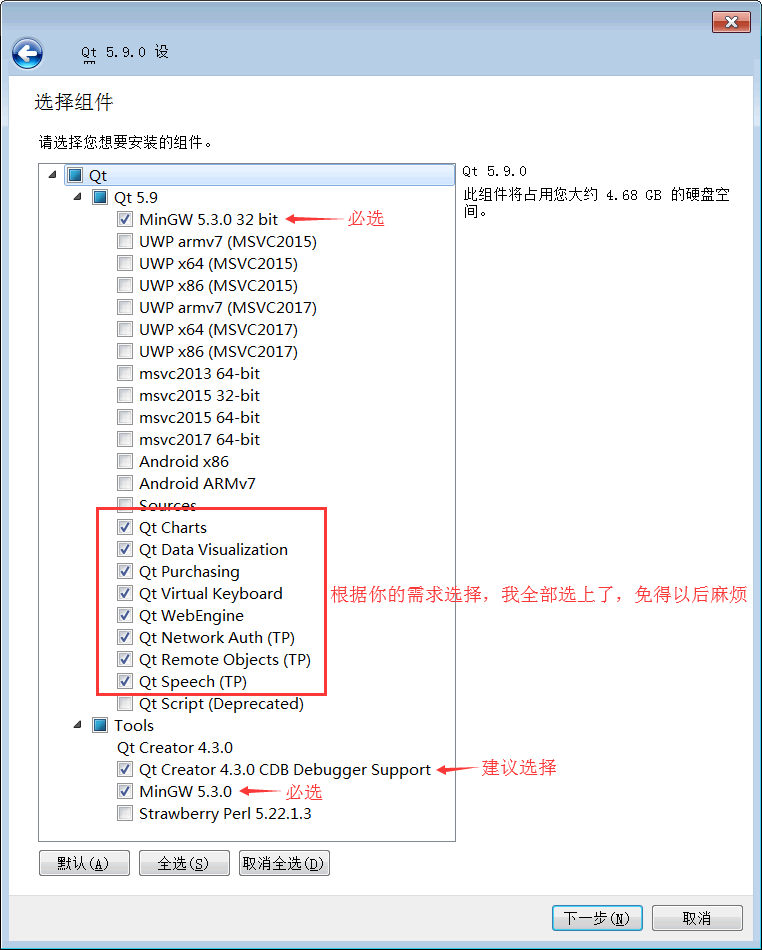
Qt 占用的存储空间很大,安装之前建议先准备好 8GB 以上的磁盘空间。对于目前 Qt 最新版开发环境,如果不安装源代码包,实际占用大约 5.5GB;如果选择安装源码包,大约占用 7.5GB。
双击下载得到的 qt-opensource-windows-x86-5.9.0.exe 即可开始安装。Qt 的安装过程和普通的 Windows 软件一样,按照向导进行操作即可。
注意过程中需要注意注册邮箱,要进去点邮件操作。
3.QT的使用
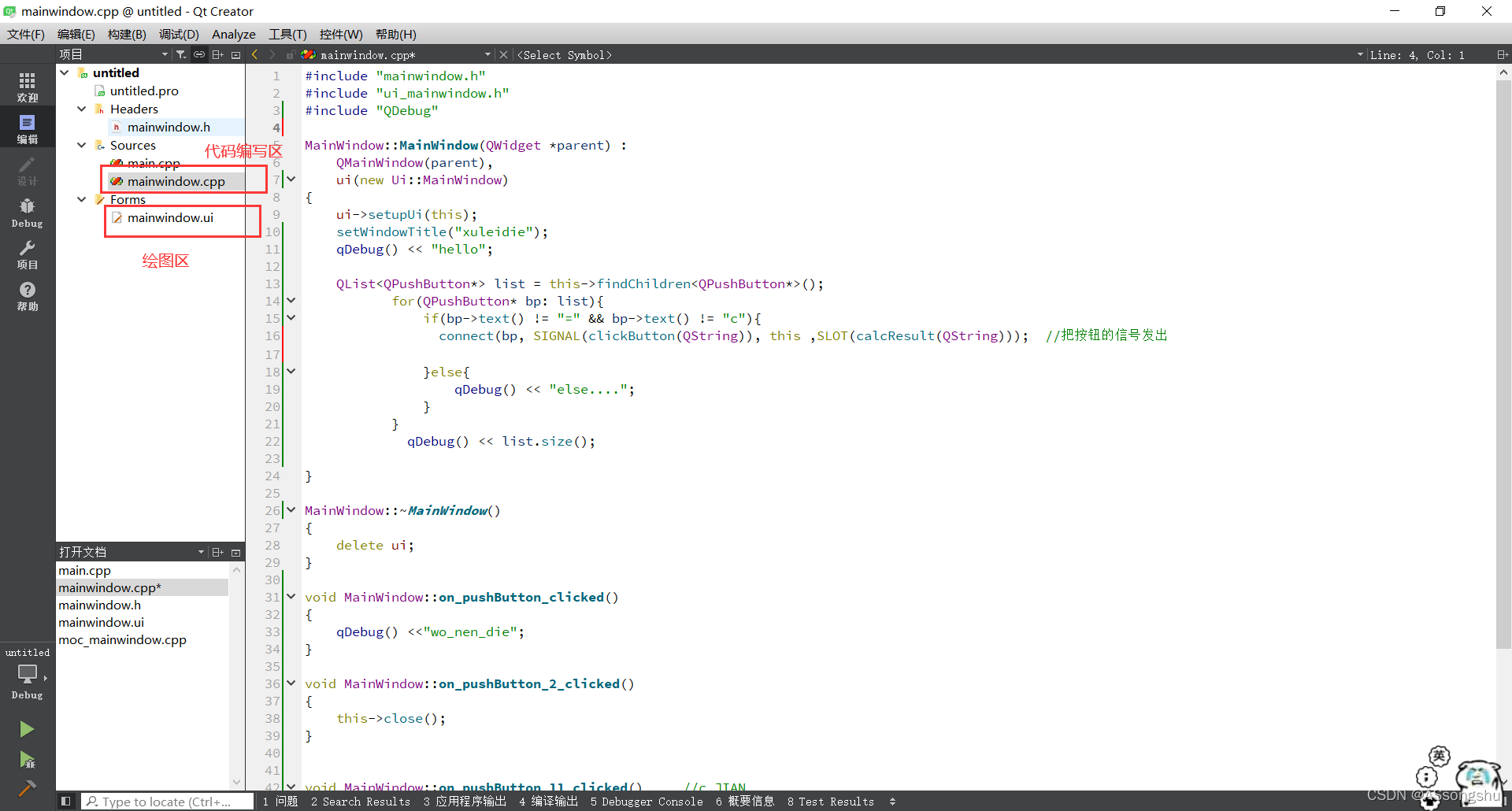
代码区和绘制UI区:
代码区
PS:
C++和Qt
1.向右:将要移动的代码选中,然后按Tab键
2.向左:将要移动的代码选中,然后按Shift+Tab键
绘制UI区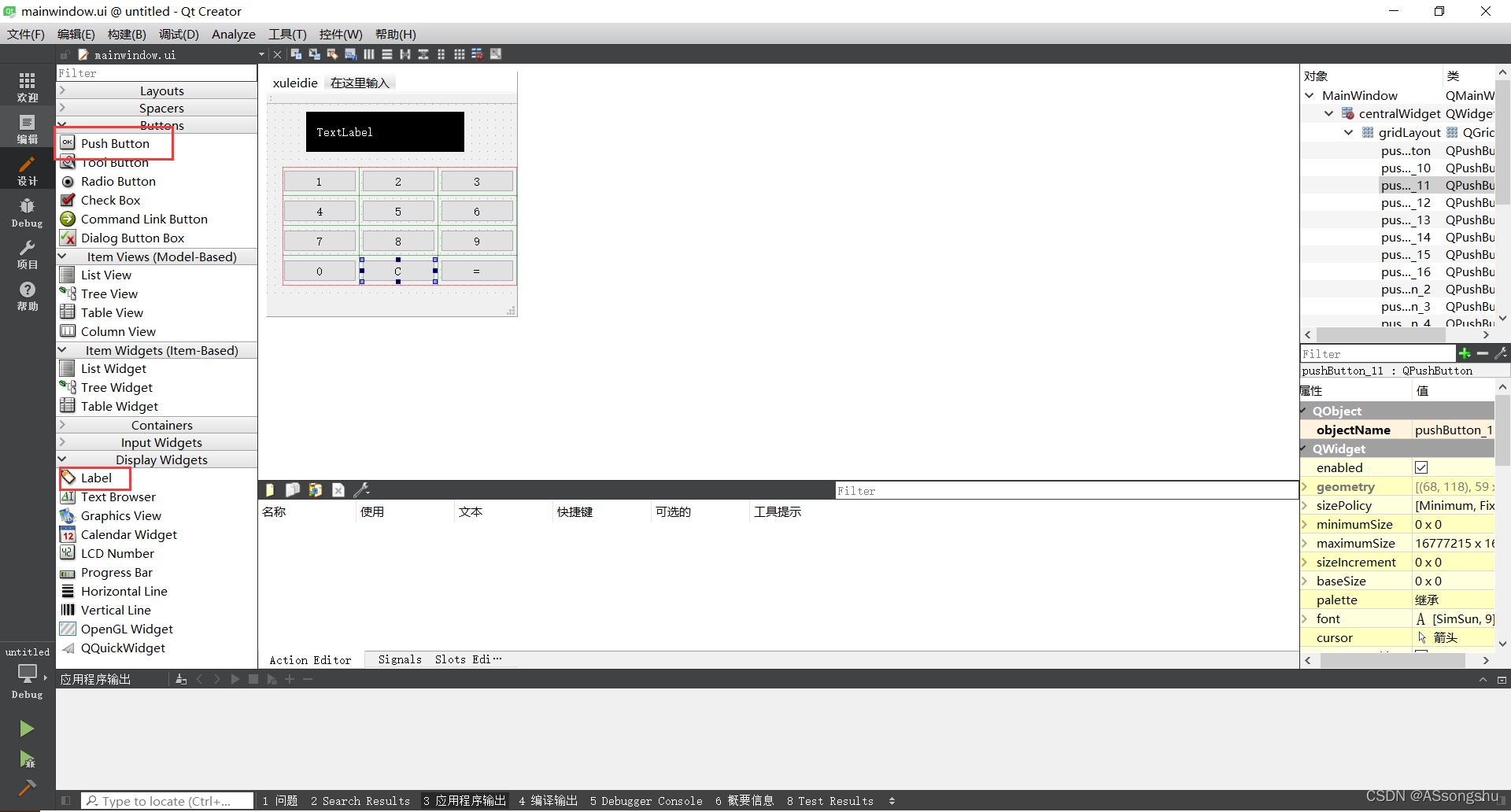
4.代码
mainwindow.h部分:
//mainwindow.h


#ifndef MAINWINDOW_H
#define MAINWINDOW_H

#include <QMainWindow>
#include <QLabel>
#include <QPushButton>

namespace Ui {
class MainWindow;
}

class MainWindow : public QMainWindow
{
    Q_OBJECT

public:
    explicit MainWindow(QWidget *parent = nullptr);
    ~MainWindow();

private:
    Ui::MainWindow *ui;
    QString operand1;
    QString operand2;
    QChar op;

public slots:
    void calcResult(QChar c){
        QLabel* lbl = this->findChild<QLabel*>("lbl", 0); //0表示在直接孩子中查找,1表示递归(默认)

        if((c >= '0' && c <= '9') || c == '.'){
            if(op == ' '){
                operand1.push_back(c);
            }else{
                operand2.push_back(c);
            }
        }else if(c == '+' || c == '-' || c == '*' || c == '/'){
            op = c;
        }
        lbl->setText(operand1 + op + operand2);

        if(c == '='){
            double rs = 0;
            double a = operand1.toDouble();
            double b = operand2.toDouble();
            switch(op.toLatin1()){
            case '+':
                rs = a + b;
                break;
            case '-':
                rs = a - b;
                break;
            case '*':
                rs = a * b;
                break;
            case '/':
                rs = a / b;
                break;
            }

            //qDebug() << rs;

            QString qResult = QString::number(rs);

            //QRegExp rx("(\\.)0+$");
            //lbl->setText(qResult.replace(rx, ""));

            lbl->setText(operand1 + op + operand2 + "=" + qResult);

            operand1.clear();
            operand2.clear();
            op = ' ';
        }
    }
private slots:
    void on_pushButton_clicked();
};

class MyButton : public QPushButton {
    Q_OBJECT

public:
    MyButton(){
        connect(this, SIGNAL(clicked()), this, SLOT(onclick()));
    }

private:
signals:
    void onClick2(const QChar s);

private slots:
    void onclick(){
        emit onClick2(this->text().at(0));
    }
};


#endif // MAINWINDOW_H
mainwindow.cpp部分
#include "mainwindow.h"
#include "ui_mainwindow.h"
#include "QDebug"
#include "QLabel"


MainWindow::MainWindow(QWidget *parent) :
    QMainWindow(parent),
    ui(new Ui::MainWindow)
{
    ui->setupUi(this);

    this->op = ' ';
    this->resize(340, 340);

    QLabel* lbl = new QLabel;
    lbl->setText("");
    lbl->setObjectName("lbl");
    lbl->setParent(this);
    lbl->setStyleSheet("QLabel{background:black;color:#fff;padding:5px;font:bold 20px arial}");
    lbl->resize(240, 30);
    lbl->move(50, 50);
    lbl->show();

    QString symbols[] = {
        "1", "2", "3", "+",
        "4", "5", "6", "-",
        "7", "8", "9", "*",
        "0", ".", "=", "/"
    };

    int offsetX = 50, offsetY = 100;

    for(int i = 0; i<4;i++){
        for(int j = 0;j<4;j++){
            MyButton* btn = new MyButton;
            connect(btn, SIGNAL(onClick2(QChar)), this, SLOT(calcResult(QChar)));
            btn->move(offsetX + 60*j, offsetY + 50*i);
            btn->resize(60, 30);
            btn->setText(symbols[i*4+j]);
            btn->setParent(this);
            btn->show();
        }
   }

}

MainWindow::~MainWindow()
{
    delete ui;
}


void MainWindow::on_pushButton_clicked()
{
    QLabel* lp = this->findChild<QLabel*>("lblScreen",Qt::FindChildOption::FindChildrenRecursively);
       if(lp == nullptr){
       return;
   }
       lp->setText("");
}
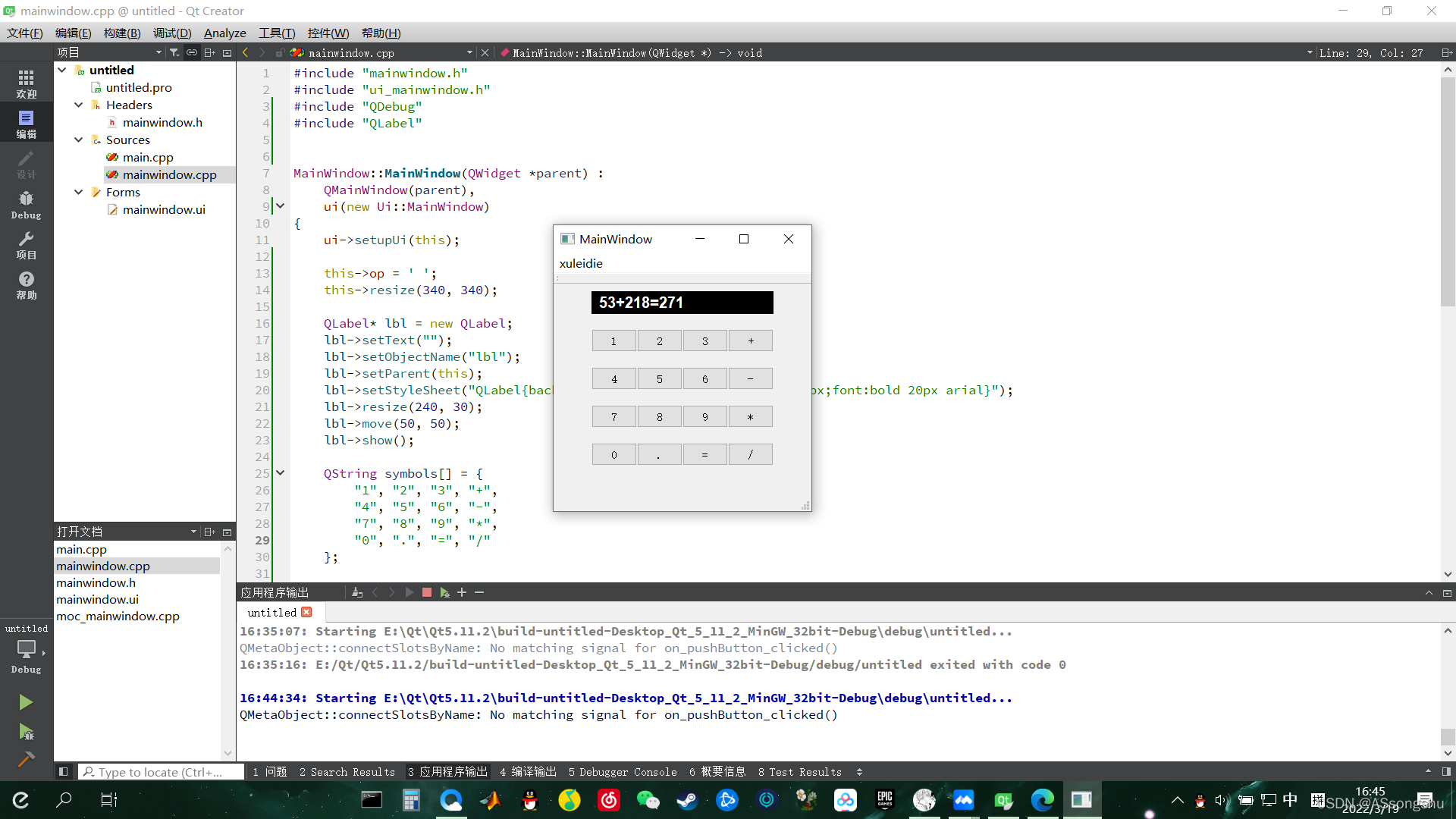
5.最终结果

开源鸿蒙跨平台开发社区汇聚开发者与厂商,共建“一次开发,多端部署”的开源生态,致力于降低跨端开发门槛,推动万物智联创新。
更多推荐
 18
18 0
0- 0


 已为社区贡献1条内容

所有评论(0)