七、Qt界面设计之自定义标题栏
达到的效果:代码CustomDialog.h#ifndef DIALOG_H#define DIALOG_H#include <QDialog>class QPoint;class QRect;namespace Ui {class Dialog;}class CustomDialog : public QDialog{Q_OBJECTpu...
·
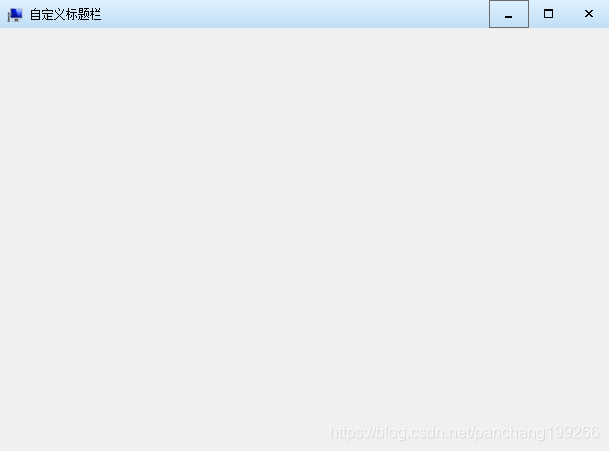
达到的效果:
代码
CustomDialog.h
#ifndef DIALOG_H
#define DIALOG_H

#include <QDialog>
class QPoint;
class QRect;

namespace Ui {
class Dialog;
}

class CustomDialog : public QDialog
{
    Q_OBJECT

public:
    explicit CustomDialog(QWidget *parent = 0);
    ~CustomDialog();

private:
    Ui::Dialog *ui;
    bool mousePressed; //鼠标左键是否按下
    QPoint mousePoint; //鼠标的位置
    bool isMax;        //当前界面是否最大化
    QRect localRect;   //鼠标移动窗体后的坐标位置
    void init();

public:
    bool eventFilter(QObject *watched, QEvent *event) Q_DECL_OVERRIDE;
private slots:
    void on_btnMenu_max_clicked();
    void on_btnMenu_min_clicked();
};

#endif // DIALOG_H
CustomDialog.cpp
#include "dialog.h"
#include "ui_dialog.h"

#include <QMouseEvent>
#include <QRect>
#include <QDesktopWidget>


CustomDialog::CustomDialog(QWidget *parent) :
    QDialog(parent),
    ui(new Ui::Dialog)
{
    ui->setupUi(this);
    init();
}


CustomDialog::~CustomDialog()
{
    delete ui;
}

void CustomDialog::init()
{
    //初始化鼠标是否按下
    this->mousePressed = false;
    this->isMax = false;
    //记录位置
    this->localRect = this->geometry();
    /**
      * 设置窗体标题栏隐藏:
      *     Qt::FramelessWindowHint系统的外框,但是去掉以后,在任务栏上的右键菜单也没有了,个人觉得这个这个东西还是挺
      * 有必要的,所有加上Qt::WindowSystemMenuHint,而Qt::WindowMinimizeButtonHint则是让这个菜单上有最小化功能,
      * 不加的话,菜单就只有关闭这个功能了。
      */
    this->setWindowFlags(Qt::FramelessWindowHint | Qt::WindowSystemMenuHint | Qt::WindowMinimizeButtonHint);
    //标题栏安装事件监听器,让标题栏识别鼠标双击
    this->installEventFilter(this);

    //这里使用内置图标,你可以设置成其他好看的图标
    ui->btnMenu_min->setIcon(this->style()->standardIcon(QStyle::SP_TitleBarMinButton));
    ui->btnMenu_max->setIcon(this->style()->standardIcon(QStyle::SP_TitleBarMaxButton));
    ui->btnMenu_close->setIcon(this->style()->standardIcon(QStyle::SP_TitleBarCloseButton));
    ui->btnMenu_icon->setIcon(this->style()->standardIcon(QStyle::SP_ComputerIcon));
    //设置布局至边框的距离(默认9)
    ui->mainLayout->setContentsMargins(0, 0, 0, 0);
    //设置布局内各个组件之间的间隔
    ui->mainLayout->setSpacing(0);
    //几个按钮所在的布局也需要设置
    ui->menuLayout->setContentsMargins(0, 0, 0, 0);
    ui->menuLayout->setSpacing(0);
}

/**
 * @brief 鼠标点击移动界面
 */
bool CustomDialog::eventFilter(QObject *watched, QEvent *event)
{
    QWidget *wdt = (QWidget *)watched;
    QMouseEvent *mouseEvent = static_cast<QMouseEvent *>(event);
    if (mouseEvent->type() == QEvent::MouseButtonPress) {
        mousePressed = true;
        mousePoint = mouseEvent->globalPos() - wdt->pos();
        return true;
    } else if (mouseEvent->type() == QEvent::MouseButtonRelease) {
        mousePressed = false;
        return true;
    } else if (mouseEvent->type() == QEvent::MouseMove) { //若是移动,则计算移动距离,将组件移动到目标位置
        if (mousePressed && (mouseEvent->buttons() && Qt::LeftButton)) {
            wdt->move(mouseEvent->globalPos() - mousePoint);
            return true;
        }
    }
    return QDialog::eventFilter(watched, event);
}

void CustomDialog::on_btnMenu_max_clicked()
{
    if (this->isMax) {
        //恢复原来的位置
        this->setGeometry(localRect);
    } else {
        //记录放大前的位置
        localRect = this->geometry();
        //放大到整个桌面
        this->setGeometry(qApp->desktop()->availableGeometry());
    }

    this->isMax = !this->isMax;

}

void CustomDialog::on_btnMenu_min_clicked()
{
    this->showMinimized();
}
真个标题栏组件的样式表:
background:qlineargradient(spread:pad,x1:0,y1:0,x2:0,y2:1,stop:0 #DEF0FE,stop:1 #C0DEF6);

开源鸿蒙跨平台开发社区汇聚开发者与厂商,共建“一次开发,多端部署”的开源生态,致力于降低跨端开发门槛,推动万物智联创新。
更多推荐
 0
0 0
0- 0


 已为社区贡献14条内容

所有评论(0)