qt-C++笔记之事件过滤器
而不使用事件过滤器的方式更加直接,通常用于处理特定对象的事件。你可以在这个方法中编写自定义的逻辑来决定是否拦截某个事件,改变事件的默认行为,或者在事件传递到目标对象之前进行一些特殊处理。通过安装事件过滤器,你可以在事件到达目标对象之前对其进行拦截和处理,这允许你在不修改目标对象代码的情况下增加额外的行为。:事件过滤器可以用来监控事件流,帮助开发者理解事件是如何在应用程序中流转的,这对于调试事件相关
qt-C++笔记之事件过滤器
—— 2024-02-25


code review!
文章目录
一.使用事件过滤器和不使用事件过滤器对比
在Qt框架中,事件过滤器通常通过重写QObject类的eventFilter()方法来实现。下面提供两个简单的示例,展示在Qt C++中使用和不使用事件过滤器的情况:
1.1.使用事件过滤器
首先,创建一个新的类(例如MyFilter),从QObject派生,并重写eventFilter()方法来拦截和处理特定的事件。
#include <QObject>
#include <QEvent>
#include <QDebug>

class MyFilter : public QObject {
    Q_OBJECT

protected:
    bool eventFilter(QObject *obj, QEvent *event) override {
        if (event->type() == QEvent::KeyPress) {
            qDebug() << "A key press event has been filtered.";
            // 处理事件
            return true;  // 返回true表示事件已被处理,不需要进一步传递
        }
        // 其他事件传递给基类的eventFilter方法
        return QObject::eventFilter(obj, event);
    }
};
然后,你需要在你想要过滤其事件的对象上安装这个过滤器:
#include <QApplication>
#include <QWidget>

int main(int argc, char *argv[]) {
    QApplication a(argc, argv);
    QWidget window;

    MyFilter *filter = new MyFilter(&window);
    window.installEventFilter(filter);  // 安装事件过滤器

    window.show();
    return a.exec();
}
1.2.不使用事件过滤器
如果不使用事件过滤器,你可能会直接在对象的事件处理方法中处理所有的事件,例如在QWidget的子类中重写keyPressEvent()方法:
#include <QWidget>
#include <QKeyEvent>
#include <QDebug>

class MyWidget : public QWidget {
    Q_OBJECT

protected:
    void keyPressEvent(QKeyEvent *event) override {
        qDebug() << "A key press event has been received.";
        // 处理事件
        QWidget::keyPressEvent(event);  // 调用基类的keyPressEvent方法
    }
};

int main(int argc, char *argv[]) {
    QApplication a(argc, argv);
    MyWidget window;

    window.show();
    return a.exec();
}
在这个例子中,MyWidget会接收并处理所有的按键事件,而不是通过一个单独的过滤器来进行筛选。
1.3.比较
使用事件过滤器的方式更加灵活,因为你可以在不修改原有类的情况下,通过安装或移除过滤器来动态改变事件处理行为。此外,过滤器可以用于多个对象,不需要为每个对象编写重复的事件处理代码。
而不使用事件过滤器的方式更加直接,通常用于处理特定对象的事件。这种方式能够保证事件不会被其他对象意外截获,但是如果需要在多个对象之间共享相同的事件处理逻辑,可能会导致代码重复。
二.Qt 中事件过滤器存在的意义
Qt框架中的事件过滤器(Event Filter)是一个强大的功能,它允许对象拦截和处理发给其他对象的事件。事件过滤器的存在意义主要体现在以下几个方面:
-
灵活的事件处理:在Qt中,通常情况下,事件是被发送到目标对象的事件处理函数中(如
mousePressEvent、keyPressEvent等)。通过安装事件过滤器,你可以在事件到达目标对象之前对其进行拦截和处理,这允许你在不修改目标对象代码的情况下增加额外的行为。 -
代码解耦:事件过滤器可以帮助你减少类之间的耦合。例如,可以在一个单独的类中处理所有相关的事件,而不是将这些处理逻辑分散到多个子类中。
-
条件事件处理:你可以根据需要决定是否要处理某个事件,或者在某些条件满足时改变事件的行为。事件过滤器可以基于动态条件(如应用程序的状态)来决定是否和如何处理事件。
-
监控和调试:事件过滤器可以用来监控事件流,帮助开发者理解事件是如何在应用程序中流转的,这对于调试事件相关的问题非常有用。
-
创建可重用的行为:通过事件过滤器,可以创建可以附加到多个对象上的通用行为,而无需每个对象都实现相同的事件处理代码。
要使用事件过滤器,你需要重写QObject的eventFilter方法,并使用installEventFilter方法将过滤器对象安装到目标对象上。当事件发生并且传递给目标对象之前,eventFilter方法会被调用,你可以在这个方法中决定如何处理事件。
下面是一个简单的例子,说明如何为一个对象安装事件过滤器:
class MyEventFilter : public QObject
{
protected:
    bool eventFilter(QObject *obj, QEvent *event) override
    {
        if (event->type() == QEvent::KeyPress) {
            // 处理按键事件
            // ...
            return true; // 返回true表示事件被处理,不再传递
        }
        // 将事件传递给基类的事件过滤器
        return QObject::eventFilter(obj, event);
    }
};

// 在某个地方使用事件过滤器
MyEventFilter *filter = new MyEventFilter();
targetObject->installEventFilter(filter);
在这个例子中,MyEventFilter类重写了eventFilter方法来处理按键事件。当目标对象targetObject接收到按键事件时,eventFilter方法会被调用,我们可以在这里决定如何处理该事件。如果我们返回true,则表示事件已经被处理并且不应该继续传递;如果返回false,事件将会继续传递给目标对象的相应事件处理方法。
三.为什么要重写QObject的eventFilter方法?使用QObject默认的eventFilter方法不可以吗?
在Qt中,QObject类提供了一个默认的实现eventFilter方法,但这个默认实现只是简单地返回false,表示它没有处理该事件,事件应该继续传递给目标对象的事件处理方法。换句话说,如果你不重写eventFilter方法,那么安装事件过滤器将没有任何实际效果,因为所有事件都会按照正常的流程继续传递。
重写eventFilter方法的目的是为了在事件到达目标对象之前介入处理流程。你可以在这个方法中编写自定义的逻辑来决定是否拦截某个事件,改变事件的默认行为,或者在事件传递到目标对象之前进行一些特殊处理。
下面是QObject中eventFilter方法默认实现的伪代码表示:
bool QObject::eventFilter(QObject *watched, QEvent *event)
{
    // 默认实现,不做任何处理,返回false表示不拦截事件
    return false;
}
当你创建一个新的类继承自QObject或者其子类,并且你希望该类能够以某种方式处理或者监控其他对象的事件时,你就需要提供eventFilter的自定义实现。例如,你可能想要记录所有的鼠标点击事件,或者在用户按下特定快捷键时触发某个动作。这时,你就需要重写eventFilter方法,如下所示:
class MyCustomFilter : public QObject
{
    // ...

protected:
    bool eventFilter(QObject *watched, QEvent *event) override
    {
        if (event->type() == QEvent::MouseButtonPress) {
            // 处理鼠标按下事件
            // ...
            return true; // 事件被处理,不再传递
        }
        // 对于不处理的事件,调用基类的eventFilter方法
        return QObject::eventFilter(watched, event);
    }
};
在这个例子中,MyCustomFilter类重写了eventFilter方法以便在鼠标按下时执行一些自定义操作。如果eventFilter方法返回true,则表示事件已经被处理,不应该继续传递;如果返回false,则事件会按照正常的事件处理流程继续传递给目标对象。
四.事件过滤器的使用场景
当然可以,下面是针对每个场景的main.cpp文件的完整示例。
4.1. 灵活的事件处理:
#include <QApplication>
#include <QLineEdit>
#include <QDebug>
#include <QObject>

class HelpEventFilter : public QObject {
protected:
    bool eventFilter(QObject *obj, QEvent *event) override {
        if (event->type() == QEvent::KeyPress) {
            QKeyEvent *keyEvent = static_cast<QKeyEvent *>(event);
            if (keyEvent->key() == Qt::Key_F1) {
                qDebug() << "Help requested for:" << obj;
                return true;
            }
        }
        return QObject::eventFilter(obj, event);
    }
};

int main(int argc, char *argv[]) {
    QApplication app(argc, argv);

    QLineEdit lineEdit;
    HelpEventFilter helpFilter;
    lineEdit.installEventFilter(&helpFilter);

    lineEdit.show();
    return app.exec();
}
4.2. 代码解耦:
#include <QApplication>
#include <QWidget>
#include <QDebug>
#include <QObject>

class UpdateEventFilter : public QObject {
protected:
    bool eventFilter(QObject *obj, QEvent *event) override {
        if (event->type() == QEvent::MouseButtonPress) {
            qDebug() << "Updating components due to click on:" << obj;
            return true;
        }
        return QObject::eventFilter(obj, event);
    }
};

int main(int argc, char *argv[]) {
    QApplication app(argc, argv);

    QWidget widget;
    UpdateEventFilter updateFilter;
    widget.installEventFilter(&updateFilter);

    widget.show();
    return app.exec();
}
4.3. 条件事件处理:
#include <QApplication>
#include <QWidget>
#include <QDebug>
#include <QObject>

class GameEventFilter : public QObject {
    bool gameRunning;

public:
    GameEventFilter(bool running) : gameRunning(running) {}

protected:
    bool eventFilter(QObject *obj, QEvent *event) override {
        if (event->type() == QEvent::KeyPress && gameRunning) {
            qDebug() << "Game is running - event processed for:" << obj;
            return true;
        }
        return QObject::eventFilter(obj, event);
    }
};

int main(int argc, char *argv[]) {
    QApplication app(argc, argv);

    QWidget widget;
    GameEventFilter gameFilter(true);
    widget.installEventFilter(&gameFilter);

    widget.show();
    return app.exec();
}
4.4. 监控和调试:
#include <QApplication>
#include <QWidget>
#include <QDebug>
#include <QObject>

class DebugEventFilter : public QObject {
protected:
    bool eventFilter(QObject *obj, QEvent *event) override {
        qDebug() << "Event:" << event->type() << "for object:" << obj;
        return QObject::eventFilter(obj, event);
    }
};

int main(int argc, char *argv[]) {
    QApplication app(argc, argv);

    QWidget widget;
    DebugEventFilter debugFilter;
    widget.installEventFilter(&debugFilter);

    widget.show();
    return app.exec();
}
4.5. 创建可重用的行为:
#include <QApplication>
#include <QWidget>
#include <QDebug>
#include <QObject>
#include <QDragEnterEvent>
#include <QMimeData>

class DragDropEventFilter : public QObject {
protected:
    bool eventFilter(QObject *obj, QEvent *event) override {
        if (event->type() == QEvent::DragEnter) {
            QDragEnterEvent *dragEvent = static_cast<QDragEnterEvent *>(event);
            if (dragEvent->mimeData()->hasFormat("text/plain")) {
                qDebug() << "Drag enter event for:" << obj;
                dragEvent->accept();
                return true;
            }
        }
        return QObject::eventFilter(obj, event);
    }
};

int main(int argc, char *argv[]) {
    QApplication app(argc, argv);

    QWidget widget;
    widget.setAcceptDrops(true);

    DragDropEventFilter dragDropFilter;
    widget.installEventFilter(&dragDropFilter);

    widget.show();
    return app.exec();
}
在每个例子中,我们创建了一个应用程序实例和一个主窗口部件,然后创建了一个事件过滤器并将其安装到主窗口部件上。在实际应用中,你可能需要调整过滤器逻辑以适应你的具体需求。这些示例中的eventFilter函数的返回值很重要,如果它返回true,则表明事件已被处理,不会再传递给对象;如果返回false,则事件会继续传递给对象的event方法。
五.使用事件过滤器和不使用事件过滤器优缺点
在计算机编程和系统设计中,事件过滤器是一种用来决定是否应该处理或忽略某个事件的机制。事件可以是用户操作、系统生成的消息或者是由硬件设备产生的信号等。使用事件过滤器和不使用事件过滤器可以带来不同的效果和影响,下面列举了一些对比点:
使用事件过滤器
优点:
- 效率提升:当事件数量很大时,过滤器可以帮助减少无关事件的处理,从而节省CPU时间和内存资源。
- 更好的用户体验:过滤器可以确保只有相关和重要的事件被处理,避免了不必要的干扰,提高应用程序的响应性。
- 可维护性:过滤器可以帮助组织和管理事件处理逻辑,使代码更加清晰,易于维护和更新。
- 灵活性:过滤器可以动态地添加或移除,方便地调整哪些事件应该被处理。
- 安全性:过滤掉不必要的或潜在危险的事件,可以减少安全风险。
缺点:
- 复杂性:设计和实现事件过滤器会增加系统的复杂度。
- 性能开销:虽然过滤器可以提高整体效率,但是过滤器本身的运行也会消耗一定的性能。
- 可能的错误过滤:如果过滤器逻辑设计不当,可能会错误地过滤掉应该处理的事件。
不使用事件过滤器
优点:
- 简单性:不需要考虑过滤逻辑,实现起来比较简单直接。
- 无额外性能开销:没有过滤器运行的开销,每个事件都直接送进事件处理流程。
- 完整性:所有事件都会被送至处理程序,没有遗漏的风险。
缺点:
- 效率低下:没有过滤机制意味着所有事件,无论是否相关,都会被处理,这可能会导致不必要的性能负担。
- 用户体验不佳:处理大量无关事件可能会导致应用程序响应变慢,影响用户体验。
- 可维护性差:随着事件处理逻辑的增多,代码可能变得难以管理和维护。
- 安全风险:处理所有事件可能会使系统面临更多的安全威胁,因为不加选择的处理可能包含恶意的事件。
总结来说,使用事件过滤器可以帮助提高系统效率,提升用户体验,加强安全性,并有助于代码维护。然而,它也会带来额外的复杂性和性能开销。不使用事件过滤器则在实现上更为简单,但可能会导致效率低下和维护困难等问题。在实际应用中,是否使用事件过滤器取决于具体的需求、资源限制和安全考虑。
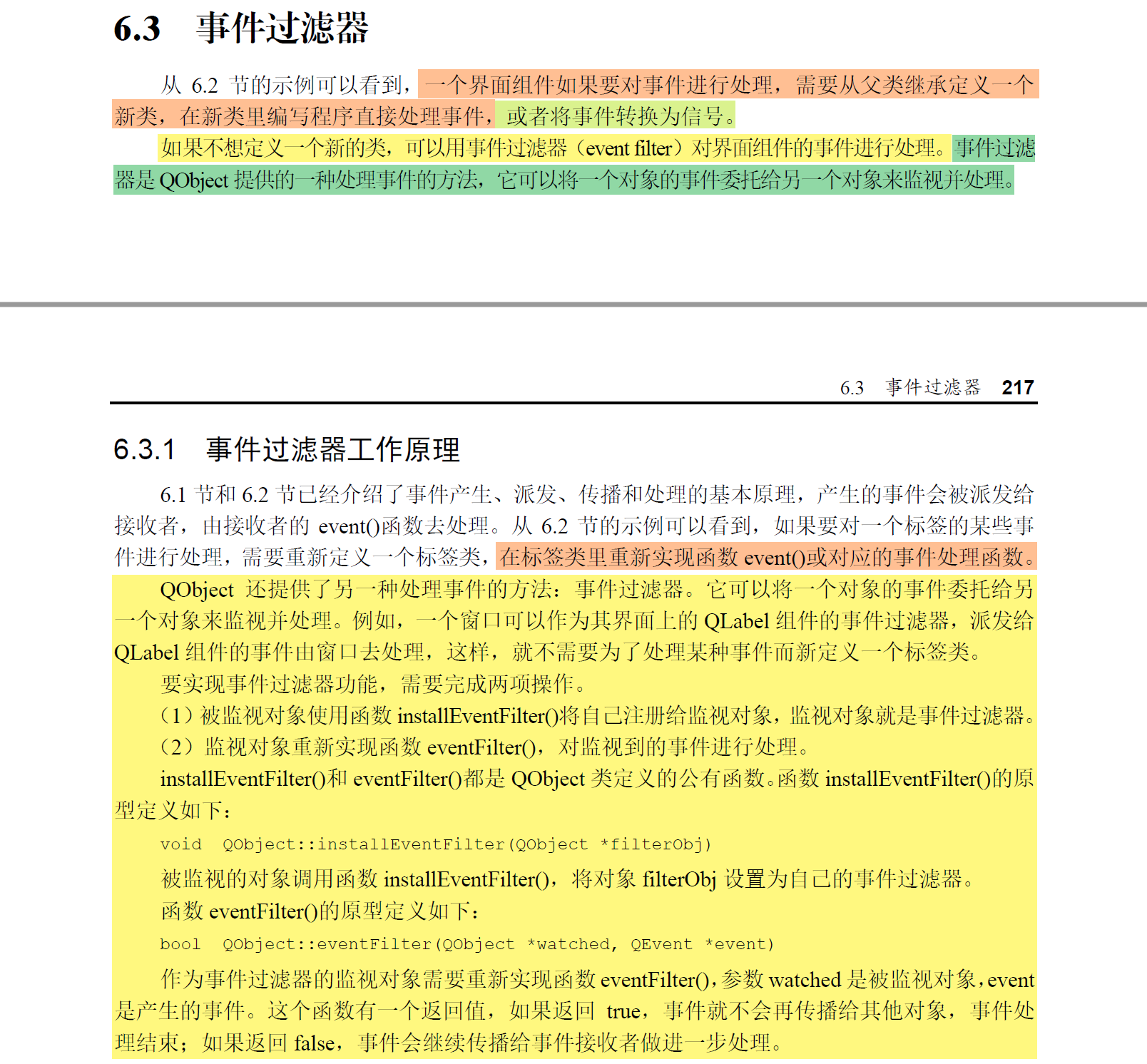
六.《Qt6 C++开发指南》——事件过滤器部分
七.《Qt程序设计基础 基于银河麒麟桌面操作系统》
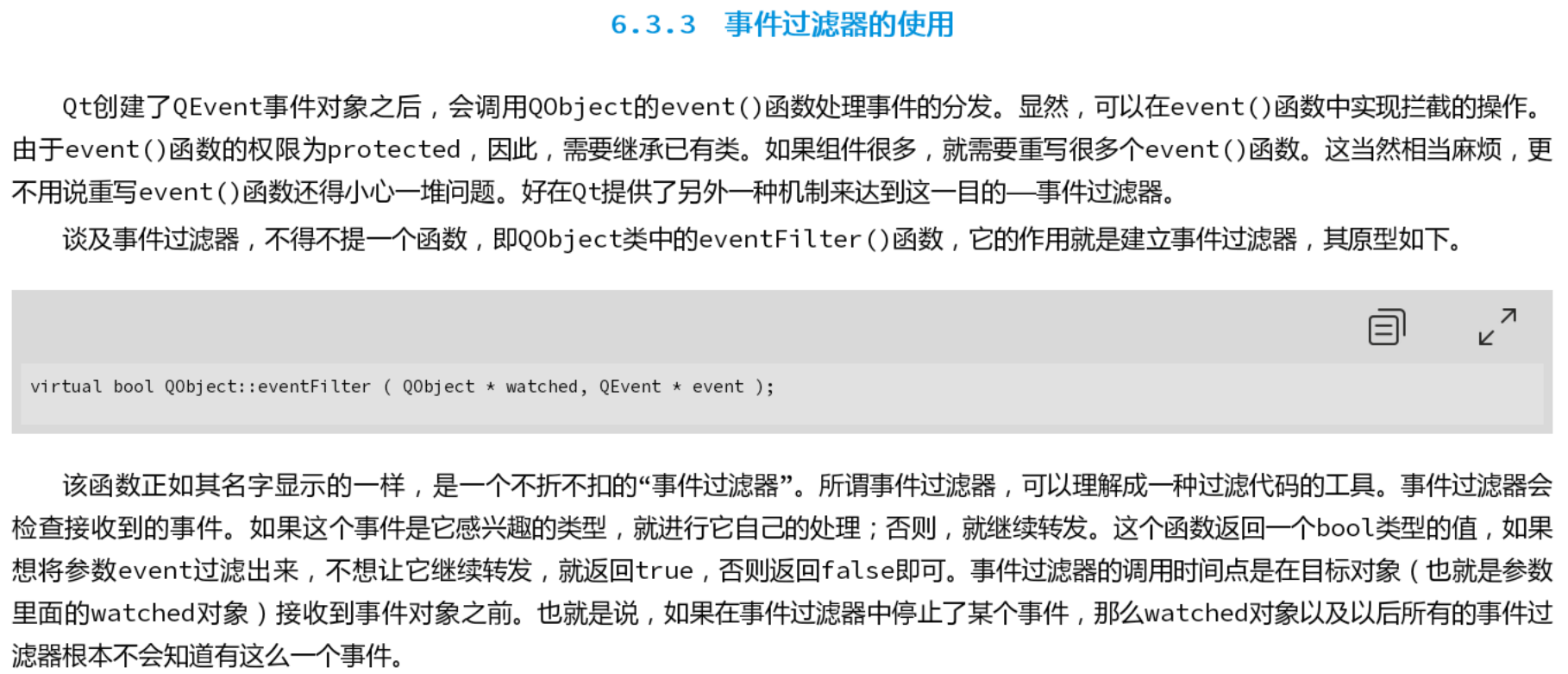
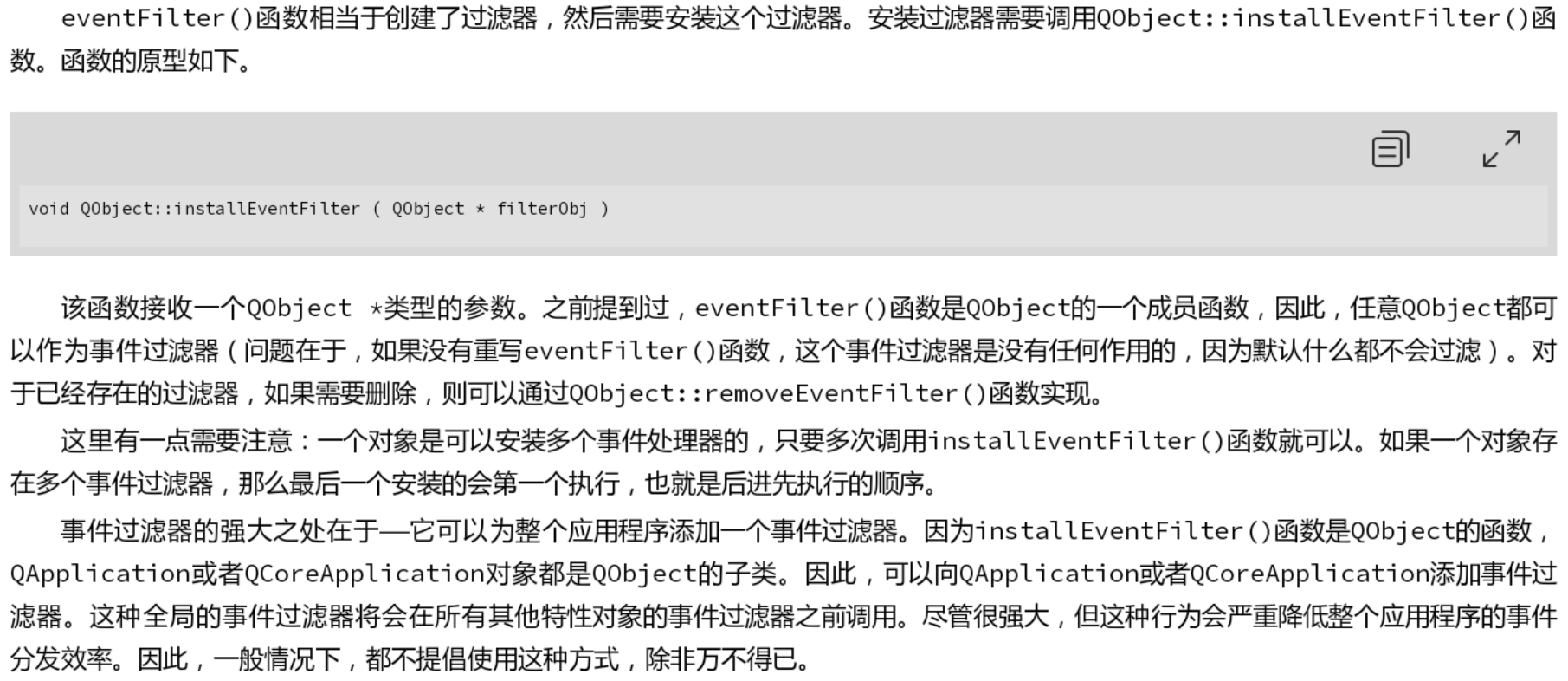

开源鸿蒙跨平台开发社区汇聚开发者与厂商,共建“一次开发,多端部署”的开源生态,致力于降低跨端开发门槛,推动万物智联创新。
更多推荐


 22
22 0
0- 0


 已为社区贡献12条内容

所有评论(0)