electron 打包_electron学习笔记之初步了解
简介最近需要开发桌面应用,需要有一个简单的界面,本来打算用QT,后面发现学习成本有点高,我的要求很简单,就是启动一个exe,然后能有一些数据的交互就可以了,经过筛选发现electron超级符合我的需求,主要是简单,其它的都不是事。Electron 前称为atom shell,是从github开源项目Atom编辑器中抽离出来的,是一个能让你通过 JavaScript、HTML 和 CSS 构建桌面应
简介
最近需要开发桌面应用,需要有一个简单的界面,本来打算用QT,后面发现学习成本有点高,我的要求很简单,就是启动一个exe,然后能有一些数据的交互就可以了,经过筛选发现electron超级符合我的需求,主要是简单,其它的都不是事。
Electron 前称为atom shell,是从github开源项目Atom编辑器中抽离出来的,是一个能让你通过 JavaScript、HTML 和 CSS 构建桌面应用的库 。这些应用能打包到 Mac、Windows 和 Linux 电脑上运行。
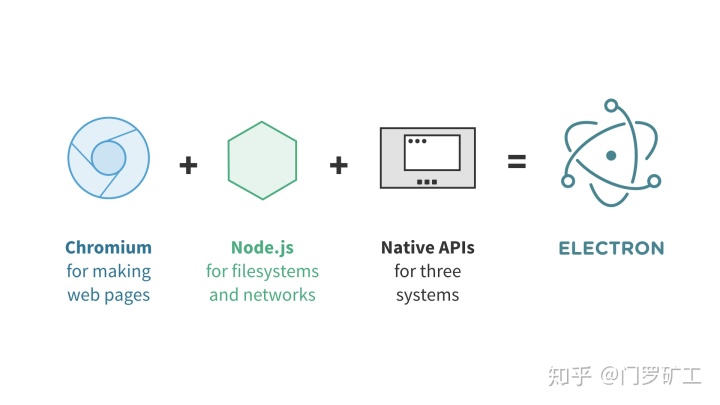
它还有其它一些特性:
- 自动更新 —— 应用支持自动更新
- 原生菜单和通知 —— 可以创建原生应用菜单和上下文菜单
- 应用崩溃报告 —— 可以将崩溃报告提交到远程服务器
- 调试和分析 —— Chrominum 的内容模块可以发现性能瓶颈和缓慢的操作。你也可以在应用中使用自己喜欢的 Chrome 开发者工具。
- Windows installer —— 可以快速便捷地创建安装包。
使用手册
API英文版
https://github.com/electron/electron-api-demosgithub.com简易使用说明
electron/electron-quick-startgithub.com
API中文版
demopark/electron-api-demos-Zh_CNgithub.com
程序
electron/electrongithub.com
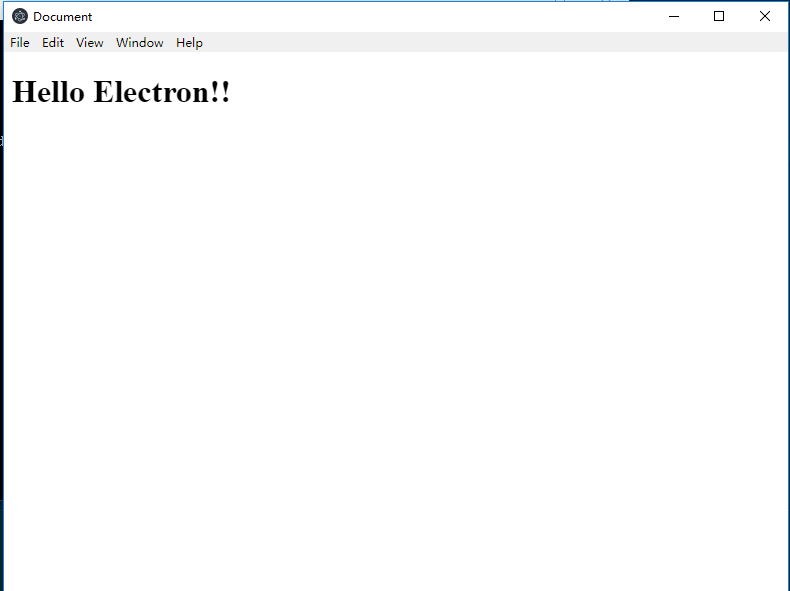
Hello world!
- 安装node.js
- 使用国内npm镜像地址:
npm config set registry https://mirrors.huaweicloud.com/repository/npm/
npm config set disturl Index of /mirrors_toolkit/nodejs/
npm config set electron_mirror Index of /mirrors_toolkit/electron/

npm config set registry https://registry.npm.taobao.org
npm config set disturl Node.js Mirror
npm config set electron_mirror electron Mirror- 安装electron :
npm install electron -g- 创建基本文件
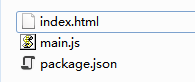
index.html
Hello world!package.json
{
  "name"    : "app-name",
  "version" : "0.1.0",
  "main"    : "main.js"
}
main.js
const {app, BrowserWindow} = require('electron')
const path = require('path')
const url = require('url')

// Keep a global reference of the window object, if you don't, the window will
// be closed automatically when the JavaScript object is garbage collected.
let win

function createWindow () {
  // Create the browser window.
  win = new BrowserWindow({width: 800, height: 600})

  // and load the index.html of the app.
  win.loadURL(url.format({
    pathname: path.join(__dirname, 'index.html'),
    protocol: 'file:',
    slashes: true
  }))

  // Open the DevTools.
  // win.webContents.openDevTools()

  // Emitted when the window is closed.
  win.on('closed', () => {
    // Dereference the window object, usually you would store windows
    // in an array if your app supports multi windows, this is the time
    // when you should delete the corresponding element.
    win = null
  })
}

// This method will be called when Electron has finished
// initialization and is ready to create browser windows.
// Some APIs can only be used after this event occurs.
app.on('ready', createWindow)

// Quit when all windows are closed.
app.on('window-all-closed', () => {
  // On macOS it is common for applications and their menu bar
  // to stay active until the user quits explicitly with Cmd + Q
  if (process.platform !== 'darwin') {
    app.quit()
  }
})

app.on('activate', () => {
  // On macOS it's common to re-create a window in the app when the
  // dock icon is clicked and there are no other windows open.
  if (win === null) {
    createWindow()
  }
})

// In this file you can include the rest of your app's specific main process
// code. You can also put them in separate files and require them here.- 打开当前目录命令行
再全局安装 npm install electron-packager -g
- 打包
还在这个目录里直接执行 electron-packager .
打包慢,无反应
electron-packager在当前机器的首次打包前,会下载electron的预编译文件至当前用户,而electron-prebuilder的默认源在国外,在网络不好的情况下,即便有代理,速度非常慢。
本问题的最大坑点在于,下载预编译文件的进度不显示在命令行。
1. 修改npm镜像
首先,你可以更换阿里镜像源,全局执行如下npm脚本再重新打包
npm config set ELECTRON_MIRROR http://npm.taobao.org/mirrors/electron/2. 修改系统环境变量
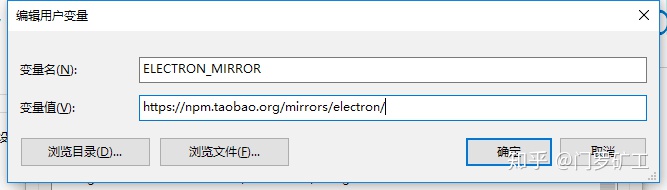
由于未知原因,electron-packger / electron-builder 在真实打包时并不识别npm的镜像地址,此时,你需要修改环境变量
变量名:
ELECTRON_MIRROR变量值:
http://npm.taobao.org/mirrors/electron/然后,再重启cmd,使环境变量生效,进行打包即可。
安装electron提示install.js error的问题
更换淘宝的镜像
npm install cnpm -g --registry=http://registry.npm.taobao.org使用cnpm install更新后没有问题。
electron 打包后找不到模块
修改package.json的dependencies
例如:
{
参考资料
Electron调用命令行(cmd)方法总结_操作系统_王俊的博客-CSDN博客blog.csdn.net

开源鸿蒙跨平台开发社区汇聚开发者与厂商,共建“一次开发,多端部署”的开源生态,致力于降低跨端开发门槛,推动万物智联创新。
更多推荐
 0
0 0
0- 0


 已为社区贡献2条内容

所有评论(0)