QLable创建矩形阵列
项目需要创建方块图,每个方块可以不同颜色来表示通道状态,想着用TableWidget,后面觉得QLabel也可以简单实现,所以就是下面这个项目,同时利用了Qt的属性系统和重绘事件来描绘颜色每个方格的头文件capunitlab.h#ifndef CAPUNITLAB_H#define CAPUNITLAB_H#include <QLabel>class CapUnitLab : publ
·
项目需要创建方块图,每个方块可以不同颜色来表示通道状态,想着用TableWidget,后面觉得QLabel也可以简单实现,所以就是下面这个项目,同时利用了Qt的属性系统和重绘事件来描绘颜色
每个方格的头文件
capunitlab.h
#ifndef CAPUNITLAB_H
#define CAPUNITLAB_H
#include <QLabel>

class CapUnitLab : public QLabel
{
    Q_OBJECT
    Q_PROPERTY(int channel READ Channel WRITE setChannel)
    Q_PROPERTY(float capacitance READ Capacitance WRITE setCapacitance)
    Q_PROPERTY(QColor color READ Color WRITE setColor)
    Q_PROPERTY(LEVEL level READ Level WRITE setLevel NOTIFY LevelChangedSig)
public:
    CapUnitLab(QWidget *parent);
    ~CapUnitLab();

    enum LEVEL {VeryLow,Low,Normal,High,VeryHigh};
    Q_ENUM(LEVEL)

    int Channel() const{ return m_channel; }
    void setChannel(const int &channel = 0){m_channel = channel;}

    float Capacitance() const{ return m_capacitance; }
    void setCapacitance(const float &capacitance = 0);

    QColor Color() const{ return m_color; }
    void setColor(const QColor &color = Qt::white){m_color = color;}

    LEVEL Level() const{ return m_level; }
    void setLevel(const LEVEL &level = VeryLow);

    void paintEvent(QPaintEvent *);

signals:
    void LevelChangedSig(LEVEL level);
private slots:
    void LevelChangedSlot(LEVEL level);

private:
    int m_channel;
    float m_capacitance;
    QColor m_color;
    LEVEL m_level;

};

#endif // CAPUNITLAB_H
方块的源文件:capunitlab.cpp
#include "capunitlab.h"
#include <QPainter>

CapUnitLab::CapUnitLab(QWidget *parent):QLabel(parent)
{
    setChannel(0);
    setCapacitance(0.0);
    setColor(Qt::gray);
    setLevel(VeryLow);
    connect(this,SIGNAL(LevelChangedSig(LEVEL)),this,SLOT(LevelChangedSlot(LEVEL)));
    setMinimumSize(25,25);//设置窗口最下大小
}

CapUnitLab::~CapUnitLab()
{

}

void CapUnitLab::paintEvent(QPaintEvent *)
{

   QPainter painter(this);
   // 反走样
   painter.setRenderHint(QPainter::Antialiasing, true);
   // 设置画笔颜色、宽度
   painter.setPen(QPen(QColor(0, 160, 230), 2));
   // 设置画刷颜色

   switch (m_level) {
   case Low:
       setColor(QColor(135,206,250)); //淡蓝色
       break;
   case Normal:
       setColor(QColor(0,128,0)); //绿色
       break;
   case High:
       setColor(QColor(255,165,0)); //橙色
       break;
   case VeryHigh:
       setColor(QColor(255,0,0)); //红色
       break;
   case VeryLow:
   default:
       setColor(QColor(128,128,128)); //灰色
       break;
   }
   painter.setBrush(Color());
//   painter.drawRect(frameGeometry());
//   painter.drawRect(geometry());
   painter.drawRect(0, 0,width(),height());


}


void CapUnitLab::setCapacitance(const float &capacitance)
{
    m_capacitance = capacitance;
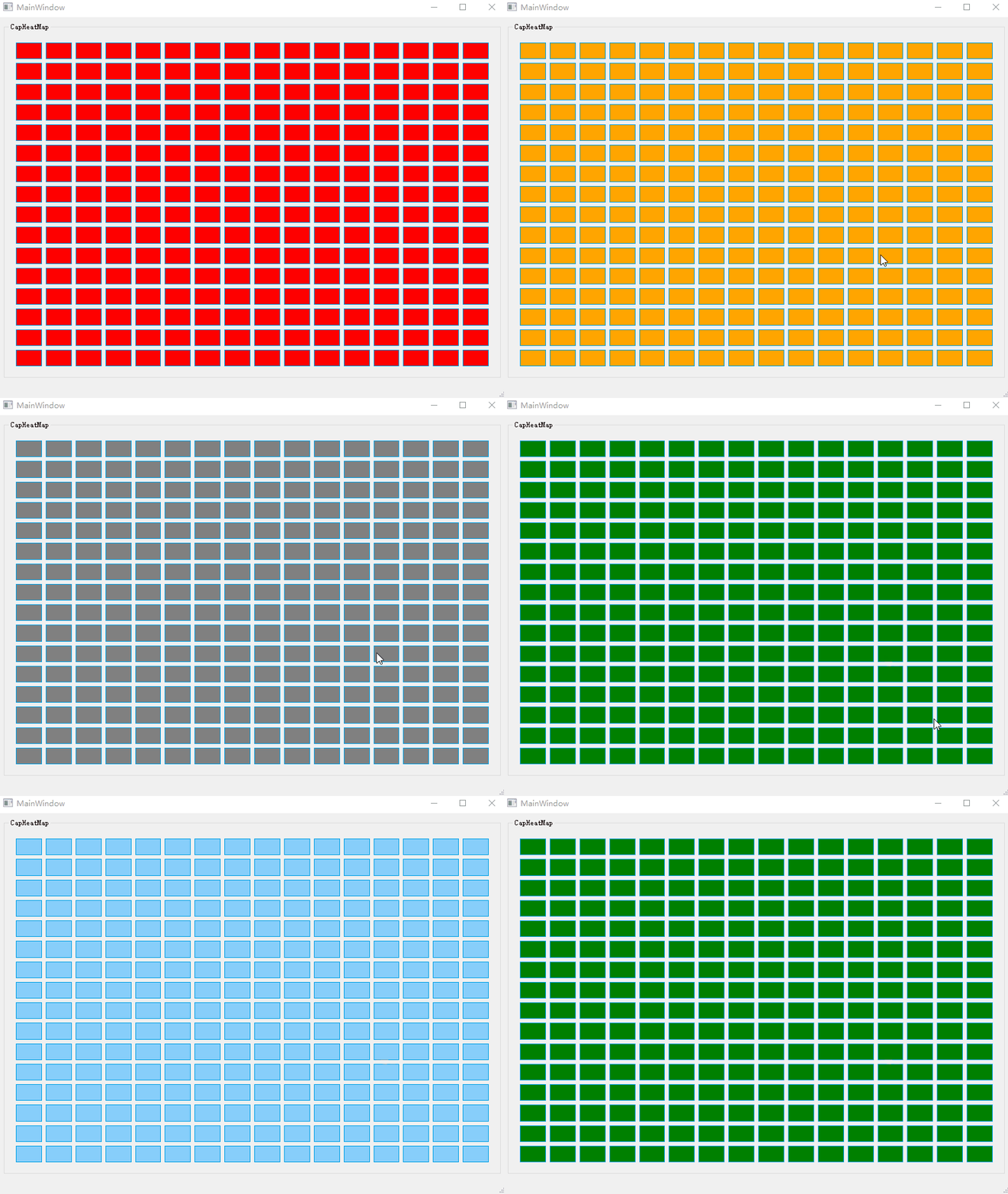
    if(m_capacitance < 10)  //0-10pF 灰色
    {
        setLevel(VeryLow);
    }
    else if(m_capacitance >= 300) //300pF以上 红色
    {
        setLevel(VeryHigh);
    }
    else if(10 <= m_capacitance && m_capacitance < 40 ) //10-40pF 灰蓝色
    {
        setLevel(Low);
    }
    else if(40 <= m_capacitance && m_capacitance < 200) //40-200pF 绿色
    {
        setLevel(Normal);
    }
    else //200pF-300pF 橙色
    {
        setLevel(High);
    }
}

void CapUnitLab::setLevel(const LEVEL &level)
{
     if(level != m_level)
     {
         m_level = level;
         emit LevelChangedSig(level);
     }
}

void CapUnitLab::LevelChangedSlot(LEVEL level)
{
    update();
}
负责所有方块的容器头文件capheatmap.h
#ifndef CAPHEATMAP_H
#define CAPHEATMAP_H

#include <QWidget>

namespace Ui {
class CapHeatmap;
}

class CapUnitLab;
class CapHeatmap : public QWidget
{
    Q_OBJECT

public:
    explicit CapHeatmap(QWidget *parent = nullptr);
    ~CapHeatmap();

    void InitHeatMapView(void);
    void SetCapValue(const float &capValue);

private:
    Ui::CapHeatmap *ui;
    std::vector<std::shared_ptr<CapUnitLab>> m_vctCapUnitLab;
};

#endif // CAPHEATMAP_H
负责所有方块的容器源文件capheatmap.cpp
#ifndef CAPHEATMAP_H
#define CAPHEATMAP_H

#include <QWidget>

namespace Ui {
class CapHeatmap;
}

class CapUnitLab;
class CapHeatmap : public QWidget
{
    Q_OBJECT

public:
    explicit CapHeatmap(QWidget *parent = nullptr);
    ~CapHeatmap();

    void InitHeatMapView(void);
    void SetCapValue(const float &capValue);

private:
    Ui::CapHeatmap *ui;
    std::vector<std::shared_ptr<CapUnitLab>> m_vctCapUnitLab;
};

#endif // CAPHEATMAP_H
mainwindow.h
#ifndef MAINWINDOW_H
#define MAINWINDOW_H

#include <QMainWindow>
#include <QTimer>

QT_BEGIN_NAMESPACE
namespace Ui { class MainWindow; }
QT_END_NAMESPACE

class CapHeatmap;

class MainWindow : public QMainWindow
{
    Q_OBJECT

public:
    MainWindow(QWidget *parent = nullptr);
    ~MainWindow();
public slots:
    void timeoutslot(void);

private:
    Ui::MainWindow *ui;
    QTimer m_timer;
    CapHeatmap *m_pCapHeatmap;
};
#endif // MAINWINDOW_H
mainwindow.cpp
#include "mainwindow.h"
#include "ui_mainwindow.h"
#include "capheatmap.h"
#include <QDebug>

MainWindow::MainWindow(QWidget *parent)
    : QMainWindow(parent)
    , ui(new Ui::MainWindow)
{
    ui->setupUi(this);

    m_pCapHeatmap  = new CapHeatmap(this);
    connect(&m_timer, SIGNAL(timeout()),this,SLOT(timeoutslot()));
    m_timer.start(50);
    this->setCentralWidget(m_pCapHeatmap);
}

MainWindow::~MainWindow()
{
    delete m_pCapHeatmap;
    delete ui;
}

void MainWindow::timeoutslot(void)
{
    static float capValue = 10;
    capValue += 10;
    if(capValue > 350)
    {
        capValue = 0;
    }
    qDebug()<<"capValue"<<capValue;
    m_pCapHeatmap->SetCapValue(capValue);
}
最后的main.cpp
#include "mainwindow.h"

#include <QApplication>

int main(int argc, char *argv[])
{
    QApplication a(argc, argv);
    MainWindow w;
    w.show();
    return a.exec();
}
源码下载地址:https://download.csdn.net/download/u010505080/13452868
最后的动态效果图:

开源鸿蒙跨平台开发社区汇聚开发者与厂商,共建“一次开发,多端部署”的开源生态,致力于降低跨端开发门槛,推动万物智联创新。
更多推荐



 0
0 0
0- 0


 已为社区贡献1条内容

所有评论(0)