qt enabled属性导致图片颜色_Qt 纯属娱乐-做一个类似微信滑动聊天界面demo
视频由于编译器不可以上传视频,想要视频效果,可以访问以下链接。网页链接软件架构编译结果现在开始讲一下源码吧看到上拉下拉出现的缓慢旋转的小圈圈了吗,其实使用的一个图片,不过看着还是有动态的效果,bingo.RectangleQML的Rectangle组件,顾名思义就是描绘一个矩形,一个可视化的对象。外加设置属性来达到我们想要的效果。常用的有矩形的颜色,边框颜色,圆角等设置。Recta...
视频
由于编译器不可以上传视频,想要视频效果,可以访问以下链接。
网页链接
软件架构
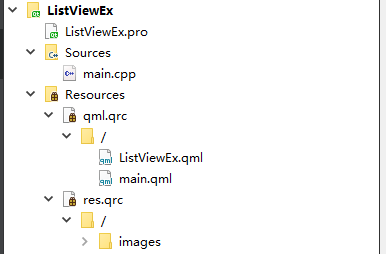
编译结果

现在开始讲一下源码吧
看到上拉下拉出现的缓慢旋转的小圈圈了吗,其实使用的一个图片,不过看着还是有动态的效果,bingo.

Rectangle
QML的Rectangle组件,顾名思义就是描绘一个矩形,一个可视化的对象。外加设置属性来达到我们想要的效果。常用的有矩形的颜色,边框颜色,圆角等设置。
Rectangle {
    id: loadTip
    width: parent.width
    height: -root.contentY
    color: Qt.lighter("green")
    z: -2
    clip: true

    Text {
        Anchor个人博客-Anchor个人博客: loadImage.bottom
        anchors.horizontalCenter: parent.horizontalCenter
        text: qsTr("loading")
        font.pointSize: 10
        color: Qt.lighter("white")
    }

    Image {
        id: loadImage
        source: "qrc:/images/loading.ico"
        anchors.centerIn: parent
    }
}
ParallelAnimation
组合动画有两种,这个只是其中一种而已,ParallelAnimation自己并不会产生动画,而是把其它的动画放进来。另外呢,在ParallelAnimation里面的动画也都是同时执行的。当然,别的方法也能实现,但是在大部分时候ParallelAnimation的方法是比其它方式更好的。
SequentialAnimation
SequentialAnimation和ParallelAnimation这两个类型允许多个动画定义在一起。定义在SequentialAnimation中的动画,一个接一个运行。定义在ParallelAnimation在同一时间一起运行
PropertyAnimation
PropertyAnimation提供了一种对属性值的更改进行动画处理的方法。它可以通过多种方式用于定义动画
RotationAnimation
RotationAnimation是一种特殊的PropertyAnimation,它可以控制动画期间的旋转方向。默认情况下,它会沿数值变化的方向旋转。从0到240的旋转将顺时针旋转240度,而从240到0的旋转将逆时针旋转240度。可以设置direction属性以指定旋转发生的方向。
NumberAnimation
NumberAnimation是一种特殊的PropertyAnimation,它定义在数值更改时要应用的动画。
ParallelAnimation {
    id: dropDownAnimation
    NumberAnimation {
        target:  root
        property: "contentY"
        to: -100;
        duration: 1
    }

    SequentialAnimation {
        RotationAnimation {
            target: loadImage
            from: 0
            to: 360
            duration: loadDuration
        }
        NumberAnimation {
            target: root
            property: "contentY"
            to: 0
            duration: 100
        }
    }

    onStopped: {root.load(); isDropDown = false; }
}
对于上拉更新,下拉加载,删除一系列的动作,代码如下
onIsPullOnChanged: {
    if(root.isPullOn)
        pullOnAnimation.restart();
}
onContentYChanged: {
    if( (root.height - Math.abs(contentY - contentHeight)) < 1.5
        && (root.height - Math.abs(contentY - contentHeight) ) > -1.5)
        root.bottomContentY = contentY;
}
onIsDropDownChanged: {
    if(isDropDown && !dropDownAnimation.running && (-contentY > 100.0))
        dropDownAnimation.restart();
}
onFlickingChanged: {
    if(!isDropDown && (-contentY > 100.0))
        isDropDown = true;

    if(!isPullOn && ((height - Math.abs(contentY - contentHeight)) > 65.0)) {
        isPullOn = true;
    }
}
总结
qt 真是个好东西,这个还有很多功能可以增加,比如置顶某人,编辑备注,设置为未读状态,这些都是很好的锻炼自己的例子,抛砖引玉一番。

开源鸿蒙跨平台开发社区汇聚开发者与厂商,共建“一次开发,多端部署”的开源生态,致力于降低跨端开发门槛,推动万物智联创新。
更多推荐
 0
0 0
0- 0


 已为社区贡献2条内容

所有评论(0)