qt使用curl访问url_如何在HTTPS协议和URL中使用Curl?

qt使用curl访问url
Curl is a command line tool and library which implements protocols like HTTP, HTTPS, FTP etc. Curl also supports HTTPS protocol which is secure version of the HTTP. Using curl may create some problems. We will examine how to solve these curl HTTPS related problems.
Curl是一个命令行工具和库,可实现HTTP,HTTPS,FTP等协议。Curl还支持HTTPS协议,该协议是HTTP的安全版本。 使用curl可能会产生一些问题。 我们将研究如何解决这些与HTTPS curl相关的问题。
安装卷发 (Install Curl)
We will start with the installation of the curl tool with the following command.
我们将使用以下命令开始安装curl工具。
Ubuntu,Debian,Mint,Kali: (Ubuntu, Debian, Mint, Kali:)
$ sudo apt install curl

Fedora,CentOS,RHEL: (Fedora, CentOS, RHEL:)
$ sudo yum install curl
SSL / TLS问题 (SSL/TLS Problems)
Especial in self-signed or expired X.509 or SSL/TLS certificates may create problems. The error detail is printed to the terminal. As an example, we will try to access https://www.wikipedia.com and we will get an error like
特别是自签名或已过期的X.509或SSL / TLS证书可能会造成问题。 错误详细信息将打印到终端。 例如,我们将尝试访问https://www.wikipedia.com,并且会出现类似以下的错误
curl: (51) SSL: no alternative certificate subject name matches target host name 'www.wikipedia.com'
AND we run following command.
并且我们运行以下命令。
$ curl https://www.wikipedia.com

允许不安全的连接(Allow Insecure Connections)
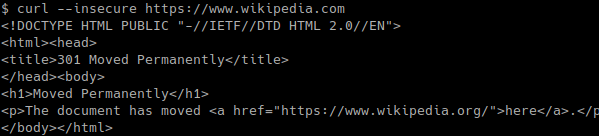
In order to prevent this error and accept an insecure certificate, we need to provide--insecure This will accept all provided certificates without complaining about it.
为了防止出现此错误并接受不安全的证书,我们需要提供--insecure它将接受所有提供的证书,而不会对此进行投诉。
$ curl --insecure https://www.wikipedia.com
手动提供站点HTTPS证书(Provide Site HTTPS Certificate Manually)
If we do not want to use web site provided certificate and provide sites HTTPS certificate manually we can use -E or --cert option with the certificate file. In this example, we will use a certificate named inwk.cert order to connect https://www.wikipedia.com.
如果我们不想使用网站提供的证书,而是手动提供网站的HTTPS证书,则可以在证书文件中使用-E或--cert选项。 在此示例中,我们将使用以wk.cert顺序命名的证书来连接https://www.wikipedia.com。
$ curl -E wk.cert https://www.wikipedia.com
明确提供证书颁发机构证书 (Provide a Certificate Authority Certificate Explicitly)
In some cases, we may need to use another certificate chain then internet. Certificate chains provide a trust relationship between hierarchical certificates where the leaf is the site certificate we want to navigate. Certificate Authority is the top certificate which is provided by Certification Authority firms. We can provide another certificate authority like our company local certificate authority with the --cacert option.
在某些情况下,我们可能需要使用另一个证书链,然后是Internet。 证书链提供了分层证书之间的信任关系,其中叶是我们要导航的站点证书。 证书颁发机构是由证书颁发机构公司提供的最高证书。 我们可以使用--cacert选项提供其他证书颁发机构,例如我们公司的本地证书颁发机构。
$ curl --cacert mycompany.cert https://www.mycompany.com
翻译自: https://www.poftut.com/how-to-use-curl-with-https-protocol-and-urls/
qt使用curl访问url

开源鸿蒙跨平台开发社区汇聚开发者与厂商,共建“一次开发,多端部署”的开源生态,致力于降低跨端开发门槛,推动万物智联创新。
更多推荐
 0
0 0
0- 0


 已为社区贡献1条内容

所有评论(0)