QObject各成员函数功能详细说明(文字+用例+代码+效果图)
文章目录
- 1.测试工程配置
- 2.成员函数
- 2.1 bool blockSignals(bool block)
- 2.2 int startTimer(std::chrono::milliseconds time, Qt::TimerType timerType = Qt::CoarseTimer)
- 2.3 int startTimer(int interval, Qt::TimerType timerType = Qt::CoarseTimer)
- 2.4 bool setProperty(const char *name, const QVariant &value)
- 2.5 void setParent(QObject *parent)
- 2.6 void setObjectName(const QString &name)
- 2.7 void installEventFilter(QObject *filterObj)
- 2.8 void removeEventFilter(QObject *obj)
- 2.9 QVariant property(const char *name) const
- 2.10 QObject *parent() const
- 2.11 QString objectName() const
- 2.12 QThread *thread() const
- 2.13 void moveToThread(QThread *targetThread)
- 2.14.virtual const QMetaObject *metaObject() const
- 2.15.void killTimer(int id)
- 2.16 bool isWindowType() const
- 2.17 bool isWidgetType() const
- 2.18 bool inherits(const char *className) const
- 2.19 T findChild(const QString &name = QString(), Qt::FindChildOptions options = Qt::FindChildrenRecursively) const
- 2.20 QList<T> findChildren(const QString &name = QString(), Qt::FindChildOptions options = Qt::FindChildrenRecursively) const
- 2.21 QList<T>findChildren(const QRegularExpression &re, Qt::FindChildOptions options = Qt::FindChildrenRecursively) const
- 2.22 virtual bool event(QEvent *e)
- 2.23 QList<QByteArray> dynamicPropertyNames() const
- 2.24 QMetaObject::Connection connect(const QObject *sender, const char *signal, const char *method, Qt::ConnectionType type = Qt::AutoConnection) const
- 2.25 bool disconnect(const char *signal = nullptr, const QObject *receiver = nullptr, const char *method = nullptr) const
- 2.26 bool disconnect(const QObject *receiver, const char *method = nullptr) const
- 2.27 信号 void destroyed(QObject *obj = nullptr)
- 2.28 信号 void objectNameChanged(const QString &objectName)
- 2.29 静态成员 connect与disconnect
- 2.30 静态成员 const QMetaObject staticMetaObject
1.测试工程配置
创建名为QtGuiAppTest的qwidget工程,带ui文件

2.成员函数
2.1 bool blockSignals(bool block)
(1)功能说明
如果一个继承自qobject的对象的阻塞信号设置为true,该对象发出的任何信号都会被阻塞,即发出的信号不会触发任何槽函数执行。返回值为阻塞信号的前一个设置的值。
注意:即使设置了阻塞信号, destroyed()信号仍然会被发出,并触发连接的槽。
(2)效果展示
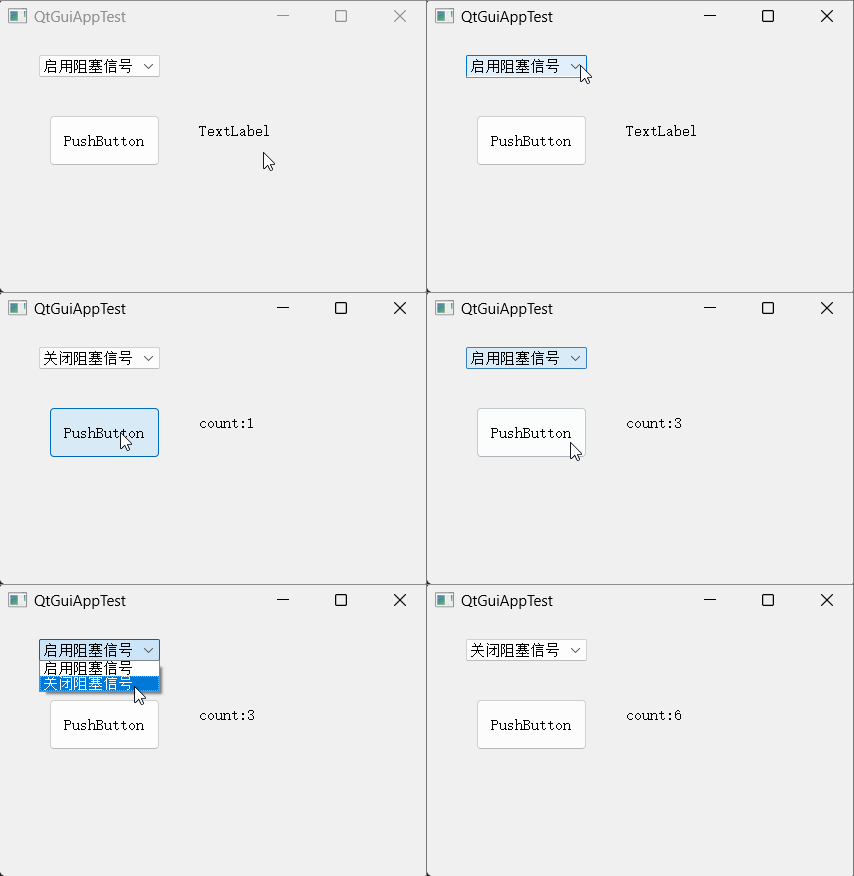
(3)调用程序
QtGuiAppTest.ui
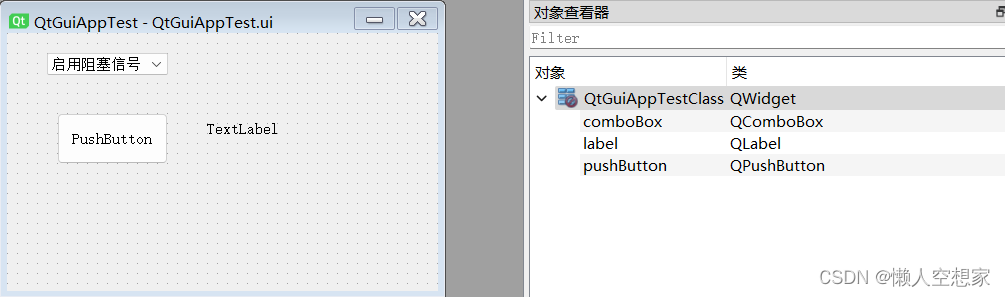
QtGuiAppTest.h
#pragma once
#include <QtWidgets/QWidget>
#include "ui_QtGuiAppTest.h"
class QtGuiAppTest : public QWidget
{
    Q_OBJECT
public:
    QtGuiAppTest(QWidget *parent = Q_NULLPTR);
public slots:
    //显示count计数
    void SlotTest();
    //根据下拉列表选项,设置blocksignals
    void SlotComboxChg(int id);
private:
    Ui::QtGuiAppTestClass ui;
    //计数
    int count;
};
QtGuiAppTest.cpp
#include "QtGuiAppTest.h"
QtGuiAppTest::QtGuiAppTest(QWidget *parent)
    : QWidget(parent)
{
    ui.setupUi(this);
    //初始设置信号阻塞
    ui.pushButton->blockSignals(true);
    count = 0;
    //连接按钮点击信号和SlotTest槽函数
    connect(ui.pushButton, &QPushButton::clicked, this,  &QtGuiAppTest::SlotTest);
    //连接下拉列表comboBox的选择改变信号与SlotComboxChg槽函数
    connect(ui.comboBox,  QOverload<int>::of(&QComboBox::currentIndexChanged),  this,
            &QtGuiAppTest::SlotComboxChg);
}
void QtGuiAppTest::SlotTest()
{
    ui.label->setText("count:" +  QString::number(count));
    count++;
}
void QtGuiAppTest::SlotComboxChg(int id)
{
        //如果下拉列表为启用阻塞信号,则设置pushButton的blockSignals为true
    if(id == 0)
    {
        ui.pushButton->blockSignals(true);
    }
    //如果下拉列表为关闭阻塞信号,则设置pushButton的blockSignals为true
    if(id == 1)
    {
        ui.pushButton->blockSignals(false);
    }
}
2.2 int startTimer(std::chrono::milliseconds time, Qt::TimerType timerType = Qt::CoarseTimer)
(1)功能说明
这是一个重载函数。
启动一个定时器,并返回该定时器ID。如果没有能够启动定时器则则返回0。
定时器事件会在每个事件间隔触发,直到killTimer()被调用。如果第一个参数time与std::chrono::duration::zero()相等,则定时器事件会在没有其他系统事件需要处理的情况下被反复调用
当一个定时器事件触发,虚函数timerEvent()会被调用并传入 QTimerEvent类的参数
如果多个定时器正在运行,QTimerEvent::timerId()可以被用于查找当前活跃的是哪个定时器
注意:定时器的精度依赖于底层运行的系统和硬件。第二个参数timerType允许去自定义定时器的精度。参考Qt::TimerType 中不同定时器类型枚举值。大多数平台支持一个20毫秒的精度;还有一些提供更高的精度支持。如果qt无法获取并提供定时器事件请求的精度数值,qt将默认丢弃一些精度。
(2)效果展示
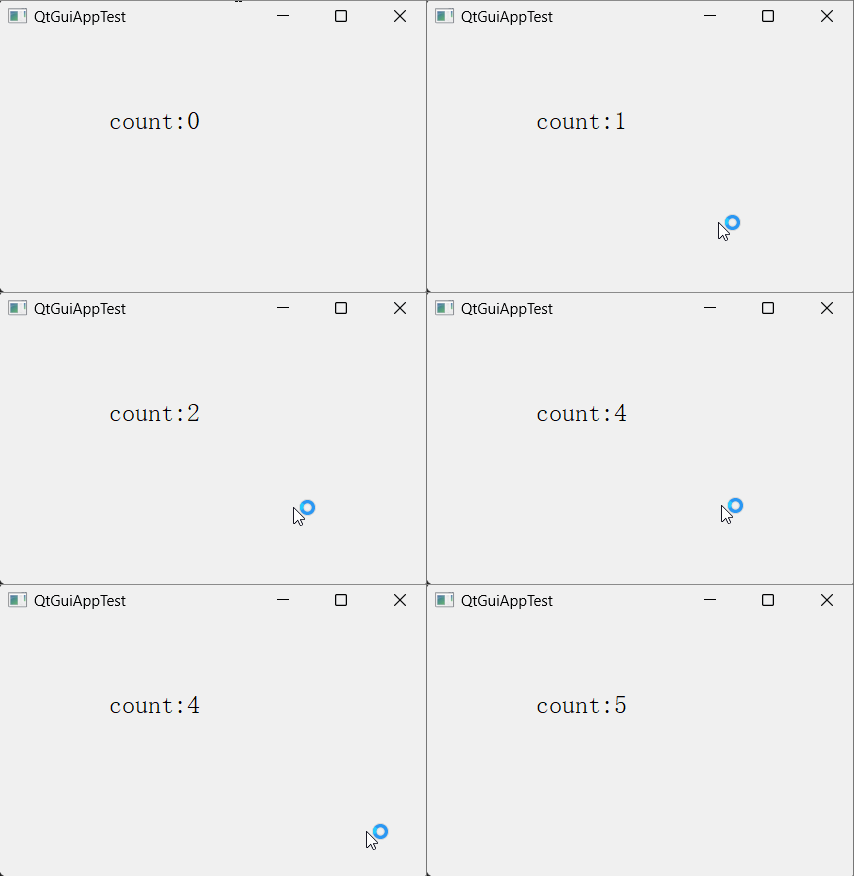
(3)调用程序
QtGuiAppTest.ui
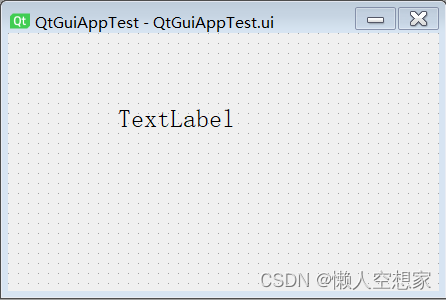
QtGuiAppTest.h
#pragma once
#include <QtWidgets/QWidget>
#include "ui_QtGuiAppTest.h"
class QtGuiAppTest : public QWidget
{
    Q_OBJECT
public:
    QtGuiAppTest(QWidget *parent = Q_NULLPTR);
protected:
    void timerEvent(QTimerEvent* event) override;
private:
    Ui::QtGuiAppTestClass ui;
    int count;
};
QtGuiAppTest.cpp
#include "QtGuiAppTest.h"
QtGuiAppTest::QtGuiAppTest(QWidget *parent)
    : QWidget(parent)
{
    ui.setupUi(this);
    //设置定时器时间间隔为1秒
    using namespace std::chrono;
    this->startTimer(1s);
}
void QtGuiAppTest::timerEvent(QTimerEvent* event)
{
    ui.label->setText("count:" +  QString::number(count));
    count++;
}
注意:
C++14之前延时时间设置语法如下
  using namespace std::chrono;
  startTimer(milliseconds(50));
  startTimer(seconds(1));
  startTimer(minutes(1));
C++14之后延时时间设置语法如下
  startTimer(100ms);
  startTimer(5s);
  startTimer(2min);
  startTimer(1h);
2.3 int startTimer(int interval, Qt::TimerType timerType = Qt::CoarseTimer)
(1)功能说明
第一个参数interval表示毫秒数,其他与第2.2节相同。
(2)效果展示
同第2.2节相同。
(3)调用程序
QtGuiAppTest::QtGuiAppTest(QWidget *parent)
    : QWidget(parent)
{
    ui.setupUi(this);
    //设置定时器时间间隔为1秒
    this->startTimer(1000);
}
2.4 bool setProperty(const char *name, const QVariant &value)
设置继承自qobject类对象的名称和值,见《QT属性系统(property system,Q_PROPERTY)功能和使用详细说明(文字+用例+代码+效果图)》
2.5 void setParent(QObject *parent)
给当前对象设置一个父类对象。
2.6 void setObjectName(const QString &name)
给对象设置一个名称,可以通过对象名称使用findchild找到一个子对象,默认为空字符串。
2.7 void installEventFilter(QObject *filterObj)
(1)功能说明
安装事件过滤器。
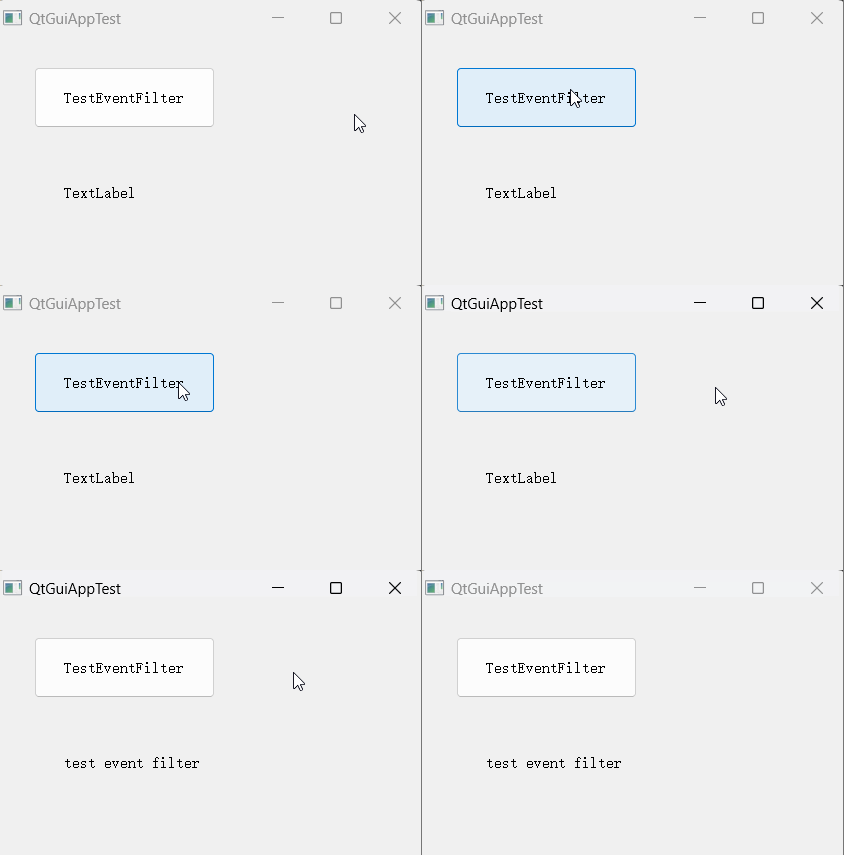
(2)效果展示
给按钮安装一个事件过滤器,过滤双击单击按钮事件,只能通过ctrl+B按下触发label内容改变。
(3)调用程序
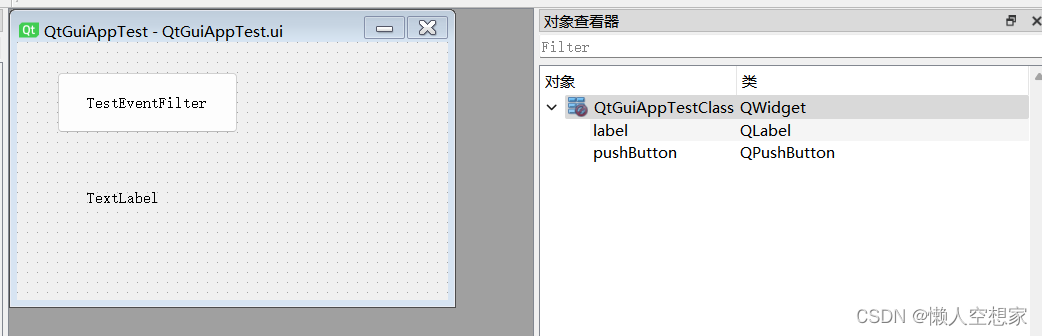
QtGuiAppTest.ui
QtGuiAppTest.h
#pragma once
#include <QtWidgets/QWidget>
#include "ui_QtGuiAppTest.h"
class QtGuiAppTest : public QWidget
{
    Q_OBJECT
public:
    QtGuiAppTest(QWidget *parent = Q_NULLPTR);
public slots:
    //根据按钮点击信号,改变label的内容
    void SlotTestEventFilter();
private:
    Ui::QtGuiAppTestClass ui;
};
/**
事件过滤器
*/
class EnterKeyPressFilter : public QObject
{
    Q_OBJECT
public:
    EnterKeyPressFilter(QWidget* parent = Q_NULLPTR);
    //重写事件过滤函数
    bool eventFilter(QObject* watched, QEvent* event)  override;
};
QtGuiAppTest.cpp
#include "QtGuiAppTest.h"
#include<qevent.h>
QtGuiAppTest::QtGuiAppTest(QWidget *parent)
    : QWidget(parent)
{
    ui.setupUi(this);
    //创建过事件滤器
    EnterKeyPressFilter* pEKPFilter = new  EnterKeyPressFilter(this);
    //给按钮添加快捷键
    ui.pushButton->setShortcut(QKeySequence(Qt::CTRL +  Qt::Key_B));
    //给按钮安装事件过滤器
    ui.pushButton->installEventFilter(pEKPFilter);
    //连接按钮点击信号与改变label内容的槽函数
    connect(ui.pushButton, &QPushButton::clicked, this,  &QtGuiAppTest::SlotTestEventFilter);
}
void QtGuiAppTest::SlotTestEventFilter()
{
    ui.label->setText("test event filter");
}
EnterKeyPressFilter::EnterKeyPressFilter(QWidget*  parent)
    : QObject(parent)
{
}
bool EnterKeyPressFilter::eventFilter(QObject* watched,  QEvent* event)
{
    //判断如果事件为鼠标双击或鼠标按下事件,则过滤掉,不发给按钮对象
    if(event->type() == QEvent::MouseButtonDblClick
            || event->type() ==  QEvent::MouseButtonPress)
    {
        return true;
    }
    //剩余事件转给默认的QObject过滤函数执行
    return QObject::eventFilter(watched, event);
}
2.8 void removeEventFilter(QObject *obj)
移除对象上安装的事件过滤器,参考第2.7节。
2.9 QVariant property(const char *name) const
获取对象上指定名称的属性值,参考属性系统。
2.10 QObject *parent() const
获取当前对象的父类对象。
2.11 QString objectName() const
获取当前对象的名称,默认该名称为空字符串。
2.12 QThread *thread() const
获取当前对象所在线程,用例见第2.13节。
2.13 void moveToThread(QThread *targetThread)
(1)功能说明
要迁移对象和其子对象所属的线程,如果对象有父类对象,则不能迁移。迁移对象到主线程,需要使用QApplication::instance()取到当前应用程序的指针,并使用 QApplication::thread()取到当前应用程序所在的线程。例如:
myObject->moveToThread(QApplication::instance()->thread());
如果目标线程是空的,对于待迁移对象和其子对象所有事件的处理都会停止。
对象迁移后,所有活跃的定时器将被重置。迁移过程中,在原先线程中所有定时器优先停止,并在目标线程中重新启动。如果不断的在线程之间迁移对象,则定时器事件将被无限期的推迟下去。
当对象所属的线程发生改变,一个QEvent::ThreadChange事件会被发送给该对象。开发者可以使用这个事件执行任何的特殊处理。在迁移过程中,任何发给迁移对象的新事件都将在非空的目标线程中处理。如果目标线程为空,这些发给迁移对象的事件将不再执行。
注意:
该函数不是线程安全的。该函数只能将对象从当前线程推送到目标线程,而不能将对象从目标线程拉取回到当前主线程。有一个例外情况:如果对象不属于线程,该对象就能够被拉取到当前主线程中。
(2)效果展示
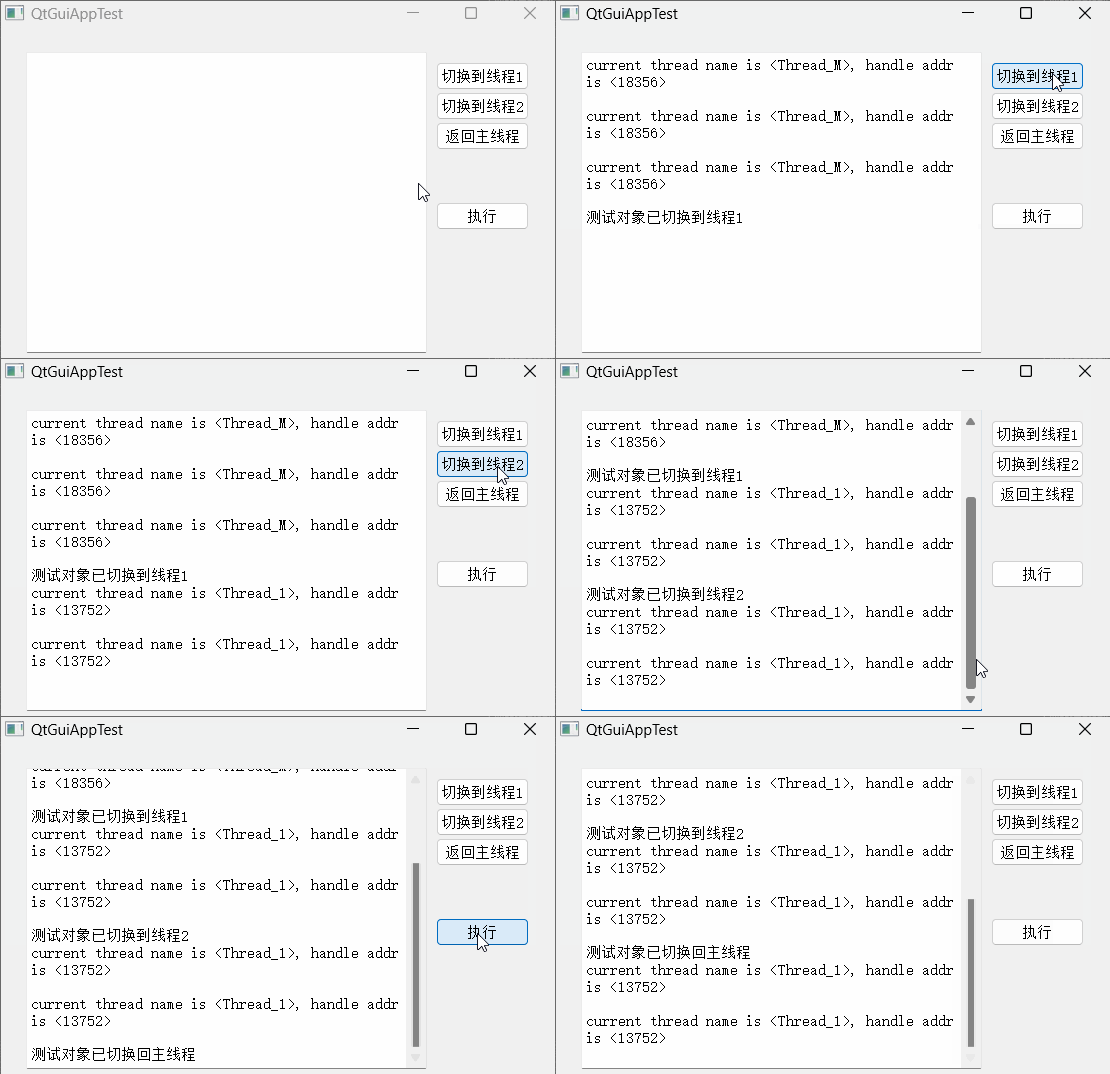
可以看到当点击返回主线程试图将测试对象所属线程切换到主线程时,再执行显示线程仍然在上一个所属线程中。即该方法无法将从主线程迁移出的对象再迁移回主线程。
(3)调用程序
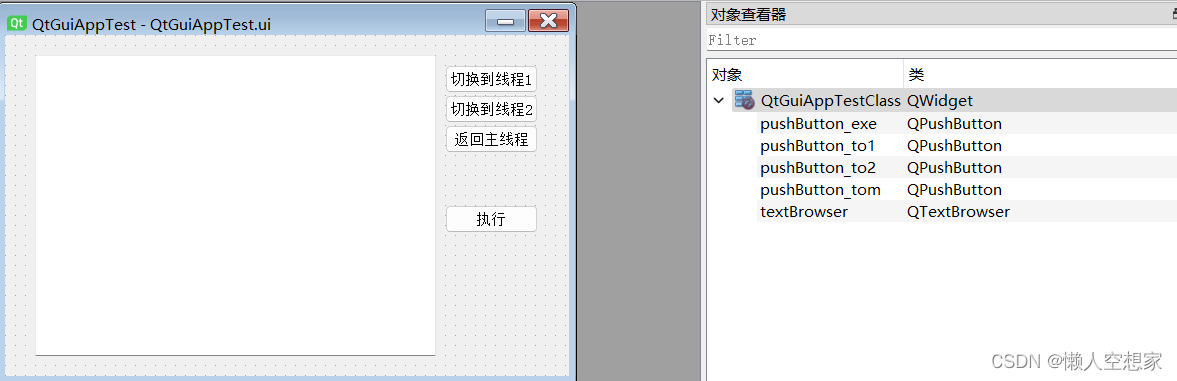
QtGuiAppTest.ui
QtGuiAppTest.h
#pragma once
#include <QtWidgets/QWidget>
#include "ui_QtGuiAppTest.h"
#include<qthread.h>
class QtGuiAppTest : public QWidget
{
    Q_OBJECT
public:
    QtGuiAppTest(QWidget *parent = Q_NULLPTR);
    ~QtGuiAppTest();
public slots:
    //将TestObj对象迁移到线程1
    void SlotMovetoThread1();
    //将TestObj对象迁移到线程2
    void SlotMovetoThread2();
     //将TestObj对象迁移到主线程
    void SlotReturnMainThread();
private:
    Ui::QtGuiAppTestClass ui;
    //TestObj对象
    QObject* m_pObj;
     //线程1
    QThread* m_pth1;
    //线程2
    QThread* m_pth2;
    //主线程
    QThread* m_pthm;
};
class TestObj : public QObject
{
    Q_OBJECT
public:
    TestObj(QWidget* parent = Q_NULLPTR);
    //从外部获取一个对象用于显示内部输出信息
    void SetBlackBoard(QTextBrowser* blackboard);
public slots:
    //输出当前所属线程信息
    void SlotProSomeThing();
private:
    QTextBrowser* m_blackboard;
};
QtGuiAppTest.cpp
#include "QtGuiAppTest.h"
#include<Windows.h>
QtGuiAppTest::QtGuiAppTest(QWidget *parent)
    : QWidget(parent)
{
    ui.setupUi(this);
    //创建线程
    m_pth1 = new QThread();
    m_pth2 = new QThread();
    m_pthm = this->thread();
    //给线程添加名称
    m_pth1->setObjectName("Thread_1");
    m_pth2->setObjectName("Thread_2");
    m_pthm->setObjectName("Thread_M");
    //创建待传递的测试对象
    TestObj* test = new TestObj();
    //记录测试对象指针
    m_pObj = test;
    //给测试对象一个textbrowser用于显示测试对象输出信息
    test->SetBlackBoard(ui.textBrowser);
    //关联按钮与槽函数
    connect(ui.pushButton_to1, &QPushButton::clicked,  this, &QtGuiAppTest::SlotMovetoThread1);
    connect(ui.pushButton_to2, &QPushButton::clicked,  this, &QtGuiAppTest::SlotMovetoThread2);
    connect(ui.pushButton_tom, &QPushButton::clicked,  this, &QtGuiAppTest::SlotReturnMainThread);
    connect(ui.pushButton_exe, &QPushButton::clicked,  test, &TestObj::SlotProSomeThing);
    //启动线程
    m_pth1->start();
    m_pth2->start();
}
QtGuiAppTest::~QtGuiAppTest()
{
        //线程退出
    if(m_pth1)
    {
        m_pth1->quit();
        m_pth1->wait();
    }
    if(m_pth2)
    {
        m_pth2->quit();
        m_pth2->wait();
    }
    if(m_pObj)
    {
        delete m_pObj;
    }
}
void QtGuiAppTest::SlotMovetoThread1()
{
    m_pObj->moveToThread(m_pth1);
    ui.textBrowser->append(QString::fromLocal8Bit("测试对象已切换到线程1"));
}
void QtGuiAppTest::SlotMovetoThread2()
{
    m_pObj->moveToThread(m_pth2);
    ui.textBrowser->append(QString::fromLocal8Bit("测试对象已切换到线程2"));
}
void QtGuiAppTest::SlotReturnMainThread()
{
    m_pObj->moveToThread(m_pthm);
    ui.textBrowser->append(QString::fromLocal8Bit("测试对象已切换回主线程"));
}
TestObj::TestObj(QWidget* parent): QObject(parent)
{
}
void TestObj::SetBlackBoard(QTextBrowser* blackboard)
{
    m_blackboard = blackboard;
}
void TestObj::SlotProSomeThing()
{
    if(m_blackboard)
    {
        qint64 adr =  qint64(this->thread()->currentThreadId());
        m_blackboard->append(QString("current thread  name is <%1>, handle addr is <%2>\n").arg(
                                  this->thread()->objectName()).arg(adr));
    }
}
2.14.virtual const QMetaObject *metaObject() const
(1)功能说明
返回一个指针指向该对象的meta-object.
一个meta-object包含关于一个继承自qobject类的信息,例如类名称、超类名称、属性、信号和槽。每一个包含Q_OBJECT 宏的qobject子类都会有一个对应的meta-object。
meta-object的信息对于信号/槽连接机制和属性系统是必须的,inherits()函数也使用了meta-object。
如果没有一个指针指向一个实际的类实例,但是想获取一个类的meta-object,可以通过staticMetaObject获取。
例如:
QObject *obj = new QPushButton;
  obj->metaObject()->className(); // 返回类名称"QPushButton"
  QPushButton::staticMetaObject.className();  // 返回类名称"QPushButton"
关于meta-object的详细说明,详见《QT的meta-object系统(QMetaObject)功能和使用详细说明(文字+用例+代码+效果图)》
(2)效果展示
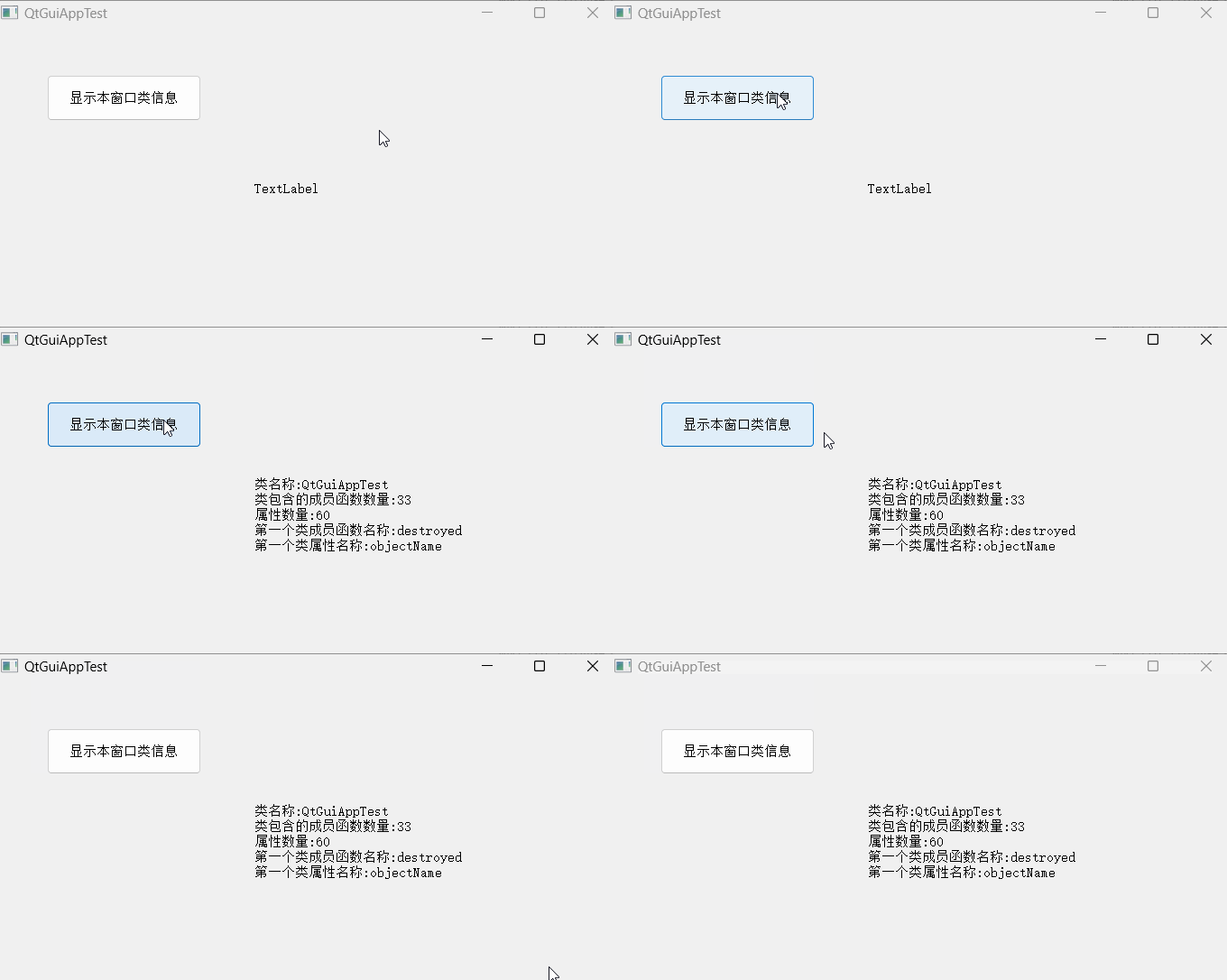
(3)调用程序
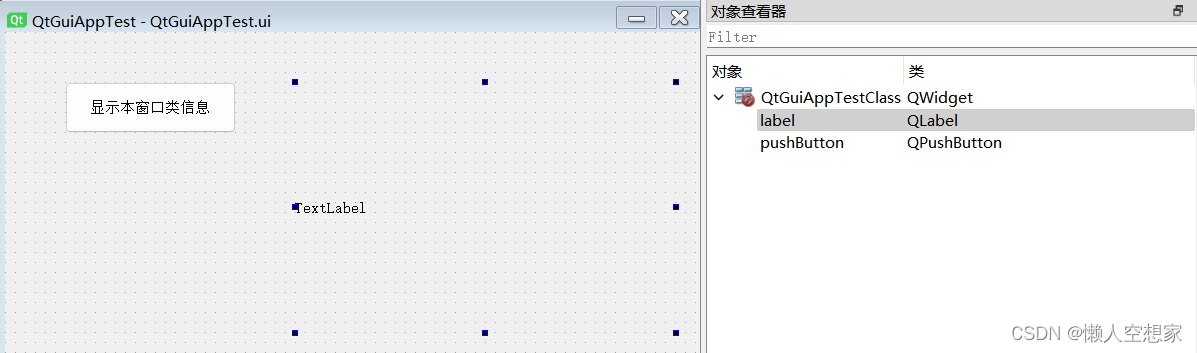
QtGuiAppTest.ui
QtGuiAppTest.h
#pragma once
#include <QtWidgets/QWidget>
#include "ui_QtGuiAppTest.h"
class QtGuiAppTest : public QWidget
{
    Q_OBJECT
public:
    QtGuiAppTest(QWidget *parent = Q_NULLPTR);
    ~QtGuiAppTest();
public slots:
    //在label中展示类的信息
    void SlotDisplayClassInf();
private:
    Ui::QtGuiAppTestClass ui;
        //记录类的信息
    const QMetaObject* m_pMetaInf;
};
QtGuiAppTest.cpp
#include "QtGuiAppTest.h"
#include<qmetaobject.h>
QtGuiAppTest::QtGuiAppTest(QWidget *parent)
    : QWidget(parent)
{
    ui.setupUi(this);
    //获取当前类的类信息
    m_pMetaInf = this->metaObject();
    //连接按钮点击的信号与展示类信息的槽函数
    connect(ui.pushButton, &QPushButton::clicked, this,  &QtGuiAppTest::SlotDisplayClassInf);
}
QtGuiAppTest::~QtGuiAppTest()
{
}
void QtGuiAppTest::SlotDisplayClassInf()
{
        //获取类的相关信息并在label中显示
    QString strClsInf = QString::fromLocal8Bit("类名称:") + QString(m_pMetaInf->className()) + "\n";
    strClsInf += QString::fromLocal8Bit("类包含的成员函数数量:") + QString::number(
                     m_pMetaInf->methodCount()) + "\n";
    strClsInf += QString::fromLocal8Bit("属性数量:") +  QString::number(
                     m_pMetaInf->propertyCount()) +  "\n";
    strClsInf += QString::fromLocal8Bit("第一个类成员函数名称:") + m_pMetaInf->method(
                     0).name() + "\n";
    strClsInf += QString::fromLocal8Bit("第一个类属性名称:") + m_pMetaInf->property(
                     0).name();
    ui.label->setText(strClsInf);
}
2.15.void killTimer(int id)
(1)功能说明
关闭指定ID的定时器。
(2)效果展示
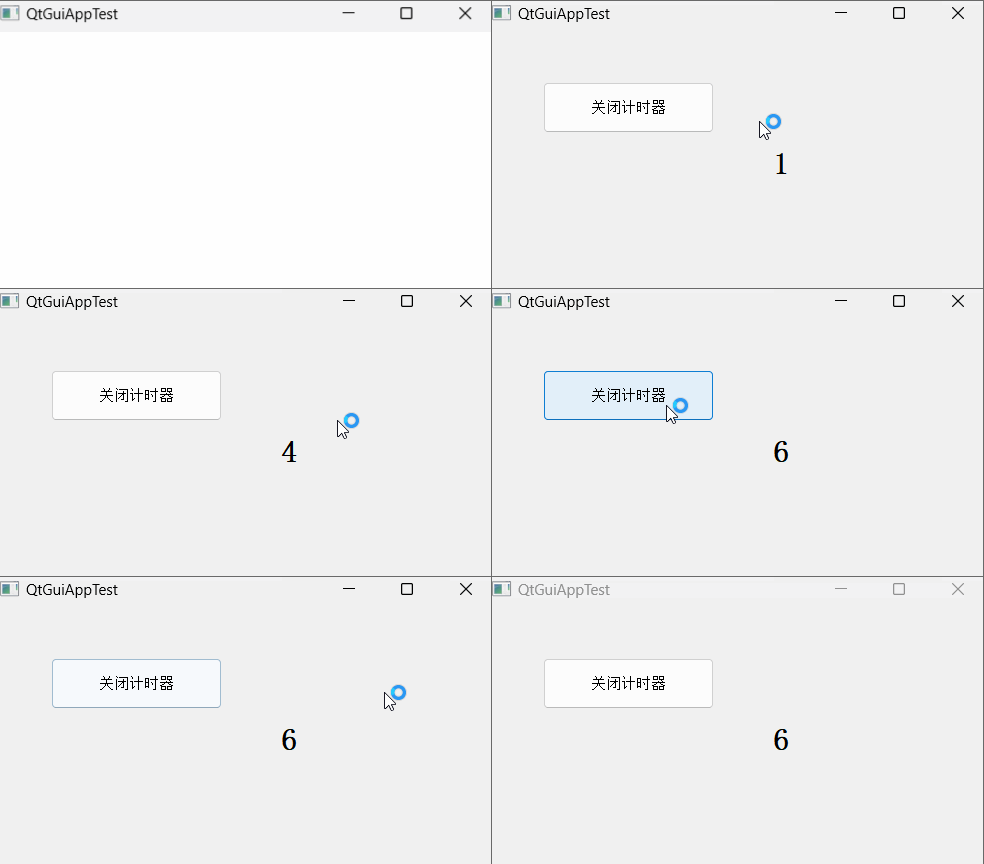
(3)调用程序
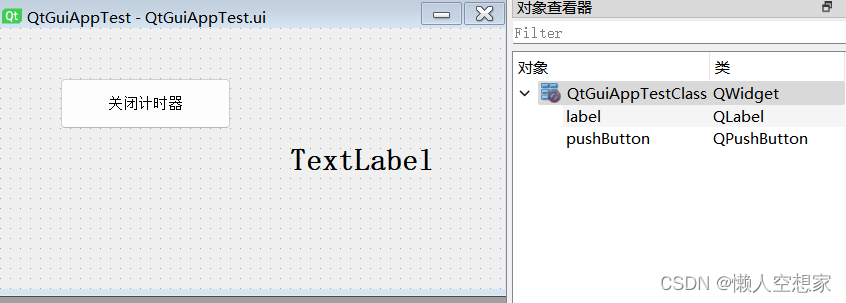
QtGuiAppTest.ui
QtGuiAppTest.h
#pragma once
#include <QtWidgets/QWidget>
#include "ui_QtGuiAppTest.h"
class QtGuiAppTest : public QWidget
{
    Q_OBJECT
public:
    QtGuiAppTest(QWidget *parent = Q_NULLPTR);
    ~QtGuiAppTest();
public slots:
    //关闭定时器
    void SlotStopTimer();
protected:
    void timerEvent(QTimerEvent* event) override;
private:
    Ui::QtGuiAppTestClass ui;
    //记录定时器ID
    int m_timerID;
    //计数用于显示
    int m_nCount;
};
QtGuiAppTest.cpp
#include "QtGuiAppTest.h"
QtGuiAppTest::QtGuiAppTest(QWidget *parent)
    : QWidget(parent)
{
    ui.setupUi(this);
    //启动定时器
    m_timerID = this->startTimer(1000);
    //计数变量初始化
    m_nCount = 0;
    //在label中显示计数变量的值
    ui.label->setText(QString::number(m_nCount));
    //连接按钮点击信号与展示计数变量值的槽函数
    connect(ui.pushButton, &QPushButton::clicked, this,  &QtGuiAppTest::SlotStopTimer);
}
QtGuiAppTest::~QtGuiAppTest()
{
}
void QtGuiAppTest::SlotStopTimer()
{
    //关闭定时器
    this->killTimer(m_timerID);
}
void QtGuiAppTest::timerEvent(QTimerEvent* event)
{
    m_nCount++;
    ui.label->setText(QString::number(m_nCount));
}
2.16 bool isWindowType() const
如果本对象是一个window,则返回true;否则返回false。
2.17 bool isWidgetType() const
如果本对象是一个widget,则返回true;否则返回false。
2.18 bool inherits(const char *className) const
判断当前类对象是否继承自名为className的类。如果本对象是直接继承自名称为className的类或者继承自一个继承了className的QObject子类,则返回true,否则返回false。
如果className是对象类本身,也会返回true。
例如:
  QTimer *timer = new QTimer; // QTimer 继承自 QObject
  timer->inherits("QTimer");          // 返回 true
  timer->inherits("QObject");         // 返回 true
  timer->inherits("QAbstractButton"); // 返回 false


  // QVBoxLayout inherits QObject and QLayoutItem
  QVBoxLayout *layout = new QVBoxLayout;
  layout->inherits("QObject");        // 返回 true
  layout->inherits("QLayoutItem");    // 返回 true (即使 QLayoutItem 不是一个 QObject)
如果为了将当前对象转换为QObject,而需要确定当前对象是否为QObject,可以考虑使用qobject_cast<Type *>(object)。
2.19 T findChild(const QString &name = QString(), Qt::FindChildOptions options = Qt::FindChildrenRecursively) const
(1)功能说明
在当前对象的子对象中查找objectname为name且能够转换为T类型的,并返回。如果没有找到,则返回nullptr。如果没有给name参数,则所有的objectname都会被匹配。根据第二个参数可知默认的查找模式为递归,还可以指定为另一种查找模式Qt::FindDirectChildrenOnly,即找当前类的直接子类。
如果有多个对象匹配成功,则返回继承关系最近的对象。如果处在统一继承层级上的多个对象匹配成功,对于哪一个对象被返回则没有明确定义,如果需要所有匹配的对象应该使用 findChildren()。
下面的例子是从一个widget的子对象中找到一个名称为"button1"、类型为QPushButton的对象,即使这个按钮不是widget的直接子对象:
QPushButton *button = parentWidget->findChild<QPushButton *>("button1");
下面的例子是从widget中找到一个类型为QListWidget的对象,并返回
QListWidget *list = parentWidget->findChild<QListWidget *>();
下面的例子是从widget的直接子类中找到一个名称为"button1"、类型为QPushButton的对象:
QPushButton *button = parentWidget->findChild<QPushButton *>("button1", Qt::FindDirectChildrenOnly);
下面的例子是从widget的直接子类中找到一个类型为QListWidget的对象:
QListWidget *list = parentWidget->findChild<QListWidget *>(QString(), Qt::FindDirectChildrenOnly);
(2)效果展示
找到按钮,按钮会设置按下状态,找到label活lineEdit,会写入“被找到”,如果没有找到,则会在text browser中输出。
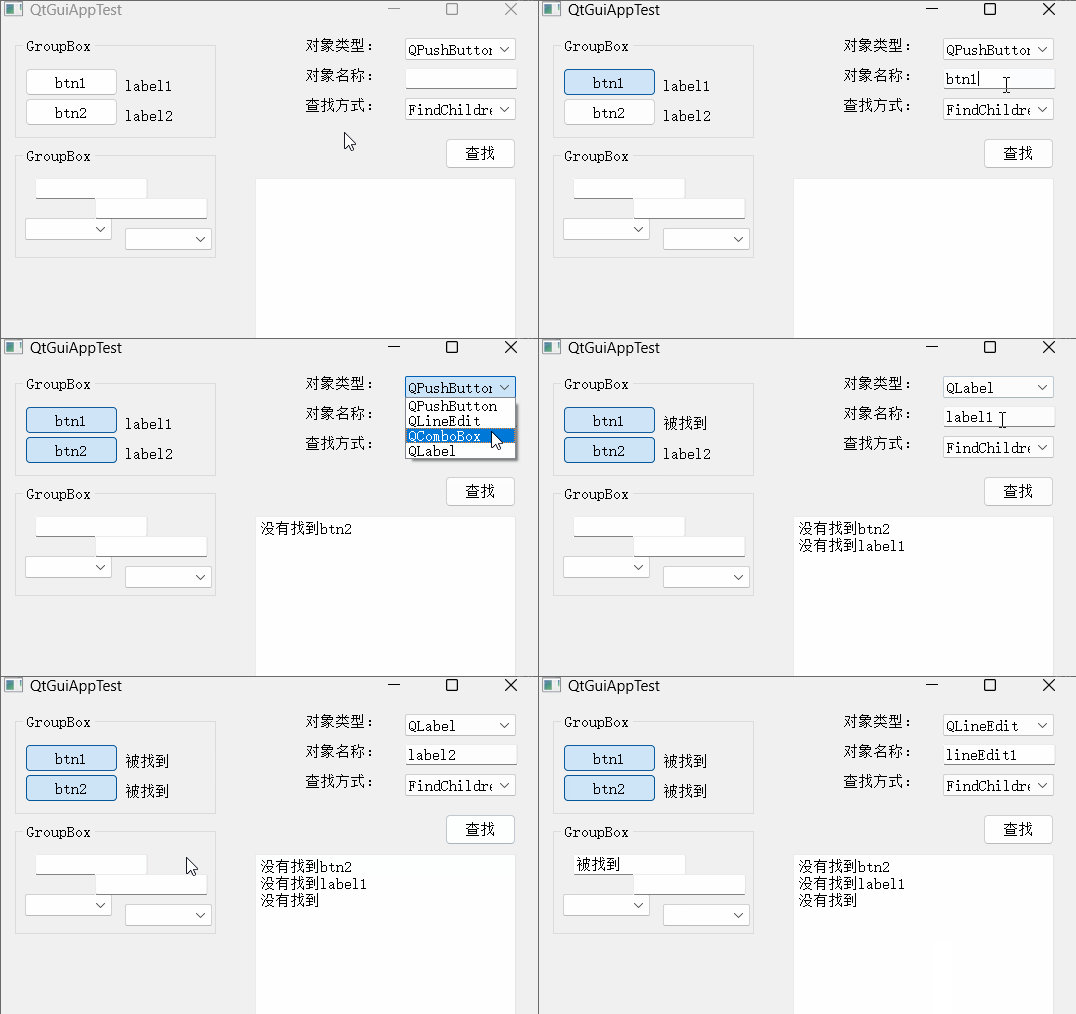
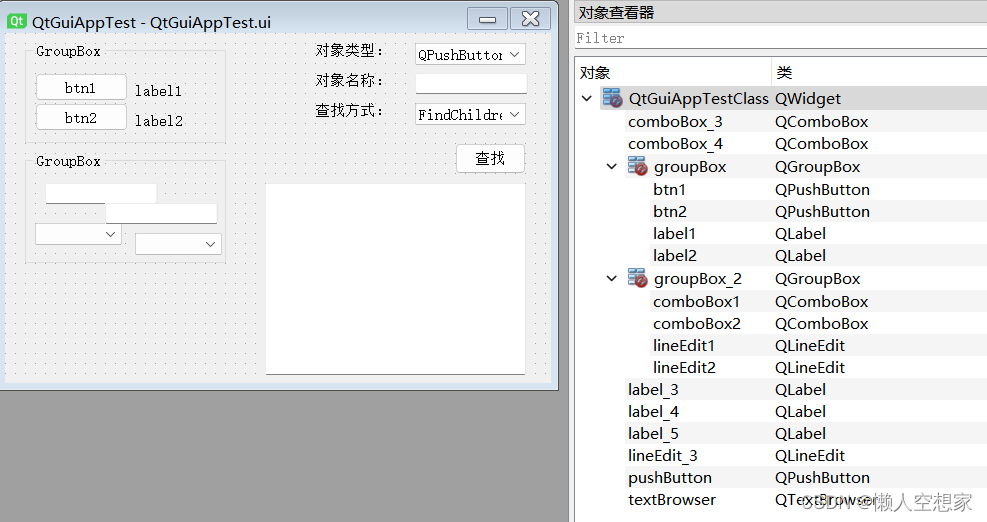
注意:对象名称为空的时候,找不到对象。查找方式设置为Qt::FindDirectChildrenOnly时,也找不到对象,是因为查找的对象都在groupbox子对象的下面,不是widget的直接子对象。
(3)调用程序
QtGuiAppTest.ui
QtGuiAppTest.h
#pragma once
#include <QtWidgets/QWidget>
#include "ui_QtGuiAppTest.h"
class QtGuiAppTest : public QWidget
{
    Q_OBJECT
public:
    QtGuiAppTest(QWidget *parent = Q_NULLPTR);
    ~QtGuiAppTest();
public slots:
    //查早指定特征的子类对象
    void SlotFindSpecialChildObj();
private:
    Ui::QtGuiAppTestClass ui;
};
QtGuiAppTest.cpp
#include "QtGuiAppTest.h"
QtGuiAppTest::QtGuiAppTest(QWidget *parent)
    : QWidget(parent)
{
    ui.setupUi(this);
    //连接按钮点击信号与展示计数变量值的槽函数
    connect(ui.pushButton, &QPushButton::clicked, this,  &QtGuiAppTest::SlotFindSpecialChildObj);
}
QtGuiAppTest::~QtGuiAppTest()
{
}
void QtGuiAppTest::SlotFindSpecialChildObj()
{
    Qt::FindChildOption fcMod =  Qt::FindChildrenRecursively;
    QPushButton* pbtn = nullptr;
    QLineEdit* pled = nullptr;
    QComboBox* pcombx = nullptr;
    QLabel* plb = nullptr;
    switch(ui.comboBox_4->currentIndex())
    {
    case 0:
        fcMod = Qt::FindChildrenRecursively;
        break;
    case 1:
        fcMod = Qt::FindDirectChildrenOnly;
        break;
    default:
        break;
    }
    switch(ui.comboBox_3->currentIndex())
    {
    case 0:
        pbtn =  this->findChild<QPushButton*>(ui.lineEdit_3->text(),  fcMod);
        if(pbtn)
        {
            pbtn->setDown(true);
        }
        else
        {
             ui.textBrowser->append(QString::fromLocal8Bit("没有找到") + ui.lineEdit_3->text());
        }
        break;
    case 1:
        pled =  this->findChild<QLineEdit*>(ui.lineEdit_3->text(),  fcMod);
        if(pled)
        {
            pled->setText(QString::fromLocal8Bit("被找到"));
        }
        else
        {
             ui.textBrowser->append(QString::fromLocal8Bit("没有找到") + ui.lineEdit_3->text());
        }
        break;
    case 2:
        pcombx =  this->findChild<QComboBox*>(ui.lineEdit_3->text(),  fcMod);
        if(pcombx)
        {
            pcombx->addItem(QString::fromLocal8Bit("被找到"));
        }
        else
        {
             ui.textBrowser->append(QString::fromLocal8Bit("没有找到") + ui.lineEdit_3->text());
        }
        break;
    case 3:
        plb =  this->findChild<QLabel*>(ui.lineEdit_3->text(), fcMod);
        if(plb)
        {
            plb->setText(QString::fromLocal8Bit("被找到"));
        }
        else
        {
             ui.textBrowser->append(QString::fromLocal8Bit("没有找到") + ui.lineEdit_3->text());
        }
        break;
    default:
        break;
    }
}
2.20 QList findChildren(const QString &name = QString(), Qt::FindChildOptions options = Qt::FindChildrenRecursively) const
功能与第2.19节函数功能类似,只不过此函数会返回匹配的所有对象到qlist列表中,如果没有找到则列表为空 。
2.21 QListfindChildren(const QRegularExpression &re, Qt::FindChildOptions options = Qt::FindChildrenRecursively) const
是第2.20节函数的重载,第一个参数换为正则表达式,通过使用正则表达式和对象类型进行匹配查找。
2.22 virtual bool event(QEvent *e)
(1)功能说明
该虚函数接收给当前所属对象的所有事件,并且如果一个事件被接受并处理,则应返回true。本函数可以通过重写去自定义对事件的处理行为。如果当前对象没有处理事件,则在函数结尾应调用父类event函数实现的处理结果作为返回值。
(2)效果展示
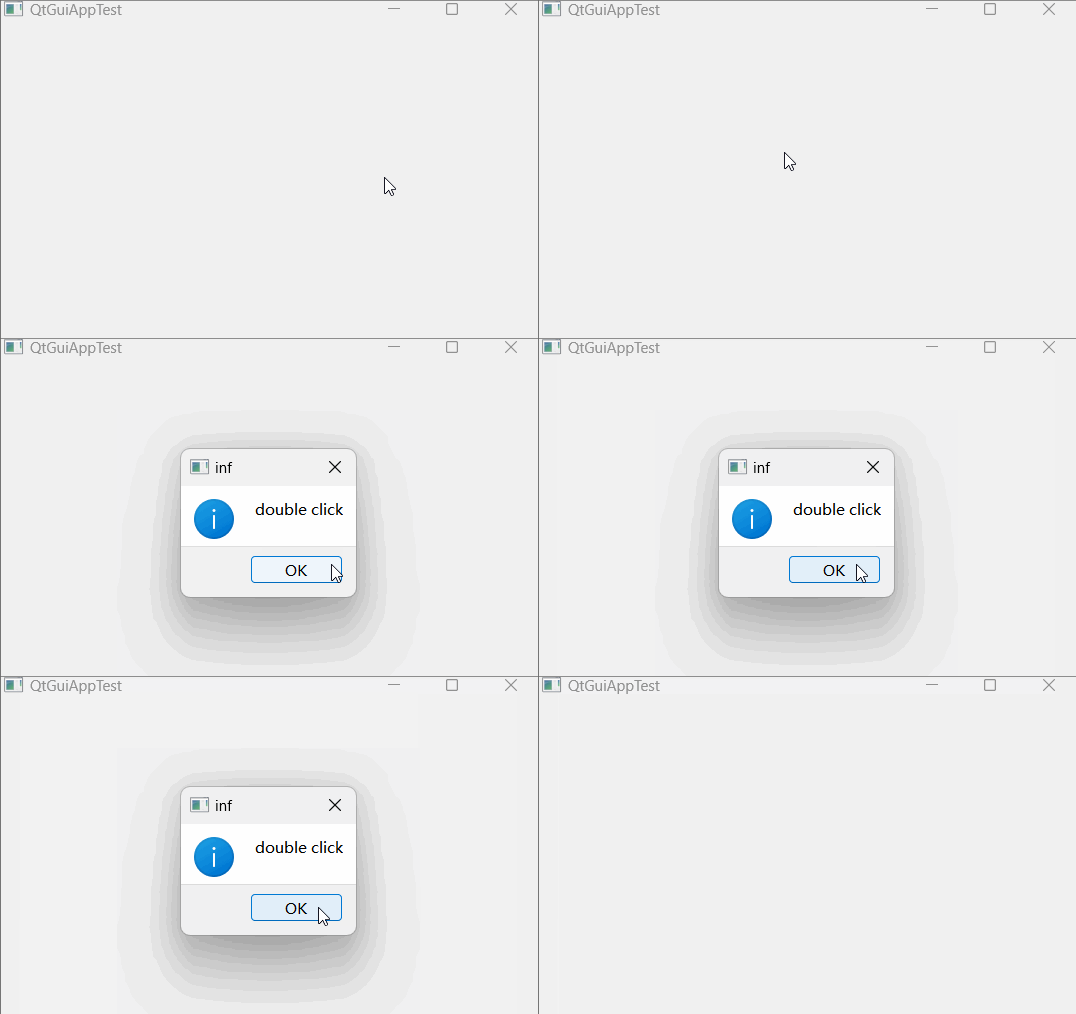
当窗口收到双击事件时,弹窗说明。
(3)调用程序
QtGuiAppTest.ui
QtGuiAppTest.h
#pragma once
#include <QtWidgets/QWidget>
#include "ui_QtGuiAppTest.h"
class QtGuiAppTest : public QWidget
{
    Q_OBJECT
public:
    QtGuiAppTest(QWidget *parent = Q_NULLPTR);
    ~QtGuiAppTest();
    //重写event函数
    bool event(QEvent* event) override;
private:
    Ui::QtGuiAppTestClass ui;
};
QtGuiAppTest.cpp
#include "QtGuiAppTest.h"
#include<qmessagebox.h>
QtGuiAppTest::QtGuiAppTest(QWidget *parent)
    : QWidget(parent)
{
    ui.setupUi(this);
}
QtGuiAppTest::~QtGuiAppTest()
{
}
bool QtGuiAppTest::event(QEvent* event)
{
    //如果判断收到的事件类型为鼠标双击事件,则弹窗
    if(event->type() == QEvent::MouseButtonDblClick)
    {
        QMessageBox::information(this, "inf", "double  click");
        return true;
    }
    返回父类qwidget的event处理结果
    return QWidget::event(event);
}
2.23 QList dynamicPropertyNames() const
返回所有通过setproperty添加的动态属性名称。
2.24 QMetaObject::Connection connect(const QObject *sender, const char *signal, const char *method, Qt::ConnectionType type = Qt::AutoConnection) const
信号槽连接函数。
2.25 bool disconnect(const char *signal = nullptr, const QObject *receiver = nullptr, const char *method = nullptr) const
断开信号槽连接关系,如果连接不存在则返回false。
2.26 bool disconnect(const QObject *receiver, const char *method = nullptr) const
断开所有与对象receiver的槽函数method连接的信号,如果连接不存在则返回false。
2.27 信号 void destroyed(QObject *obj = nullptr)
(1)功能说明
在对象obj被销毁之前,该信号会被发出并通知到所有QPointer实例。(QPointer详见《QPointer功能与使用详细说明(xxx)》)
在信号发出后,对象obj的所有子对象都会被立即销毁。
(2)效果展示
窗口和上面的控件销毁时弹窗提示
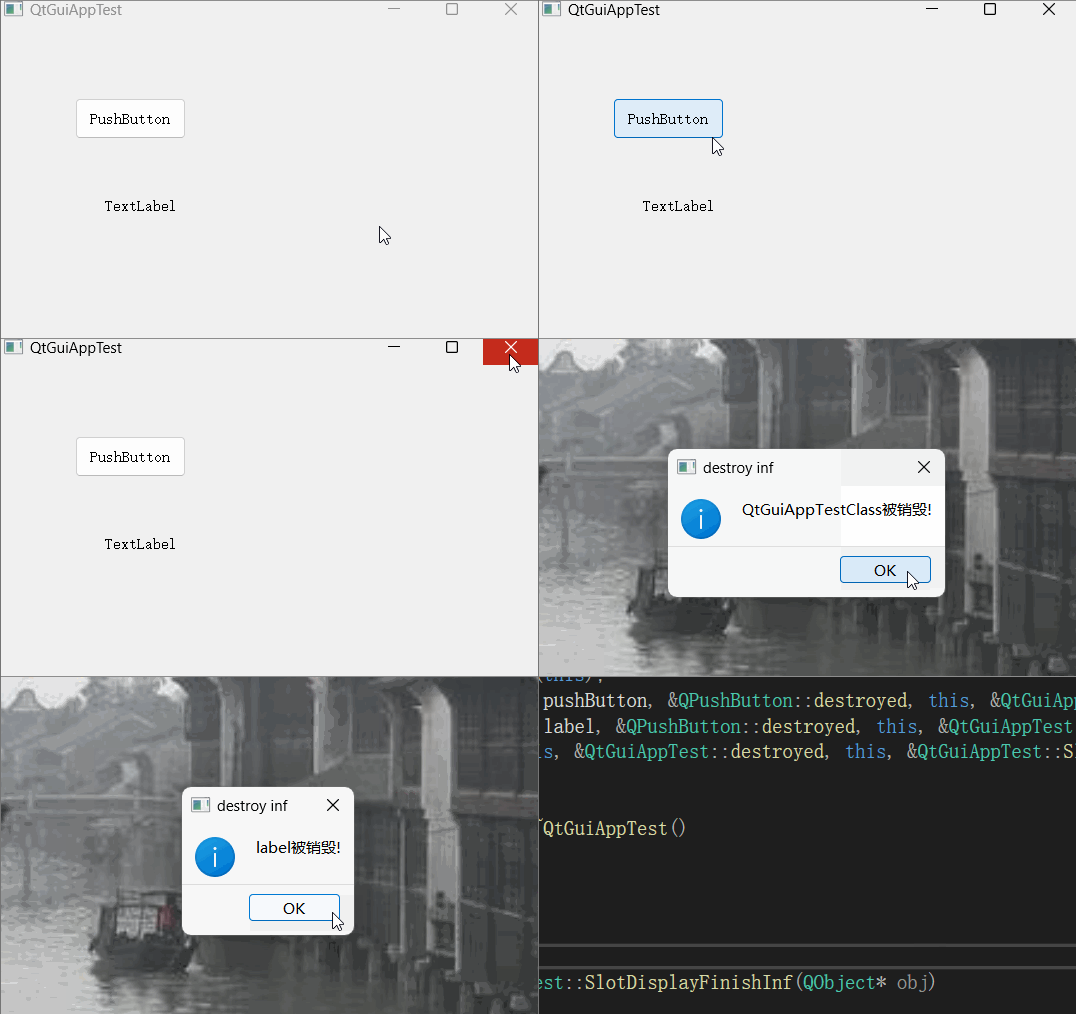
由测试结果可知,窗口类的销毁信号先输出,之后是窗口类的子类销毁信号输出。
(3)调用程序
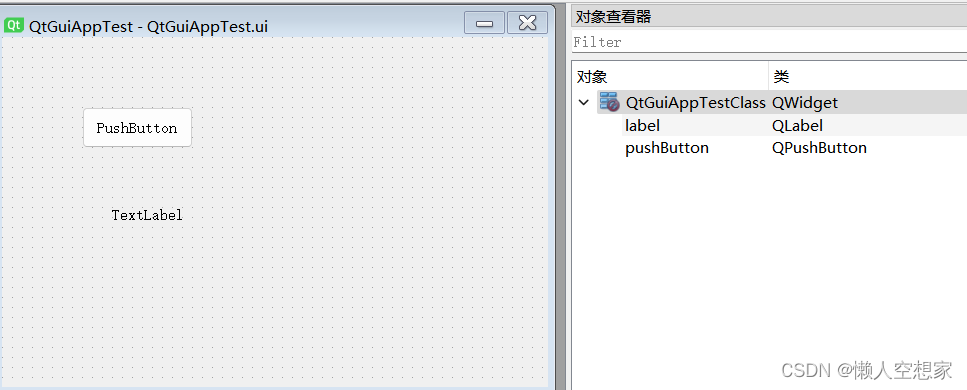
QtGuiAppTest.ui
QtGuiAppTest.h
#pragma once
#include <QtWidgets/QWidget>
#include "ui_QtGuiAppTest.h"
class QtGuiAppTest : public QWidget
{
    Q_OBJECT
public:
    QtGuiAppTest(QWidget *parent = Q_NULLPTR);
    ~QtGuiAppTest();
public slots:
    //输出对象销毁信息,参数obj为被销毁的对象
    void SlotDisplayFinishInf(QObject* obj = nullptr);
private:
    Ui::QtGuiAppTestClass ui;
};
QtGuiAppTest.cpp
#include "QtGuiAppTest.h"
#include<qmessagebox.h>
QtGuiAppTest::QtGuiAppTest(QWidget *parent)
    : QWidget(parent)
{
    ui.setupUi(this);
    //将销毁对象的destroy信号都与显示销毁信息的槽函数连接
    connect(ui.pushButton, &QPushButton::destroyed,  this, &QtGuiAppTest::SlotDisplayFinishInf);
    connect(ui.label, &QPushButton::destroyed, this,  &QtGuiAppTest::SlotDisplayFinishInf);
    connect(this, &QtGuiAppTest::destroyed, this,  &QtGuiAppTest::SlotDisplayFinishInf);
}
QtGuiAppTest::~QtGuiAppTest()
{
}
void QtGuiAppTest::SlotDisplayFinishInf(QObject* obj)
{
        //创建弹窗显示销毁信息
    QMessageBox::information(nullptr, "destroy inf",
                             obj->objectName() +  QString::fromLocal8Bit("被销毁!"));
}
2.28 信号 void objectNameChanged(const QString &objectName)
(1)功能说明
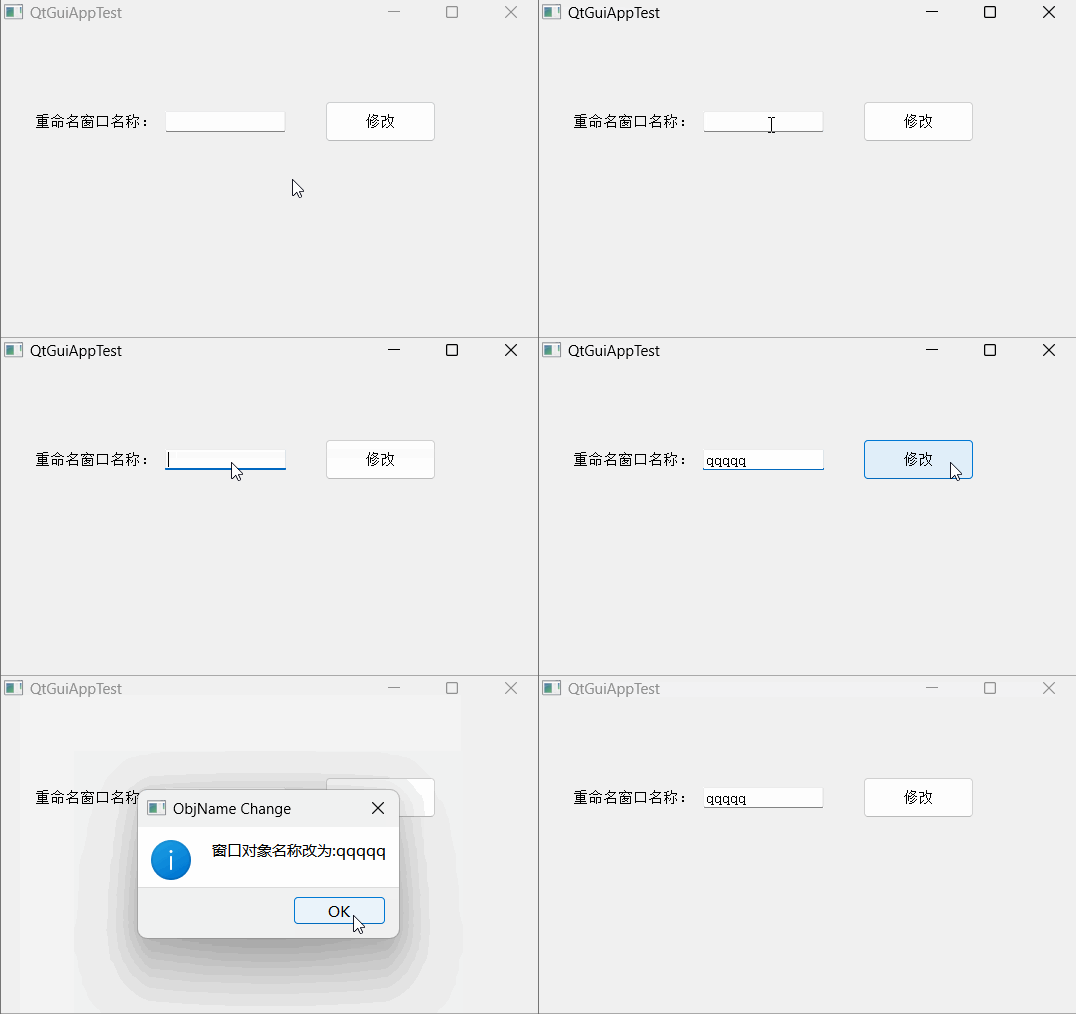
当前对象的objectname被修改后发出该信号,信号的参数objectName为当前对象的新名称。
注意:这是一个私有信号,该信号可以被用来连接槽函数,但不能被调用者执行emit操作
(2)效果展示
(3)调用程序
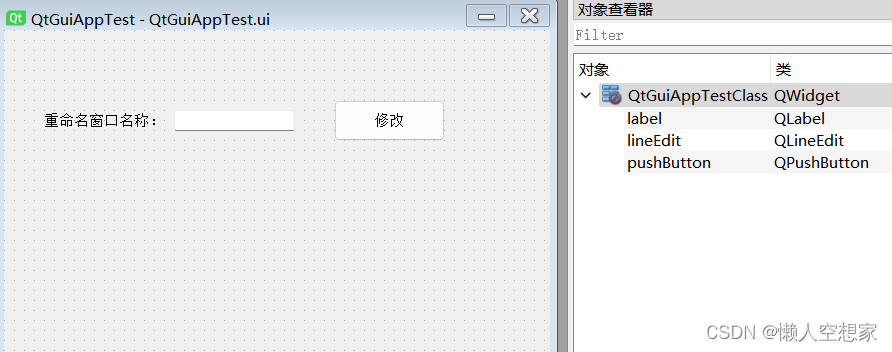
QtGuiAppTest.ui
QtGuiAppTest.h:
#pragma once
#include <QtWidgets/QWidget>
#include "ui_QtGuiAppTest.h"
class QtGuiAppTest : public QWidget
{
    Q_OBJECT
public:
    QtGuiAppTest(QWidget *parent = Q_NULLPTR);
    ~QtGuiAppTest();
public slots:
    //修改窗口的objectname
    void SlotChangeWinObjName();
    //显示修改后的objectname
    void SlotDisplayWinObjName(const QString&  objectName);
private:
    Ui::QtGuiAppTestClass ui;
};
QtGuiAppTest.cpp:
#include "QtGuiAppTest.h"
#include<qmessagebox.h>
QtGuiAppTest::QtGuiAppTest(QWidget *parent)
    : QWidget(parent)
{
    ui.setupUi(this);
    //连接按钮点击信号与改变窗口objectname槽函数
    connect(ui.pushButton, &QPushButton::clicked, this,  &QtGuiAppTest::SlotChangeWinObjName);
    //连接窗口的objectname改变信号与改变后的objectname展示槽函数
    connect(this, &QtGuiAppTest::objectNameChanged,  this, &QtGuiAppTest::SlotDisplayWinObjName);
}
QtGuiAppTest::~QtGuiAppTest()
{
}
void QtGuiAppTest::SlotChangeWinObjName()
{
    this->setObjectName(ui.lineEdit->text());
}
void QtGuiAppTest::SlotDisplayWinObjName(const QString&  objectName)
{
    QMessageBox::information(nullptr, "ObjName Change",
                             QString::fromLocal8Bit("窗口对象名称改为:") + objectName);
}
2.29 静态成员 connect与disconnect
用于建立和断开信号与槽的连接
2.30 静态成员 const QMetaObject staticMetaObject
该成员存储了当前类的meta-object,可参考第2.14节
例如:
 QPushButton::staticMetaObject.className(); // 返回 "QPushButton"


  QObject *obj = new QPushButton;
  obj->metaObject()->className();             // 返回"QPushButton"

开源鸿蒙跨平台开发社区汇聚开发者与厂商,共建“一次开发,多端部署”的开源生态,致力于降低跨端开发门槛,推动万物智联创新。
更多推荐

 26
26 0
0- 0


 已为社区贡献5条内容

所有评论(0)