QML开发——PropertyAnimation属性动画元素
目录效果动图Rect1.qmlRect2.qmlRect3.qmlRect4.qmlmain.qml效果动图Rect1.qml//属性值源矩形import QtQuick 2.0Rectangle{id: rect1width: 80height: 80color: "orange"radius: 1...
·
目录
效果动图
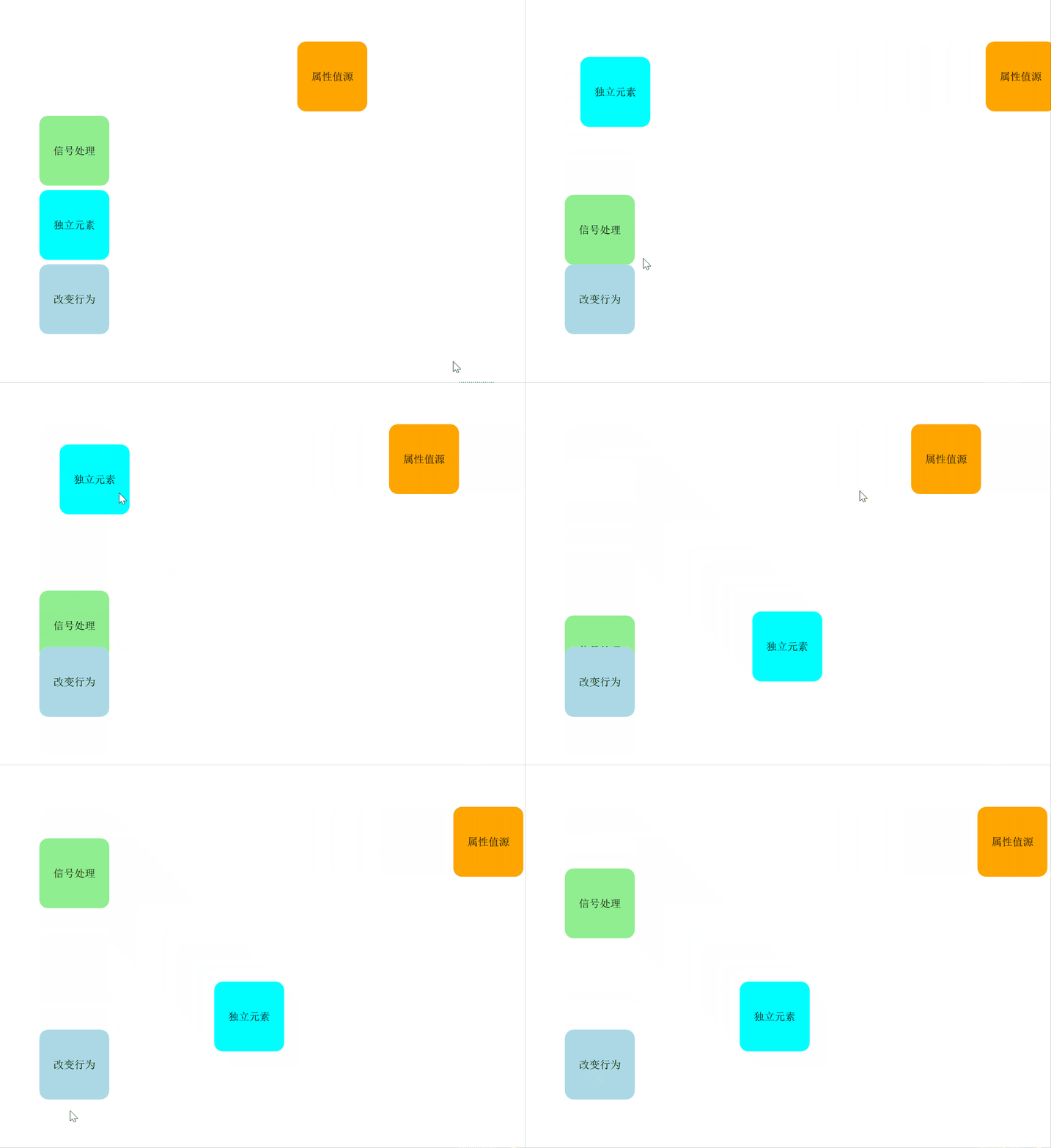
Rect1.qml
//属性值源矩形
import QtQuick 2.0

Rectangle{
    id: rect1
    width: 80
    height: 80
    color: "orange"
    radius: 10
    Text{
        anchors.centerIn: parent
        font.pointSize: 12
        text: "属性值源"
    }
    PropertyAnimation on x{ //属性动画元素
        from: 50    //起点
        to: 500     //终点
        duration: 30000 //运动时间(单位:毫秒)
        loops: Animation.Infinite   //无限循环
        easing.type: Easing.OutBounce   //设置属性值动画中使用的缓和曲线;这里设置了动画达到目标值时反弹效果
    }
}
Rect2.qml
//信号处理矩形
import QtQuick 2.0

Rectangle{
    id: rect2
    width: 80
    height: 80
    color: "lightgreen"
    radius: 10
    Text{
        anchors.centerIn: parent
        font.pointSize: 12
        text: "信号处理"
    }
    MouseArea{
        anchors.fill: parent
        onClicked: PropertyAnimation{//在信号处理器中创建动画,在接受信号触发
            target: rect2   //设置目标对象
            property: "y"   //y轴方向的动画
            from: 30    //起点
            to: 300     //终点
            duration: 3000  //运动时间(单位:秒)
            loops: 3    //运动三个周期
            easing.type: Easing.Linear  //匀速线性运动
        }
    }
}
Rect3.qml
//独立元素矩形
import QtQuick 2.0

Rectangle{
    id: rect3
    width: 80
    height: 80
    color: "aqua"
    radius: 10
    Text{
        anchors.centerIn: parent
        font.pointSize: 12
        text: "独立元素"
    }
    PropertyAnimation{//独立动画元素
        id: animation
        target: rect3
        properties: "x,y"
        duration: 10000
        easing.type: Easing.InOutBack   //设置为运动到半程增加过冲,然后减少
    }
    MouseArea{
        anchors.fill: parent
        onClicked:{
            animation.from = 20
            animation.to = 200
            animation.running = true    //开启动画
        }
    }
}
Rect4.qml
//改变行为矩形
import QtQuick 2.0

Rectangle{
    width: 80
    height: 80
    color: "lightblue"
    radius: 10
    Text{
        anchors.centerIn: parent
        font.pointSize: 12
        text: "改变行为"
    }
    Behavior on x{  //定义x属性上的行为动画
        PropertyAnimation{
            duration: 1000
            easing.type: Easing.InQuart //加速运动
        }
    }
    Behavior on y{  //定义y属性上的行为动画
        PropertyAnimation{
            duration: 1000
            easing.type: Easing.InQUart //加速运动
        }
    }
}
main.qml
import QtQuick 2.12
import QtQuick.Window 2.12

Window {
    visible: true
    width: 640
    height: 480
    title: qsTr("属性动画元素")
    Rectangle{
        property alias mouseArea: mouseArea
        property alias textEdit: textEdit
        property alias rect4: rect4
        width: 360
        height: 360
        MouseArea{
            id: mouseArea
            anchors.fill: parent
        }
        TextEdit{
            id: textEdit
            visible: false
        }
        Column{ //列布局进行排列
            x: 50
            y: 50
            spacing: 5
            Rect1{}
            Rect2{}
            Rect3{}
            Rect4{id: rect4}
        }
    }
}
行为改变的动画效果貌似有点问题……

开源鸿蒙跨平台开发社区汇聚开发者与厂商,共建“一次开发,多端部署”的开源生态,致力于降低跨端开发门槛,推动万物智联创新。
更多推荐



 1
1 0
0- 0


 已为社区贡献1条内容

所有评论(0)