Kotlin学习笔记-7 --- 扩展
·
- Kotlin 可以对一个类的属性和方法进行扩展,且不需要继承或使用 Decorator 模式
- 扩展是一种静态行为,对被扩展的类代码本身不会造成任何影响
1、函数扩展
定义类
class User constructor(var name: String) {

    var mName: String = name
}
使用扩展函数
class UIActivity : AppCompatActivity() {

    override fun onCreate(savedInstanceState: Bundle?) {
        super.onCreate(savedInstanceState)
        setContentView(R.layout.ac_ui)

        val user = User("Alex")
        user.showInfo()
    }

	/**
     * 定义 User 的扩展函数
     */
    private fun User.showInfo() {
        Log.i("TAG_ZLZ", "------ name : $mName")
    }
}
日志输出

- 调用扩展函数时,具体被调用的的是哪一个函数,由调用函数的的对象表达式来决定的,而不是动态的类型决定的
open class A {
}
class B : A() {
}
class UIActivity : AppCompatActivity() {

    override fun onCreate(savedInstanceState: Bundle?) {
        super.onCreate(savedInstanceState)
        setContentView(R.layout.ac_ui)

        val a = A()
        val b = B()
        showInfo(a)
        showInfo(b)
    }


    /**
     * A 的扩展函数
     */
    fun A.show() {
        Log.i("TAG_ZLZ", "------ A")
    }

    /**
     * B 的扩展函数
     */
    fun B.show() {
        Log.i("TAG_ZLZ", "------ A")
    }


    fun showInfo(a: A) {
        a.show()
    }
}
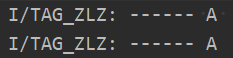
2、属性扩展
- 扩展属性允许定义在类或者kotlin文件中,不允许定义在函数中
- 初始化属性因为属性没有后端字段,所以不允许被初始化,只能由显式提供的 getter/setter 定义
定义
class Person {

        /***************** 位置 *****************/
        val HashMap<Int, String>.firstPosition: Int
            get() = 0

        val HashMap<Int, String>.lastPosition: Int
            get() = size - 1

        val HashMap<Int, String>.midPosition: Int
            get() = (firstPosition + lastPosition) / 2


        /***************** ID *****************/
        val HashMap<Int, String>.firstPersonID: Int?
            get() {
                val set = this.keys
                return set.elementAt(firstPosition)
            }

        val HashMap<Int, String>.lastPersonID: Int?
            get() {
                val set = this.keys
                return set.elementAt(lastPosition)
            }

        val HashMap<Int, String>.midPersonID: Int?
            get() {
                val set = this.keys
                return set.elementAt(midPosition)
            }


        /***************** 姓名 *****************/
        val HashMap<Int, String>.firstPersonName: String?
            get() {
                val set = this.values
                return set.elementAt(firstPosition)
            }

        val HashMap<Int, String>.lastPersonName: String?
            get() {
                val set = this.values
                return set.elementAt(lastPosition)
            }

        val HashMap<Int, String>.midPersonName: String?
            get() {
                val set = this.values
                return set.elementAt(midPosition)
            }


        val map = HashMap<Int, String>()

        fun test() {
            map.put(1001, "Alex")
            map.put(2721, "Bob")
            map.put(3923, "Cam")
            map.put(4001, "Allen")
            map.put(5721, "Sam")

            Log.i(
                "TAG_ZLZ",
                "------ 第一人 : ${map.firstPosition},  ${map.firstPersonID},  ${map.firstPersonName}"
            )
            Log.i(
                "TAG_ZLZ",
                "------ 中间人 : ${map.midPosition},  ${map.midPersonID},  ${map.midPersonName}"
            )
            Log.i(
                "TAG_ZLZ",
                "------ 最后人 : ${map.lastPosition},  ${map.lastPersonID},  ${map.lastPersonName}"
            )
        }
    }
使用
val p = Person()
p.test()
日志输出

3、空对象扩展
4、伴生对象扩展
5、扩展声明为成员

开源鸿蒙跨平台开发社区汇聚开发者与厂商,共建“一次开发,多端部署”的开源生态,致力于降低跨端开发门槛,推动万物智联创新。
更多推荐

 0
0 0
0- 0


 已为社区贡献6条内容

所有评论(0)