android kotlin
·
java 转 kotlin
参考: https://blog.csdn.net/zyw0101/article/details/79792889
快捷键: Ctrl+Shift+Alt+K
日志
添加依赖: implementation 'com.github.ajalt:timberkt:1.5.1'
在onCreate中添加如下代码
timber.log.Timber.plant(object : timber.log.Timber.DebugTree() {
    override fun createStackElementTag(element: StackTraceElement): String? {
        return "[${element.lineNumber}] : " + super.createStackElementTag(element)
    }
})

Timber.tag(this.javaClass.name)

Timber.i { "hello laolang" }
timber简单使用参考: https://www.jianshu.com/p/4f54fcba3ad3
timber文档: https://javadoc.jitpack.io/com/github/ajalt/timberkt/1.5.1/javadoc/timberkt/com.github.ajalt.timberkt/index.html
timber 输出行号参考: https://www.136.la/code/show-188087.html
避免 findViewById
添加apply plugin: 'kotlin-android-extensions' (可能默认已添加)
在view中添加一个button, 给一个id
<?xml version="1.0" encoding="utf-8"?>
<androidx.constraintlayout.widget.ConstraintLayout xmlns:android="http://schemas.android.com/apk/res/android"
    xmlns:tools="http://schemas.android.com/tools"
    android:layout_width="match_parent"
    android:layout_height="match_parent"
    tools:context=".MainActivity">

    <Button
        android:id="@+id/btn"
        android:layout_width="wrap_content"
        android:layout_height="wrap_content"
        android:text="hello world" />

</androidx.constraintlayout.widget.ConstraintLayout>
在 Activity 中敲 this.btn 回车就会自动导入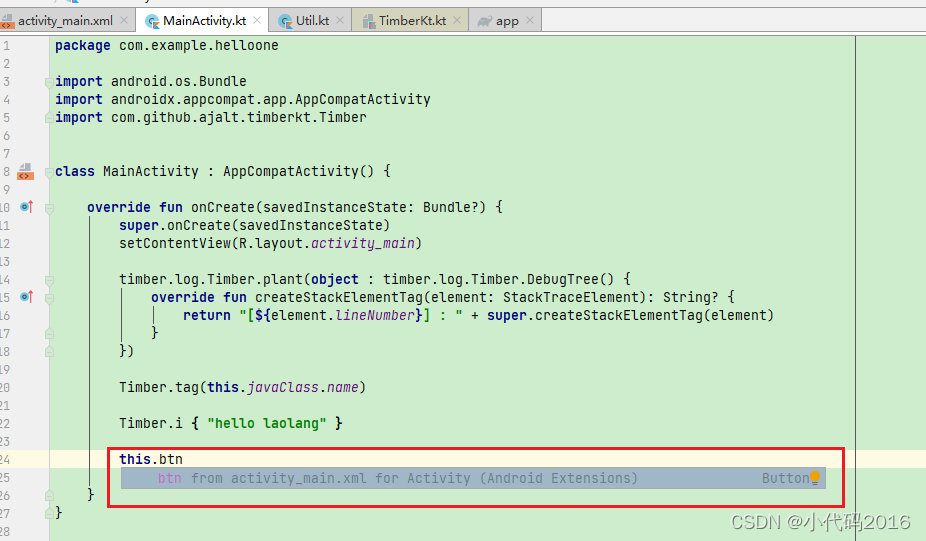

开源鸿蒙跨平台开发社区汇聚开发者与厂商,共建“一次开发,多端部署”的开源生态,致力于降低跨端开发门槛,推动万物智联创新。
更多推荐



 0
0 0
0- 0


 已为社区贡献1条内容

所有评论(0)