不练不熟,不写就忘 之 compose 之 动画之 animateIntAsState动画练习
·
场景
- 进度类展示(加载 / 完成进度、评分星数)
- 尺寸 / 位置动画(宽度、高度、偏移量)
- 数字滚动效果(计数器、金额变化)
- 渐变切换(透明度、颜色通道)
进度类展示(加载 / 完成进度、评分星数)
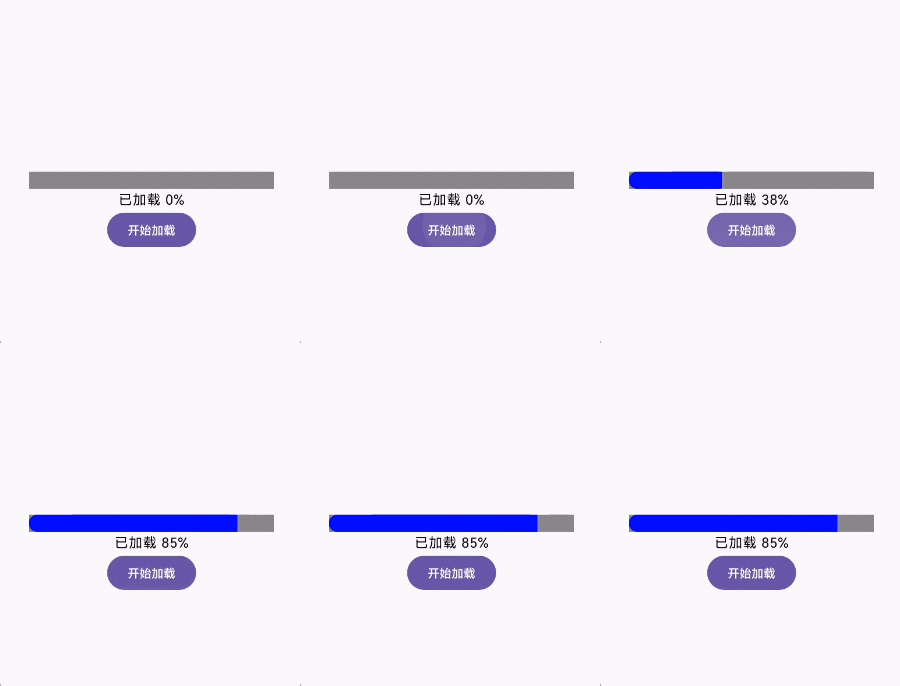
加载进度条(0→100 平滑增长)
@Composable
fun LoadingProgress() {
    // 目标进度(可从网络请求、业务逻辑中动态更新)
    var targetProgress by remember { mutableStateOf(0) }

    // 整数动画:从当前值平滑过渡到 targetProgress,动画时长300ms
    val animatedProgress by animateIntAsState(
        targetValue = targetProgress,
        animationSpec = tween(durationMillis = 300),
        label = "加载进度动画" // 必传label,用于无障碍和调试
    )

    Column(horizontalAlignment = Alignment.CenterHorizontally) {
        // 进度条:用动画后的整数作为宽度占比
        Box(
            modifier = Modifier
                .fillMaxWidth(0.8f)
                .height(20.dp)
                .background(Color.Gray)
                .clip(RoundedCornerShape(10.dp))
        ) {
            Box(
                modifier = Modifier
                    .fillMaxWidth(animatedProgress / 100f) // 整数→浮点数占比
                    .height(20.dp)
                    .background(Color.Blue)
            )
        }
        Text(text = "已加载 $animatedProgress%")

        // 模拟触发进度更新(实际场景可能是网络回调、按钮点击)
        Button(onClick = { targetProgress = 85 }) {
            Text("开始加载")
        }
    }
}
评分星数(1→5 平滑过渡)
@Composable
fun RatingStars() {
    var targetRating by remember { mutableStateOf(3) } // 目标评分(1-5)
    val animatedRating by animateIntAsState(
        targetValue = targetRating,
        animationSpec = spring(stiffness = Spring.StiffnessMedium), // 弹性动画
        label = "评分动画"
    )

    Row {
        repeat(5) { index ->
            Icon(
                imageVector = if (index < animatedRating) Icons.Filled.Star else Icons.Outlined.Star,
                contentDescription = null,
                tint = if (index < animatedRating) Color.Yellow else Color.Gray,
                modifier = Modifier.size(32.dp)
            )
        }
    }
    // 点击按钮切换评分,星数会平滑增减
    Button(onClick = { targetRating = (1..5).random() }) {
        Text("随机评分")
    }
}

尺寸 / 位置动画(宽度、高度、偏移量)
@Composable
fun CollapsiblePanel() {
    var isExpanded by remember { mutableStateOf(false) }
    // 目标高度:折叠时0dp,展开时300dp(先转成像素值,适合整数动画)
    val targetHeightDp = if (isExpanded) 300 else 0
    // 屏幕密度(dp→px 转换用)
    val density = LocalDensity.current

    // 整数动画:dp转px后,对像素值做平滑过渡
    val animatedHeightPx by animateIntAsState(
        targetValue = with(density) { targetHeightDp.dp.roundToPx() },
        animationSpec = tween(500),
        label = "面板高度动画"
    )

    Box(
        modifier = Modifier
            .fillMaxWidth()
            .height(with(density) { animatedHeightPx.toDp() }) // px转回dp
            .background(Color.LightGray)
            .padding(16.dp)
    ) {
        Text(text = "可展开面板内容")
    }

    Button(onClick = { isExpanded = !isExpanded }) {
        Text(if (isExpanded) "收起" else "展开")
    }
}

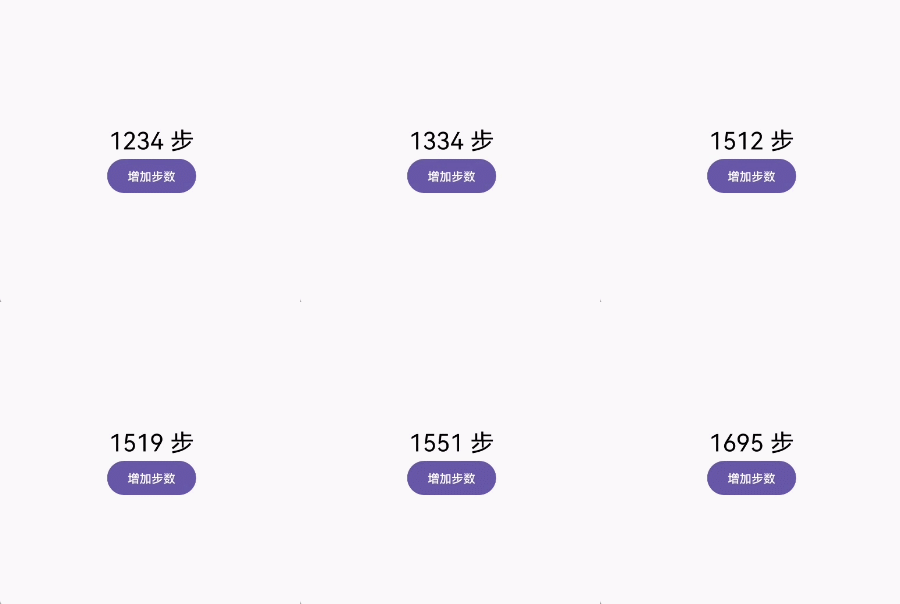
数字滚动效果(计数器、金额变化)
@Composable
fun StepCounter() {
    var targetSteps by remember { mutableStateOf(1234) }
    // 动画时长随数值差动态调整(差值越大,动画越长)
    val animationSpec = tween<Int>(
        durationMillis = (500 + abs(targetSteps - remember { mutableStateOf(1234) }.value) * 2),
    )

    val animatedSteps by animateIntAsState(
        targetValue = targetSteps,
        animationSpec = animationSpec,
        label = "步数动画"
    )

    Column(horizontalAlignment = Alignment.CenterHorizontally) {
        Text(
            text = "$animatedSteps 步",
            style = MaterialTheme.typography.headlineMedium
        )
        Button(onClick = { targetSteps += (100..500).random() }) {
            Text("增加步数")
        }
    }
}
渐变切换(透明度、颜色通道)
@Composable
fun FadeInText() {
    var isVisible by remember { mutableStateOf(false) }
    // 目标透明度(整数0-255)
    val targetAlpha = if (isVisible) 255 else 0

    val animatedAlphaInt by animateIntAsState(
        targetValue = targetAlpha,
        animationSpec = tween(1000),
        label = "透明度动画"
    )

    Text(
        text = "渐变显示文本",
        style = MaterialTheme.typography.headlineSmall,
        modifier = Modifier.alpha(animatedAlphaInt / 255f) // 整数→浮点数透明度
    )

    Button(onClick = { isVisible = !isVisible }) {
        Text(if (isVisible) "隐藏" else "显示")
    }
}

关键特性与注意事项
-
- 核心特性
- 声明式 API:只需关注 “目标值”,Compose 自动管理动画生命周期(启动、暂停、取消)。
- 内置动画规格:支持 tween(匀速 / 缓动)、spring(弹性)、repeatable(循环)等,满足不同动效需求。
- 自动中断与衔接:如果目标值在动画过程中变化,会自动从当前动画值平滑过渡到新目标值,无卡顿。
-
- 注意事项
- 仅支持整数:如果需要过渡Float/Color/Size等类型,需用对应 API(animateFloatAsState/animateColorAsState等)。
- 必传label参数:用于无障碍服务和动画调试,不可省略。
- dp/px 转换:控制视图尺寸时,需通过LocalDensity将 dp 转为像素值(整数),避免小数精度问题。
- 性能考量:避免频繁切换目标值(如每秒触发数十次),可能导致动画堆积,可通过animationSpec调整时长或使用snap(无动画)优化。

开源鸿蒙跨平台开发社区汇聚开发者与厂商,共建“一次开发,多端部署”的开源生态,致力于降低跨端开发门槛,推动万物智联创新。
更多推荐


 9
9 0
0- 0


 已为社区贡献15条内容

所有评论(0)