android横竖屏切换组件,react native横屏竖屏控制组件(react-native-orientation)
react-native-orientation是一个横屏竖屏控制的react native组件,下面对react native横竖屏控制组件的用法做一个简单介绍。react-native-orientation的git地址:https://github.com/yamill/react-native-orientationreact-native-orientation组件安装1.如果项目正在运
react-native-orientation是一个横屏竖屏控制的react native组件,下面对react native横竖屏控制组件的用法做一个简单介绍。
react-native-orientation的git地址:https://github.com/yamill/react-native-orientation
react-native-orientation组件安装
1.如果项目正在运行,先关闭模拟器和终端;
2.执行安装命令:npm install --save react-native-orientation;
3.执行命令:rnpm link
4.现在使用的版本为1.15.0,link执行过之后,我们要需要手动配置
iOS:
1.用Xcode打开项目,右键点击项目名称,选择 “Add Files to ‘项目名’ “ ;
2.找到路径文件: 项目文件夹/node_modules/react-native-orientation/RCTOrientation ,将该文件添加上;
3.然后重新运行项目;
Android:
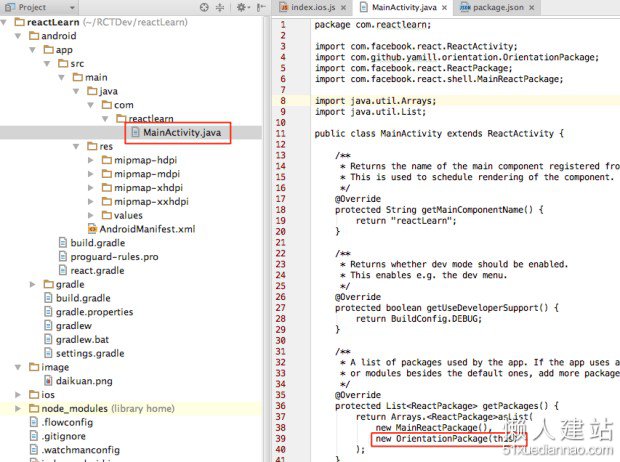
react-native-orientation用法
componentWillMount() {
// 判断横竖屏幕
var initial = Orientation.getInitialOrientation();
if (initial === 'PORTRAIT') {
//do stuff
} else {
//do other stuff
}
// 只允许竖屏
Orientation.lockToPortrait();
//只允许横屏
Orientation.lockToLandscape();
}
react-native-orientation更多方法
lockToPortrait()
lockToLandscape()
lockToLandscapeLeft()
lockToLandscapeRight()
unlockAllOrientations()
getOrientation(function(err, orientation)
返回的结果有 LANDSCAPE PORTRAIT UNKNOWN PORTRAITUPSIDEDOWN
getSpecificOrientation(function(err, specificOrientation)
返回的结果有 LANDSCAPE-LEFT LANDSCAPE-RIGHT PORTRAIT UNKNOWN PORTRAITUPSIDEDOWN
参考官方文档:https://github.com/yamill/react-native-orientation
↓ 查看全文

开源鸿蒙跨平台开发社区汇聚开发者与厂商,共建“一次开发,多端部署”的开源生态,致力于降低跨端开发门槛,推动万物智联创新。
更多推荐

 1
1 0
0- 0


 已为社区贡献1条内容

所有评论(0)