Flutter Web端使用DeepLinks唤起跳转到Flutter Andriod安卓app,无需插件
·
前言
刚接触网页端或者App端通过Url Schame来跳转到Flutter的应用,在pub.dev上看了很多的相关插件和博客,大多数都是App与App之间的跳转,没有一个Flutter的Web应用跳转到Flutter的Andriod应用的,所以我记录一下本次摸索后的解决方案:
首先,我在网上找到了一个网站:H5页面唤醒App
可以看到里面的每一个按钮都对应一个非常简单的标签就可以实现跳转: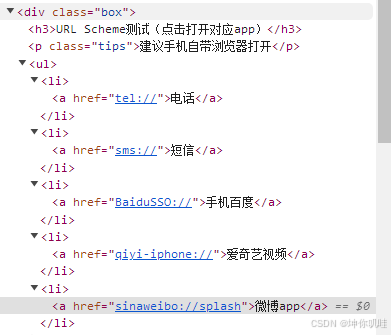
例如最上方的电话,tel://,tel就是Deep Links中的Schame,我们可以仿照这种模式,在Flutter的Android应用中设置好Deep Links的Schame,然后在Flutter Web中使用href进行跳转到这个Schame即可。
Flutter Android应用中的配置
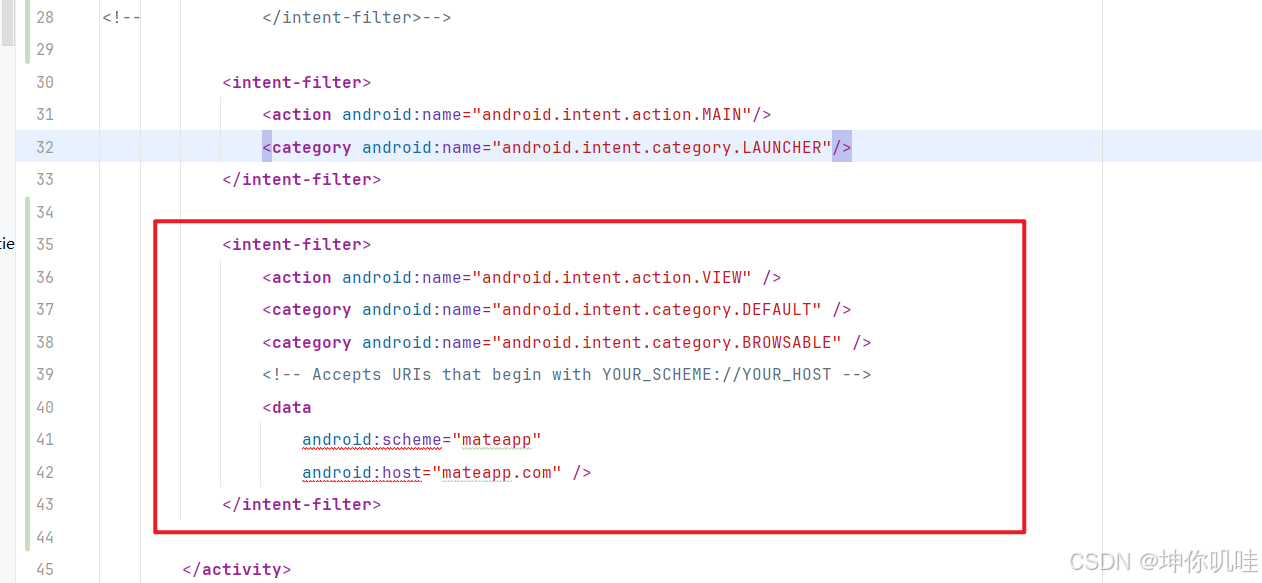
        <activity
            android:name=".MainActivity"
            android:exported="true"
            android:launchMode="singleTop"
            android:theme="@style/LaunchTheme"
            android:configChanges="orientation|keyboardHidden|keyboard|screenSize|smallestScreenSize|locale|layoutDirection|fontScale|screenLayout|density|uiMode"
            android:hardwareAccelerated="true"
            android:windowSoftInputMode="adjustResize">
            <!-- Specifies an Android theme to apply to this Activity as soon as
                 the Android process has started. This theme is visible to the user
                 while the Flutter UI initializes. After that, this theme continues
                 to determine the Window background behind the Flutter UI. -->
            <meta-data
              android:name="io.flutter.embedding.android.NormalTheme"
              android:resource="@style/NormalTheme"
              />
<!--            <intent-filter>-->
<!--                <action android:name="android.intent.action.MAIN"/>-->
<!--                <action android:name="android.intent.action.VIEW" />-->
<!--                <category android:name="android.intent.category.LAUNCHER"/>-->
<!--            </intent-filter>-->

            <intent-filter>
                <action android:name="android.intent.action.MAIN"/>
                <category android:name="android.intent.category.LAUNCHER"/>
            </intent-filter>

            <intent-filter>
                <action android:name="android.intent.action.VIEW" />
                <category android:name="android.intent.category.DEFAULT" />
                <category android:name="android.intent.category.BROWSABLE" />
                <!-- Accepts URIs that begin with YOUR_SCHEME://YOUR_HOST -->
                <data
                    android:scheme="mateapp"
                    android:host="mateapp.com" />
            </intent-filter>

        </activity>
关于Flutter的Deep Links的配置,网上已经有很多教程了,我这里就展示一下我的配置
Flutter Web端的代码实现
import 'dart:html' as html;

import 'package:flutter/material.dart';
import 'package:flutter_easyloading/flutter_easyloading.dart';

class DevPage extends StatelessWidget {
  const DevPage({super.key});

  @override
  Widget build(BuildContext context) {
    return Center(
      child: Column(
        children: [
          ElevatedButton(
            onPressed: () async {
              html.window.location.href = "mateapp://mateapp.com";
              EasyLoading.showInfo("执行完毕...");
            },
            child: Text("唤起"),
          ),
        ],
      )
    );
  }
}
我们引入import 'dart:html' as html;这个包,可以利用这个包快速地使用H5的一些API方法
其中下面这行代码就模拟了最上面的a标签被点击时的跳转逻辑
html.window.location.href = "mateapp://mateapp.com";当我们点击按钮后,就可以正常提示是否要打开XXX应用了,这种方式不受浏览器本身的一些跳转限制(比如夸克禁止跳转)。

开源鸿蒙跨平台开发社区汇聚开发者与厂商,共建“一次开发,多端部署”的开源生态,致力于降低跨端开发门槛,推动万物智联创新。
更多推荐
 5
5 0
0- 0


 已为社区贡献2条内容

所有评论(0)