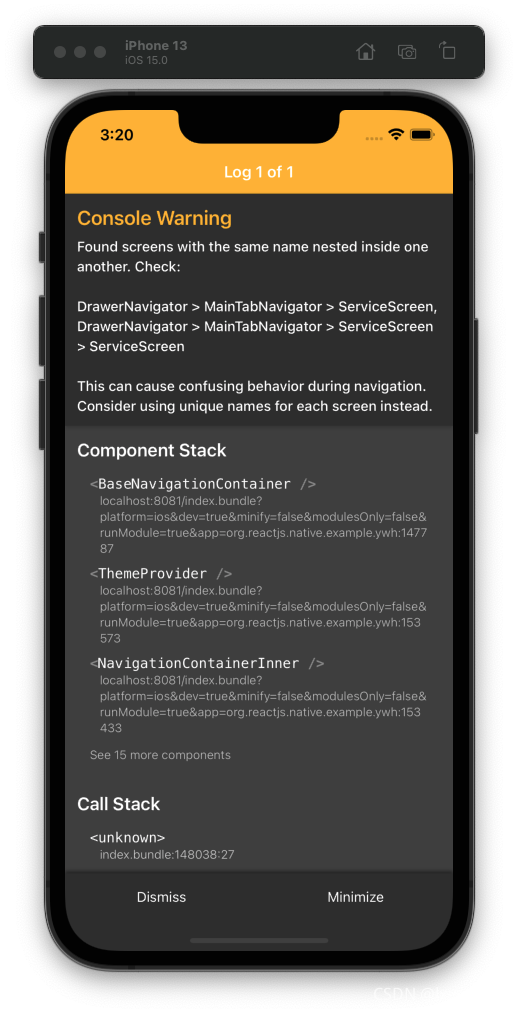
WARN Found screens with the same name nested inside one another.
警告信息WARNFound screens with the same name nested inside one another. Check:DrawerNavigator > MainTabNavigator > ServiceScreen, DrawerNavigator > MainTabNavigator > ServiceScreen > Servic
警告信息
WARN Found screens with the same name nested inside one another. Check:
DrawerNavigator > MainTabNavigator > ServiceScreen, DrawerNavigator > MainTabNavigator > ServiceScreen > ServiceScreen
This can cause confusing behavior during navigation. Consider using unique names for each screen instead.
BaseNavigationContainer@http://localhost:8081/index.bundle?platform=ios&dev=true&minify=false&modulesOnly=false&runModule=true&app=org.reactjs.native.example.ywh:147787:28
ThemeProvider@http://localhost:8081/index.bundle?platform=ios&dev=true
原因分析
通过这个层级关系可以看出,写代码的过程中出现名称相同的Screen组件。
- DrawerNavigator > MainTabNavigator > ServiceScreen,
- DrawerNavigator > MainTabNavigator > ServiceScreen > ServiceScreen
虽然是一个警告,但是看着还是很难受的。
解决办法
因为我用Stack把ServiceScreen又嵌套了一层,让它能有header。但是写的时候忘记修改名称了。
const ServiceStackScreen = ({navigation}: any) => {
  return (
    <StackScreen
      navigation={navigation}
      title={'服务'}
      backgroundColor={tabColor3}
      {/*screenName={'ServiceScreen'}修改成screenName={'ServiceStackScreen'}*/}
      screenName={'ServiceStackScreen'}
      component={ServiceScreen}
    />
  );
};
screenName={‘ServiceScreen’}修改成screenName={‘ServiceStackScreen’}
问题解决。
总结
粗心导致的问题。

开源鸿蒙跨平台开发社区汇聚开发者与厂商,共建“一次开发,多端部署”的开源生态,致力于降低跨端开发门槛,推动万物智联创新。
更多推荐


 0
0 0
0- 0


 已为社区贡献20条内容

所有评论(0)