全局UI方法-弹窗四-日期滑动选择器弹窗(DatePickerDialog)
·

1、描述
根据指定的日期范围创建日期滑动选择器,展示在弹窗上。
2、接口
DatePickerDialog.show(options?: DatePickerDialogOptions)
3、DatePickerDialogOptions
|
参数名称 |
参数类型 |
必填 | 默认值 |
参数描述 |
|---|---|---|---|---|
|
start | Date |
否 | Date("1970-1-1") |
设置选择器的起始日期。 |
| end | Date | 否 | Date("2100-12-31") | 设置选择器的结束日期。 |
| selected | Date | 否 | 当前系统日期 | 设置当前选中的日期。 |
| lunar | boolean | 否 | false | 日期是否显示为农历。 |
| onAccept |
(value:DatePickResult) => void | 否 | - | 点击弹窗中的“确定”按钮时触发该回调。 |
| onCancel | () => void | 否 | - | 点击弹窗中的“取消”按钮时触发该回调。 |
| onChange | (value:DatePickResult) => void | 否 | - | 滑动弹窗中的滑动选择器使当前选中项改变时触发该回调。 |
4、DatePickResult对象说明
|
名称 |
参数类型 |
描述 |
|---|---|---|
|
year |
number |
选中日期的年。 |
|
month |
number |
选中日期的月(0~11),0表示1月,11表示12月。 |
|
day |
number |
选中日期的日。 |
5、示例
@Entry
@Component
struct DatePickerDialogPage {
  @State message: string = '定义日期滑动选择器弹窗并弹出'

  build() {
    Row() {
      Column() {
        Text(this.message)
          .fontSize(20)
          .fontWeight(FontWeight.Bold)
          .width("96%")
          .margin({ top: 12 })

        Button("DatePickerDialog.show Default")
          .width("96%")
          .fontSize(20)
          .margin({ top: 12 })
          .onClick(() => {
            DatePickerDialog.show({
              onAccept: (result: DatePickerResult) => {
                console.info("DatePickerDialog Default onAccept result = " + JSON.stringify(result));
              },
              onCancel: () => {
                console.info("DatePickerDialog Default onCancel");
              },
              onChange: (result: DatePickerResult) => {
                console.info("DatePickerDialog Default onChange result = " + JSON.stringify(result));
              }
            })
          })

        Button("DatePickerDialog.show selected")
          .width("96%")
          .fontSize(20)
          .margin({ top: 12 })
          .onClick(() => {
            DatePickerDialog.show({
              start: new Date("2010-1-1"),
              end: new Date("2050-12-13"),
              selected: new Date(),
              onAccept: (result: DatePickerResult) => {
                console.info("DatePickerDialog selected onAccept result = " + JSON.stringify(result));
              },
              onCancel: () => {
                console.info("DatePickerDialog selected onCancel");
              },
              onChange: (result: DatePickerResult) => {
                console.info("DatePickerDialog selected onChange result = " + JSON.stringify(result));
              }
            })
          })

      }
      .width('100%')
      .height("100%")
    }
    .height('100%')
  }
}
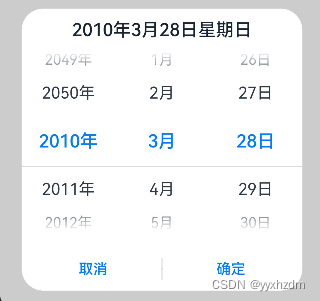
6、效果图
默认:
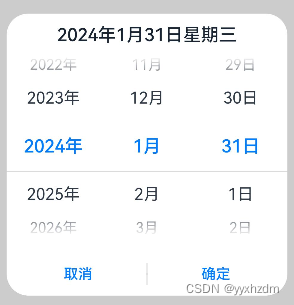
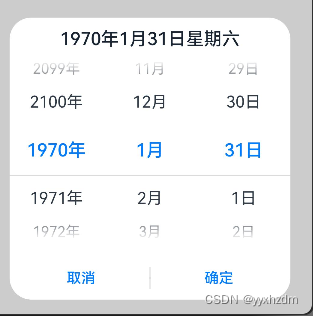
selected: new Date():
start: new Date("2010-1-1"),
end: new Date("2050-12-13"),

开源鸿蒙跨平台开发社区汇聚开发者与厂商,共建“一次开发,多端部署”的开源生态,致力于降低跨端开发门槛,推动万物智联创新。
更多推荐
 17
17 0
0- 0


 已为社区贡献7条内容

所有评论(0)