taro生命周期与跳转的方法
·
生命周期
生命周期钩子函数
componentWillMount()
//页面加载时触发,一个页面只会调用一次,此时页面 DOM 尚未准备好,还不能和视图层进行交互


componentDidMount()
//页面初次渲染完成时触发,一个页面只会调用一次,代表页面已经准备妥当,可以和视图层进行交互


shouldComponentUpdate(nextProps, nextState)
//页面是否需要更新,返回 false 不继续更新,否则继续走更新流程


componentWillUpdate(nextProps, nextState)
//页面即将更新


componentDidUpdate(prevProps, prevState)
//页面更新完毕


componentWillUnmount()
//页面卸载时触发,如 redirectTo 或 navigateBack 到其他页面时


componentDidShow()
//页面显示/切入前台时触发


componentDidHide()
//页面隐藏/切入后台时触发, 如 navigateTo 或底部 tab 切换到其他页面,小程序切入后台等
页面事件处理函数
onPullDownRefresh()
//监听用户下拉刷新事件
//需要在全局配置的 window 选项中或页面配置中开启 enablePullDownRefresh可以通过 Taro.startPullDownRefresh 触发下拉刷新,调用后触发下拉刷新动画,效果与用户手动下拉刷新一致。当处理完数据刷新后,Taro.stopPullDownRefresh 可以停止当前页面的下拉刷新


onReachBottom()
//监听用户上拉触底事件
//可以在全局配置的 window 选项中或页面配置中设置触发距离 onReachBottomDistance,在触发距离内滑动期间,本事件只会被触发一次


onPageScroll(Object)
//监听用户滑动页面事件


onShareAppMessage(Object)
//监听用户点击页面内转发按钮(Button 组件 openType='share')或右上角菜单“转发”按钮的行为,并自定义转发内容。
//只有定义了此事件处理函数,右上角菜单才会显示“转发”按钮
生命周期与初始状态this.state
这个是案例说明
嵌入时间的操作
这个是组件里面的文件
这个组件是在components组件的值 clock
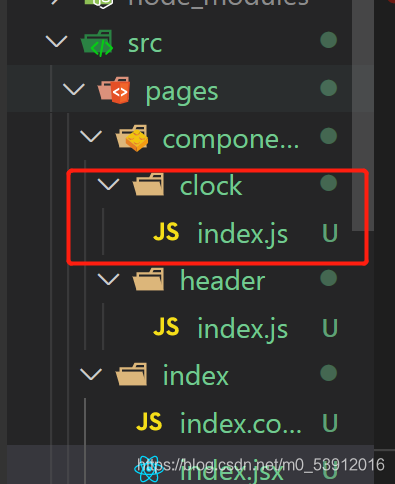
import Taro, { Component } from 'react'//首先因为我们要使用taro所有我们要导入它
import { View, Text } from '@tarojs/components'//因为我们要使用这些标签所有我们要导入
export default class Clock extends Component {
    //   构造函数
    constructor(props) {
        super(props)
        this.state = { time: new Date() }
    }
    // 放置挂载完成之后的组件
    //setstate 数据更新 视图更新
    componentDidMount(){
        setInterval(()=>{
            this.setState({
                time:new Date()
            })
        },1000)
    }

    // 组件卸载触发
    componentWillUnmount(){
        console.log(balabal)
    }
    render() {
        const { time } = this.state


        // 不要将对象直接放入页面模板
        //因为react是对象时直接会报错 所以我们要进行转换 时间为字符串形式
        console.log(time.toLocaleString())
        return (
            <View>
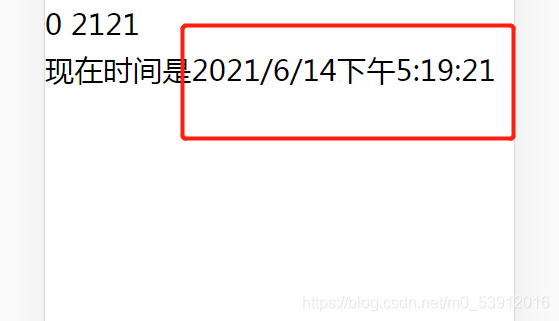
                <Text>现在时间是</Text>
                <Text>{time.toLocaleString()}</Text>
            </View>
        )
    }

}
在使用组件的文件
引入组件的地址
import Clock from  '../components/clock'//把组件引入进来


在 render () {
    return (
    <Clock/>
)}
taro跳转方法
因为要运到taro 在刚开始把它引入过来
import Taro from '@tarojs/taro'
- 只能跳转到tabBar配置页面
switchTab:只能跳转到tabBar配置页面(写在app.json里tabbar的路径url)
taro.switchTab({ url: '/pages/index/index' })
- 关闭当前页面,跳转到应用内的某个页面
redirectTo:关闭当前页面,跳转到应用内的某个页面
taro.redirectTo({ url: '/pages/index/index' })
- 保留当前页面,跳转到应用内的某个页面
navigateTo:保留当前页面,跳转到应用内的某个页面
taro.navigateTo({ url: '/pages/index/index' })
- 关闭所有页面,打开应用内的某个页面,一般用于注册页面
reLaunch:关闭所有页面,打开应用内的某个页面,一般用于注册页面,切换账号
taro.reLaunch({ url: '/pages/index/index' })
- 返回上级页面,参数delta为返回页面层数,默认1,大于现有页面数时返回首页
navigateBack:返回上级页面,参数delta为返回页面层数,默认1,大于现有页面数时返回首页
taro.navigateBack({ delta: 2 })

开源鸿蒙跨平台开发社区汇聚开发者与厂商,共建“一次开发,多端部署”的开源生态,致力于降低跨端开发门槛,推动万物智联创新。
更多推荐

 1
1 0
0- 0


 已为社区贡献2条内容

所有评论(0)