kotlin - Glide默认压缩图片流程
kotlin - Glide默认压缩图片流程
kotlin - Glide默认压缩图片流程
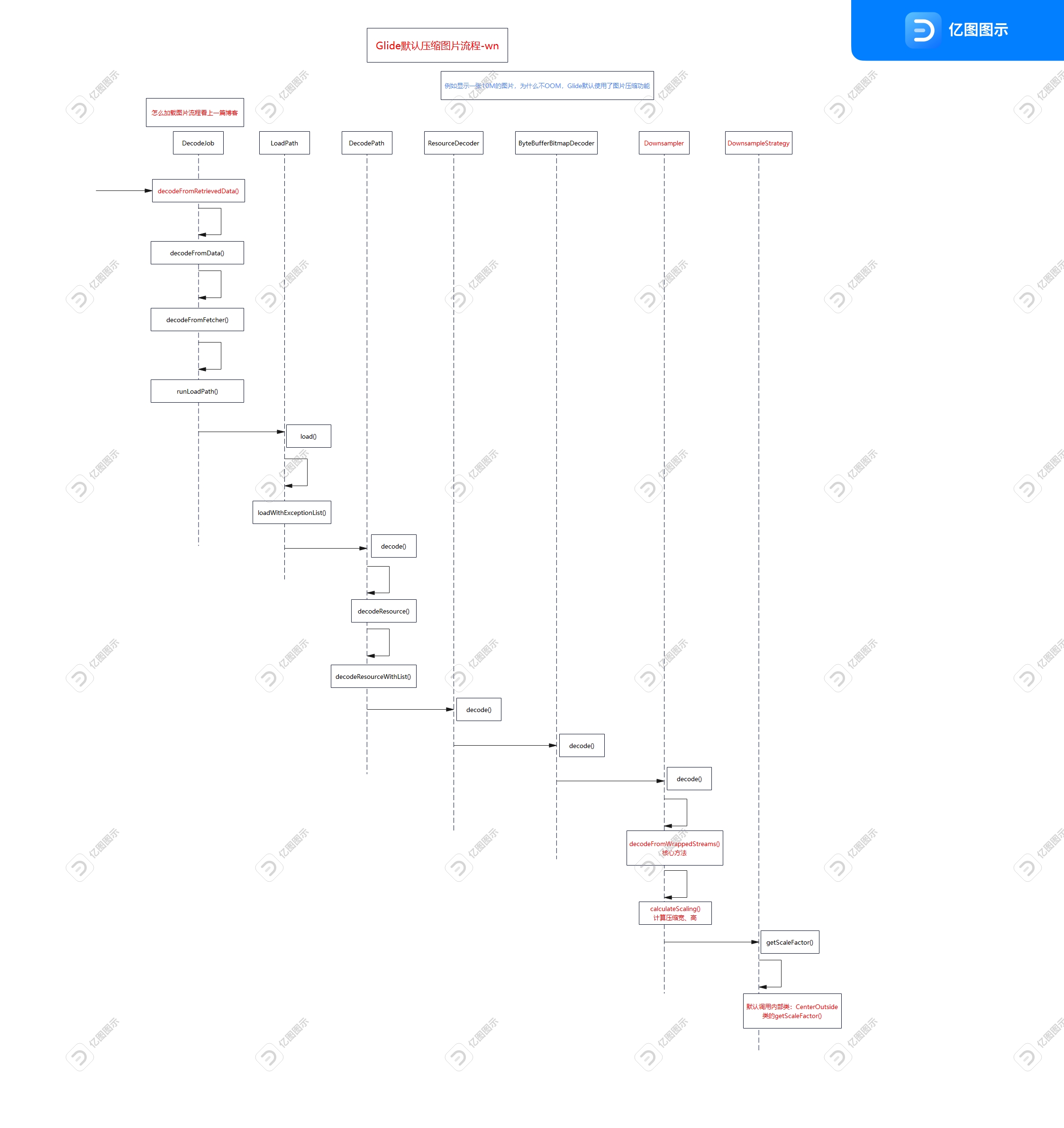
Glide默认显示10M的图片,为什么不OOM?
因为Glide默认处理了图片的大小,
比如5400*9600的图片在1080*1920的手机上显示,等比(5倍)成1080*1920图片
设置.override(200, 200),或者layout_width="200dp"都是同理,源码中使用(目标宽度/图片实际宽度)200/5400,计算出比例,再等比缩放。
如果不知道怎么获取图片流程,看上一篇博客:https://blog.csdn.net/maoning20080808/article/details/147094683
关键流程如下:
DecodeJob类
-> decodeFromRetrievedData()
-> decodeFromData()
-> decodeFromFetcher()
-> runLoadPath()
LoadPath类
-> load()
-> loadWithExceptionList()
DecodePath类
-> decode()
-> decodeResource()
-> decodeResourceWithList()
ResourceDecoder接口,实现类是ByteBufferBitmapDecoder
-> decode()
ByteBufferBitmapDecoder类
-> decode()
Downsampler类
-> decode()
-> decodeFromWrappedStreams() 核心,获取原图宽高和目标宽高
options.inJustDecodeBounds = true;
-> calculateScaling() 计算缩放
(getDimensions方法)使用options.inJustDecodeBounds = true;获取原图宽、高度
DownsampleStrategy类,是抽象类,默认回调CenterOutside
默认定义:public static final DownsampleStrategy DEFAULT = CENTER_OUTSIDE;
-> getScaleFactor()
CenterOutside类
-> getScaleFactor()
SingleRequest类begin()方法,获取宽、高度。
target.getSize(this);
ViewTarget类
-> getSize()
SizeDeterminer类
-> getSize()

开源鸿蒙跨平台开发社区汇聚开发者与厂商,共建“一次开发,多端部署”的开源生态,致力于降低跨端开发门槛,推动万物智联创新。
更多推荐
 3
3 0
0- 0


 已为社区贡献106条内容

所有评论(0)