基于鸿蒙操作———制作健康App(实现一次开发多端部署,记录项,饮食记录)
·
目录
前言
媒体查询的实现方案:
1.导入媒体查询模块
2.设置媒体查询条件,并获取对应的listener(监听器)
3.给listener设置回调函数,当设备状态变化时会执行回调函数
4.将设备状态记录到全局状态中
实现效果
手机端展示

折叠手机端展示
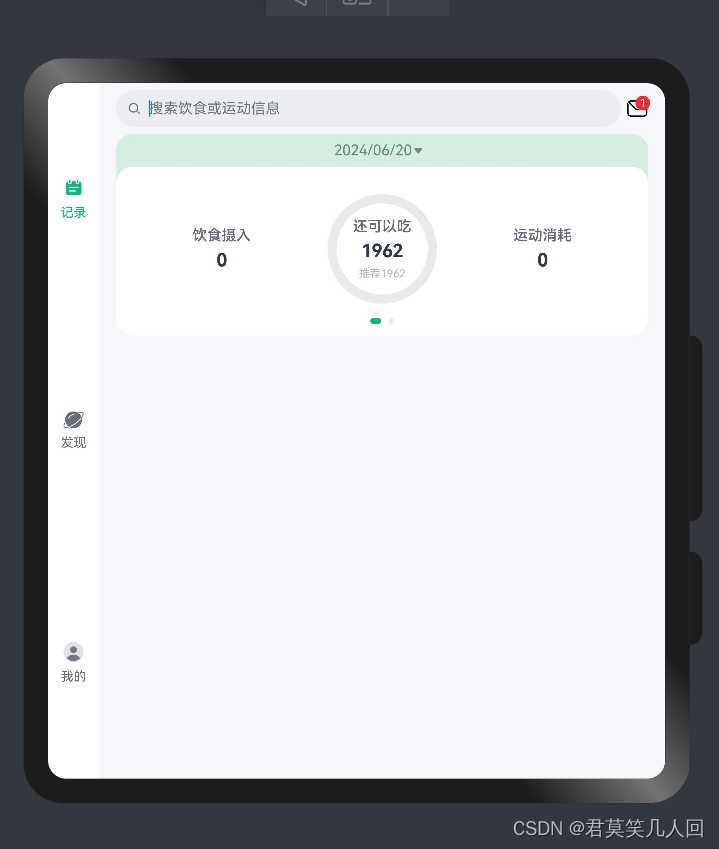
平板端展示
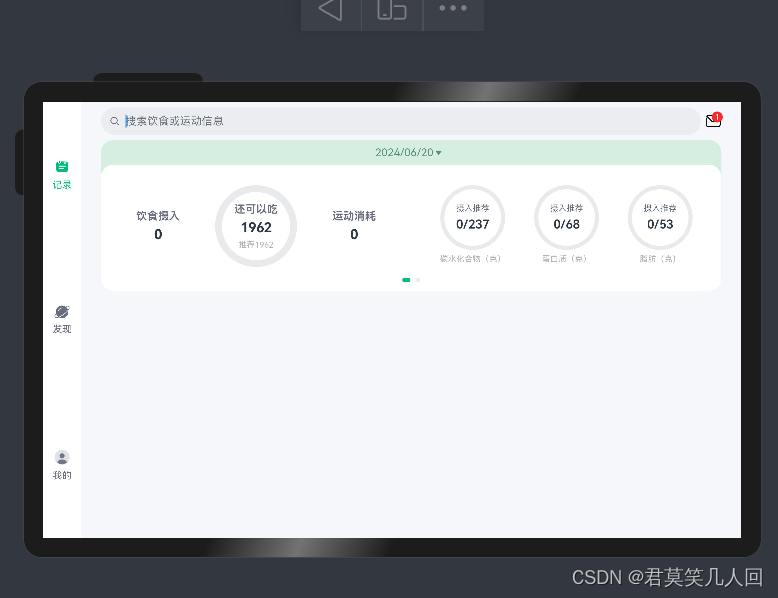
记录端展示:
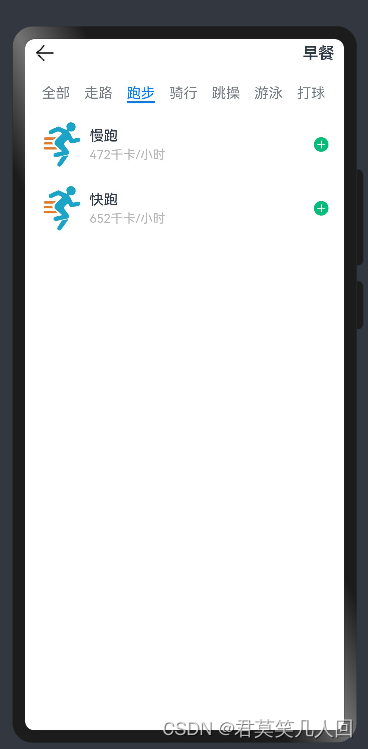
饮食记录展示
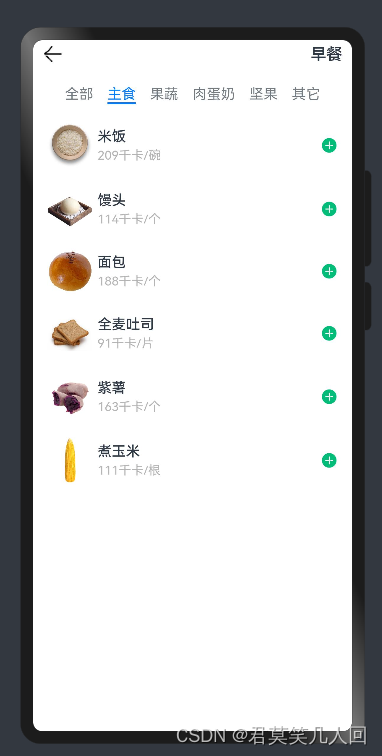
项目实现
一次开发多端部署
代码
// 工具类

import BreakpointType from '../bean/BreanpointType';
export default class BreakpointConstants {
  /**
   * 小屏幕设备的 Breakpoints 标记.
   */
  static readonly BREAKPOINT_SM: string = 'sm';

  /**
   * 中等屏幕设备的 Breakpoints 标记.
   */
  static readonly BREAKPOINT_MD: string = 'md';

  /**
   * 大屏幕设备的 Breakpoints 标记.
   */
  static readonly BREAKPOINT_LG: string = 'lg';

  /**
   * 当前设备的 breakpoints 存储key
   */
  static readonly CURRENT_BREAKPOINT: string = 'currentBreakpoint';

  /**
   * 小屏幕设备宽度范围.
   */
  static readonly RANGE_SM: string = '(320vp<=width<600vp)';

  /**
   * 中屏幕设备宽度范围.
   */
  static readonly RANGE_MD: string = '(600vp<=width<840vp)';

  /**
   * 大屏幕设备宽度范围.
   */
  static readonly RANGE_LG: string = '(840vp<=width)';

  //提前将其定义屏幕适应定义好
  static readonly BAR_POSITION: BreakpointType<BarPosition> = new BreakpointType({
    sm: BarPosition.End,
    md: BarPosition.Start,
    lg: BarPosition.Start,
  })
}

import mediaQuery from '@ohos.mediaquery'
import BreakpointConstants from '../constants/BreakpointConstants'

export default class BreakpointSystem{

  private smListener: mediaQuery.MediaQueryListener = mediaQuery.matchMediaSync(BreakpointConstants.RANGE_SM)
  private mdListener: mediaQuery.MediaQueryListener = mediaQuery.matchMediaSync(BreakpointConstants.RANGE_MD)
  private lgListener: mediaQuery.MediaQueryListener = mediaQuery.matchMediaSync(BreakpointConstants.RANGE_LG)

  smListenerCallback(result: mediaQuery.MediaQueryResult){
    if(result.matches){
      this.updateCurrentBreakpoint(BreakpointConstants.BREAKPOINT_SM)
    }
  }

  mdListenerCallback(result: mediaQuery.MediaQueryResult){
    if(result.matches){
      this.updateCurrentBreakpoint(BreakpointConstants.BREAKPOINT_MD)
    }
  }

  lgListenerCallback(result: mediaQuery.MediaQueryResult){
    if(result.matches){
      this.updateCurrentBreakpoint(BreakpointConstants.BREAKPOINT_LG)
    }
  }

  updateCurrentBreakpoint(breakpoint: string){
    AppStorage.SetOrCreate(BreakpointConstants.CURRENT_BREAKPOINT, breakpoint)
  }

  register(){
    this.smListener.on('change', this.smListenerCallback.bind(this))
    this.mdListener.on('change', this.mdListenerCallback.bind(this))
    this.lgListener.on('change', this.lgListenerCallback.bind(this))
  }

  unregister(){
    this.smListener.off('change', this.smListenerCallback.bind(this))
    this.mdListener.off('change', this.mdListenerCallback.bind(this))
    this.lgListener.off('change', this.lgListenerCallback.bind(this))
  }
}

// 泛型类
declare interface BreakpointTypeOptions<T>{
  sm?:T,
  md?:T,
  lg?:T
}

export default class BreakpointType<T>{
  options: BreakpointTypeOptions<T>

  constructor(options: BreakpointTypeOptions<T>) {
    this.options = options
  }

  getValue(breakpoint: string): T{
    return this.options[breakpoint]
  }
}


// 实现类index
import BreakpointType from '../common/bean/BreanpointType'
import BreakpointConstants from '../common/constants/BreakpointConstants'
import { CommonConstants } from '../common/constants/CommonConstants'
import BreakpointSystem from '../common/utils/BreakpointSystem'
import RecordIndex from '../view/record/RecordIndex'
@Entry
@Component
struct Index {
  @State currentIndex:number = 0
  private breakpointSystem:BreakpointSystem = new BreakpointSystem()
  @StorageProp('currentBreakpoint') currentBreakpoint:string = BreakpointConstants.BREAKPOINT_SM


  // 自定义样式,title为String字符串类型
  @Builder TabBarBuilder(title:ResourceStr,image:ResourceStr,index:number){
    Column({space:CommonConstants.SPACE_8}){
      Image(image)
        .width(22)
        .fillColor(this.selectColor(index))
      Text(title)
        .fontSize(14)
        .fontColor(this.selectColor(index))
    }
  }


  aboutToAppear(){
    this.breakpointSystem.register()
  }
  aboutToDisappear(){
    this.breakpointSystem.unregister()
  }

  // 对颜色代码进行封装
  selectColor(index:number){
     return this.currentIndex === index?$r('app.color.primary_color'):$r('app.color.gray')
  }

  chooseBarPosition(){
    return new BreakpointType({
      sm:BarPosition.End,
      md:BarPosition.Start,
      lg:BarPosition.Start
    }).getValue(this.currentBreakpoint)
  }


  build() {
    Tabs({barPosition:BreakpointConstants.BAR_POSITION.getValue(this.currentBreakpoint)}) {

      TabContent(){
        RecordIndex()
      }
      .tabBar(this.TabBarBuilder($r('app.string.tab_record'),$r('app.media.ic_calendar'),0))

      TabContent(){
        Text('发现页面')
      }
      .tabBar(this.TabBarBuilder($r('app.string.tab_discover'),$r('app.media.discover'),1))

      TabContent(){
        Text('我的主页')
      }
      .tabBar(this.TabBarBuilder($r('app.string.tab_user'),$r('app.media.ic_user_portrait'),2))


    }
    .width('100%')
    .height('100%')
    .onChange(index => this.currentIndex = index)
    .vertical(new BreakpointType({
      sm:false,
      md:true,
      lg:true
    }).getValue(this.currentBreakpoint))
  }
}
小结
(1)首先设置工具类属性,分别定义sm,md,lg代表了小,中,大屏幕的显示方式,设置不同的标记来记录,规定好显示的范围,然后通过调用;
(2)然后在工具类BreakpointSystem.ets中定义好不同的屏幕的实现的不同效果;
(3)通过在index类中进行调用创建私有的对象breakpointSystem,然后再index中定义独立的函数块chooseBarPosition实现后面在Tabs({})中属性的定义,使得菜单项显示的位置发生不同的改变,当屏幕的大小发生改变时会出现不同的效果。
记录项
代码
/**
 * 饮食记录中的记录项,可以是食物或运动
 */
export default class RecordItem{
  /**
   * id
   */
  id: number
  /**
   * 名称
   */
  name: ResourceStr
  /**
   * 图片
   */
  image: ResourceStr
  /**
   * 分类id
   */
  categoryId: number
  /**
   * 包含的卡路里
   */
  calorie: number
  /**
   * 单位
   */
  unit: ResourceStr
  /**
   * 碳水含量,单位(克)
   */
  carbon: number
  /**
   * 蛋白质含量,单位(克)
   */
  protein: number
  /**
   * 脂肪含量,单位(克)
   */
  fat: number

  constructor(id: number, name: ResourceStr, image: ResourceStr,
              categoryId: number, unit: ResourceStr, calorie: number,
              carbon: number = 0, protein: number = 0, fat: number = 0) {
    this.id = id
    this.name = name
    this.image = image
    this.categoryId = categoryId
    this.unit = unit
    this.calorie = calorie
    this.protein = protein
    this.fat = fat
    this.carbon = carbon
  }
}

import ItemCategory from '../viewmodel/ItemCategory'

/**
 * 食物类型的枚举
 */
enum FoodCategoryEnum{
  /**
   * 主食
   */
  STAPLE,
  /**
   * 蔬果
   */
  FRUIT,
  /**
   * 肉蛋奶
   */
  MEAT,
  /**
   * 坚果
   */
  NUT,
  /**
   * 其它
   */
  OTHER,
}

/**
 * 食物类型数组
 */
let FoodCategories = [
  new ItemCategory(0, $r('app.string.staple')),
  new ItemCategory(1, $r('app.string.fruit')),
  new ItemCategory(2, $r('app.string.meat')),
  new ItemCategory(3, $r('app.string.nut')),
  new ItemCategory(4, $r('app.string.other_type')),
]

/**
 * 运动类型枚举
 */
enum WorkoutCategoryEnum {
  /**
   * 走路
   */
  WALKING,
  /**
   * 跑步
   */
  RUNNING,
  /**
   * 骑行
   */
  RIDING,
  /**
   * 跳操
   */
  AEROBICS,
  /**
   * 游泳
   */
  SWIMMING,
  /**
   * 打球
   */
  BALLGAME,
  /**
   * 力量训练
   */
  STRENGTH
}

/**
 * 运动类型数组
 */
let WorkoutCategories = [
  new ItemCategory(0, $r('app.string.walking_type')),
  new ItemCategory(1, $r('app.string.running')),
  new ItemCategory(2, $r('app.string.riding')),
  new ItemCategory(3, $r('app.string.aerobics')),
  new ItemCategory(4, $r('app.string.swimming')),
  new ItemCategory(5, $r('app.string.ballgame')),
  new ItemCategory(6, $r('app.string.strength')),
]

export {FoodCategories , WorkoutCategories , FoodCategoryEnum, WorkoutCategoryEnum}


这里由于代码太多直接省略了...,有需要的可以评论666,看到后回复
小结
(1)首先实现的是数据的接口,通过后面对接口的调用进行开发实现;
(2)在model中定义的方法统一都是采用的枚举的形式,这样可以简化代码,也可以在调用时方便调用从上到下依次递增;
(3)将所有的数据都写出来然后进行信息之间的调用;
(4)在itemModel中定义需要查询的是食物还是运动,通过定义的isFood类型设置为boolean,通过false和true进行设置;
(5) 然后在前面类中写死的数据进行更改成调用工具类中的数据,改完即可;
(6)菜单中分项太多可以设置属性.barMode(BarMode.Scrollable)属性后便可以改成菜单滑动,不会显示出因为空间不够导致的省略号

开源鸿蒙跨平台开发社区汇聚开发者与厂商,共建“一次开发,多端部署”的开源生态,致力于降低跨端开发门槛,推动万物智联创新。
更多推荐

 6
6 0
0- 0


 已为社区贡献2条内容

所有评论(0)