基于CupertinoPicker封装日期选择器
实现这个需求,可以找一下三方插件,应该有很多插件实现了这个功能,不过我们项目使用到的比较简单,就自行实现了一个,这里做一下简单的记录。因为实现类似于ios风格的可滑动选择的小部件,所以通过查阅官方文档,找到了小部件 =>
·
基于CupertinoPicker封装日期选择器
实现这个需求,可以找一下三方插件,应该有很多插件实现了这个功能,不过我们项目使用到的比较简单,就自行实现了一个,这里做一下简单的记录。
因为实现类似于ios风格的可滑动选择的小部件,所以通过查阅官方文档,找到了 CupertinoPicker 小部件 => 官方文档
简单使用
将必须的属性设置完成即可
CupertinoPicker(
  itemExtent: 40, // 子项高度
  onSelectedItemChanged: (int value) {
    print('当前选中的元素索引为:$value');
  },
  children: const [
    Text('选项1'),
    Text('选项2'),
    Text('选项3'),
    Text('选项4'),
  ],
),
预览效果
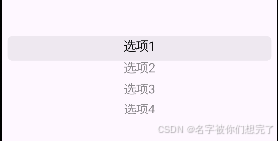
这样我们就简单使用了一下 CupertinoPicker 小部件,接下来我们探索一下它的其他属性。
SizedBox(
  height: 160,
  child: CupertinoPicker(
    looping: true, // 控制选项是否可以循环
    itemExtent: 40, // 子项高度
    useMagnifier: true, // 是否使用放大镜效果
    magnification: 1.1, // 放大倍数
    // 设置选中项的背景样式
    selectionOverlay: Container(
      padding: EdgeInsets.zero,
      margin: const EdgeInsets.only(left: 10, right: 10),
      decoration: BoxDecoration(
        color: const Color.fromRGBO(255, 0, 0, 0.2),
        borderRadius: BorderRadius.circular(10)
      ),
    ),
    // 控制器,可以通过此属性来设置初始选中的项
    scrollController: FixedExtentScrollController(initialItem: 2),
    onSelectedItemChanged: (int value) {
      print('当前选中的元素索引为:$value');
    },
    children: const [
      SizedBox(
        height: 40,
        child: Center(
          child: Text('选项1'),
        ),
      ),
      SizedBox(
        height: 40,
        child: Center(
          child: Text('选项2'),
        ),
      ),
      SizedBox(
        height: 40,
        child: Center(
          child: Text('选项3'),
        ),
      ),
      SizedBox(
        height: 40,
        child: Center(
          child: Text('选项4'),
        ),
      ),
    ],
  ),
)
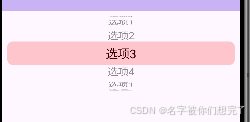
这样简单体验了一下它的其他属性,其他属性可以自行体验,接下来实现我们的日期选择器。
封装日期选择器
不同的项目有不同的需求,此处只简单描述一下我们的需求。
通过点击选中栏,弹出日期选择器,日期选择器可滑动选择年月日,当前选中的月份对应的天数要动态变化(例如当前选中的年月有31天,那么可选的日就是1-31,如果是28天,那么就是1-28)
上帝视角:
- 当前选中的日索引大于重新计算得出的可选日列表的时候,重新计算日索引,如果不通过控制器去重新设置,会导致更新不及时,滑动乱跳等问题。
- 多个选择器排列在一起的时候,原生选中的样式无法衔接,可以使用 selectionOverlay 属性自定义选中样式,只设置两端的圆角属性,这样中间部分就自动连接在一起了,看起来就像是连贯的。
代码实现
// 下面代码优化空间很大,可以抽离很多公共部分,这里就不进行抽离了,
// 还有部分参数也可以提取常量等等
class _MyHomePageState extends State<MyHomePage> {
List<int> yearList = [];
List<int> monthList = [];
List<int> dateList = [];
int yearIndex = 0;
int monthIndex = 0;
int dateIndex = 0;
late FixedExtentScrollController dayScrollController = FixedExtentScrollController();
void initState() {
initTimeList();
super.initState();
}
Widget buildItem(int text) {
return SizedBox(
height: 40,
child: Center(
child: Text(
'$text',
softWrap: true,
style: const TextStyle(
fontSize: 16,
fontWeight: FontWeight.w600,
color: Color(0xFF222222),
decoration: TextDecoration.none,
),
),
)
);
}
// 初始化日期,生成对应的年月日可选择列表
Future<void> initTimeList() async {
DateTime now = DateTime.now();
var tempYear = now.year;
var tempMonth = now.month;
var tempDate = now.day;
// 年列表的生成可以根据你们自己的需求来实现
for (int y = tempYear - 50; y <= tempYear + 100; y++) {
yearList.add(y);
}
var tempYearIndex = yearList.indexOf(tempYear);
for (int m = 1; m <= 12; m++) {
monthList.add(m);
}
var tempMonthIndex = monthList.indexOf(tempMonth);
var currDays = DateTime(tempYear, tempMonth + 1, 0).day;
for (int d = 1; d <= currDays; d++) {
dateList.add(d);
}
var tempDateIndex = dateList.indexOf(tempDate);
setState(() {
yearIndex = tempYearIndex;
monthIndex = tempMonthIndex;
dateIndex = tempDateIndex;
});
}
void changeIndex(String key, int index) {
var tempYearIndex = yearIndex;
var tempMonthIndex = monthIndex;
if (key == 'yearIndex') {
tempYearIndex = index;
setState(() {
yearIndex = index;
});
}
if (key == 'monthIndex') {
tempMonthIndex = index;
setState(() {
monthIndex = index;
});
}
if (key == 'dateIndex') {
setState(() {
dateIndex = index;
});
}
// 每次月索引和年索引更改的时候,重新计算天数
if (key == 'monthIndex' || key == 'monthIndex') {
var tempYear = yearList[tempYearIndex];
var tempMonth = monthList[tempMonthIndex];
// 获取某年某月的天数
var tempDate = DateTime(tempYear, tempMonth + 1, 0).day;
List<int> tempDateArray = [];
for (int d = 1; d <= tempDate; d++) {
tempDateArray.add(d);
}
setState(() {
dateList = List.from(tempDateArray);
// 如果当前选择的日索引大于生成新的日列表的最大索引,则重新设置当前选择的日索引
if (dateIndex > tempDateArray.length - 1) {
dateIndex = tempDateArray.length - 1;
dayScrollController.animateToItem(
tempDateArray.length - 1,
duration: const Duration(milliseconds: 300),
curve: Curves.easeOut
);
}
});
}
}
void _showStartTime() {
// 每次展示弹框前更新一下初始选中的日索引
setState(() {
dayScrollController = FixedExtentScrollController(initialItem: dateIndex);
});
showModalBottomSheet(
context: context,
builder: (BuildContext context) => Container(
padding: const EdgeInsets.only(top: 20),
width: MediaQuery.of(context).size.width,
height: 300,
child: Column(
children: [
// 顶部标题
SizedBox(
height: 40,
width: MediaQuery.of(context).size.width,
child: Stack(
alignment: AlignmentDirectional.topCenter,
children: [
const Text(
'Start Time',
style: TextStyle(
fontSize: 24,
color: Color(0xFF222222),
height: 0.83,
fontWeight: FontWeight.w600
),
textAlign: TextAlign.center,
),
Positioned(
right: 20,
child: GestureDetector(
onTap: () {
Navigator.of(context).pop();
},
child: Image.asset(
'assets/images/icon_edit_picker_close.png',
width: 20,
height: 20,
),
)
)
],
),
),
// 选择器头部
const Flex(
direction: Axis.horizontal,
children: [
Flexible(
child: Center(
child: Text(
'Month',
style: TextStyle(
fontSize: 18,
fontWeight: FontWeight.w600,
color: Color(0xFF222222)
),
),
),
),
Flexible(
child: Center(
child: Text(
'Day',
style: TextStyle(
fontSize: 18,
fontWeight: FontWeight.w600,
color: Color(0xFF222222)
),
),
),
),
Flexible(
child: Center(
child: Text(
'Year',
style: TextStyle(
fontSize: 18,
fontWeight: FontWeight.w600,
color: Color(0xFF222222)
),
),
),
)
],
),
Flex(
direction: Axis.horizontal,
children: [
// 月选择
Flexible(
child: SizedBox(
height: 160,
child: CupertinoPicker(
looping: true,
itemExtent: 40,
useMagnifier: false,
selectionOverlay: Container(
padding: EdgeInsets.zero,
margin: EdgeInsets.zero,
decoration: const BoxDecoration(
color: Color.fromRGBO(180, 180, 180, 0.1),
borderRadius: BorderRadius.only(
topLeft: Radius.circular(9),
bottomLeft: Radius.circular(9)
)
),
),
onSelectedItemChanged: (index) {
changeIndex('monthIndex', index);
},
scrollController: FixedExtentScrollController(initialItem: monthIndex),
children: monthList.map((e) => buildItem(e)).toList(),
),
),
),
// 日选择
Flexible(
flex: 1,
child: SizedBox(
height: 160,
child: CupertinoPicker(
looping: true,
itemExtent: 40,
useMagnifier: false,
selectionOverlay: Container(
padding: EdgeInsets.zero,
margin: EdgeInsets.zero,
decoration: const BoxDecoration(
color: Color.fromRGBO(180, 180, 180, 0.1),
),
),
onSelectedItemChanged: (index) {
changeIndex('dateIndex', index);
},
scrollController: dayScrollController,
children: dateList.map((e) => buildItem(e)).toList(),
),
),
),
// 年选择
Flexible(
flex: 1,
child: SizedBox(
height: 160,
child: CupertinoPicker(
looping: true,
itemExtent: 40,
useMagnifier: false,
selectionOverlay: Container(
padding: EdgeInsets.zero,
margin: EdgeInsets.zero,
decoration: const BoxDecoration(
color: Color.fromRGBO(180, 180, 180, 0.1),
borderRadius: BorderRadius.only(
topRight: Radius.circular(9),
bottomRight: Radius.circular(9)
)
),
),
onSelectedItemChanged: (index) {
changeIndex('yearIndex', index);
},
scrollController: FixedExtentScrollController(initialItem: yearIndex),
children: yearList.map((e) => buildItem(e)).toList(),
),
),
)
],
)
],
),
),
);
}
Widget build(BuildContext context) {
return Scaffold(
backgroundColor: const Color(0xFFF0F0F0),
appBar: AppBar(
backgroundColor: Theme.of(context).colorScheme.inversePrimary,
title: Text(widget.title),
),
body: GestureDetector(
// 点击底部弹出日期选择器
onTap: _showStartTime,
child: Container(
height: 50,
margin: const EdgeInsets.only(left: 20, right: 20, top: 20),
padding: const EdgeInsets.only(left: 20, right: 20),
decoration: BoxDecoration(
color: const Color(0xFFFFFFFF),
borderRadius: BorderRadius.circular(10)
),
child: Row(
mainAxisAlignment: MainAxisAlignment.spaceBetween,
children: [
const Text(
'Start Time',
style: TextStyle(
color: Color(0xFF333333),
fontSize: 20,
fontWeight: FontWeight.bold
),
),
// 展示当前选中的日期
Text(
'${yearList[yearIndex]}-${monthList[monthIndex]}-${dateList[dateIndex]}',
style: const TextStyle(
color: Color(0xFF333333),
fontSize: 20,
fontWeight: FontWeight.bold
),
)
],
),
),
)
);
}
}
最终效果
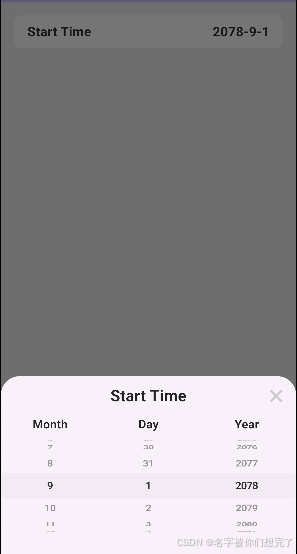
这样就简单实现了一个日期选择器,当然可以继续扩展功能,当然,如果太复杂,则可以去找一些好的轮子。感谢阅读,拜拜~

开源鸿蒙跨平台开发社区汇聚开发者与厂商,共建“一次开发,多端部署”的开源生态,致力于降低跨端开发门槛,推动万物智联创新。
更多推荐

 4
4 0
0- 0


 已为社区贡献9条内容

所有评论(0)