标签管理中心 - Flutter OpenHarmony管理平台
OpenHarmony钱包应用v1.21.0版本新增交易收藏功能。更新内容包括:1)在Transaction类中新增isFavorited字段标记收藏状态;2)提供_toggleFavoriteTransaction方法实现收藏/取消收藏功能;3)在交易列表和操作菜单中增加红色爱心图标作为收藏标识。该功能支持与现有置顶功能同时使用,用户可通过三点菜单快速切换收藏状态,方便管理重要交易记录。版本对比
·
更新概述
v1.21.0 版本为 OpenHarmony 钱包应用增加了交易收藏功能。用户现在可以收藏重要的交易,通过红色爱心图标标记,方便快速识别和管理收藏的交易。这个新功能帮助用户标记和追踪特别重要的交易记录。
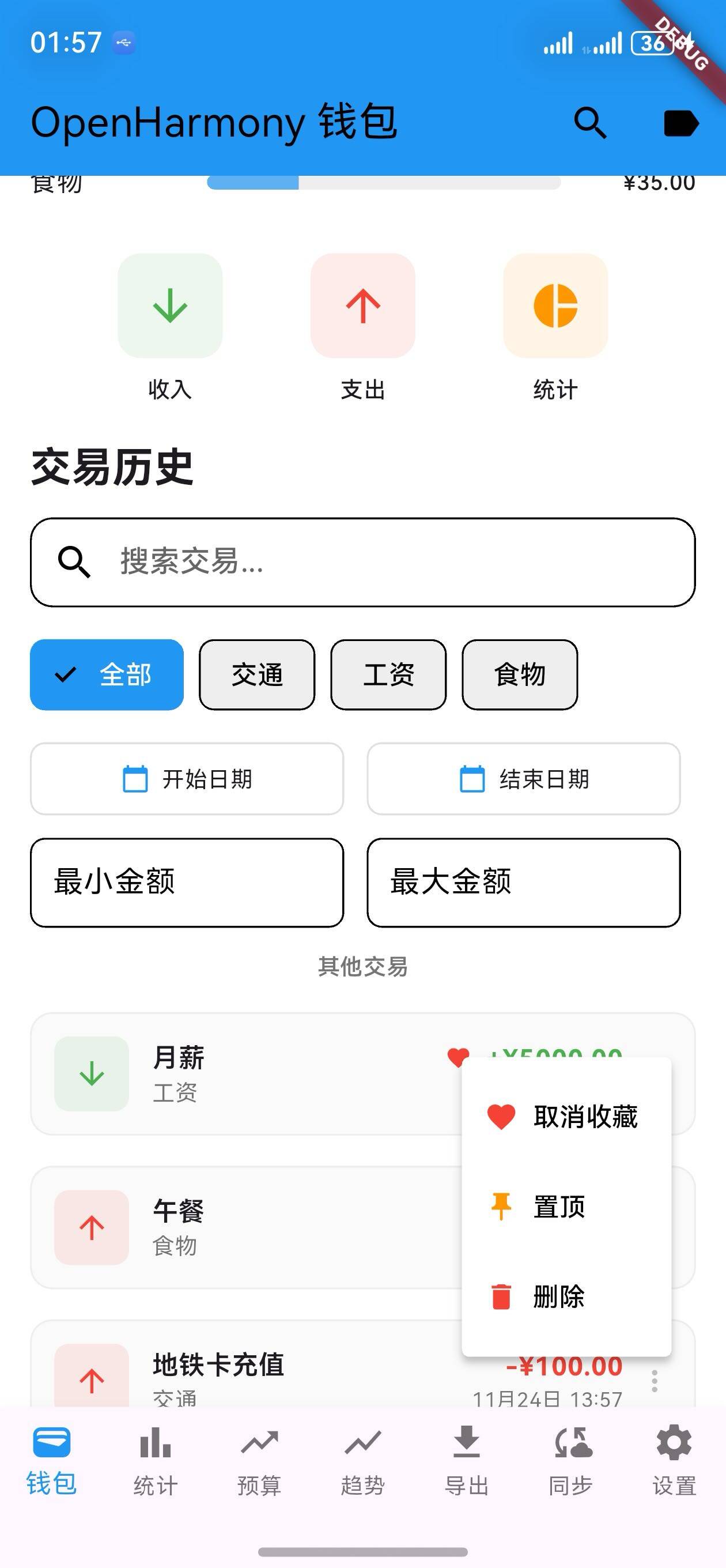
核心功能更新
1. 交易收藏数据模型
Transaction 类扩展
/// OpenHarmony 交易记录模型
class Transaction {
  final String id;
  final String title;
  final double amount;
  final DateTime date;
  final TransactionType type;
  final String category;
  final String? note;
  final List<String> tags;
  final bool isPinned;
  final bool isFavorited;  // 新增:是否收藏

  Transaction({
    required this.id,
    required this.title,
    required this.amount,
    required this.date,
    required this.type,
    required this.category,
    this.note,
    this.tags = const [],
    this.isPinned = false,
    this.isFavorited = false,  // 默认未收藏
  });
}
说明:
- 添加
isFavorited字段用于标记收藏状态 - 布尔类型,默认为 false
- 不影响现有交易
2. 交易收藏管理
收藏切换方法
/// 切换交易收藏状态
void _toggleFavoriteTransaction(Transaction transaction) {
  int transactionIndex = _transactions.indexWhere((t) => t.id == transaction.id);
  if (transactionIndex != -1) {
    final updatedTransaction = Transaction(
      id: transaction.id,
      title: transaction.title,
      amount: transaction.amount,
      date: transaction.date,
      type: transaction.type,
      category: transaction.category,
      note: transaction.note,
      tags: transaction.tags,
      isPinned: transaction.isPinned,
      isFavorited: !transaction.isFavorited,  // 切换收藏状态
    );
    setState(() {
      _transactions[transactionIndex] = updatedTransaction;
      _applyFilters();
    });
  }
}
说明:
- 点击收藏按钮切换状态
- 自动更新交易列表
- 实时刷新显示
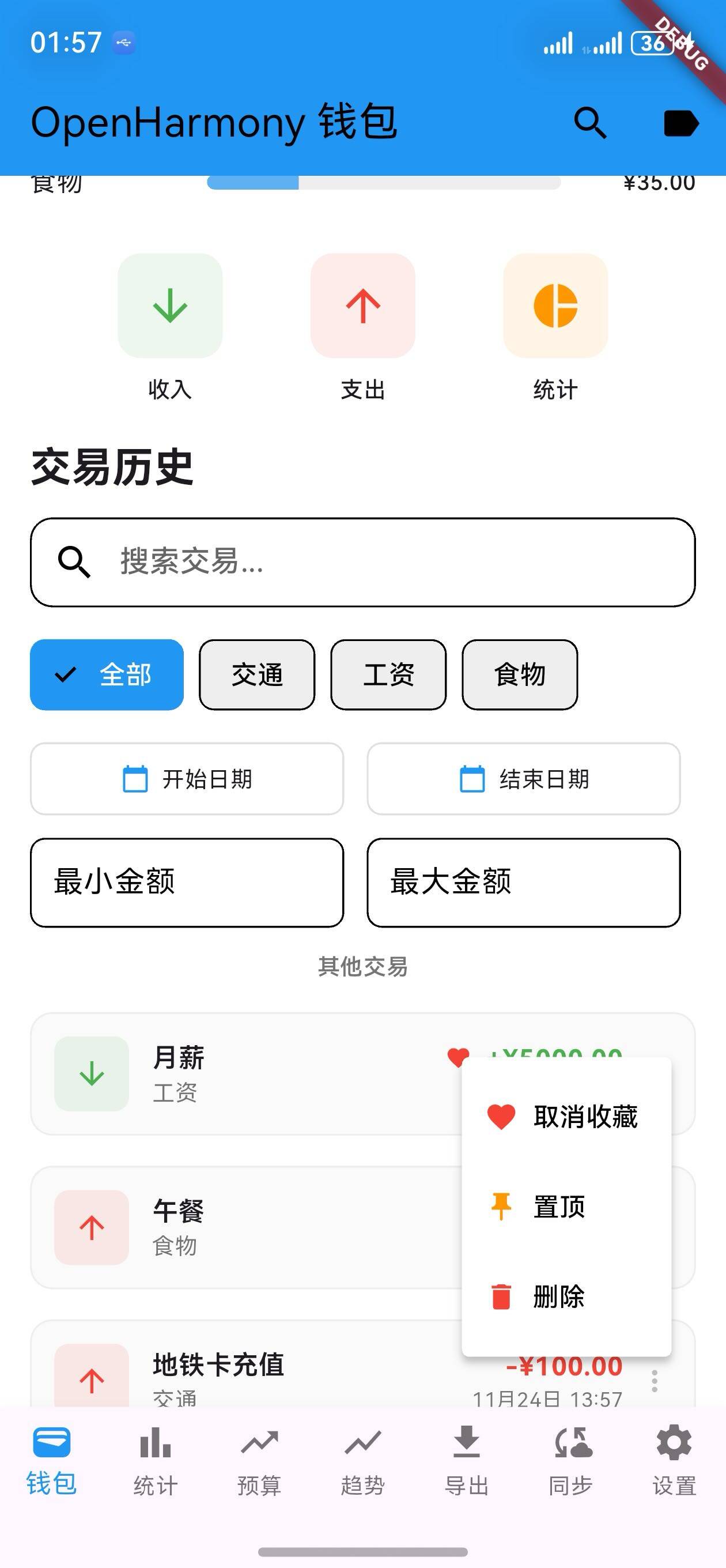
收藏操作菜单
/// 构建操作菜单
PopupMenuButton<String>(
  onSelected: (value) {
    if (value == 'favorite') {
      _toggleFavoriteTransaction(transaction);
    } else if (value == 'pin') {
      _togglePinTransaction(transaction);
    } else if (value == 'delete') {
      removeTransaction(transaction.id);
    }
  },
  itemBuilder: (BuildContext context) => [
    PopupMenuItem<String>(
      value: 'favorite',
      child: Row(
        children: [
          Icon(
            transaction.isFavorited ? Icons.favorite : Icons.favorite_outline,
            size: 18,
            color: Colors.red,
          ),
          const SizedBox(width: 8),
          Text(transaction.isFavorited ? '取消收藏' : '收藏'),
        ],
      ),
    ),
    // ... 其他菜单项 ...
  ],
)
说明:
- 三点菜单操作
- 支持收藏/取消收藏
- 支持置顶和删除操作
3. 交易列表中的收藏标记
收藏标记显示
/// 显示收藏标记
Row(
  children: [
    Expanded(
      child: Text(
        transaction.title,
        style: const TextStyle(
          fontWeight: FontWeight.w600,
          fontSize: 14,
        ),
      ),
    ),
    if (transaction.isFavorited)
      Icon(Icons.favorite, size: 14, color: Colors.red),
    if (transaction.isFavorited && isPinned)
      const SizedBox(width: 4),
    if (isPinned)
      Icon(Icons.push_pin, size: 14, color: Colors.orange),
  ],
)
说明:
- 收藏交易显示红色爱心图标
- 支持同时显示收藏和置顶标记
- 清晰的视觉标识
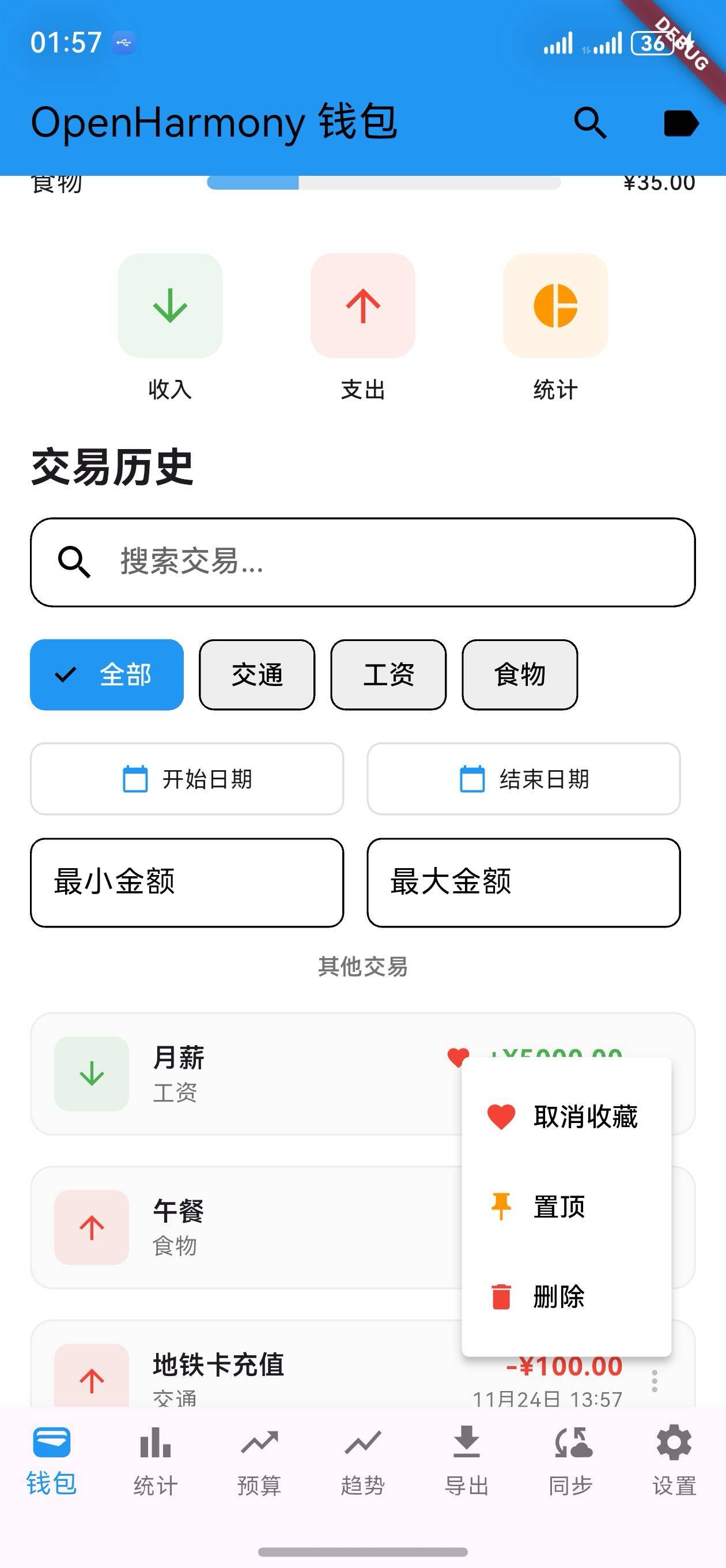
UI 变化
交易卡片布局
┌─────────────────────────────────┐
│  ❤️ 工资                   ¥5000 │
│  工资 • 2024-12-01              │
│  🏷️ 工作                   │
└─────────────────────────────────┘

┌─────────────────────────────────┐
│  ❤️ 📌 早餐                 ¥50  │
│  食物 • 2024-12-01              │
│  📝 在公司附近的咖啡馆      │
│  🏷️ 生活 🏷️ 食物          │
└─────────────────────────────────┘
操作菜单
┌──────────────────┐
│ ❤️ 收藏           │
│ 📌 置顶           │
│ 🗑️ 删除           │
└──────────────────┘
版本对比
| 功能 | v1.20.0 | v1.21.0 |
|---|---|---|
| 交易置顶 | ✅ | ✅ |
| 置顶显示 | ✅ | ✅ |
| 收藏字段 | ❌ | ✅ |
| 收藏功能 | ❌ | ✅ |
| 收藏标记 | ❌ | ✅ |
| 收藏管理 | ❌ | ✅ |
| 多状态支持 | ❌ | ✅ |
使用场景
场景 1:收藏重要交易
- 进入钱包页面
- 找到重要交易
- 点击三点菜单
- 选择"收藏"
场景 2:查看收藏标记
- 进入交易列表
- 收藏交易显示红色爱心
- 快速识别收藏交易
场景 3:取消收藏
- 进入交易列表
- 找到收藏交易
- 点击三点菜单
- 选择"取消收藏"
场景 4:同时使用收藏和置顶
- 收藏重要交易
- 置顶关键交易
- 同时显示两个标记
- 全面管理交易
技术亮点
1. 灵活的收藏系统
- 支持多个收藏交易
- 简单的状态切换
- 易于扩展
2. 清晰的视觉标识
- 红色爱心图标
- 与置顶标记兼容
- 直观易识别
3. 便捷的操作菜单
- 三点菜单设计
- 快速切换状态
- 支持多种操作
4. 完整的交易管理
- 备注、标签、置顶、收藏
- 多维度管理交易
- 提高使用效率

开源鸿蒙跨平台开发社区汇聚开发者与厂商,共建“一次开发,多端部署”的开源生态,致力于降低跨端开发门槛,推动万物智联创新。
更多推荐


 3
3 0
0- 0


 已为社区贡献11条内容

所有评论(0)