登录(三)01-表单验证-介绍——antd-mobile & formik & yup
·
登录-表单验证-介绍——antd-mobile & formik & yup
登录-表单验证-介绍
- 表单提交前,需要先进行表单验证,验证通过后再提交表单
- antd-mobile 组件库的方式。(需要 InputItem 文本输入组件) -> rc-form
- 使用更通用的 formik 或https://github.com/formium/formik,React 中专门用来进行表单处理和表单校验的库
- 通过Formik组件名去使用
- 通过withFormik()这个HOC去使用 -> 推荐
基于表单验证方式重构登录功能
-
使用formik完成登录的表单验证功能
-
步骤
- 安装:yarn add formik
- 导入 withFormik,使用 withFormik 高阶组件包裹 Login 组件。
- 为 withFormik 提供配置对象:mapPropsToValues / handleSubmit。
- 在 Login 组件中,通过 props 获取到 values(表单元素值对象)、 handleSubmit、handleChange。
- 使用 values 提供的值,设置为表单元素的 value,使用 handleChange 设置为表单元素的 onChange。
- 使用 handleSubmit 设置为表单的 onSubmit 。
- 在 handleSubmit 中,通过 values 获取到表单元素值。
- 在 handleSubmit 中,完成登录逻辑。
export default withFormik({
  mapPropsToValues: () => ({ username: '', password: '' }),
  handleSubmit: async (values, login) => {
    const { username, password } = values
    const res = await axios.post(`http://localhost:8080/user/login`, {
      username,
      password
    })
    // console.log(res)
    const { status, body, description } = res.data
    if (status === 200) {
      window.localStorage.setItem('token', body.token)
      login.props.history.push('/')
    } else {
      Toast.info(description, 1)
    }
  }
})(Login)
let {
  // 表单绑定的数据
  values,
  // 表单提交的动作
  handleSubmit,
  // 监控表单的数据变化
  handleChange
} = this.props

<input
    value={values.username}
    onChange={handleChange}
    className={styles.input}
    name="username"
    placeholder="请输入账号"
  />
<button onClick={handleSubmit} className={styles.submit} type="button">
  登 录
</button>
表单验证的两种方式
// 验证规则:
const REG_UNAME = /^[a-zA-Z_\d]{5,8}$/
const REG_PWD = /^[a-zA-Z_\d]{5,12}$/

// 控制表单验证
validate: (values) => {
  // values表示所有表单数据
  // errors表示验证的结果
  let errors = {}
  if (!values.username) {
    // 如果用户名是空的,就提示相应信息
    errors.username = '用户名不能为空'
  } else if (!REG_UNAME.test(values.username)) {
    errors.username = '用户名必须是5-8个字符'
  }
  if (!values.password) {
    errors.password = '密码不能为空'
  } else if (!REG_PWD.test(values.password)) {
    errors.password = '密码必须是5-12个字符'
  }
  return errors
}


let {
  errors,
  // 表单是否被访问过
  touched,
  // 判断是否访问必须绑定该函数
  handleBlur
} = this.props
验证登录-不为空
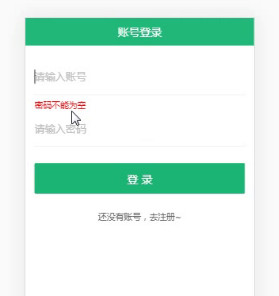
<input
  onBlur={handleBlur}
  value={values.username}
  onChange={handleChange}
  className={styles.input}
  name="username"
  placeholder="请输入账号"
/>
{touched.password&&errors.password&&<div className={styles.error}>{errors.password}</div>}
验证登录-字数
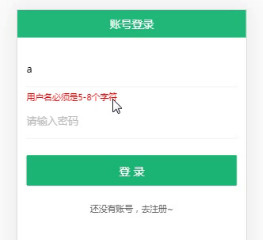

开源鸿蒙跨平台开发社区汇聚开发者与厂商,共建“一次开发,多端部署”的开源生态,致力于降低跨端开发门槛,推动万物智联创新。
更多推荐
 1
1 0
0- 0


 已为社区贡献5条内容

所有评论(0)