NG-ZORRO-MOBILE 抽屉遮罩层点击关闭抽屉
https://ng.mobile.ant.design/#/components/drawer/zh框架自带的抽屉是没有遮罩层的,刚开始准备直接写在抽屉上面,但是遮罩层点击事件会冒泡。解决方法:自定义遮罩层html <ion-button size="small" (click)="openDrawer('line')"><ion-icon class="icon naviga
·
https://ng.mobile.ant.design/#/components/drawer/zh
框架自带的抽屉是没有遮罩层的,刚开始准备直接写在抽屉上面,但是遮罩层点击事件会冒泡。
解决方法:
自定义遮罩层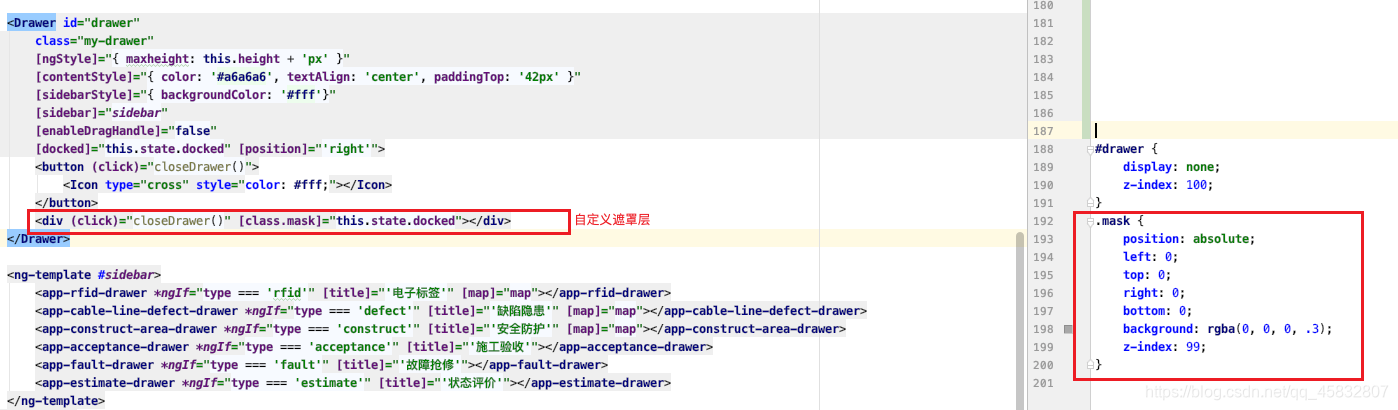
- html
<ion-button size="small" (click)="openDrawer('line')"> <ion-icon class="icon navigation"></ion-icon> </ion-button> <Drawer id="drawer" class="my-drawer" [ngStyle]="{ maxheight: this.height + 'px' }" [contentStyle]="{ color: '#a6a6a6', textAlign: 'center', paddingTop: '42px' }" [sidebarStyle]="{ backgroundColor: '#fff'}" [sidebar]="sidebar" [enableDragHandle]="false" [docked]="this.state.docked" [position]="'right'"> <button (click)="closeDrawer()"> <Icon type="cross" style="color: #fff;"></Icon> </button> <div (click)="closeDrawer()" [class.mask]="this.state.docked"></div> </Drawer> <ng-template #sidebar> <app-rfid-drawer *ngIf="type === 'rfid'" [title]="'电子标签'" [map]="map"></app-rfid-drawer> <app-cable-line-defect-drawer *ngIf="type === 'defect'" [title]="'缺陷隐患'" [map]="map"></app-cable-line-defect-drawer> <app-construct-area-drawer *ngIf="type === 'construct'" [title]="'安全防护'" [map]="map"></app-construct-area-drawer> <app-acceptance-drawer *ngIf="type === 'acceptance'" [title]="'施工验收'"></app-acceptance-drawer> <app-fault-drawer *ngIf="type === 'fault'" [title]="'故障抢修'"></app-fault-drawer> <app-estimate-drawer *ngIf="type === 'estimate'" [title]="'状态评价'"></app-estimate-drawer> </ng-template> - css
#drawer { display: none; z-index: 100; } .mask { position: absolute; left: 0; top: 0; right: 0; bottom: 0; background: rgba(0, 0, 0, .3); z-index: 99; } - ts
height: number = document.documentElement.clientHeight;
state = {
    docked: false,
    modal: false,
};

/**
 * 抽屉内容
 */
contents: any[];

/**
 * 标题
 */
title: string;

/**
 * 类型
 */
type: string;

constructor(public drawerService: NzDrawerService) {
}

/**
 * 打开侧边栏 drawer
 */
openDrawer(type): void {
    this.type = type;
    switch (type) {
        case 'line':
            this.title = '线路导航';
            break;
    }
    document.getElementById('drawer').style.display = 'block';
    this.state.docked = true;
}

closeDrawer(): void {
    this.state.docked = false;
    document.getElementById('drawer').style.display = 'none';
}

开源鸿蒙跨平台开发社区汇聚开发者与厂商,共建“一次开发,多端部署”的开源生态,致力于降低跨端开发门槛,推动万物智联创新。
更多推荐
 0
0 0
0- 0


 已为社区贡献3条内容

所有评论(0)