Angular+Ionic数据加载中,消息提示方法
·
Angular+Ionic数据加载中,消息提示方法
1,加载中效果
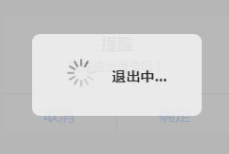
2,ts中引入配置
import { ToastController, LoadingController, NavController,AlertController } from '@ionic/angular';

export class  SetUpPage extends UserInfo implements OnInit {
constructor(
    private loadingCtrl: LoadingController,
  ) { super(appService, localStorageService); }
3,使用
//退出登录
  async logout() {
    this.showLoading(this.loadingCtrl, '退出中...').then((loading) => {
      this.rest.apiPost('', this.rest.logout + '/' + localStorage.getItem('QZH_TOKEN'))
        .subscribe((res) => {
          if (res.status === 200) {
            this.toastSuccess(this.toastCtrl, '退出成功');
            this.storageService.removeToken();
            // this.storageService.removeStorage('username');
            // this.storageService.removeStorage('password');
            // this.storageService.removeStorage('userId');
            // this.appService.userInfoEvent.emit('update');]
            this.goBack();
          } else {
            this.toastError(this.toastCtrl, res.msg);
          }
          loading.dismiss();
        }, (err) => {
          this.toastError(this.toastCtrl, err.msg);
          loading.dismiss();
        });
    });
  }
}
4,消息提示框效果

5,ts中
//引入 ToastController,
import { ToastController, LoadingController, NavController, IonSlides,AlertController  } from '@ionic/angular';

constructor(
    private rest: RestService,

    private router: Router,
    private activatedRoute: ActivatedRoute,
    private navCtrl: NavController,
    private loadingCtrl: LoadingController,
    public appService: AppService,
    public localStorageService: StorageService,
    private toastCtrl: ToastController,//引入 ToastController,

  ) {
    super(appService, localStorageService);
    this.goodsId = this.activatedRoute.snapshot.paramMap.get('goodsId');
  }


//方法中使用
upAdd(info, symbol) {
    if (symbol == "-") {
      if (info.proCount <= 1) {
        this.toastWarning(this.toastCtrl, "亲~,数量低于选择范围~");
      } else {
        info.proCount -= 1;
      }
    } else if (symbol == "+") {
      if (info.proCount > 1000) {
        this.toastWarning(this.toastCtrl, "亲~,数量超出库存范围~");
      } else {
        info.proCount += 1;
      }
    }
  }
6,html中使用

 <div class="rate-type-change">
           <!--  (click)="downReduce()" -->
          <div class="rate-type" (click)="upAdd(info,'-')"><span>-</span></div>
          <div class="rate-type-number"><span>{{info.proCount}}</span></div>
          <div class="rate-type" (click)="upAdd(info,'+')"><span>+</span></div>
        </div>

开源鸿蒙跨平台开发社区汇聚开发者与厂商,共建“一次开发,多端部署”的开源生态,致力于降低跨端开发门槛,推动万物智联创新。
更多推荐
 1
1 0
0- 0


 已为社区贡献11条内容

所有评论(0)