thrift JAVA使用示例(可与C++/QT互相访问)
thrift JAVA使用示例(可与C++/QT互相访问)
·
thrift JAVA使用示例(可与C++/QT互相访问)
JAVA客户端、服务器端/QT客户端、服务器端
接 上一篇文章 搭建C++的thrift环境之后,本文继续实现thrift的JAVA服务器端和客户端,thrift仍然使用上一篇使用的add.thrift。
//add.thrift
//a + b
service AddService{
	i32 add(1: i32 num1, 2: i32 num2)
}
(1)生成java接口文件
thrift -r --gen java add.thrift
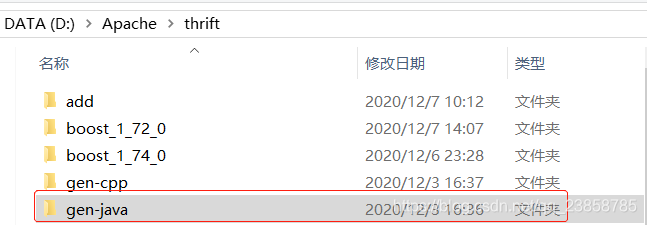

(2)编写java客户端和服务端
本文使用IDEA编辑器,首先新建项目,并添加Maven依赖。
java对thrift的支持很完善,只需要引入maven,不像c++一样需要自行编译依赖库。
        <!-- https://mvnrepository.com/artifact/org.apache.thrift/libthrift -->
        <dependency>
            <groupId>org.apache.thrift</groupId>
            <artifactId>libthrift</artifactId>
            <version>0.13.0</version>
        </dependency>

        <!-- https://mvnrepository.com/artifact/org.slf4j/slf4j-api -->
        <dependency>
            <groupId>org.slf4j</groupId>
            <artifactId>slf4j-api</artifactId>
            <version>1.7.21</version>
        </dependency>

        <!-- https://mvnrepository.com/artifact/org.slf4j/slf4j-nop -->
        <dependency>
            <groupId>org.slf4j</groupId>
            <artifactId>slf4j-nop</artifactId>
            <version>1.7.21</version>
        </dependency>
项目的整体目录如下:
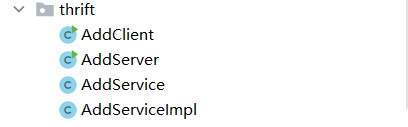
- AddClient:客户端
- AddServer:服务器端
- AddService:thrift文件产生的代码,主要是Iface和client
- AddServiceImpl:接口的实现类
在Addservice中,Iface是个接口文件,主要是用来被服务器端的程序继承和重写的,Iface里面定义了方法的接口,在服务器端的程序中应当实现这个接口,而client程序中定义了add 方法,而add方法中又调用了send_add和 recv_add 用来发送请求和接受反馈,具体通信的细节不用用户去考虑,thrift已经帮我们完全生成好了,只需要我们具体实现add的方法即可。
AddServiceImpl.java:实现了AddService的Iface接口
import org.apache.thrift.TException;

public class AddServiceImpl implements AddService.Iface{

    @Override
    public int add(int num1, int num2) throws TException {
        System.out.println("num1:" + num1);
        System.out.println("num2:" + num2);
        return num1 + num2;
    }
}
AddClient.java:调用AddService的client即可,client调用add方法,向服务器传递参数,并接受服务器返回的信息。
import org.apache.thrift.TException;
import org.apache.thrift.protocol.TBinaryProtocol;
import org.apache.thrift.protocol.TProtocol;
import org.apache.thrift.transport.TSocket;
import org.apache.thrift.transport.TTransport;

public class AddClient {

    public static final String SERVER_IP = "localhost";
    public static final int SERVER_PORT = 9090;
    public static final int TIMEOUT = 30000;

    public void startClient(int a, int b) {
        TTransport transport = null;
        try {
            // 创建TTransport
            transport = new TSocket(SERVER_IP, SERVER_PORT, TIMEOUT);
            // 创建TProtocol 协议要与服务端一致
            TProtocol protocol = new TBinaryProtocol(transport);
            // 创建client
            AddService.Client client = new AddService.Client(protocol);
            // 建立连接
            transport.open();
            // client调用server端方法
            int result = client.add(a,b);
            System.out.println("thirft client result =: " + result);
        } catch (TException e) {
            e.printStackTrace();
        } finally {
            // 请求结束,断开连接
            if (null != transport) {
                transport.close();
            }
        }
    }

    public static void main(String[] args) {
        AddClient client = new AddClient();
        client.startClient(1, 2);

    }
}
AddServer.java:impl文件只会在服务器端被调用,来规定服务器端返回的信息
import org.apache.thrift.TProcessor;
import org.apache.thrift.protocol.TBinaryProtocol;
import org.apache.thrift.server.TServer;
import org.apache.thrift.server.TSimpleServer;
import org.apache.thrift.transport.TServerSocket;

public class AddServer {

    public static final int SERVER_PORT = 9090;

    public void startServer() {
        try {
            System.out.println("HelloService TSimpleServer start ....");

            // Transport 简单的单线程服务模型,一般用于测试
            TServerSocket serverTransport = new TServerSocket(SERVER_PORT);
            // Processor
            TProcessor tprocessor = new AddService.Processor<AddService.Iface>(new AddServiceImpl());

            TServer.Args tArgs = new TServer.Args(serverTransport);
            tArgs.processor(tprocessor);
            tArgs.protocolFactory(new TBinaryProtocol.Factory());
            // Server
            TServer server = new TSimpleServer(tArgs);
            server.serve();

        } catch (Exception e) {
            System.out.println("Server start error!!!");
            e.printStackTrace();
        }
    }

    public static void main(String[] args) {
        AddServer server = new AddServer();
        server.startServer();
    }
}
与上一篇文章的QT实例合起来,可以通过thrift实现java和c++的互相调用。

开源鸿蒙跨平台开发社区汇聚开发者与厂商,共建“一次开发,多端部署”的开源生态,致力于降低跨端开发门槛,推动万物智联创新。
更多推荐
 0
0 0
0- 0


 已为社区贡献1条内容

所有评论(0)