QT实现扫描局域网客户端并且发送文件夹与指令
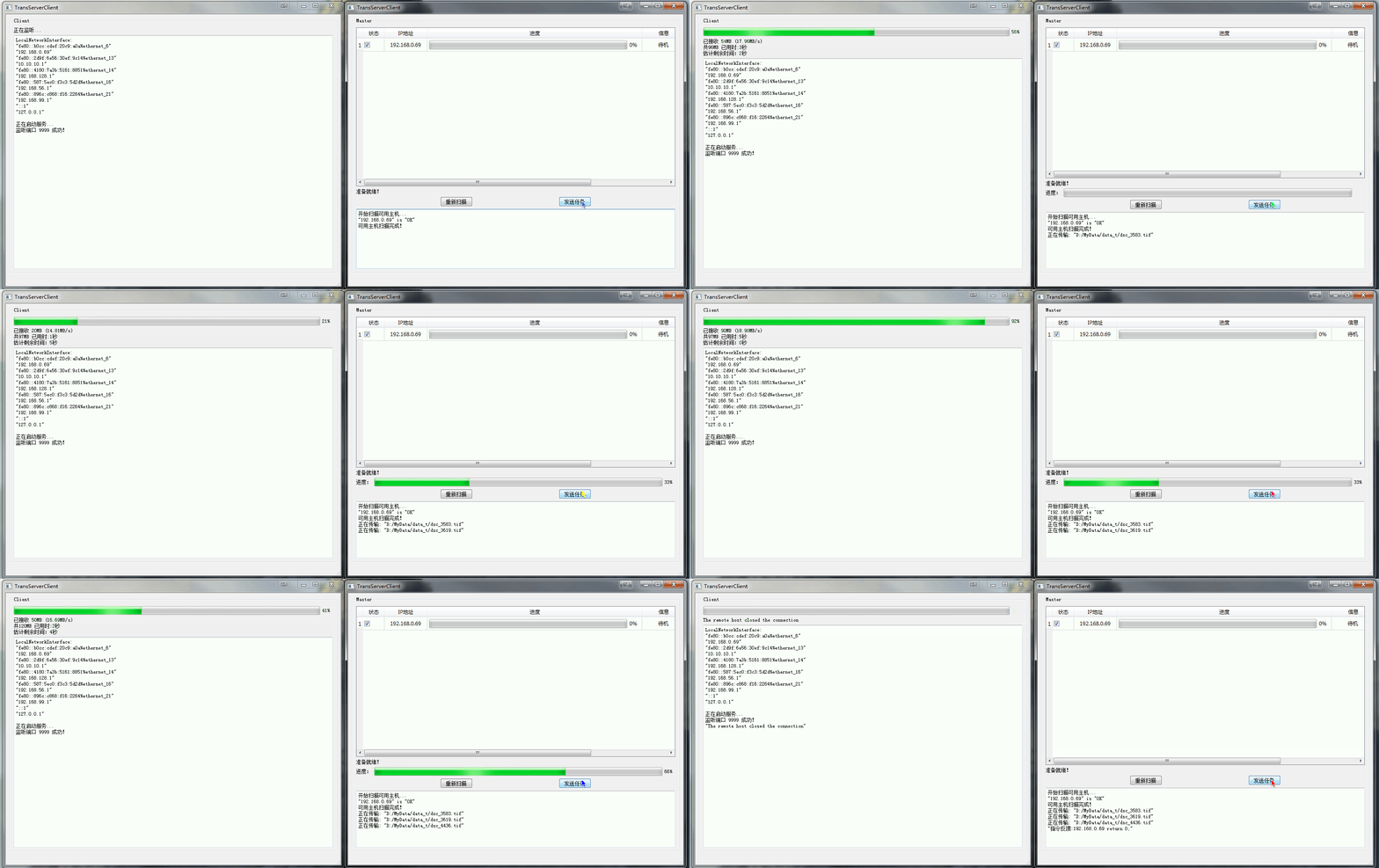
之前写过基于QT的TCP传输连续多个文件(目录)的实现,看来很多人被这个问题困扰了,于是我决定再次更新一下这个问题,首先看一下效果。本软件主要解决了“主动扫描局域网客户端,往客户端连续传输数据(多个文件),传输完成后自动运行指定的程序”的问题。给客户端发送文件夹(其实也就是连续发送多个文件),接收的位置由客户端的配置文件决定,发送完成之后自动运行客户端配置的程序,本程序跨平台,在Windows和L
之前写过基于QT的TCP传输连续多个文件(目录)的实现,看来很多人被这个问题困扰了,于是我决定再次更新一下这个问题,首先看一下效果。
本软件主要解决了“主动扫描局域网客户端,往客户端连续传输数据(多个文件),传输完成后自动运行指定的程序”的问题。
给客户端发送文件夹(其实也就是连续发送多个文件),接收的位置由客户端的配置文件决定,发送完成之后自动运行客户端配置的程序,本程序跨平台,在Windows和Linux下均成功运行,实测Windows下传输速度大约50MB/s(图中因为是本机传输,穿越了几层,速度受限,解释起来有点麻烦,具体速度我改天再上一个跨电脑的图),Linux下大约110Mb/s,还是不错的。
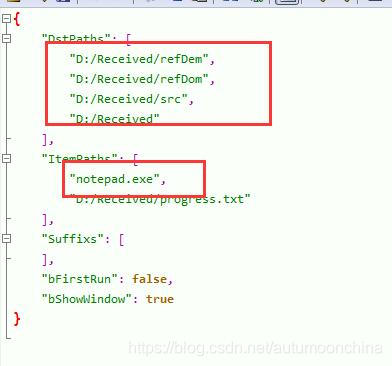
配置文件,接收位置以及接收完需要运行的程序:
关键问题就是,很多人在传输目录的时候发现无法连续传输,或者传输需要延时,那肯定是有问题的!
网上提供的例子大多数都是传输单个文件,但是只建立一次连接而实现连续传输文件的例子实在是太少了!
我这套代码解决了这个问题,真正实现了连续传送文件而不需要延时,之前在网上找了好久都找不到答案,最终还是自己研究解决的!
核心代码,在基于QT的TCP传输连续多个文件(目录)的实现已经提供了。
这里再次提供接收端代码给各位参考!
//author:autumoon
//联系QQ:4589968
//日期:2020-10-20
#ifndef TCPUPLOADSERVER_H
#define TCPUPLOADSERVER_H

#include <QObject>
#include <QtNetwork/QTcpServer>
#include <QtNetwork/QTcpSocket>
#include <QFile>
#include <QLabel>
#include <QElapsedTimer>

class TcpUploadServer : public QObject
{
    Q_OBJECT
public:
    explicit TcpUploadServer(QObject *parent = nullptr);

    bool StartServer();
    void SetLableStatus(QLabel *lableStatus){m_lbStatus = lableStatus;}
    void SetPort(const quint16& nPort){m_nPort = nPort;}

signals:
    void begin();
    void progress(qint64, qint64);
    void finished(bool bSuccess);

private slots:
    void acceptConnection();
    void readClient();
    void displayError(QAbstractSocket::SocketError socketError);

private:
    void initialize();
    void release();

private:
    //界面相关
    QLabel *m_lbStatus;

    quint16 m_nPort;
    QElapsedTimer m_timer;

    QTcpServer *m_tcpServer;
    QTcpSocket *m_tcpReceivedSocket;
    qint64 m_totalBytes;
    qint64 m_bytesReceived;
    qint64 m_filePathSize;
    QString m_filePathName;
    QFile *m_localFile;
    QByteArray m_inBlock;
};

#endif // TCPUPLOADSERVER_H
实现文件:
//author:autumoon
//联系QQ:4589968
//日期:2020-10-20
#include "TcpUploadServer.h"
#include <QTextCodec>
#include <QDataStream>
#include <QFileInfo>
#include "QStdDirFile.h"

TcpUploadServer::TcpUploadServer(QObject *parent) : QObject(parent)
{
    //界面相关
    m_lbStatus = nullptr;

    m_nPort = 9999;

    m_tcpServer = nullptr;
    m_tcpReceivedSocket = nullptr;
    m_totalBytes = 0;
    m_bytesReceived = 0;
    m_filePathSize = 0;
    m_localFile = 0;

    QTextCodec::setCodecForLocale(QTextCodec::codecForName("GBK"));
}

void TcpUploadServer::initialize()
{
    m_totalBytes = 0;
    m_bytesReceived = 0;
    m_filePathSize = 0;

    m_tcpServer = new QTcpServer(this);
    connect(m_tcpServer, SIGNAL(newConnection()), this, SLOT(acceptConnection()));
}

void TcpUploadServer::release()
{
    if (m_tcpReceivedSocket)
    {
        disconnect(m_tcpReceivedSocket, SIGNAL(readyRead()), this, SLOT(readClient()));
        disconnect(m_tcpReceivedSocket, SIGNAL(error(QAbstractSocket::SocketError)), this ,SLOT(displayError(QAbstractSocket::SocketError)));
        m_tcpReceivedSocket->close();
        m_tcpReceivedSocket->deleteLater();
    }

    if (m_tcpServer)
    {
        disconnect(m_tcpServer, SIGNAL(newConnection()), this, SLOT(acceptConnection()));
        m_tcpServer->close();
        m_tcpServer->deleteLater();
    }
}

bool TcpUploadServer::StartServer()
{
    if (m_tcpServer)
    {
        release();
    }

    initialize();
    qDebug()<<"正在启动服务...";

    if(!m_tcpServer->listen(QHostAddress("localhost"), m_nPort))
    {
        qDebug()<<m_tcpServer->errorString();

        return false;
    }

    qDebug() << "监听端口" << m_nPort << "成功!";

    if (m_lbStatus)
    {
        m_lbStatus->setText("正在监听...");
    }

    return true ;
}

void TcpUploadServer::acceptConnection()
{
    emit begin();

    if (m_lbStatus)
    {
        m_timer.restart();
    }

    m_tcpReceivedSocket = m_tcpServer->nextPendingConnection();
    connect(m_tcpReceivedSocket, SIGNAL(readyRead()), this, SLOT(readClient()));
    connect(m_tcpReceivedSocket, SIGNAL(error(QAbstractSocket::SocketError)), this ,SLOT(displayError(QAbstractSocket::SocketError)));

    if (m_lbStatus)
    {
        m_lbStatus->setText("接受连接");
    }
}

void TcpUploadServer::readClient()
{
    if(m_bytesReceived<= sizeof(qint64)*2)  //才刚开始接收数据,此数据为文件信息
    {
        QDataStream in(m_tcpReceivedSocket);
        in.setVersion(QDataStream::Qt_5_6);
        //in>>m_totalBytes>>m_bytesReceived>>m_filePathName;

        if((m_tcpReceivedSocket->bytesAvailable()>=sizeof(qint64)*2)&&(m_filePathSize==0))
        {
            // 接收数据总大小信息和带路径的文件名大小信息
            in>>m_totalBytes>>m_filePathSize;
            m_bytesReceived +=sizeof(qint64)*2;
        }

        if((m_tcpReceivedSocket->bytesAvailable()>=m_filePathSize)&&(m_filePathSize!=0))
        {
            // 接收文件名,并建立文件
            in>>m_filePathName;

            //传输出现错误
            if (m_filePathName.length() == 0)
            {
                return;
            }

            //可能需要建立文件夹
            if (m_filePathName.indexOf("/")  != -1)
            {
                QString strFileName = CStdStr::GetNameOfFile(m_filePathName, '/');
                QString strSaveDir = CStdStr::GetDirOfFile(m_filePathName);
                QFileInfo fiDir(strSaveDir);
                if (!fiDir.exists()&& !CStdDir::createDirectory(strSaveDir))
                {
                    if (m_lbStatus)
                    {
                        m_lbStatus->setText(tr("接收文件 %1 失败!").arg(m_filePathName));
                    }
                    qDebug() << (tr("接收文件 %1 失败!").arg(m_filePathName));
                    emit finished(false);

                    return;
                }
            }

            m_localFile = new QFile(m_filePathName);
            if (!m_localFile->open(QFile::WriteOnly))
            {
                qDebug() << (tr("创建文件 %1 失败!").arg(m_filePathName));
                return;
            }

            //注意此处是赋值而不是+=
            m_bytesReceived = m_filePathSize;

            if (m_lbStatus)
            {
                m_timer.restart();
            }
        }
    }
    else  //正式读取文件内容
    {
        qint64 nbytesAvailable = m_tcpReceivedSocket->bytesAvailable();

        if (m_bytesReceived + nbytesAvailable <= m_totalBytes)
        {
            m_inBlock = m_tcpReceivedSocket->readAll();
            m_bytesReceived += m_inBlock.size();
        }
        else
        {
            m_inBlock = m_tcpReceivedSocket->read(m_totalBytes - m_bytesReceived);
            m_bytesReceived += m_inBlock.size();
        }
        m_localFile->write(m_inBlock);
        m_inBlock.clear();

        if (m_lbStatus)
        {
            float useTime = m_timer.elapsed();
            double speed = m_bytesReceived / useTime;

            m_lbStatus->setText(tr("已接收 %1MB (%2MB/s) \n共%3MB 已用时:%4秒\n估计剩余时间:%5秒")
                                .arg(m_bytesReceived / (1024*1024))//已接收
                                .arg(speed*1000/(1024*1024),0,'f',2)//速度
                                .arg(m_totalBytes / (1024 * 1024))//总大小
                                .arg(useTime/1000,0,'f',0)//用时
                                .arg(m_totalBytes/speed/1000 - useTime/1000,0,'f',0));//剩余时间
        }

        emit progress(m_bytesReceived, m_totalBytes);
    }

    if(m_bytesReceived == m_totalBytes)
    {
        m_localFile->flush();
        m_localFile->close();
        m_localFile = nullptr;

        m_inBlock.clear();
        m_bytesReceived = 0;
        m_totalBytes = 0;
        m_filePathSize = 0;

        emit finished(true);
    }
    else if (m_bytesReceived > m_totalBytes)
    {
        qDebug() << "超量接收!请增加发送延迟!";
    }
}

void TcpUploadServer::displayError(QAbstractSocket::SocketError socketError)
{
    Q_UNUSED(socketError)

    qDebug()<<m_tcpReceivedSocket->errorString();

    if (m_lbStatus)
    {
        m_lbStatus->setText(m_tcpReceivedSocket->errorString());
    }
}
如果需要帮助,欢迎交流!

开源鸿蒙跨平台开发社区汇聚开发者与厂商,共建“一次开发,多端部署”的开源生态,致力于降低跨端开发门槛,推动万物智联创新。
更多推荐
 0
0 0
0- 0


 已为社区贡献6条内容

所有评论(0)